Note
Access to this page requires authorization. You can try signing in or changing directories.
Access to this page requires authorization. You can try changing directories.
Blob access points let you read data that lives in a supported external data source through the Azure Blob Storage APIs that you already use. You don't copy or migrate the data. Applications and Azure services read it in place, as blobs in a container in your storage account.
By using blob access points, you can:
- Read data in Azure NetApp Files, Qumulo, Nasuni, and Commvault through standard Blob Storage operations.
- Use that data with Azure services that read from Blob Storage, without building custom connectors.
- Control who can read the data by using Azure role-based access control (Azure RBAC) and the other authorization methods that Blob Storage supports.
- Reach your data source over the internet, or over a private connection (preview).
How blob access points work
You set up a blob access point in two parts. First you create a blob access point configuration, and then you create a blob access point that uses it.
| Blob access point configuration | Blob access point | |
|---|---|---|
| What it is | The connection to your data source. It holds the source type, the source endpoint, the credentials, and the network path. It doesn't store data. | A container whose blobs are read-only. Applications read them like blobs in any other container. |
| Where it lives | A child resource of the storage account in Azure Resource Manager | A container in the same storage account |
| Endpoint | https://management.azure.com/subscriptions/<subscription-id>/resourceGroups/<resource-group>/providers/Microsoft.Storage/storageAccounts/<storage-account>/blobAccessPointConfigurations/<configuration-name> |
https://<storage-account>.blob.core.windows.net/<blob-access-point> |
When an application reads from a blob access point, the following steps occur:
- The application or Azure service sends a Blob Storage request, such as List Blobs, to the blob access point.
- Azure Storage authorizes the request. It then uses the settings in the configuration to send an authenticated request to the data source.
- The data source returns the data to Azure Storage.
- Azure Storage returns the data in the Blob Storage response. Nothing is copied into the storage account.
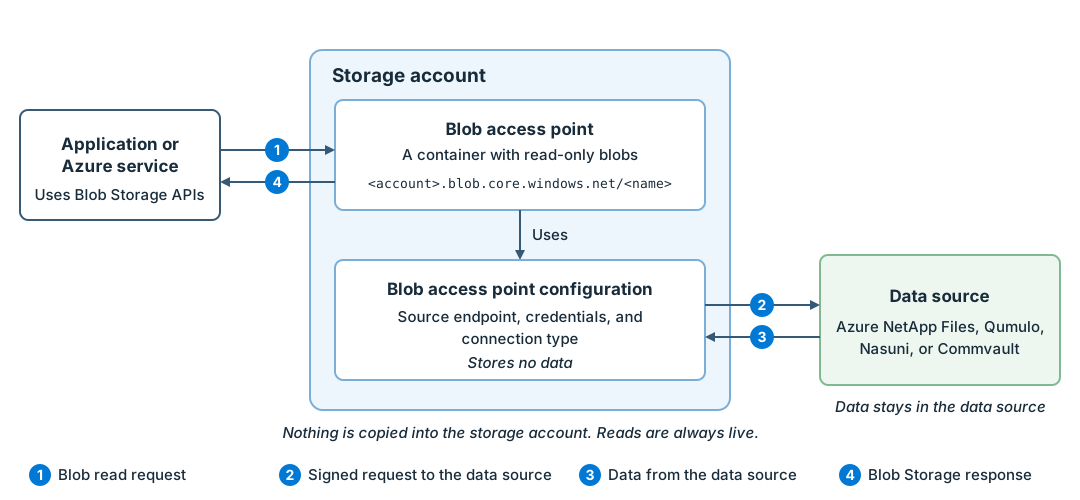
Azure Storage reads data directly from the data source each time an application requests it. It doesn't cache the data, so expect higher latency than when you read data that's stored in Azure Storage.
Each configuration connects to one data source and serves one blob access point. A blob access point and its configuration must be in the same storage account. Regular containers in the storage account keep working as before.
Supported data sources
Blob access points connect to the following data sources:
- Azure NetApp Files
- Qumulo
- Nasuni
- Commvault
To learn which data sources are supported and what they need, see Data source requirements for blob access points.
Connection types
Each configuration uses one connection type. You choose it when you create the configuration, and you can't change it later.
| Connection type | Status | How Azure Storage reaches the data source |
|---|---|---|
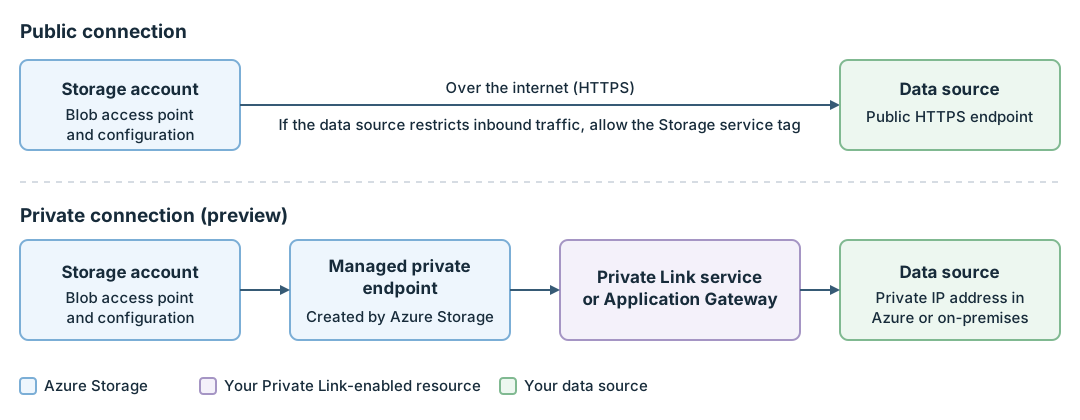
| Public | Generally available in Japan East. Preview in the other supported regions. | Over the internet, through the public endpoint of the data source |
| Private | Preview in all supported regions | Through a managed private endpoint to a Private Link service or an Application Gateway in front of the data source |
Important
Public connections for blob access points are generally available in Japan East and in preview in the other supported regions. Private connections are in preview in all supported regions.
See the Supplemental Terms of Use for Microsoft Azure Previews for legal terms that apply to Azure features that are in beta, preview, or otherwise not yet released into general availability.
To set up a private connection, see Connect blob access points privately (preview).
Supported regions
Blob access points are available in the following regions. Use the Azure portal or the REST API where they're available.
| Region | Status | Azure portal | REST API |
|---|---|---|---|
| Japan East | Generally available | Available | Available |
| Australia East | Preview | Not available yet | Available |
| Canada Central | Preview | Not available yet | Available |
| North Europe | Preview | Not available yet | Available |
| South Central US | Preview | Not available yet | Available |
| UK South | Preview | Not available yet | Available |
Private connections are in preview in all regions. In regions where the Azure portal isn't available yet, use the REST API to create and manage configurations and blob access points, and to read data. Microsoft will add more regions and the Azure portal experience in more regions over time.
The storage account and, for a private connection, the Private Link-enabled resource must be in one of these regions.
Supported storage accounts
You can create blob access points in standard general-purpose v2 accounts and premium block blob accounts. Accounts with or without a hierarchical namespace are supported.
The following redundancy options are supported: locally redundant storage (LRS), zone-redundant storage (ZRS), geo-redundant storage (GRS), and read-access geo-redundant storage (RA-GRS). To learn about these options, see Azure Storage redundancy.
On an RA-GRS account, you can't read a blob access point through the secondary endpoint. After an account failover, blob access points don't work in the secondary region. To learn about failover, see Azure Storage disaster recovery planning and failover.
Use your data with Azure services
Azure services, tools, and client libraries that read data through the Blob Storage endpoint can read from a blob access point like any other container. They must use the List Blobs, Get Blob Properties, and Get Blob operations. Services that read through the Data Lake Storage endpoint (dfs.core.windows.net) can't use blob access points.
To learn how to read data, see Access data in a blob access point.
Networking considerations
For blob access points to work, both of the following conditions must be met:
Azure Storage can reach your data source. For a public connection, the source endpoint must be reachable from Azure over the internet. If your data source restricts inbound traffic, allow the IP address ranges of the
Storageservice tag for the region of your storage account. For more information, see Azure service tags overview. For a private connection, Azure Storage reaches the data source through a managed private endpoint instead. For more information, see Connect blob access points privately (preview).Clients can reach your storage account. The network rules of your storage account apply to a blob access point the same way that they apply to any other container. You can create configurations, test connections, and create blob access points in the Azure portal with any public network access setting. To create a blob access point by using the Create Container operation, or to read data, a client must be allowed by those rules. For example, set public network access to Enabled from all networks, allow the client's virtual network or IP address with Enabled from selected virtual networks and IP addresses, or use a private endpoint for the storage account. For more information, see Azure Storage network security.
Your data source should present a TLS certificate from a trusted certificate authority. You can allow self-signed certificates, but that option is less secure. Use it only for testing.
Pricing and billing
You're billed for the following items:
Access fee. Each blob access point configuration is billed for every hour that it's active. Billing starts when you create an active configuration or activate one, and it stops when you deactivate or delete the configuration. You aren't billed for an inactive configuration. Because each configuration serves one blob access point, the hourly rate on the pricing page is the rate for one blob access point.
Operations. Requests through a blob access point are billed as Blob Storage operations on your storage account, at hot tier rates.
Data processing for private connections (preview). Private connections also have a fee for each GB that's read through the blob access point. The total is calculated for the storage account.
Note
You can try private connections during the preview without the per-GB data processing fee. The hourly access fee and your networking resource charges still apply. Microsoft will update this article before the data processing fee starts.
Your networking resources. For a private connection, you pay for your Private Link service or Application Gateway, and for the managed private endpoint that Azure Storage creates.
Azure doesn't charge for data that comes into Azure from your data source. Standard Azure bandwidth charges apply to data that leaves an Azure region, as with other Blob Storage reads. Your data source provider might also charge to transfer data out of its platform.
For prices, see the Blob access points section of Azure Blob Storage pricing. To estimate your costs, use the Azure pricing calculator.
Tip
To avoid charges for a data source that you aren't using, deactivate its configuration. For more information, see Deactivate or activate a configuration.
Feature support
Support for this feature might be impacted by enabling Data Lake Storage Gen2, Network File System (NFS) 3.0 protocol, or the SSH File Transfer Protocol (SFTP). If you've enabled any of these capabilities, see Blob Storage feature support in Azure Storage accounts to assess support for this feature.
Limitations
- Each configuration serves one blob access point.
- Blobs in a blob access point are read-only. You can list blobs, get blob properties, and read blobs.
- Requests through the Data Lake Storage, SFTP, and NFS endpoints aren't supported.
- Features that write data, such as lifecycle management, don't apply to blob access points.
- On an RA-GRS account, you can't read a blob access point through the secondary endpoint.
- After an account failover, blob access points don't work in the secondary region.
- Storage accounts that allow blob access point creation don't return List Blobs results in Apache Arrow format.
For the full list, see Limitations and known issues with blob access points.
Frequently asked questions (FAQ)
Is my data copied into the storage account?
No. Azure Storage reads the data from your data source each time an application requests it. Nothing is stored in the storage account.
Can I write to a blob access point?
No. Blobs in a blob access point are read-only. Write, update, and delete requests for blobs fail with error code OperationNotSupportedForBlobAccessPoints.
Does deleting a blob access point delete data in my data source?
No. Deleting a blob access point removes only the container in your storage account. Data in your data source isn't affected.
Does deleting a configuration delete its blob access point?
No. The blob access point stays in the storage account, but it can no longer read data. Delete the blob access point first, and then delete the configuration.