Note
Access to this page requires authorization. You can try signing in or changing directories.
Access to this page requires authorization. You can try changing directories.
SSH File Transfer Protocol (SFTP) support for Azure Blob Storage lets a storage account answer on port 22 directly, so you get the same protocol that your users already connect to without running a server behind it. If you host an SFTP server on a virtual machine (VM) today, that means no operating system to patch, no capacity to size, and no copy job moving files off a landing disk, because the data that you upload becomes the blob automatically.
This article compares a self-hosted SFTP server to Azure Blob Storage SFTP across cost, performance, operations, and security. It also covers how to check compatibility before you migrate and how to validate the change with a single workload.
How files reach the storage account
With a self-hosted server, a transfer passes through several components that you own and manage. The following image shows the pattern of a typical transfer.
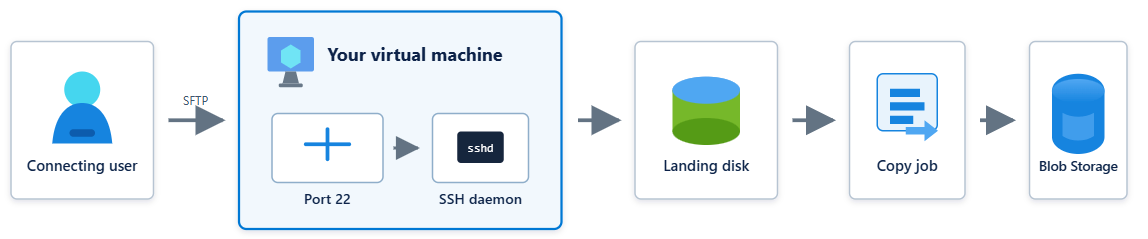
The file arrives on a disk, and then a process that you built moves it to where it's needed. You own every hop: the VM, the operating system, the SSH daemon, the disk and its retention, the copy job, and the monitoring around all of it. Until the copy completes, the data exists in two places, and neither one is the system of record.
With Azure Blob Storage SFTP, the storage account terminates the protocol itself. The following image shows this transfer pattern.
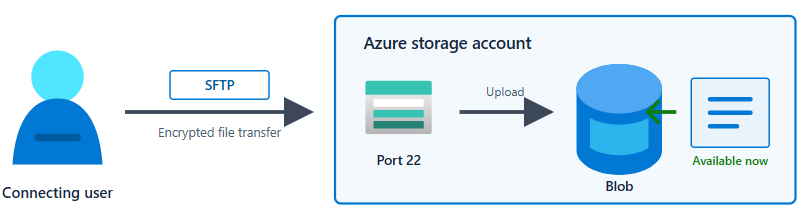
The upload is the blob. There's no landing disk and no copy job, because there's nothing to copy. As soon as the transfer completes, the file is available to the Blob REST API, Azure Data Lake Storage, Network File System (NFS) 3.0, Azure Event Grid, and any processing that already points at that account.
Only the hostname changes. For users that connect and transfer data, everything else remains the same. They use the same protocol, the same client tools, and the same credential model if you want it.
If your goal is to move file transfer to the cloud while keeping cost and security in view, this approach is a practical starting point. You aren't adopting a new transfer pattern; you're removing the infrastructure beneath the one that you already run.
Cost
Enabling SFTP adds an hourly charge that applies whenever SFTP is enabled, whether or not anyone is connected. Everything else bills at standard account rates, including capacity at rest, transactions, and egress. All SFTP commands convert to Read, Write, or Other transactions on the account. There's no separate per-gigabyte charge for data moved over SFTP.
If your transfers run in a defined window, you can enable SFTP only while you need it and avoid the charge in between.
Note
To find the current hourly rate, see the Azure Blob Storage Pricing page. The charge is visible in that page only if you select Hierarchical Namespace (NFS v3.0, SFTP Protocol) in the File Structure drop-down list.
The following table describes the outcome that you can expect, based on what you run today:
| What you run today | Blob Storage SFTP is likely to be | Why |
|---|---|---|
| A single VM with one or two vCPUs | More expensive | The hourly endpoint charge exceeds a small VM's compute cost. If that's your entire footprint, cost isn't the reason to move. However, operational efficiency might be a reason to move. You can learn more about those efficiencies in the Operations section of this article. |
| A VM sized for sustained throughput, with a managed disk and backup | About the same | The endpoint charge offsets compute, disks, and backup. |
| More than one instance for availability, or a second region for disaster recovery | Materially less | You stop paying for redundant compute and the second region. |
| Any of the preceding rows, once engineering time is included | Less | Patching, key rotation, and on-call time don't appear on either bill. |
To compare each option fairly, include the cost of compute, the operating system and landing disks, and backup in your estimates. Include a load balancer, public IP addresses, or a second region only if you deployed them, because many SFTP servers run as a single VM without any of them.
Two costs are easy to miss. First, data usually sits on the landing disk and in its destination for the length of the retention window, so you pay for both. Second, the engineering time for patching, key rotation, and maintaining the copy job doesn't appear on an invoice at all.
Use cost analysis on the existing resource group rather than a pricing calculator, so that you're working from what's actually billed. For current rates, see Azure Blob Storage pricing and Plan and manage costs for Azure Blob Storage.
Performance
A VM's ceiling is set by its own SKU: its network bandwidth, its disk throughput, and the CPU left over for SSH encryption. A storage account's ceiling is the account's ingress and request rate limits, which are considerably higher and require no work from you to reach.
Throughput scales with the number of concurrent connections, and a premium block blob account reaches approximately 2.3 times the bandwidth of a standard general-purpose v2 account with a single client. For tuning guidance, see SFTP performance considerations.
Operations
Azure Blob Storage SFTP provides greater operational efficiency.
Because the storage account terminates SFTP, the VM, the landing disk, and the copy job all disappear, along with the work of keeping them running. You no longer need to patch an operating system, harden an SSH daemon, plan capacity, build and test your own high availability and disaster recovery, or support the pipeline that moves files into storage.
Host key management is one example. Rebuilding a VM changes its SSH host key unless you deliberately preserve it, and client tools treat an unexpected host key change as a possible machine-in-the-middle attack. Routine maintenance therefore becomes a coordination exercise with everyone who connects. By contrast, Azure publishes its SFTP host keys, so client tools can verify them against a documented source. See Host keys for SFTP.
Security
A self-hosted OpenSSH server supports both password and public key authentication. You own the accounts, the sshd configuration, and key distribution and rotation.
Azure Blob Storage SFTP supports both of those methods and adds Microsoft Entra ID. You can choose the appropriate method for each user:
| Method | How it works | Best for |
|---|---|---|
| Password | Azure generates the password and displays it once. You can't set custom passwords, so weak or reused passwords aren't possible. | Getting started quickly |
| SSH key pair | You supply or generate a public key, up to 10 per local user. | Automated, unattended transfers |
| Microsoft Entra ID | Users authenticate to Entra ID and receive a certificate that's valid for 65 minutes, authorized by Azure role-based access control (RBAC), Azure attribute-based access control (ABAC), and POSIX access control lists (ACLs). | Recommended wherever identity governance matters |
Microsoft Entra ID is the most significant difference between the two approaches. With any local credential, whether on a VM or in a storage account, the secret is long-lived and sits outside the identity controls that you apply to the rest of your estate.
An Entra ID certificate expires after 65 minutes, so a mishandled credential stops working on its own. Multifactor authentication and Conditional Access apply to file transfer the same way that they apply to everything else. When an account is disabled, SFTP access ends at the same moment. By using External Identities, organizations that you exchange files with can authenticate from their own tenant, so you no longer issue or store credentials on their behalf.
Local users remain fully supported, so you can adopt Entra ID at whatever pace suits you.
Beyond identity, a storage account provides controls that you'd otherwise build and maintain yourself:
Only algorithms approved under the Microsoft Security Development Lifecycle are accepted, so weak options such as
ssh-dssand SHA-1 based key exchanges aren't available.Private endpoints keep traffic on your virtual network.
Microsoft Defender for Storage scans uploads for malware, with no scanner to install or maintain.
Encryption at rest, customer-managed keys, immutability policies, and diagnostic logging apply to files uploaded through SFTP the same way that they apply to any other blob.
For more information, see SFTP permission model and Authorize access to Blob Storage over SFTP by using Microsoft Entra ID.
Check compatibility before you migrate
Most workloads migrate without changes, and Azure Blob Storage supports a wide range of SFTP client tools. To confirm your own scenario, see known supported clients and Limitations and known issues with SFTP.
Check these items early, because they're the most common reasons that a workload can't move as-is:
An existing ACL configuration in the access path.
A static outbound IP address that another organization allowlists.
A requirement for a managed file transfer workflow or for AS2.
Try it with one workload
Enable SFTP on a nonproduction storage account and run one low-risk feed alongside your existing server for two weeks. You get throughput, compatibility, and cost figures from your own workload, which are more useful than an estimate.