Note
Access to this page requires authorization. You can try signing in or changing directories.
Access to this page requires authorization. You can try changing directories.
This article describes how to use Virtual WAN static routes to send traffic to a network virtual appliance in a spoke virtual network for indirect spoke connectivity, internet egress, or VPN/SD-WAN tunnels.
Scenario overview
This routing scenario explains how to configure Azure Virtual WAN to route traffic to a network virtual appliance (NVA) deployed in a Virtual WAN spoke virtual network. In this design, the NVA inspects traffic and then forwards it either to the Internet, virtual networks that are indirectly connected to the virtual hub (but peered with the NVA virtual network), or VPN/SDWAN tunnels terminated on the NVA.
Network diagram
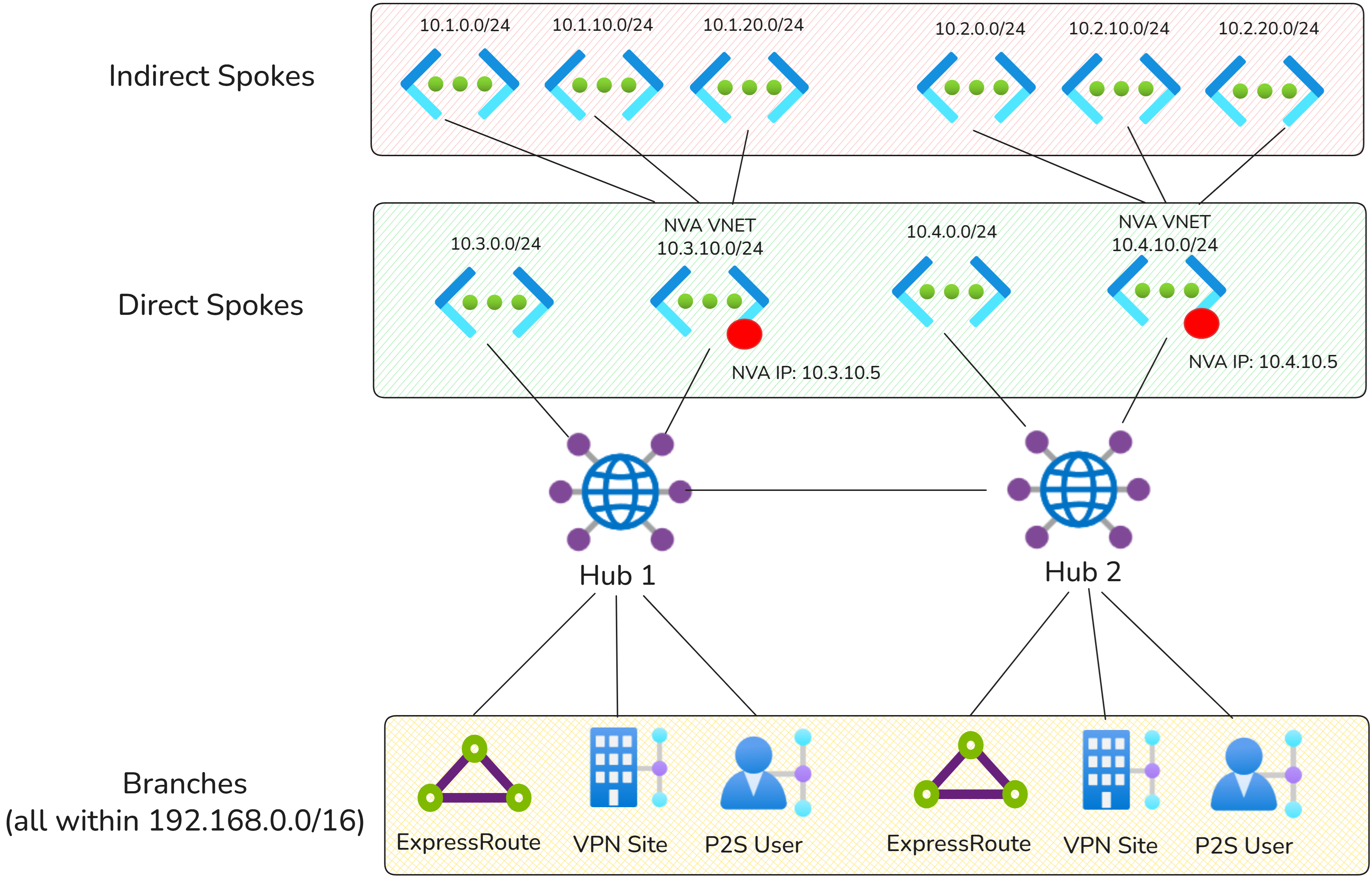
Traffic flows
The following sections explain how traffic is routed to indirect spokes and the Internet using Virtual WAN static routes.
Indirect spoke patterns
The following connectivity matrix summarizes whether traffic flows directly through Virtual WAN or traverses an NVA in this scenario.
| Source/Destination | Hub 1 Indirect Spokes | Hub 1 Direct Spokes | Hub 1 Branches | Hub 2 Indirect Spokes | Hub 2 Direct Spokes | Hub 2 Branches |
|---|---|---|---|---|---|---|
| Hub 1 Indirect Spokes | Via Hub 1 NVA | Via Hub 1 NVA | Via Hub 1 NVA | Via Hub 1,2 NVA | Via Hub 1 NVA | Via Hub 1 NVA |
| Hub 1 Direct Spokes | Via Hub 1 NVA | Direct | Direct | Via Hub 2 NVA | Direct | Direct |
| Hub 1 Branches | Via Hub 1 NVA | Direct | Direct | Via Hub 2 NVA | Direct | Direct |
| Hub 2 Indirect Spokes | Via Hub 1 and Hub 2 NVAs | Via Hub 2 NVA | Via Hub 2 NVA | Via Hub 2 NVA | Via Hub 2 NVA | Via Hub 2 NVA |
| Hub 2 Direct Spokes | Via Hub 1 NVA | Direct | Direct | Via Hub 2 NVA | Direct | Direct |
| Hub 2 Branches | Via Hub 1 NVA | Direct | Direct | Via Hub 2 NVA | Direct | Direct |
Internet access patterns
Note
The 0.0.0.0/0 route isn't propagated across Virtual WAN hubs. Each connection must use the local hub's NVA for Internet egress.
The following connectivity matrix summarizes Internet access in this scenario.
| Source | Internet |
|---|---|
| Hub 1 Direct Spokes | Via Hub 1 NVA |
| Hub 1 Branches | Via Hub 1 NVA |
| Hub 2 Direct Spokes | Via Hub 2 NVA |
| Hub 2 Branches | Via Hub 2 NVA |
Configuration
The configuration in this section uses option 1 static route configuration. Option 2 can also be used, but requires additional configuration to add static routes with next hop NVA Virtual Network connections in all defaultRouteTable across the Virtual WAN.
Static routes for indirect spokes
The following static routes are configured by adding the static routes on the NVA virtual network connection directly, with Propagate static route set to true.
| Hub | Connection | Prefix | Next hop IP address |
|---|---|---|---|
| Hub 1 | NVA Virtual Network Connection (Hub1) | 10.2.0.0/16 | 10.3.10.5 |
| Hub 2 | NVA Virtual Network Connection (Hub2) | 10.4.0.0/16 | 10.4.10.5 |
Static routes for internet egress
The following static routes are configured by adding the static routes on the NVA virtual network connection directly, with Propagate static route set to true (option 1 static routing model).
| Hub | Connection | Prefix | Next hop IP address |
|---|---|---|---|
| Hub 1 | NVA Virtual Network Connection (Hub 1) | 0.0.0.0/0 | 10.3.10.5 |
| Hub 2 | NVA Virtual Network Connection (Hub 2) | 0.0.0.0/0 | 10.4.10.5 |
Virtual WAN Routing configuration
For both Virtual WAN hubs, all connections should propagate to all defaultRouteTables across the Virtual WAN. This configuration ensures that all directly connected spoke workloads and static routes are propagated to all connections, providing full-mesh reachability.
The following table describes the routing configuration of the Virtual WAN connections to Hub 1:
| Hub | Connection type | Associated route table | Propagated route table(s) | Propagated label |
|---|---|---|---|---|
| Hub 1 | Branches (ExpressRoute and VPN) | defaultRouteTable (Hub 1) | defaultRouteTable (Hub 1, Hub 2) | default label (all defaultRouteTable in the Virtual WAN) |
| Hub 1 | Virtual networks | defaultRouteTable (Hub 1) | defaultRouteTable (Hub 1, Hub 2) | default label (all defaultRouteTable in the Virtual WAN) |
The following table describes the routing configuration of the Virtual WAN connections to Hub 2:
| Hub | Connection type | Associated route table | Propagated route table(s) | Propagated label |
|---|---|---|---|---|
| Hub 2 | Branches (ExpressRoute and VPN) | defaultRouteTable (Hub 2) | defaultRouteTable (Hub 1, Hub 2) | default label (all defaultRouteTable in the Virtual WAN) |
| Hub 2 | Virtual networks | defaultRouteTable (Hub 2) | defaultRouteTable (Hub 1, Hub 2) | default label (all defaultRouteTable in the Virtual WAN) |
Additional indirect spoke routing configuration
Virtual WAN only configures routes on virtual networks that are directly connected to the Virtual WAN hub. Add user-defined routes on the indirect spoke virtual networks to route traffic to the correct NVA IP address.
This user-defined route is required so that workloads in the indirect spoke virtual networks have a path back to the NVA and, therefore, to the rest of the Virtual WAN.
In the example above, indirect spoke virtual networks on Hub 1 would need the following entries:
| Prefix | Next Hop IP address | Purpose |
|---|---|---|
| 0.0.0.0/0 | 10.3.10.5 | Route internet traffic for inspection |
| 192.168.0.0/16 | 10.3.10.5 | Route to on-premises |
| 10.1.0.0/16 | 10.3.10.5 | Route to other indirect spokes on Hub 1 |
| 10.2.0.0/16 | 10.3.10.5 | Route to indirect spokes on Hub 2 |
| 10.3.0.0/24 | 10.3.10.5 | Route to direct spokes on Hub 1 |
| 10.4.0.0/24 | 10.3.10.5 | Route to direct spokes on Hub 2 |
Alternatively, configure aggregate routes such as 10.0.0.0/8.
Additional considerations
- If static routes overlap with the NVA virtual network address space, make sure the bypass next hop IP for workloads within this VNet setting is configured correctly on the virtual network connection. Toggling this setting to "true" is often required for scenarios where direct access to the management interface of the NVA is required. For more information, see Bypass next hop IP for workloads within this VNet.
- Ensure the Propagate default route or Enable Internet Security setting is set to Off for the virtual network connection with the NVA. This ensures that the
0.0.0.0/0route isn't advertised to the NVA and doesn't create routing loops. Alternatively, you can add a user-defined route for0.0.0.0/0with next hop Internet on the subnet where the public-facing NVA interface is deployed.