Note
Access to this page requires authorization. You can try signing in or changing directories.
Access to this page requires authorization. You can try changing directories.
This document describes the different types of static routes in Virtual WAN, common use cases, and the main best practices and limitations to consider during network design and implementation.
Overview of static routes
Note
Static routes in Virtual WAN can't be used to direct traffic to a Network Virtual Appliance (NVA) or software-as-a-service (SaaS) solution deployed in the Virtual WAN hub. For NVA and SaaS solutions, the only supported method of directing traffic is through routing intent and policies. For more information, see routing intent and policies documentation.
Virtual WAN static routes are used to direct traffic to a specific next-hop. Static routes deliver two main routing use cases:
- Route traffic through an Azure Firewall deployed in the Virtual WAN hub.
- Route traffic to a designated IP address (often a load balancer in front of a Network Virtual Appliance) deployed in a spoke virtual network that's connected to the Virtual WAN hub.
At a high level, the following static route configurations are needed for the two main use cases mentioned above.
| Use case | Configuration | Detailed use case documentation |
|---|---|---|
| Route traffic through Azure Firewall deployed in Virtual WAN hub | Static routes in Virtual WAN route table with next hop Azure Firewall resource ID. | Route traffic to secure hub Azure Firewall with Virtual WAN static routes. |
| Route traffic to designated IP address in a spoke Virtual Network | Option 1: Static routes on the Virtual Network connection with next hop set to the IP address of the NVA or load balancer in the spoke Virtual Network. Propagate static route set to true. Option 2: Configure a static route in Virtual WAN route table with next hop spoke Virtual Network connection. Configure corresponding static route on Virtual Network connection with next hop set to the IP address of the NVA or load balancer in the spoke Virtual Network. |
Route traffic to spoke Virtual Networks using Virtual WAN static routes |
Routing use cases
Routing traffic to Azure Firewall
Note
There are two disjoint ways to direct traffic to Azure Firewall: static routes in Virtual WAN hub route tables, or routing intent and policies. Mixing the two configuration options is not supported. In this article, the Azure Firewall static route pattern refers to a secured virtual hub with Azure Firewall where routing intent isn't enabled.
Configuration
Configure Virtual WAN to route traffic to Azure Firewall in a secure hub using static routes. This configuration applies to secured virtual hubs with Azure Firewall where routing intent isn't enabled. This configuration involves adding two separate configurations to your Virtual WAN deployment:
- Add static routes to Virtual WAN hub route tables, with the next hop specified as your Azure Firewall resource identifier.
- Configure the associated and propagated route tables of your Virtual WAN hub connections.
To configure static routes and associated/propagated route tables in secure hub scenarios, utilize the following best practices:
- Best practices regarding static route configurations and route tables:
- Minimize the number of custom route tables (in addition to defaultRouteTable and noneRouteTable). Custom route tables should be used for more customized routing scenarios such as different routing patterns for Virtual Networks.
- Use aggregate ranges instead of specific ranges in static routes when possible. This minimizes the number of static routes configured.
- Carefully evaluate multi-hub designs and utilize routing intent when possible. Architectures utilizing static routes to send traffic to Azure Firewall can become complex to operate across multiple hubs and inter-region inspection through Azure Firewall isn't supported with static route configurations.
- Best practices regarding configuring associations and propagations:
- All branches (VPN/ExpressRoute) must associate to the defaultRouteTable and propagate to the same set of route tables and route table labels.
- Propagating a connection's routes to a route table implies that all connections associated to that route table can access the propagated routes directly. Ensure your routing configuration is consistent and results in routing symmetry. For example, if branches propagate to a Virtual Network's route table, ensure that the same Virtual Networks propagate to the defaultRouteTable. The same holds if a connection doesn't propagate to another connection's route table.
- Similarly, not propagating a connection to a route table typically implies that connections associated with that same route table won't be able to access that connection. A static route is required.
Common use cases
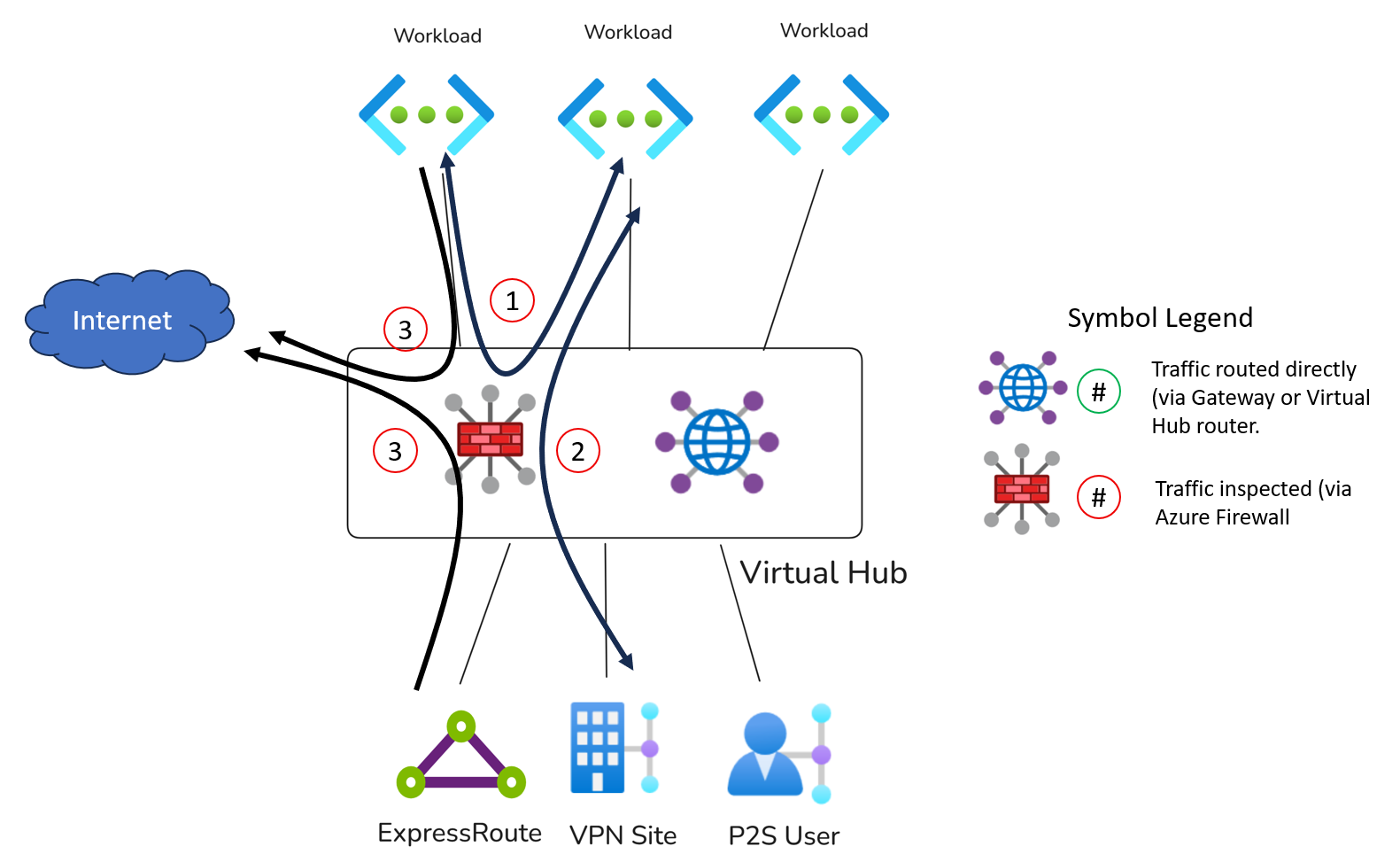
One common use case for static routes in Virtual WAN is to send same-hub private traffic through an Azure Firewall deployed in the virtual hub. In this design, the firewall acts as the next hop for traffic that would otherwise flow directly to the final destination.
This pattern is used to deliver Azure Firewall inspection for the following high-level use cases:
Additional, more complex use cases include:
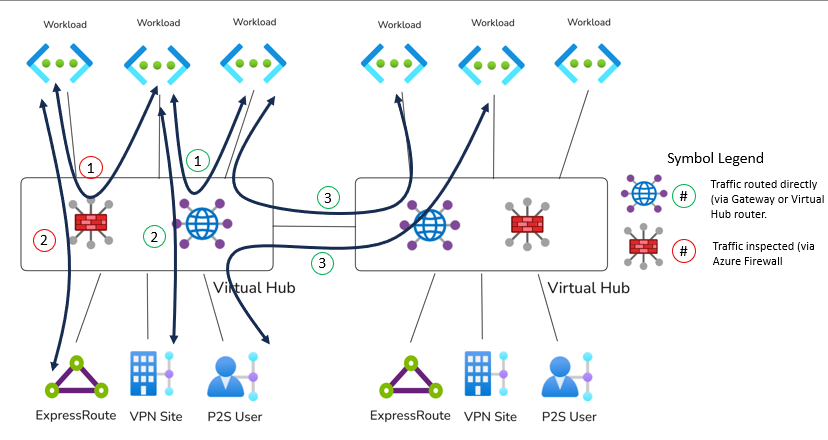
Other common use cases that require alternate approaches or are not supported with static routes:
| Use Case | Alternative Approach |
|---|---|
| Route traffic to an NVA deployed inside of the Virtual WAN hub | Inspecting traffic with an NVA deployed in the hub requires using routing intent and policies. |
| Inspect inter-hub traffic | Use routing intent and policies. |
| Inspect branch-to-branch traffic (ExpressRoute, Site-to-site VPN and Point-to-site VPN) | Branch-to-branch traffic inspection requires using routing intent and policies. |
| Virtual Network isolation with secure hubs. | Utilize Azure Firewall network rules to block traffic between Virtual Networks that shouldn't be able to communicate. Virtual WAN routing, even when propagations and associations are properly configured, can't guarantee that two Virtual Networks are isolated from a routing perspective. For example, two Virtual Networks that don't propagate to each other can still communicate via Azure Firewall if an aggregate route (such as a 10.0.0.0/8 or 0.0.0.0/0) is configured as a static route pointing to Azure Firewall in the hub on the Virtual Network's associated Virtual WAN route table. |
Routing traffic to an NVA in a spoke Virtual Network
Configuration options
You can configure routing to an IP address in a spoke virtual network in two ways:
- Option 1: Specify the static route on the virtual network connection. Set Propagate static route to True. In this model, the static route on the virtual network connection is automatically propagated into Virtual WAN without needing a separate static route entry in Virtual WAN route tables. This configuration has better scaling properties because Virtual WAN automatically propagates the static routes according to the Virtual Network's propagated route tables and labels.
- Option 2: Specify a static route in a Virtual WAN route table, with the next hop set to the Hub virtual network connection. In this model, there must also be a corresponding static route on the virtual network connection that specifies the next hop IP address for the prefix. Additionally, you must add a static route in every Virtual WAN route table (including remote Virtual WAN hubs) point to the Hub virtual network connection that needs to utilize the static route.
The two configuration options support different routing patterns and have different available use cases:
| Option | Overview | Supported Use Cases | Example Architectures | Unsupported Use Cases |
|---|---|---|---|---|
| 1 | Static route on the virtual network connection with Propagate static route set to True | Utilize spoke NVA as a source of routes for indirect spokes, VPN tunnels terminated on the NVA device or as an internet edge. Compatible with routing intent hubs. | Indirect spoke architectures and route internet-bound traffic to spoke NVA for egress, Hybrid scenarios | This configuration option can't be used for inspection scenarios between a Virtual WAN on-premises connection and spoke Virtual Network. |
| 2 | Static route in a Virtual WAN route table with next hop set to the hub virtual network connection, plus a matching next hop IP on the virtual network connection | Utilize spoke NVA as a source of routes for indirect spokes, VPN tunnels terminated on the NVA device or as an internet edge. Utilize for inspection scenarios between two Virtual WAN connections (on-premises to Virtual Network). | Indirect spoke architectures, routing internet-bound traffic to spoke NVA for egress, Hybrid scenarios, On-premises to Virtual Network inspection. | Not compatible with hubs using routing intent. |
When using static routes to route traffic to a Virtual Network connection in Virtual WAN, note the following best practices and considerations:
- Utilize configuration option 1 over configuration option 2 whenever possible, as option 1 ensures that static routes are automatically advertised to the relevant Virtual WAN route tables. This significantly reduces the operational overhead of static route management across multiple Virtual WAN route tables and hubs.
- The bypass next-hop IP address setting determines how traffic destined for IP addresses in the same Virtual Network as the NVA is routed. Align this setting with your intended network pattern. Often, setting this value to true is critical to routing NVA management traffic correctly to the expected NVA interface or instance.
- If there are multiple static routes configured where the destination CIDRs are not in IANA RFC1918, all static routes with non-RFC1918 destinations must use the same next hop IP address.
- For scenarios where the NVA is used to inspect traffic between on-premises and other Virtual Networks, the NVA's Virtual Network will typically be associated with a custom route table different from the branches or other Virtual Networks, while all the other connections will propagate to the NVA Virtual Network's custom route table. For an example, see the common use cases section below.
Common use cases
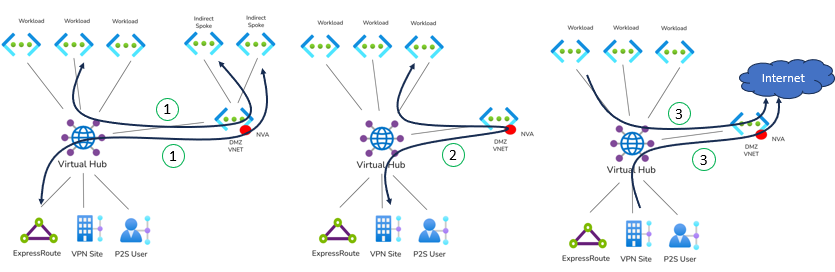
Some common use cases that require alternative approaches or are not supported in Virtual WAN:
| Use Case | Alternative Approaches |
|---|---|
| Utilize an NVA to inspect Virtual Network to Virtual Network traffic via an NVA deployed in a third Virtual WAN spoke. | Not supported. Utilize an indirect spoke architecture where spoke virtual networks are peered to the NVA spoke and not the Virtual WAN hub. Alternatively, deploy an NVA in the Virtual WAN hub, connect all spoke Virtual Networks to the Virtual WAN hub and utilize routing intent. |
| Utilize an NVA in the spoke to inspect Branch-to-branch traffic. | Not supported. Deploy an NVA in the Virtual WAN hub and utilize routing intent. |
Combining two types of static routes
You can also combine static routes that point to Azure Firewall in the virtual hub with static routes that point to a virtual network connection. This design is useful when you want different next hops for different traffic classes within the same Virtual WAN deployment.
Common use cases include:
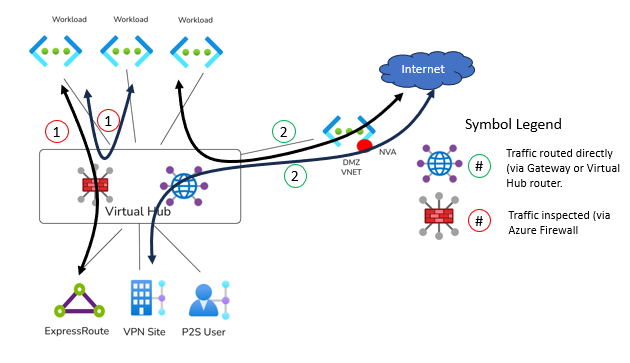
Other common use cases that require alternate approaches or are not supported with static routes:
| Use case | Alternative approach |
|---|---|
| Double-inspection scenarios: inspect traffic destined for indirect spoke or Internet with Azure Firewall deployed in a secure hub. Then, forward traffic to NVA in spoke for breakout or access to an indirect spoke. | Use routing intent and policies and static routes on Virtual Networks connection with Propagate static routes set to true. |