Note
Access to this page requires authorization. You can try signing in or changing directories.
Access to this page requires authorization. You can try changing directories.
Prove your AI skills. Power your career.
Join the Microsoft Credentials AI Challenge from January 20 to March 2, 2026, and explore real-world AI learning that’s fast, practical, and impactful.
Register for the Microsoft Credentials AI Challenge, pass one of the new AI Microsoft Applied Skills assessments and complete the sweepstakes entry form between January 20 and March 2, 2026, for a chance to receive a 50% discount Microsoft Certification voucher (below sweepstakes terms and conditions apply).
It’s your opportunity to sharpen your skills, stand out, and take the next step forward.
How do I participate in the Microsoft Credentials AI Challenge sweepstakes?
To participate in the Microsoft Credentials AI Challenge sweepstakes, you must register for a Microsoft Credentials AI Challenge, complete and pass a qualifying Microsoft Applied Skills credential, and submit a sweepstakes entry form within the sweepstakes timeframe of January 20 to March 2, 2026, for a chance to receive a 50% discount Microsoft Certification voucher (sweepstakes terms and conditions apply).
Steps to enter
Complete the following three steps for your chance to be one of the 5,000 winners to win a voucher for 50% off a new Microsoft certification exam.
- Register for and start one of six Microsoft Credentials AI Challenges by March 2, 2026.
- Earn one of three new, free, AI-focused Microsoft Applied Skills credentials between January 20, 2026, and March 2, 2026.
- Microsoft Applied Skill: Streamline business workflows with AI chat
- Microsoft Applied Skill: Generate reports with AI research agents
- Microsoft Applied Skill: Create agents in Microsoft Copilot Studio
- Enter the sweepstakes by March 2, 2026, for a chance to win 50% off a new certification exam via the entry form. Vouchers apply to:
- Microsoft Certified: AI Business Professional (Exam AB-730)
- Microsoft Certified: AI Transformation Leader (Exam AB-731)
- Microsoft 365 Certified: Copilot and Agent Administration Fundamentals (Exam AB-900)
- If you’re selected as a winner of one of the 5,000, 50% discount certification exam vouchers, you will be contacted by Pearson Vue via email with your voucher code, along with the steps on how to redeem. Those steps can also be found on the ‘How to redeem your prize’ page.
How do I earn a Microsoft Applied Skills credential?
To earn a Microsoft Applied Skills credential, you must have a Microsoft Learn profile. If you do not currently have one that is okay, you can create a free account as you take your Microsoft Applied Skills assessment.
How it works
- Prepare—Learn at your pace with self-paced learning or instructor-led training taught by Microsoft certified trainers
- Earn—Complete and pass the assessment to earn your Microsoft-verified credential.
- Share—Celebrate your new skills by sharing your credential on LinkedIn and other social platforms.
Go to the Microsoft Applied Skills assessments homepage to learn more.
How can I tell if I’ve earned a Microsoft Applied Skills credential?
Within your Microsoft Learn profile, go to the Credentials section. Once there, your Microsoft Applied Skills credentials will display under the Applied Skills tab. Make sure the credential was earned in the sweepstakes timeframe of January 20, 2026 (9:00 AM PT) – March 2, 2026 (11:59 PM PT).
I’ve earned my Microsoft Applied Skills credential. Now what?
Once you have earned your Microsoft Applied Skills credential, you can submit an entry for the sweepstakes to earn a 50% discount exam voucher by completing the sweepstakes entry form.
To complete the submission, you will need to provide; (1) your Microsoft Learn username (which can be validated here), (2) the email address you would like the discount voucher code sent to in the event you are a winner, and (3) the Credential Link of the Microsoft Applied Skills credential that you earned, which can be found in your profile under the Credentials tab when clicking “Share” on the credential (screenshot example below).
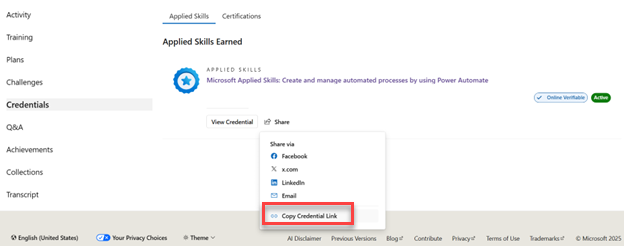
Winners will be drawn weekly starting on February 4, 2026, with the final drawing on March 4, 2026. Winners will be notified within seven (7) days of the drawing if they have been selected. The discount certification exam voucher is eligible for the following Microsoft Certification exams:
- Microsoft Certified: AI Business Professional (Exam AB-730)
- Microsoft Certified: AI Transformation Leader (Exam AB-731)
- Microsoft 365 Certified: Copilot and Agent Administration Fundamentals (Exam AB-900)
To see the complete rules of the sweepstakes, which includes the prize drawing schedule, review the official rules page.
When are winners drawn for the Microsoft Credentials AI Challenge sweepstakes?
There will be weekly drawings starting February 4, 2026, with the final drawing on March 4, 2026. Winners will be notified within seven (7) days of the entry periods. Please refer to section three (3), ‘Entry Periods’, of the Microsoft Credentials AI Challenge sweepstakes official rules.
How will I be notified if I am a winner of a Microsoft Credentials AI Challenge sweepstakes drawing?
Winners will be notified via an email sent to the email address they provided in their Microsoft Credentials AI Challenge sweepstakes form submission.
The email will be from ‘MindHub Pro by Pearson VUE’ and will contain the 50% discount certification exam voucher won along with the expiration date and steps on how to redeem.
Emails will be sent within seven (7) days of the applicable Prize Period drawing.
Refer to section six (6), ‘Winner selection and notification’, of the Microsoft Credentials AI Challenge sweepstakes official rules for a full breakdown.
How long does the Microsoft Credentials AI Challenge sweepstakes run?
The Sweepstakes starts at 9:00 a.m. Pacific Time (PT) on January 20, 2026, and ends at 11:59 p.m. PT on March 2, 2026.
I am a sweepstakes winner; how long do I have to redeem my prize?
All Microsoft Credentials AI Challenge sweepstakes discount certification exam vouchers must be redeemed by June 30, 2026.
This means you must schedule and take your chosen exam by June 30, 2026.
When using your voucher, you will not be able to use it for an exam date attempting to be scheduled for beyond June 30, 2026.
How do I redeem my discount Microsoft Certification exam voucher?
Instructions on how to redeem your voucher will be provided in the notification email you received from ‘MindHub Pro by Pearson VUE’ that also contained your voucher code. You can additionally refer to the ‘How to redeem your prize’ page.
The discount certification exam voucher is eligible for the following Microsoft Certification exams:
- Microsoft Certified: AI Business Professional (Exam AB-730)
- Microsoft Certified: AI Transformation Leader (Exam AB-731)
- Microsoft 365 Certified: Copilot and Agent Administration Fundamentals (Exam AB-900)
For the full list of rules, please refer to the Microsoft Credentials AI Challenge sweepstakes official rules.
How do I join a Challenge?
Select the Microsoft Credentials AI Challenge you want to participate in and register by selecting “Join the Challenge” once it starts. You will use your Microsoft Learn profile to register.
If you don’t have a Learn profile, that is okay. You can create one as you register.
How do I complete the Challenge?
To complete the Challenge, you'll need to finish the designated collection of Microsoft Learn content before the Challenge ends.
How can I tell if I’ve completed the Challenge?
The ‘where you stand’ section will display a fraction that indicates your current progress (e.g. 1/8 or 2/20). The Challenge is complete once the fraction displayed equals 100% (e.g. 8/8 or 20/20).
Do modules I’ve completed before the Challenge started count towards my score?
Yes, any modules in the collection that you’ve completed before the Challenge started will count towards your score.
How is the leaderboard calculated?
The leaderboard shows how many modules you have completed out of the total number of modules in the collection. The results are organized by the order of completion.
Will I receive a badge?
Yes! Badges will be available in your Microsoft Learn profile when you complete a Challenge.
What if the leaderboard is not reflecting my progress?
Make sure you are logged in when completing your modules. The leaderboard and 'where you stand' sections may take a few hours to refresh.
How can I see all my active and past Challenges?
To view your Challenge activity from the past 30 days, please visit your Microsoft Learn profile. To see all your Challenges, go to the Challenges home page.
What should I do if I’m having an issue with a sandbox, knowledge check or loading/completing a module page?
For all issues with Microsoft Learn modules, please report your feedback on the Microsoft Learn troubleshooting page.