Note
Access to this page requires authorization. You can try signing in or changing directories.
Access to this page requires authorization. You can try changing directories.
Important
Some information in this article relates to a prereleased product which may be substantially modified before it's commercially released. Microsoft makes no warranties, expressed or implied, with respect to the information provided here.
Microsoft Defender automatically discovers supported local AI agents and MCP servers configured on onboarded devices and surfaces them in the AI agent inventory and advanced hunting. To learn more about local AI agent discovery, see Local AI agent discovery with Microsoft Defender for Endpoint.
In this article, you learn how to view discovered agents in the inventory, explore their relationships with devices and identities, and investigate agent presence using advanced hunting.
Note
Local AI agent discovery provides discovery and investigation capabilities only, and doesn't include security posture assessment or alerts for endpoint agents.
Prerequisites
Before you can discover local AI agents on endpoints, make sure you meet the following requirements:
- Your devices are onboarded to Microsoft Defender for Endpoint.
- Your devices run a supported version of Windows, and Microsoft Defender Antivirus is updated with current monthly platform and engine updates.
- Your organization has the applicable Plan 2 license.
- Your devices are running Microsoft Defender Antivirus in active mode.
- Your environment is in the commercial cloud. Sovereign and national clouds aren't supported.
You don't need additional deployment, configuration, or scripts beyond the device onboarding requirements. If the device meets all of the prerequisites, agent discovery begins automatically.
View local AI agents in the inventory
To view a list of all local AI agents discovered on endpoints:
Sign in to the Microsoft Defender portal.
In the left navigation pane, select Assets > AI Agents.
Select Local agents to see a filtered list of local AI agents discovered on endpoint devices.
To view a specific agent's details:
From the Local agents list, select an agent to open the Agent pane.
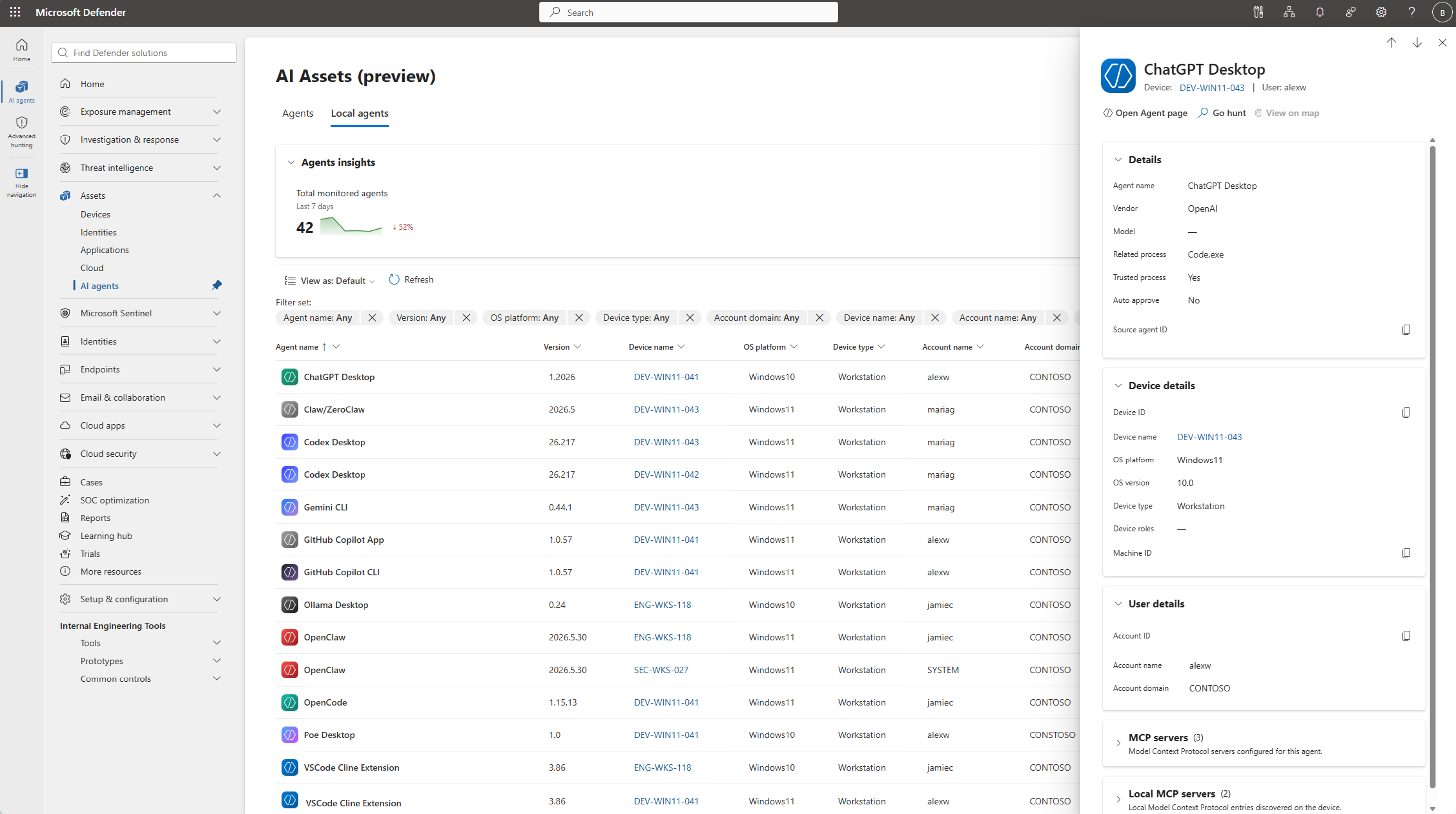
Review the agent details, including:
- Agent name, version, and related process
- Associated device and user
- First seen and last updated timestamps
- Integrity level, auto-approve status, and trust indicator
- Configured MCP servers, when detected
For more information on using the AI agent inventory, see Discover AI agents and assess security posture using Microsoft Defender.
Query local AI agents using advanced hunting
Use advanced hunting to proactively investigate local AI agent presence, understand which users and resources agents can reach, and identify high-risk configurations. These queries help you assess exposure, trace access paths to sensitive assets, and prioritize security response.
The ExposureGraphNodes and ExposureGraphEdges tables represent the security graph for local AI agents, including entities and relationships.
Note
The following queries use the ExposureGraphEdges table to query the device associated with the AI agent. You can also use the ExposureGraphNodes table to query the actual agent.
Get an inventory of AI agents across endpoints
This query lists all discovered local AI agents and the devices they run on:
ExposureGraphEdges
| where SourceNodeLabel == "endpointAiAgent"
| where EdgeLabel =~ "runs on"
| summarize Devices = make_set(TargetNodeName),
            DeviceCount = dcount(TargetNodeName)
    by AIAgent = SourceNodeName
| sort by DeviceCount desc
Map AI agents to users
This query maps local AI agents to the users with credentials on the devices they run on:
let accessEdges = dynamic(["contains", "has credentials of", "has permissions to",
                           "has role on", "can authenticate as", "can authenticate to"]);
ExposureGraphEdges
| where SourceNodeLabel == "endpointAiAgent"
| project AIAgent = SourceNodeName, DeviceId = TargetNodeId, Device = TargetNodeName
| join kind=inner (
    ExposureGraphEdges
    | where EdgeLabel in (accessEdges)
    | where TargetNodeLabel in ("device", "ec2.instance", "microsoft.compute/virtualmachines")
    | project UserId = SourceNodeId, User = SourceNodeName,
              UserType = SourceNodeLabel, DeviceId = TargetNodeId
) on DeviceId
| summarize AIAgents = make_set(AIAgent) by Device, User, UserType
| sort by Device asc
Find AI agents on devices of users with broad access
This query identifies which users on local AI agent devices have permissions to the most resources, helping you prioritize risk based on scope of access:
let accessEdges = dynamic(["contains", "has credentials of", "has permissions to",
                           "has role on", "can authenticate as", "can authenticate to",
                           "member of", "can impersonate as"]);
let biEdges =
    ExposureGraphEdges
    | where EdgeLabel in (accessEdges)
    | project src = SourceNodeId, tgt = TargetNodeId,
              srcName = SourceNodeName, tgtName = TargetNodeName, edge = EdgeLabel
    | union (
        ExposureGraphEdges
        | where EdgeLabel in (accessEdges)
        | project src = TargetNodeId, tgt = SourceNodeId,
                  srcName = TargetNodeName, tgtName = SourceNodeName, edge = EdgeLabel
    );
let userAccess =
    ExposureGraphEdges
    | where SourceNodeLabel == "user"
    | where EdgeLabel in ("has permissions to", "has role on")
    | summarize
        ResourceCount = dcount(TargetNodeId),
        ResourceTypes = make_set(TargetNodeLabel)
        by UserId = SourceNodeId, User = SourceNodeName;
ExposureGraphEdges
| where SourceNodeLabel == "endpointAiAgent"
| project AIAgent = SourceNodeName, n1 = TargetNodeId, Device = TargetNodeName
| join kind=inner (
    biEdges | project n1 = src, UserId = tgt, User = tgtName
) on n1
| join kind=inner userAccess on UserId
| summarize AIAgents = make_set(AIAgent) by Device, User, ResourceCount,
    tostring(ResourceTypes)
| sort by ResourceCount desc
Find AI agents with paths to critical or sensitive assets
This query traces access paths from local AI agents through the exposure graph to resources marked as critical or containing sensitive data:
let accessEdges = dynamic(["contains", "has credentials of", "has permissions to",
                           "has role on", "can authenticate as", "can authenticate to",
                           "member of", "can impersonate as"]);
let biEdges =
    ExposureGraphEdges
    | where EdgeLabel in (accessEdges)
    | project src = SourceNodeId, tgt = TargetNodeId,
              srcName = SourceNodeName, tgtName = TargetNodeName, edge = EdgeLabel
    | union (
        ExposureGraphEdges
        | where EdgeLabel in (accessEdges)
        | project src = TargetNodeId, tgt = SourceNodeId,
                  srcName = TargetNodeName, tgtName = SourceNodeName, edge = EdgeLabel
    );
let sensitiveAssets =
    ExposureGraphNodes
    | extend CriticalityLevel = toint(NodeProperties.rawData.criticalityLevel.criticalityLevel)
    | extend HasSensitiveData = iff(isnotempty(NodeProperties.rawData.containsSensitiveData),
        "Yes", "No")
    | extend CriticalityReason = tostring(NodeProperties.rawData.criticalityLevel.ruleNames)
    | where CriticalityLevel > 0 or HasSensitiveData == "Yes"
    | extend Criticality = case(
        CriticalityLevel == 1, "Critical",
        CriticalityLevel == 2, "High",
        CriticalityLevel == 3, "Medium",
        CriticalityLevel == 4, "Low",
        "Sensitive Data"
    )
    | project AssetId = NodeId, AssetName = NodeName, AssetType = NodeLabel,
              Criticality, HasSensitiveData, CriticalityReason;
ExposureGraphEdges
| where SourceNodeLabel == "endpointAiAgent"
| project AIAgent = SourceNodeName, n1 = TargetNodeId, Device = TargetNodeName
| join kind=inner (
    biEdges | project n1 = src, n2 = tgt, Hop1 = tgtName, Via1 = edge
) on n1
| join kind=inner (
    biEdges | project n2 = src, n3 = tgt, Via2 = edge
) on n2
| join kind=inner (
    sensitiveAssets | project n3 = AssetId, AssetName, AssetType,
                             Criticality, HasSensitiveData, CriticalityReason
) on n3
| summarize ExposedVia = make_set(Hop1) by
    AIAgent, Device, AssetName, AssetType,
    Criticality, HasSensitiveData, CriticalityReason
| sort by Criticality asc, HasSensitiveData desc