Note
Access to this page requires authorization. You can try signing in or changing directories.
Access to this page requires authorization. You can try changing directories.
Important
Some information in this article relates to a prereleased product which may be substantially modified before it's commercially released. Microsoft makes no warranties, expressed or implied, with respect to the information provided here.
Local AI agents run with user-level permissions and can access files, tools, and services on the devices where they operate. Without visibility into which agents are running and what they can reach, security teams can't assess exposure, enforce governance, or respond to agent-related incidents.
Microsoft Defender automatically discovers supported local AI agents and MCP server configurations on onboarded devices, then surfaces them in the Microsoft Defender portal. This gives security teams a centralized view of AI agent presence across the organization.
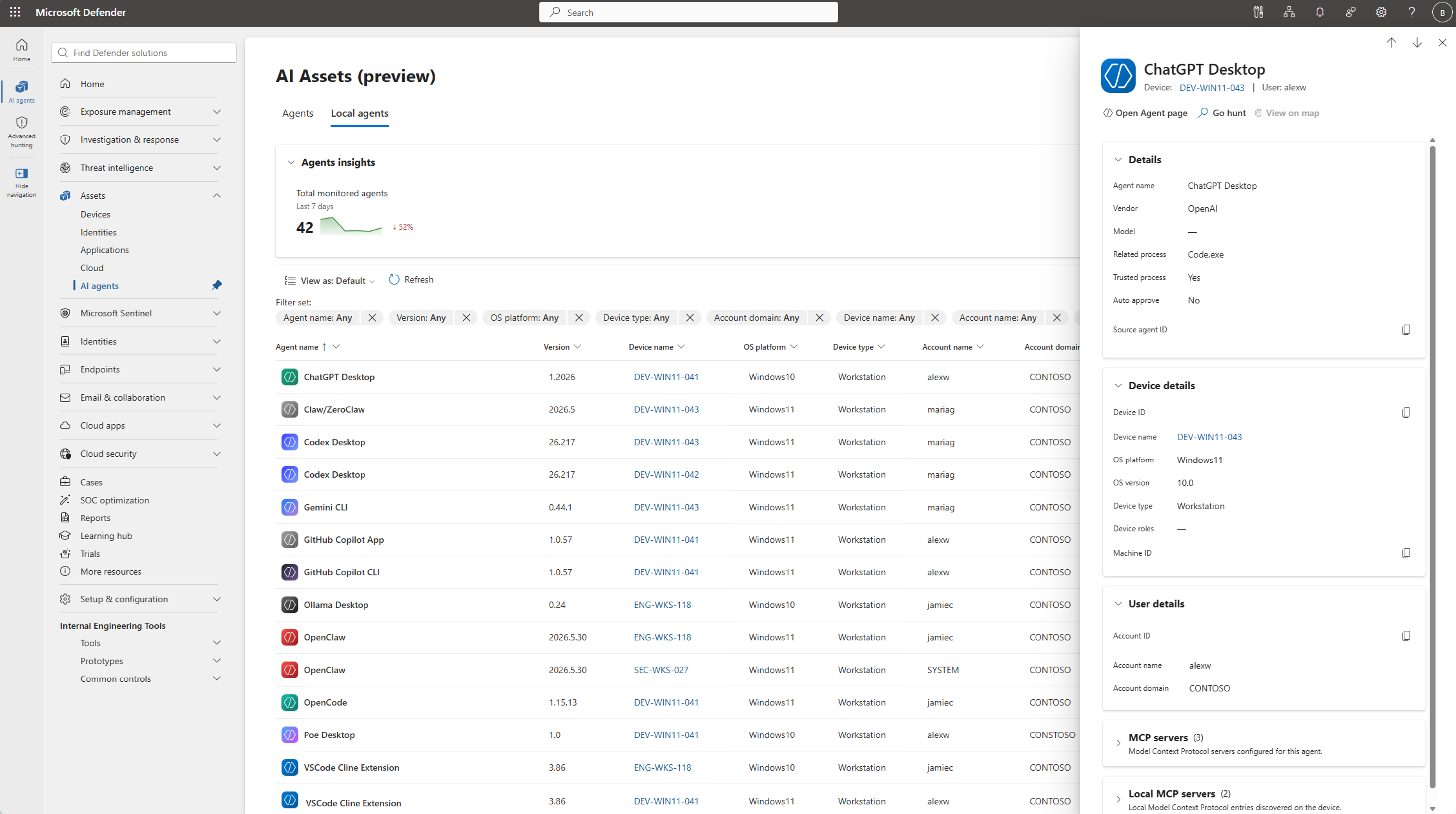
This article explains how local AI agent discovery works, lists supported agents and MCP server configurations, and describes how to view discovered agents in the Microsoft Defender portal.
Tip
Defender also provides AI agent runtime protection for local agents. When enabled, runtime protection monitors activity in the agentic loop and blocks malicious instructions before the agent can act on them. For more information, see AI agent runtime protection.
Local AI agent discovery on endpoints
Defender automatically detects supported local AI agents and MCP server configurations on onboarded devices. When Defender identifies a supported local AI agent, the agent is displayed as a discoverable asset in the Microsoft Defender portal with visibility into:
- Local AI agent inventory: A centralized view of discovered local AI agents with device and user associations and discovery metadata.
- Exposure map: Visual relationships between local AI agents, devices, identities, and the resources those identities can access, to help assess potential impact.
- Advanced hunting: Hunting for discovery data using Kusto Query Language (KQL) to investigate local AI agents and the resources they can access based on the permissions of the user running them.
Supported local AI agents and MCP server configurations
Defender defines an agent as a combination of a user, a device, and an agent type. For example, if Claude Code runs in 15 different project folders on the same device for the same user, it appears as a single agent entry in the inventory.
Defender discovers supported local AI agents on Windows endpoints. This includes agents that run from the command line, desktop apps, agentic IDEs, VS Code extensions, and Claw-based local agent implementations. When supported, Microsoft Defender also discovers MCP server configurations associated with these agents, including local and remote MCP server configurations.
Supported local AI agents include:
- CLI agents: Claude Code, Codex CLI, Gemini CLI, GitHub Copilot CLI, OpenCode, Antigravity CLI
- Desktop apps: ChatGPT Desktop, Claude Desktop, Codex Desktop, Ollama Desktop, Poe Desktop
- Agentic IDEs: Cursor, Antigravity IDE, Windsurf
- VS Code extensions: Claude Code, Cline, Codex, Gemini Code Assist, GitHub Copilot, Roo Code
- Claw-based agents: OpenClaw, Clawpilot, Claw/Nanobot
To learn how to discover and view local AI agents, see Discover local AI agents.
Broader AI security capabilities
Microsoft Defender's discovery capabilities are part of a comprehensive AI security approach. Microsoft Defender provides other capabilities across your organization's AI ecosystem:
- Discover cloud and platform agents: Find agents built with Microsoft Copilot Studio, Microsoft Foundry, Amazon Web Services (AWS) Bedrock, and Google Cloud Platform (GCP) Vertex AI.
- Detect and investigate threats: Correlate alerts and investigate suspicious agent behavior across your security infrastructure.
For details on these capabilities and how to apply them, see Protect AI assets from emerging threats and vulnerabilities using Microsoft Defender.