Note
Access to this page requires authorization. You can try signing in or changing directories.
Access to this page requires authorization. You can try changing directories.
Applies to: Dynamics 365 Finance, Dynamics 365 Supply Chain Management, Azure API Management, Service Bus, Azure Logic Apps, Azure Key Vault, Copilot Agents
This solution combines Dynamics 365 Finance, Dynamics 365 Supply Chain Management, Azure API Management, Azure Service Bus, Azure Logic Apps, Azure Application Gateway, and Azure Key Vault to build a resilient, decoupled inbound integration pattern for external line-of-business (LOB) systems. It applies to manufacturing organizations that operate specialist third-party applications, including sales quoting platforms, customer-facing ordering portals, structural design tools, and fabrication engineering software. These applications synchronize sales quotations, sales orders, project demand, bills of material, route definitions, and manufacturing specifications into Dynamics 365 Supply Chain Management without coupling the availability of either system to the other.
Introduction
Manufacturing organizations that implement Dynamics 365 Finance and Supply Chain Management as their central ERP typically operate a portfolio of specialist third-party applications alongside it. In the structural steel and pre-engineered buildings sector, these applications include: a web-based sales quoting system used by commercial teams to configure, price, and confirm customer orders; a customer-facing web ordering portal that allows builders to submit orders directly; a structural steel detailing and design tool used by engineering teams to produce structural BOMs and route specifications; and a fabrication engineering application used by a separate engineering team to design cold-formed and light-gauge steel components.
Each of these applications produces data that is the foundation of Dynamics 365 Supply Chain Management's supply chain execution. The quoting system creates the project and sales order that initiates the entire supply chain lifecycle. The design tools produce the bills of material, manufacturing routes, and specifications that drive production scheduling and MRP. Without reliable, near-real-time integration of this data into Dynamics 365, planning outputs are based on incomplete or stale information, leading to material shortages, production delays, and manual rework.
A direct point-to-point integration where the external system calls Dynamics 365 Supply Chain Management's Custom Service Endpoint directly creates a tight availability coupling that this architecture resolves. It introduces a durable message broker as the decoupling layer so both systems can operate independently, combined with a governed API gateway, structured staging and batch processing within Dynamics 365, a closed-loop error-recovery model, and a completion callback so both systems maintain consistent linked records of every transaction.
Which use cases and industries should use this reference architecture?
Manufacturing organizations running Dynamics 365 Finance or Supply Chain Management alongside two or more specialist third-party LOB systems that must push structured transactional data into Dynamics 365 for planning and execution purposes.
Industries include structural steel fabrication, pre-engineered buildings, modular construction, heavy manufacturing, engineer-to-order and make-to-order manufacturing, and any capital-goods sector where design and quoting systems must integrate tightly with a centralized ERP.
When should this reference architecture be defined in the overall implementation?
- During the Solution Architecture phase, at the point where the integration catalogue is compiled and before any development work begins. Early definition enables all inbound integrations to be standardized on a single pattern.
Who are the key stakeholders required in solution architecture?
Enterprise Solution Architect - owns and governs the integration pattern across all channels.
Dynamics 365 Technical Lead - implements the Custom Service Endpoint (X++), Batch Job framework, Integration Tables, and Integration Workspace.
Azure Integration Engineer - configures APIM policies, Logic Apps workflows, Service Bus queues, and Application Insights.
Security Architect - reviews Azure AD configuration, Managed Identity assignments, Key Vault policy, and WAF rules.
External LOB System Owner - provides the API payload specification, implements the webhook callback endpoint, and owns the ExternalReferenceId used throughout the integration.
Integration Operations Lead - defines SLAs, alert thresholds, runbooks, and ITSM integration.
Architecture
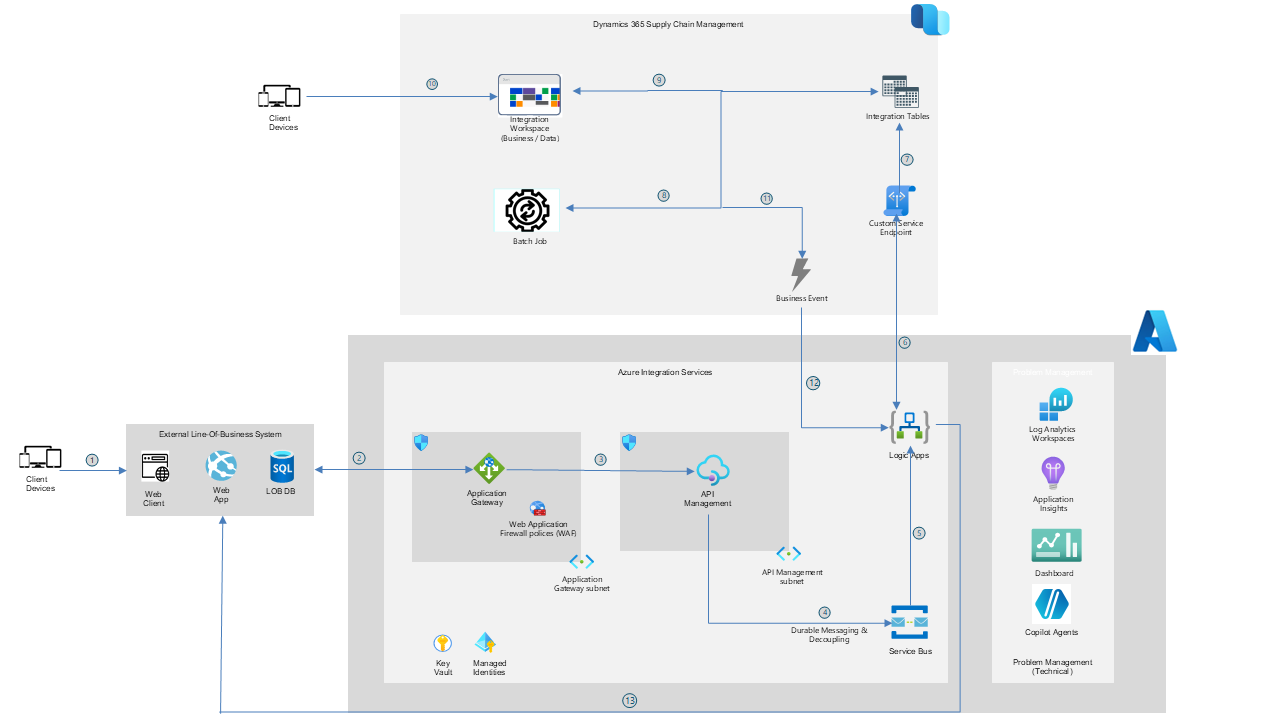
The following diagram illustrates the architecture for the solution.
Dataflow
The following numbered steps describe how data flows through the architecture. The steps correspond to the call-out numbers on the diagram.
A user or automated process in the External Line-of-Business System (Web Client) completes a business workflow. For the sales quoting and ordering portal integrations, the trigger is an explicit user action such as the Submit for Order button in the quoting system, which signals that a building order is built out, quoted, and approved by the customer. For the structural design and fabrication engineering integrations, the trigger is the engineering team generating an inbound job file upon completing and validating their design against Dynamics 365 Released Products. In all cases, the payload contains the ExternalReferenceId, the source system's own unique key for this transaction, and the full data payload.
The External LOB System sends an HTTPS POST request containing the integration payload (JSON or XML) to the Azure Application Gateway endpoint. The Web Application Firewall (WAF) validates the request against OWASP Core Rule Set 3.2 in Prevention mode. Invalid or malformed requests are rejected at the network perimeter. Valid requests are routed to the API Management subnet.
Azure API Management (APIM) receives the request and applies the full inbound policy chain: validates the Azure AD JWT bearer token (validate-jwt), enforces the per-subscription rate limit (rate-limit-by-key), generates a CorrelationId GUID and injects it as a message property for end-to-end tracing, retrieves the Azure AD access token for Service Bus from Key Vault via Managed Identity, and strips the client API key before forwarding. APIM writes the message to the Azure Service Bus Queue and returns HTTP 202 Accepted immediately to the External LOB System. The external system's workflow is unblocked at this point and doesn't wait for Dynamics 365 processing.
Azure Service Bus Queue receives and durably holds the message. The message envelope contains the ExternalReferenceId, the CorrelationId injected by APIM, the full payload, and the enqueue timestamp. The system guarantees at least once delivery. If the downstream consumer is unavailable, the message waits safely in the queue. Messages that exceed the maximum delivery count are moved to the dead-letter queue, ensuring no submission is silently lost.
Azure Logic Apps polls the Service Bus Queue by using the peek-lock pattern. On receiving a message, it locks the message, validates the payload, and prepares the request for Dynamics 365.
Logic Apps calls the Dynamics 365 Custom Service Endpoint via HTTPS POST with an Azure AD bearer token obtained through Managed Identity. The ExternalReferenceId and CorrelationId are passed as payload fields. Logic Apps completes (deletes) the Service Bus message only after Dynamics 365 confirms receipt.
The Dynamics 365 Custom Service Endpoint writes the Integration Table header record capturing: ExternalReferenceId, CorrelationId, Dynamics 365RecordId, HeaderStatus = Received, Message, ExternalSystemName, ReceivedDateTime, and RetryCount. Line records are written for each submitted item.
The Dynamics 365 Batch Job processes the Integration Table line records against Dynamics 365 tables. On success, it commits all lines and updates HeaderStatus to Processed. On failure, it writes the error detail to the line records and sets HeaderStatus to Failed with a summary error message.
On the failure path, the Integration Table record with HeaderStatus = Failed surfaces in the Dynamics 365 Integration Workspace. The ERP business user reviews the ExternalReferenceId, CorrelationId, Dynamics 365RecordId, HeaderStatus, error Message, and the line-level grid showing which lines failed and why.
The business user corrects the data directly on the Integration Workspace form and selects Reprocess. This action retries the Batch Job for the corrected record only without re-invoking Logic Apps, Service Bus, APIM, or the External LOB System. Steps ⑨ and ⑩ occur only on the failure path and aren't part of the standard happy path flow.
Once the Batch Job completes successfully, whether on the initial run at step ⑧ or after reprocessing at step ⑩, Dynamics 365 emits a Business Event. The Business Event is triggered by the HeaderStatus changing to Processed and carries the ExternalReferenceId, CorrelationId, Dynamics 365RecordId, and status.
The Dynamics 365 Business Event is received by Azure Logic Apps. Logic Apps composes the webhook callback payload containing ExternalReferenceId, CorrelationId, Dynamics 365RecordId, Status = Processed, and Message.
Logic Apps invokes the webhook endpoint registered on the External LOB System. The system uses the ExternalReferenceId to locate the originating record and updates its status. It stores the Dynamics 365RecordId for future cross-system reference. The integration loop is now closed.
Components
The reference architecture uses the following components:
Dynamics 365 Finance and Supply Chain Management is the ERP target system. It provides the Custom Service Endpoint (X++ REST), Batch Job processing framework, Integration Tables (custom X++ tables that hold inbound payloads during processing and persist error records), Integration Workspace (a custom Dynamics 365 form for error review and reprocessing), and Business Events for outbound completion notification. Core ERP modules populated include Project Management and Accounting, Production Control, Sales and Marketing, Inventory Management, and Procurement.
Azure Application Gateway with Web Application Firewall is the network perimeter entry point. It terminates TLS, applies OWASP Core Rule Set 3.2 WAF rules in Prevention mode to block injection attacks and malformed payloads, and routes validated traffic to the APIM subnet.
Azure API Management is the sole governed inbound API gateway. It enforces JWT validation, per-subscription rate limiting, CorrelationId generation and injection, OAuth 2.0 authentication translation via Managed Identity, API key stripping, and centralized telemetry emission. It returns HTTP 202 Accepted immediately on queue write, fully decoupling the external system from Dynamics 365 processing time.
Azure Service Bus provides the durable message broker that decouples the External LOB System from Dynamics 365 Suply Chain Management. Its at-least-once delivery guarantee and peek-lock pattern ensure no submission is lost regardless of downstream availability. The dead-letter queue captures messages that can't be processed after the maximum delivery count.
Azure Logic Apps orchestrates the integration workflow between Service Bus and Dynamics 365. It reads messages (peek-lock), calls the Dynamics 365 Custom Service Endpoint with Managed Identity authentication and exponential back-off retry, and fires the outbound webhook callback to the external system upon receiving the Dynamics 365 Business Event.
Azure Key Vault centrally stores and manages all secrets, such as Azure AD client credentials and API subscription keys. Both APIM and Logic Apps reference Key Vault exclusively via Managed Identity. No credentials are stored in application configuration, pipeline variables, or source control.
Azure Managed Identities provide credential-free authentication for APIM and Logic Apps to access Key Vault and Service Bus, eliminating the need to manage, rotate, or store service account passwords.
Azure Application Insights receives telemetry from APIM, Logic Apps, and Service Bus. Every telemetry event includes the CorrelationId generated by APIM, enabling end-to-end trace correlation from the APIM request log through the Service Bus message, the Logic Apps run, and the Dynamics 365 Integration Table record using a single identifier.
Azure Log Analytics Workspace aggregates telemetry and hosts KQL alert rules that fire on sustained error rates, Dynamics 365 HTTP 429 throttle events, dead-letter queue accumulation, and rate-limit exhaustion. Outputs feed Logic Apps alert workflows and ITSM integrations.
Scenario details
Manufacturing organizations in the structural steel and pre-engineered buildings sector operate a tightly interconnected set of specialist applications that span the commercial, engineering, and production functions. The commercial sales team uses the sales quoting system to build, configure, and price building orders. When a customer approves an order, the system triggers the integration to create the corresponding Dynamics 365 Project and Sales Quotation. By using the customer-facing ordering portal, builders can submit and manage orders directly. Approved orders flow into Dynamics 365 through the same integration pattern. Structural engineers use the structural design and detailing tool to design building components. After completing and validating a design against the Dynamics 365 Released Products catalog, the engineering team generates a job file that contains the full BOM, routes, and specifications for all structural members. A separate engineering team uses the fabrication engineering tool for cold-formed and light-gauge steel components and follows an identical process.
Before you implemented this architecture, operations staff manually re-entered data from these systems into Dynamics 365 or handled it through fragile point-to-point integrations with no durable message store, no standardized error handling, and no observability. A Dynamics 365 maintenance window or a throttling event could cause submissions to be lost with no recovery path. The quoting system required the Operations team to manually convert confirmed quotes into Dynamics 365 projects. This process was unsustainable at scale because of the volume and complexity of data involved, which required manual translation of design outputs into Dynamics 365 production tables.
The goal of this implementation was to establish a single reusable pattern across all four integrations that provides: an immediate HTTP 202 acknowledgement to the external system; durable message storage through Service Bus; structured staging and asynchronous batch processing within Dynamics 365; a closed-loop error-recovery model accessible from the Dynamics 365 Integration Workspace; a self-healing resubmission capability for corrected payloads; and a webhook callback that syncs the Dynamics 365-assigned Project Number or Sales Order Number back to the source system.
The following table describes the four integrations you implemented by using this pattern. The descriptions use anonymized terms that are suitable for public reference.
| # | Generic System Type | Trigger Mechanism | Data Exchanged — Inbound to Dynamics 365 Suply Chain Management | Bidirectional Sync | Dynamics 365 Modules |
|---|---|---|---|---|---|
| 1 | External Sales Quoting System (web-based configure-price-quote platform) | 'Submit for Order' user action building order built, quoted and approved by customer | Project header (project group, division code, brand code, services contract, schedule type, projected start date, integration source); Sales Quotation header (customer account, quotation name, delivery address, payment terms, tax group); Sales Quotation lines (item ID, part name, originally quoted quantity, sales quantity, unit, price, sales category, frame/column/trim reference, custom dimensions) | Dynamics 365 Project Number and Sales Order Number synced back to source system via webhook. Quote ID and Project ID set to same value in Dynamics 365 for tracking. | Project Management and Accounting, Sales and Marketing, Procurement |
| 2 | Customer-Facing Web Ordering Portal (self-service order entry platform) | Customer order approval and submission from the portal | Project header, Sales Quotation header and lines, product and routing mappings, division codes, brand codes, customer specifications, schedule type assignments, process-to-engineering due dates | Dynamics 365 Project Number synced back to portal via webhook | Project Management and Accounting, Sales and Marketing |
| 3 | Structural Steel Design and Detailing Tool (CAD/BIM-integrated engineering application) | Engineering generates inbound job file (XML) after designing and validating against Dynamics 365 Released Products. Logic Apps polls file share periodically to retrieve the file. | Sales Order Header (references Project ID from quoting integration); Formula Headers (one per manufactured part, keyed by site code + number sequence); Formula Versions; Formula Lines (item numbers, quantities, inventory dimensions, flushing principles); Route Headers; Route Versions; Route Operations (operation number 10, Primary priority); Route Operation Properties; Sales Order Lines (item number, quantity, price, colour/size/style dimensions, BOM ID, Route ID, site code, custom manufacturing quantity fields) | Processing confirmation synced back to engineering system via webhook | Production Control, Inventory Management, Sales and Marketing, Projects |
| 4 | Fabrication Engineering and Design Software (cold-formed and light-gauge steel engineering tool) | Engineering generates inbound job file after completing and validating fabrication design. Logic Apps polls file share periodically. | Same entity structure as Integration 3: Formula Headers and Lines, Route Headers and Operations, Route Operation Properties, Sales Order Lines with custom specifications including component plane classification and internal name fields | Processing confirmation synced back to fabrication system via webhook | Production Control, Inventory Management, Sales and Marketing, Projects |
A critical dependency exists between the integrations: For integrations 3 and 4, the Sales Order Header must already exist in Dynamics 365 before the design tool data can be processed. Integration 1 or 2 creates this header. The Custom Service Endpoint for design tool integrations locates the Sales Order Header by finding the Project ID in the inbound file and navigating to the corresponding Sales Order through the Dynamics 365 Project Management module. This sequential dependency is by design and reflects the actual business process: engineering design begins only after a confirmed customer order exists.
Potential use cases
This solution was created for a manufacturing organization operating in the structural steel fabrication and pre-engineered buildings industry. It can also be applied to industries like heavy manufacturing, modular construction, offshore fabrication, aerospace components manufacturing, and any engineer-to-order or make-to-order sector. Use it in any organization that operates Dynamics 365 Finance or Supply Chain Management alongside specialist third-party applications that must push structured transactional data into Dynamics 365 for planning and execution purposes, particularly where the data from different systems is sequentially dependent and must arrive in a defined order.
You can use this solution to:
Integrate any external sales quoting or configure-price-quote platform with Dynamics 365 Supply Chain Management to eliminate manual re-entry of confirmed orders, automatically creating Dynamics 365 Projects and Sales Quotations with full field mapping from the quoting system.
Integrate CAD, BIM, or engineering design tools with Dynamics 365 Supply Chain Management Production Control, enabling engineering-generated BOMs (Formula Headers, Versions, Lines), routes, and manufacturing specifications to drive MRP and production scheduling directly from the design environment.
Implement a multi-integration program where downstream integrations depend on records created by upstream integrations. Govern the integration sequence by using the Dynamics 365 Sales Order Header dependency pattern.
Standardize multiple inbound integrations on a single governed API gateway and message broker. Reduce total infrastructure cost and enable centralized security governance and observability across all channels.
Provide a self-healing error-recovery model where the external system can resubmit a corrected payload and the pipeline handles idempotency automatically. Use the Dynamics 365 Integration Workspace as the fallback for cases requiring manual ERP data correction.
Meet enterprise security requirements including WAF perimeter protection, JWT validation, Azure AD Managed Identity authentication, Key Vault secrets management, and end-to-end audit trail via Application Insights.
Considerations
These considerations help you implement a solution that includes Dynamics 365. For more information, see the Dynamics 365 guidance documentation.
Cost optimization
Cost optimization is about finding ways to reduce unnecessary expenses and improve operational efficiencies. For more information, see Overview of the cost optimization pillar.
The cost of this architecture scales primarily with integration message volume and chosen service tiers. A single shared APIM instance serving all four integration channels is the principal cost lever — one governed gateway replaces four separate integration points.
Azure API Management
A single shared instance (Premium tier for full VNet integration with private endpoint, or Standard V2 for outbound VNet only) serves all four integration channels. Cost scales with API call volume. For typical manufacturing volumes, the per-call charge is negligible relative to instance cost.
Azure Service Bus
Base namespace fee plus per-million-message charge. Standard tier is sufficient for most manufacturing volumes. Premium tier is warranted only when dedicated throughput, geo-disaster recovery, or private endpoint is required. Cost scales linearly with message volume.
Azure Logic Apps
Standard plan pricing based on vCPU allocation and action executions per month.
Azure Application Insights and Log Analytics
Cost is based on data ingestion volume. Configure sampling at 10–25% for high-frequency APIM telemetry. Retain operational logs for 30–90 days; archive to Azure Storage for compliance retention.
Azure Key Vault, Application Gateway, and Managed Identities
Key Vault cost is negligible. Application Gateway cost scales with capacity units. Managed Identities carry no additional charge.
Security
Deploy Azure API Management in a dedicated subnet with VNet integration. The Service Bus namespace and Dynamics 365 Custom Service Endpoint must not be reachable from outside the APIM subnet in production.
Store all secrets in Azure Key Vault and reference them from APIM and Logic Apps via Managed Identity only. No credentials may appear in policy XML, workflow definitions, or source control.
Configure the
validate-jwtAPIM inbound policy to validate token issuer, audience, and required claims. Unauthenticated requests must be rejected at the APIM policy layer.Configure Application Gateway WAF in Prevention mode with OWASP CRS 3.2. Add custom rules to restrict inbound traffic to known source IP ranges.
Assign a distinct APIM subscription key to each integration channel with independent rate limits. Implement zero-downtime key rotation by using APIM's primary and secondary key mechanism.
Restrict Dynamics 365 Integration Workspace access to the Integration Operations security role. Limit reprocess capability to authorized personnel. Create a new Dynamics 365 security role (Integration Manager) with Maintain access to the Integration Workspace form.
Reliability
Set the Service Bus message lock duration to at least five minutes and the maximum delivery count to three. Enable the dead-letter queue and monitor it with a Log Analytics alert rule and a Logic Apps notification workflow.
Configure the Logic Apps retry policy with exponential back-off, up to four retries, and honor Dynamics 365 HTTP 429 Retry-After headers.
Implement the PayloadHash idempotency check in the Dynamics 365 Custom Service Endpoint before any Integration Table write to prevent duplicate ERP records from at-least-once delivery.
For design tool integrations, the Dynamics 365 Batch Job must process entity types in the correct dependency sequence: Formula Header → Formula Version → Formula Lines → Route Header → Route Version → Route Operations → Route Operation Properties → Sales Order Lines. Processing out of sequence causes foreign key constraint failures.
Assign the Dynamics 365 Batch Job to a dedicated batch group to prevent contention with core ERP processes such as MRP runs and invoice posting.
Calculate the custom quantity summary field on Sales Order lines after you populate all Sales lines for a given Sales Order, not per line, as the calculation logic depends on the complete set of lines being available.
Performance efficiency
Cache the Azure AD access token in APIM by using cache-lookup-value and cache-store-value with a 20-minute TTL. This approach eliminates per-request token acquisition overhead of 200–500ms.
For XML file-based integrations (structural design and fabrication tools), use Logic Apps to parse the entire file and batch all entity writes in a single workflow run rather than processing one part element at a time. This approach minimizes Dynamics 365 API call count.
Schedule the Dynamics 365 Batch Job to run at two-minute intervals during business hours to minimize latency between message receipt and ERP record creation.
Operational excellence
Ensure the CorrelationId generated by APIM is present in all telemetry events across APIM, Service Bus, Logic Apps, and the Dynamics 365 Integration Table header record. A single CorrelationId must be sufficient to reconstruct the complete end-to-end call chain in a single KQL query.
The Dynamics 365 Integration Workspace must surface: ExternalReferenceId, CorrelationId, Dynamics 365RecordId, HeaderStatus, Message, RetryCount, and a line-level grid. Users must be able to review the status of Project/Quote/Order ID creation and line population, track creation timestamps, see error messages, and re-trigger processing.
Define Log Analytics alert rules for: sustained error rates above five percent per channel over any five-minute window; dead-letter queue depth above zero; Dynamics 365 HTTP 429 events exceeding ten per minute; and Logic Apps workflow failure rate above threshold.
Maintain a runbook per integration channel documenting common error codes, root causes, remediation steps, and the dead-letter queue manual resubmission procedure.
Deploy all Azure components from source-controlled IaC via Azure DevOps pipelines. Prohibit manual configuration changes to production.
Implementing the solution
The following procedures describe the high-level implementation steps. Execute in sequence. Detailed configuration guidance is available in the Related resources section.
Procedure: Deploy the Azure network and security foundation
Use the following steps to establish the network perimeter and secrets management foundation.
Create a Virtual Network with Application Gateway subnet (minimum /27) and API Management subnet (minimum /27). Apply NSGs restricting APIM subnet inbound traffic to the Application Gateway subnet only.
Deploy Azure Application Gateway (WAF v2 SKU) with OWASP CRS 3.2 in Prevention mode.
Deploy Azure Key Vault with soft delete and purge protection. Grant Key Vault Secrets User role to the APIM and Logic Apps system-assigned Managed Identities.
Store initial secrets: one Azure AD client secret per integration channel and one Service Bus connection string per queue.
Procedure: Deploy and configure Azure API Management
Use the following steps to configure the API gateway.
Deploy Azure API Management (Premium or Standard V2). Enable VNet integration. Assign system-assigned Managed Identity.
Create one API product per integration channel with independent subscription key pairs.
Configure APIM inbound policy per API:
validate-jwt; rate-limit-by-key; set-variable (CorrelationId = Guid.NewGuid().ToString()); set-header (inject CorrelationId); cache-lookup-value (Azure AD token, 20-minute TTL); authenticate-managed-identity (Service Bus); set-header (delete client API key); send to Service Bus queue; return HTTP 202 Accepted.Configure APIM diagnostic settings to emit all telemetry including CorrelationId as custom dimension to Application Insights.
Procedure: Deploy Azure Service Bus and Logic Apps
Use the following steps to configure the messaging and orchestration layer.
Deploy an Azure Service Bus namespace (Standard or Premium). Create one queue per integration channel with message lock duration set to 5 minutes, maximum delivery count set to 3, and dead-letter queue enabled.
Deploy Azure Logic Apps (Standard plan). Create one workflow per integration channel with Service Bus peek-lock trigger, payload transformation logic, Dynamics 365 Custom Service Endpoint HTTP action with Managed Identity authentication, and exponential back-off retry (four retries, 30-second initial interval).
Create a dead-letter monitoring workflow that triggers on dead-letter message arrival and creates an ITSM incident with the CorrelationId and ExternalReferenceId.
Procedure: Implement Dynamics 365 Custom Service Endpoint and Integration Tables
Use the following steps to configure the Dynamics 365 receiving layer.
Create the Integration Table header (X++) with fields: ExternalReferenceId, CorrelationId, Dynamics 365RecordId, HeaderStatus (Received/Processing/Processed/Failed), Message, ExternalSystemName, PayloadHash, ReceivedDateTime, ProcessedDateTime, RetryCount.
Create the Integration Table line with fields: HeaderRecordId (FK), LineSequence, ExternalLineRef, LineStatus (Pending/Processed/Failed), LineMessage, Dynamics 365LineRef.
Create the X++ Custom Service class implementing the inbound REST endpoint.
For quoting integrations: implement simultaneous Dynamics 365 Project and Sales Quotation creation. Set Quote ID = Project ID. Map all fields from the functional design including custom fields (Reference Quote, Project ID link, Originally Quoted Quantity).
Create the Dynamics 365 Batch Job processing entity types in sequence (for design tools): Formula Header → Formula Version → Formula Lines → Route Header → Route Version → Route Operations → Route Operation Properties → Sales Order Lines.
Create the Integration Workspace form with default filter HeaderStatus = Failed. Surface ExternalReferenceId, CorrelationId, Dynamics 365RecordId, HeaderStatus, Message, RetryCount, and line-level grid. Implement Reprocess button to retry Batch Job for selected record.
Configure Dynamics 365 Business Event for integration completion. Register Logic Apps webhook URL as the endpoint with retry count set to 3 and interval set to 10 minutes.
Next step
- Review the integration overview article for Dynamics 365 finance and operations apps at Integration between finance and operations apps and external service providers.
Related resources
Review the following related architecture guides, solutions, and other guidance content:
TechTalk: Integration patterns for Dynamics 365 Finance and Operations
Integration between finance and operations apps and external service providers
Contributors
Microsoft maintains this article. The following contributors originally wrote the article.
Principal author:
- Santhosh Pola | Technical Architect — Dynamics 365 Finance & Supply Chain Management