Note
Access to this page requires authorization. You can try signing in or changing directories.
Access to this page requires authorization. You can try changing directories.
In this tutorial, learn how to read/write data into your Fabric lakehouse with a notebook. Fabric supports Spark API and Pandas API are to achieve this goal.
Load data with an Apache Spark API
In the code cell of the notebook, use the following code example to read data from the source and load it into Files, Tables, or both sections of your lakehouse.
To specify the location to read from, you can use the relative path if the data is from the default lakehouse of your current notebook. Or, if the data is from a different lakehouse, you can use the absolute Azure Blob File System (ABFS) path. Copy this path from the context menu of the data.
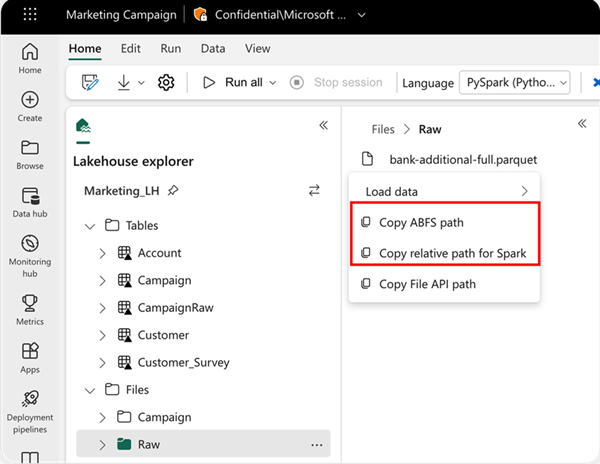
Copy ABFS path: This option returns the absolute path of the file.
Copy relative path for Spark: This option returns the relative path of the file in your default lakehouse.
df = spark.read.parquet("location to read from")

# Keep it if you want to save dataframe as CSV files to Files section of the default lakehouse

df.write.mode("overwrite").format("csv").save("Files/ " + csv_table_name)

# Keep it if you want to save dataframe as Parquet files to Files section of the default lakehouse

df.write.mode("overwrite").format("parquet").save("Files/" + parquet_table_name)

# Keep it if you want to save dataframe as a delta lake, parquet table to Tables section of the default lakehouse

df.write.mode("overwrite").format("delta").saveAsTable(delta_table_name)

# Keep it if you want to save the dataframe as a delta lake, appending the data to an existing table

df.write.mode("append").format("delta").saveAsTable(delta_table_name)
Load data with Pandas API
To support Pandas API, the default lakehouse is automatically mounted to the notebook. The mount point is /lakehouse/default/. You can use this mount point to read/write data from/to the default lakehouse. The "Copy File API Path" option from the context menu returns the File API path from that mount point. The path returned from the option Copy ABFS path also works for Pandas API.
Important
The /lakehouse/default/ mount point is only available in notebooks. For Spark job definitions, use ABFS paths and refer to the Spark job definition documentation.
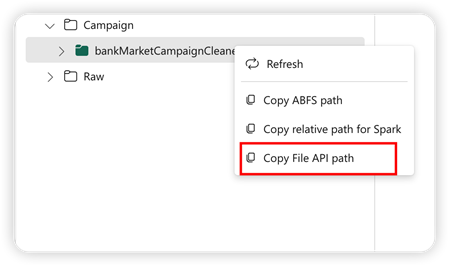
Copy File API Path: This option returns the path under the mount point of the default lakehouse.
Option 1: Using the default lakehouse mount point (recommended for same lakehouse)
import pandas as pd
df = pd.read_parquet("/lakehouse/default/Files/sample.parquet")
Option 2: Using ABFS paths (required for different lakehouses or Spark job definitions)
# Path structure: abfss://WorkspaceName@msit-onelake.dfs.fabric.microsoft.com/LakehouseName.Lakehouse/Files/filename
import pandas as pd
df = pd.read_parquet("abfss://DevExpBuildDemo@msit-onelake.dfs.fabric.microsoft.com/Marketing_LH.Lakehouse/Files/sample.parquet")
Tip
For Spark API, use the option of Copy ABFS path or Copy relative path for Spark to get the path of the file. For Pandas API, use the option of Copy ABFS path or Copy File API path to get the path of the file.
The quickest way to have the code to work with Spark API or Pandas API is to use the option of Load data and select the API you want to use. The code is automatically generated in a new code cell of the notebook.
