Note
Access to this page requires authorization. You can try signing in or changing directories.
Access to this page requires authorization. You can try changing directories.
Fabric Runtime delivers seamless integration within the Fabric ecosystem, offering a robust environment for data engineering and data science projects powered by Apache Spark.
This article introduces Fabric Runtime 2.0, the latest generally available runtime designed for big data computations in Microsoft Fabric. It highlights the key features and components that make this release a significant step forward for scalable analytics and advanced workloads.
Fabric Runtime 2.0 incorporates the following components and upgrades designed to enhance your data processing capabilities:
- Apache Spark 4.1
- Operating System: Azure Linux 3.0 (Mariner 3.0)
- Java: 21
- Scala: 2.13
- Python: 3.13
- Delta Lake: 4.2
- R: 4.5.2
Important
Fabric runtime release channels let you test upcoming runtime changes early and validate workload compatibility before updates become the default. This approach helps reduce unexpected production disruptions and provides greater control over runtime upgrades. Learn more about release channels.
Tip
Fabric Runtime 2.0 includes support for the Native Execution Engine, which can significantly enhance performance without more costs. You can enable the native execution engine at the environment level so that all jobs and notebooks automatically inherit the enhanced performance capabilities.
Enable Runtime 2.0
You can enable Runtime 2.0 at either the workspace level or the environment item level. Use the workspace setting to apply Runtime 2.0 as the default for all Spark workloads in your workspace. Alternatively, create an environment item with Runtime 2.0 to use with specific notebooks or Spark job definitions, which overrides the workspace default.
Enable Runtime 2.0 in Workspace settings
To set Runtime 2.0 as the default for your entire workspace:
Navigate to the Workspace settings page within your Fabric workspace.
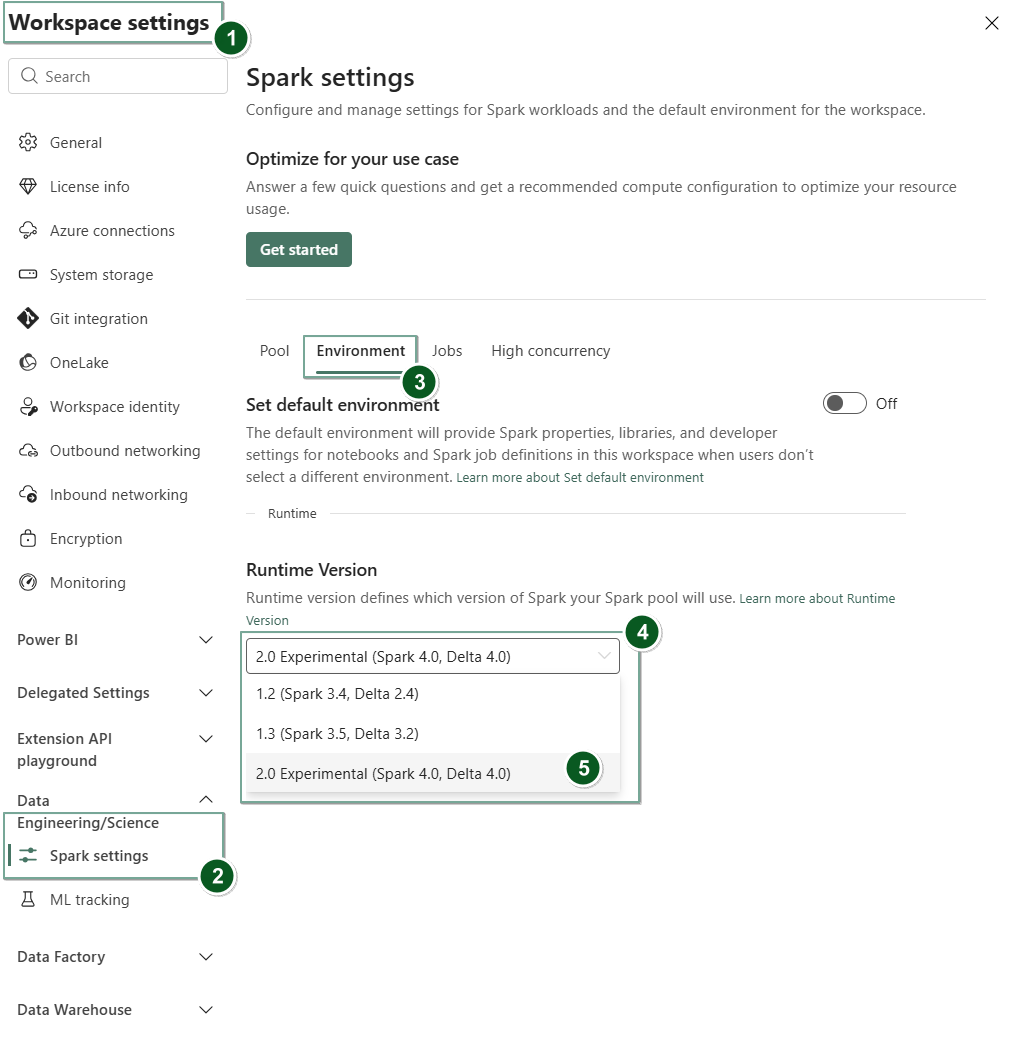
Select the Data Engineering/Science tab and then select Spark settings.
Select the Environment tab.
Under the Runtime version dropdown, select 2.0 (Spark 4.1, Delta 4.2) and save your changes.
Runtime 2.0 is set as the default runtime for your workspace.
Enable Runtime 2.0 in an Environment item
To use Runtime 2.0 with specific notebooks or Spark job definitions:
Create a new Environment item or open an existing one.
Under the Runtime dropdown, select 2.0 (Spark 4.1, Delta 4.2), Save, and Publish your changes.
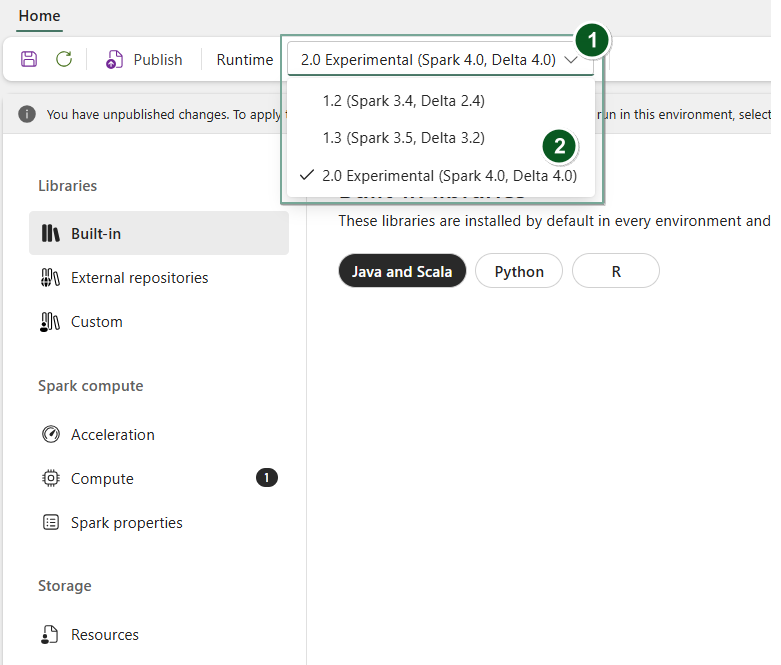
Next, use this Environment item with your Notebook or Spark Job Definition.
You can now start working with the newest improvements and functionalities introduced in Fabric Runtime 2.0 (Spark 4.1 and Delta Lake 4.2).
Note
While Runtime 2.0 is generally available and ready for production use, it isn't the default runtime yet. To give customers who rely on the current default runtime extra time to validate their workloads and plan their migration, they must explicitly opt into Runtime 2.0. The plan is to make Runtime 2.0 the default runtime selection in the user experience and the default runtime for new workspaces and environment items in late September 2026. This phased approach helps customers adopt and validate Runtime 2.0 at their own pace while benefiting from a predictable transition timeline.
Tip
For up-to-date information, a detailed list of changes, and specific release notes for Fabric runtimes, check and subscribe Spark Runtimes Releases and Updates.
Key highlights
Performance and execution engine enhancements
Fabric Runtime 2.0 includes the Native Execution Engine, which provides significant performance improvements over open-source Spark. The engine uses vectorized processing to accelerate Spark queries on lakehouse infrastructure without requiring code changes.
Key performance features in Runtime 2.0:
- Up to six times faster: Benchmarks show up to six times faster performance compared to open-source Spark on TPC-DS workloads.
- Vectorized CSV parsing: The native execution engine includes a vectorized CSV parser that accelerates CSV ingestion and query workloads. Vectorized JSON parsing and Spark Structured Streaming support are planned for future updates.
To enable the native execution engine, see Native execution engine for Fabric Data Engineering.
Apache Spark 4.1
Apache Spark 4.0 marked a significant milestone as the inaugural release in the 4.x series, embodying the collective effort of the vibrant open-source community. Fabric Runtime 2.0 now runs on Apache Spark 4.1, which builds on that foundation with additional improvements.
In this version, Spark SQL is significantly enriched with powerful new features designed to boost expressiveness and versatility for SQL workloads, such as VARIANT data type support, SQL user-defined functions, session variables, pipe syntax, and string collation. PySpark sees continuous dedication to both its functional breadth and the overall developer experience, bringing a native plotting API, a new Python Data Source API, support for Python UDTFs, and unified profiling for PySpark UDFs, alongside numerous other enhancements. Structured Streaming evolves with key additions that provide greater control and ease of debugging, notably the introduction of the Arbitrary State API v2 for more flexible state management and the State Data Source for easier debugging.
You can check the full list and detailed changes here:
Note
In Spark 4.x, SparkR is deprecated and might be removed in a future version.
Delta Lake 4.2
Delta Lake 4.2 builds on previous Delta Lake releases, continuing the commitment to making Delta Lake interoperable across formats, easier to work with, and more performant. It includes powerful new features, performance optimizations, and foundational enhancements for the future of open data lakehouses.
For the full list and detailed changes introduced with Delta Lake 3.3, 4.0, 4.1, and 4.2, see:
Data layout and optimization
Runtime 2.0 supports data layout and optimization features for Delta tables:
- Z-ordering: Organize data within Delta table files by specified columns to improve query performance for filtered queries.
- Liquid Clustering: A flexible clustering approach that automatically optimizes data layout without manual maintenance.
- Parallel Delta snapshot loading: The native execution engine loads Delta table snapshots in parallel, reducing query startup time for large tables.
Important
Delta Lake 4.2 specific features are experimental and only work on Spark experiences, such as Notebooks and Spark Job Definitions. If you need to use the same Delta Lake tables across multiple Microsoft Fabric workloads, don't enable those features. To learn more about which protocol versions and features are compatible across all Microsoft Fabric experiences, see Delta Lake table format interoperability.
Compute management in Runtime 2.0
Runtime 2.0 supports the following compute management features:
- Resource profiles: Configure predefined resource allocations for Spark sessions to match workload requirements and control costs.
- Custom live pools (preview): Create dedicated, pre-warmed Spark pools that reduce session startup time. Custom live pools are available in preview for Runtime 2.0 workloads.
Limitations and notes
- Delta Lake 4.x specific features are experimental and only work on Spark experiences, such as notebooks and Spark job definitions. If you need to use the same Delta Lake tables across multiple Fabric workloads, don't enable those features. For more information, see Delta Lake table format interoperability.
- The VS Code extension for Fabric Spark supports Runtime 2.0 for notebook and Spark job definition development.
Related content
- Apache Spark Runtimes in Fabric - Overview, Versioning, and Multiple Runtimes Support
- Spark Core migration guide
- SQL, Datasets, and DataFrame migration guides
- Structured Streaming migration guide
- MLlib (Machine Learning) migration guide
- PySpark (Python on Spark) migration guide
- SparkR (R on Spark) migration guide