Note
Access to this page requires authorization. You can try signing in or changing directories.
Access to this page requires authorization. You can try changing directories.
This article describes what the SQL analytics endpoint is, how it stays in sync with your lakehouse, and the controls you have to manage that sync. The SQL analytics endpoint automatically detects the change and updates its SQL metadata via a background process. You can also manually refresh SQL analytics endpoint metadata via the Fabric portal, REST API, or T-SQL stored procedure.
The metadata sync background process reads the Delta logs from the /Tables folder in OneLake and keeps the SQL schema up to date.
Fabric automatically keeps the SQL analytics endpoint in sync with the underlying lakehouse. There's no infrastructure to set up and, in most cases, no user action required. The platform is responsible for:
- Table discovery - detecting newly created or dropped Delta tables in the lakehouse, and creating or removing the corresponding SQL tables in the endpoint.
- Data freshness - detecting changes (inserts, updates, deletes) made to the data in existing tables and ensuring queries return up-to-date results.
- Schema change detection - detecting column additions, removals, or type changes in existing Delta tables and refreshing the corresponding SQL table definition.
For details on how this sync works and factors that affect sync latency, see SQL analytics endpoint performance considerations.
Schema change detection and metadata sync
Every lakehouse, warehouse, database, and mirrored database in Fabric is automatically provisioned with its own SQL analytics endpoint, so you can query Delta tables with T-SQL and the TDS protocol, without moving or copying data.
- Every lakehouse, warehouse, database, and mirrored database has exactly one SQL analytics endpoint.
- Each Delta table in the underlying item automatically surfaces as a SQL table in the endpoint.
- The endpoint is read-only over the autogenerated tables. You can extend the model with your own SQL schemas, views, stored procedures, and functions.
- The endpoint is powered by the same compute engine as Fabric Data Warehouse, so it provides high-performance, low-latency SQL queries against open Delta files.
New metadata sync (preview)
Important
This feature is in preview.
In May 2026, the new metadata sync for the SQL analytics endpoint was announced as a preview feature. You can enable the new metadata sync process, which applies only to new SQL analytics endpoints. The new metadata sync option works to keep the data available for querying within seconds of it landing in the lakehouse.
The new metadata sync process includes the following features:
- A new external tables-based architecture for parsing Delta logs and creating the catalog.
- A decoupled architecture that detects schema and data changes separately and refreshes the catalog accordingly.
- A background refresh that checks for data updates periodically.
- An on-demand refresh of the data when an incoming read query happens and the system detects that the data isn't fresh.
Enable new metadata sync
You can enable the new metadata sync on workspaces by going to Warehouse settings under Workspace settings.
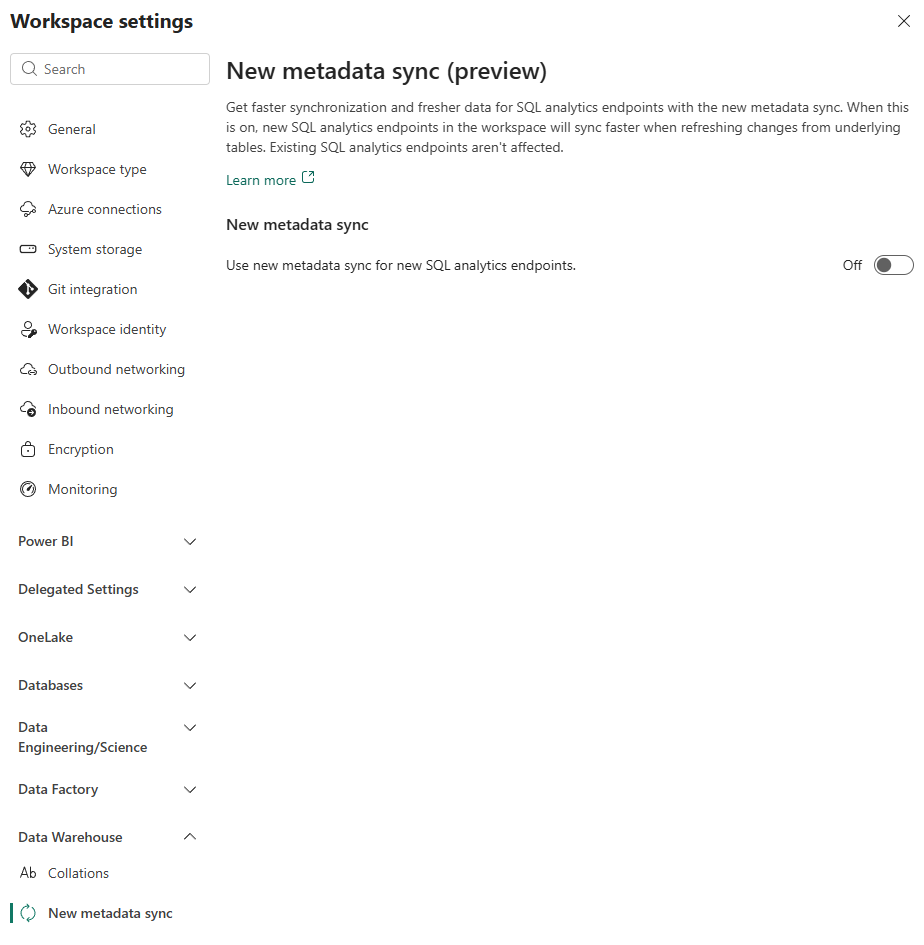
When you enable the new metadata sync, new SQL analytics endpoints in the workspace sync faster when refreshing changes from underlying tables. Currently, existing SQL analytics endpoints in that workspace remain on the legacy version of metadata sync.
Find when the metadata was last updated
If you're using the new version of the metadata sync, you can use dynamic management views (DMVs) to get details about the most recent update to the SQL analytics endpoint. Use the sys.dm_db_external_tables_log_status DMV to get details about the latest metadata sync:
last_update_time_utc: Timestamp for the last time the table was updated with new data.latest_log_version: The highest Delta transaction log version of the table that was updated.latest_checkpoint_version: The latest Delta checkpoint version that was processed.is_blocked: Indicates whether the last attempt at the table update was blocked (1) or successful (0).
For more information, see sys.dm_db_external_tables_log_status.
Limitations of the new metadata sync
- The new metadata sync doesn't support multi-part checkpoint, a deprecated delta feature. If your lakehouse tables contain multi-part checkpoints, they will fail to update in the new metadata sync.
- If your workspace is using workspace private link, currently the new metadata sync cannot be enabled.
Manual refresh
In addition to the background processes that automatically update data, you can manually refresh the metadata:
Refresh from the portal: In the Fabric portal SQL analytics endpoint editor, select the Refresh icon in the Explorer toolbar to force an on-demand metadata sync. Go to Query your SQL analytics endpoint, and look for the refresh button in the toolbar.

Refresh with the REST API: Use the Refresh SQL analytics endpoint metadata REST API to programmatically refresh the metadata of a SQL analytics endpoint.
Refresh via stored procedure: Use the sys.sp_dw_refresh_ext_table system stored procedure to refresh the data for a specific table within a SQL analytics endpoint. This T-SQL method is only available if the SQL analytics endpoint was created after enabling the New metadata sync (preview). For example:
EXEC sys.sp_dw_refresh_ext_table "dbo.publicholidays";
Use the API only if you have schema changes, such as adding or deleting tables or columns, or changing types of columns, and need to refresh the entire item. For data-only changes in a SQL analytics endpoint, use the sys.sp_dw_refresh_ext_table system stored procedure to update a specific table.
For tuning the underlying Delta tables to get the best metadata sync and query performance, see SQL analytics endpoint performance considerations.