Note
Access to this page requires authorization. You can try signing in or changing directories.
Access to this page requires authorization. You can try changing directories.
The SQL analytics endpoint is a read-optimized, T-SQL surface over Delta data in Microsoft Fabric. This article explains the Fabric data warehousing workload with the SQL analytics endpoint of the Lakehouse, and scenarios for use of the Lakehouse in data warehousing.
What is a Lakehouse SQL analytics endpoint?
The SQL analytics endpoint enables you to query data in the Lakehouse by using T-SQL language and TDS protocol.
- The SQL analytics endpoint exposes Delta tables from the Lakehouse as SQL tables that you can query with T-SQL.
- Every delta table from a Lakehouse is represented as one table. Data should be in delta format.
- Every Lakehouse has one SQL analytics endpoint, and each workspace can have more than one Lakehouse. The number of SQL analytics endpoints in a workspace matches the number of Lakehouse items.
You don't need to create a SQL analytics endpoint in Microsoft Fabric. A SQL analytics endpoint is automatically created for every lakehouse, database, or mirrored database. A SQL analytics endpoint acts as a lightweight data warehousing capability for their parent items, complementing the warehouse's lakehouse architecture. This architecture allows Spark or Fabric mirroring to control data in a folder structure in the lakehouse that the SQL analytics endpoint can view.
Note
Behind the scenes, the SQL analytics endpoint uses the same engine as the Warehouse to serve high performance, low latency SQL queries.
Automatic metadata discovery
A seamless process reads the Delta logs from the /Tables folder and ensures SQL metadata for tables, such as statistics, is always up to date. There's no user action needed, and no need to import, copy data, or set up infrastructure. For more information, see Automatically generated schema in the SQL analytics endpoint.
Scenarios the Lakehouse enables for data warehousing
In Fabric, we offer one warehouse.
The Lakehouse, with its SQL analytics endpoint, powered by the Warehouse, can simplify the traditional decision tree of batch, streaming, or lambda architecture patterns. Together with a warehouse, the lakehouse enables many additive analytics scenarios. This section explores how to use a Lakehouse together with a Warehouse for a best of breed analytics strategy.
Analytics with your Fabric Lakehouse's gold layer
A well-known strategy for lake data organization is medallion architecture. This strategy organizes files into raw (bronze), consolidated (silver), and refined (gold) layers. You can use a SQL analytics endpoint to analyze data in the gold layer of medallion architecture if the files are stored in Delta Lake format, even if they're stored outside the Microsoft Fabric OneLake.
Use OneLake shortcuts to reference gold folders in external Azure Data Lake storage accounts that Synapse Spark or Azure Databricks engines manage.
You can also add warehouses as subject area or domain oriented solutions for specific subject matter that can have bespoke analytics requirements.
If you choose to keep your data in Fabric, it is always open and accessible through APIs, Delta format, and of course T-SQL.
Query as a service over your delta tables from Lakehouse and other items from OneLake
Analysts, data scientists, and data engineers might need to query data within a data lake. In Fabric, this end-to-end experience is completely SaaSified.
OneLake is a single, unified, logical data lake for the whole organization. OneLake is OneDrive for data. OneLake can contain multiple workspaces, for example, along your organizational divisions. Every item in Fabric makes data accessible via OneLake.
Data in a Microsoft Fabric Lakehouse is physically stored in OneLake with the following folder structure:
- The
/Filesfolder contains raw and unconsolidated (bronze) files that data engineers should process before analysis. The files might be in various formats such as CSV, Parquet, different types of images, and more. - The
/Tablesfolder contains refined and consolidated (gold) data that's ready for business analysis. The consolidated data is in Delta Lake format.
A SQL analytics endpoint can read data in the /tables folder within OneLake. Analysis is as simple as querying the SQL analytics endpoint of the Lakehouse. Together with the Warehouse, you also get cross-database queries and the ability to seamlessly switch from read-only queries to building additional business logic on top of your OneLake data with Fabric Data Warehouse.
Data Engineering with Spark, and Serving with SQL
Data-driven enterprises need to keep their back-end and analytics systems in near real-time sync with customer-facing applications. The impact of transactions must reflect accurately through end-to-end processes, related applications, and online transaction processing (OLTP) systems.
In Fabric, you can use Spark Streaming or Data Engineering to curate your data. You can use the Lakehouse SQL analytics endpoint to validate data quality and for existing T-SQL processes. This can be done in a medallion architecture or within multiple layers of your Lakehouse, serving bronze, silver, gold, or staging, curated, and refined data. You can customize the folders and tables created through Spark to meet your data engineering and business requirements. When ready, a Warehouse can serve all of your downstream business intelligence applications and other analytics use cases, without copying data, using Views or refining data using CREATE TABLE AS SELECT (CTAS), stored procedures, and other DML / DDL commands.
Integration with your Open Lakehouse's gold layer
A SQL analytics endpoint isn't limited to data analytics in just the Fabric Lakehouse. By using a SQL analytics endpoint, you can analyze lake data in any lakehouse by using Synapse Spark, Azure Databricks, or any other lake-centric data engineering engine. You can store the data in Azure Data Lake Storage or Amazon S3.
You can always access this tight, bi-directional integration with the Fabric Lakehouse through any engine by using open APIs, the Delta format, and of course T-SQL.
Data virtualization of external data lakes with shortcuts
Use OneLake shortcuts to reference gold folders in external Azure Data Lake storage accounts that Synapse Spark or Azure Databricks engines manage, as well as any delta table stored in Amazon S3.
You can analyze any folder referenced by a shortcut from a SQL analytics endpoint and create a SQL table for the referenced data. Use the SQL table to expose data in externally managed data lakes and enable analytics on them.
This shortcut acts as a virtual warehouse that you can leverage from a warehouse for additional downstream analytics requirements, or query directly.
To analyze data in external data lake storage accounts, use the following steps:
- Create a shortcut that references a folder in Azure Data Lake storage or Amazon S3 account. After you enter connection details and credentials, a shortcut is shown in the Lakehouse.
- Switch to the SQL analytics endpoint of the Lakehouse and find a SQL table that has a name that matches the shortcut name. This SQL table references the folder in ADLS or S3.
- Query the SQL table that references data in ADLS or S3. Use the table as you would any other table in the SQL analytics endpoint. You can join tables that reference data in different storage accounts.
Note
If the SQL table doesn't immediately show in the SQL analytics endpoint, wait a few minutes. The SQL table that references data in external storage account is created with a delay.
Analyze archived or historical data in a data lake
Data partitioning is a well-known data access optimization technique in data lakes. Store partitioned data sets in hierarchical folder structures in the format /year=<year>/month=<month>/day=<day>, where year, month, and day are the partitioning columns. This structure keeps historical data logically separated and enables compute engines to read the data as needed with performant filtering, rather than reading the entire directory and all folders and files within.
Partitioned data enables faster access if the queries filter on the predicates that compare predicate columns with a value.
A SQL analytics endpoint can easily read this type of data with no configuration required. For example, you can use any application to archive data into a data lake, including SQL Server 2022 or Azure SQL Managed Instance. After you partition data and land it in a lake for archival purposes by using external tables, a SQL analytics endpoint can read partitioned Delta Lake tables as SQL tables and allow your organization to analyze them. This approach reduces the total cost of ownership, reduces data duplication, and lights up big data, AI, and other analytics scenarios.
You can also use time travel queries to quickly query prior versions of data. Time travel is a low-cost and efficient capability to query the past states of data with T-SQL queries. For a Lakehouse SQL analytics endpoint, time travel is limited by vacuum retention settings. To get started, see How to: Query using time travel at the statement level.
Data virtualization of Fabric data with shortcuts
Within Fabric, workspaces allow you to segregate data based on complex business, geographic, or regulatory requirements.
A SQL analytics endpoint enables you to leave the data in place and still analyze data in the Warehouse or Lakehouse, even in other Microsoft Fabric workspaces, via a seamless virtualization. Every Microsoft Fabric Lakehouse stores data in OneLake.
Shortcuts enable you to reference folders in any OneLake location.
Every Microsoft Fabric Warehouse stores table data in OneLake. If a table is append-only, the table data is exposed as Delta Lake data in OneLake. Shortcuts enable you to reference folders in any OneLake where the Warehouse tables are exposed.
Cross workspace sharing and querying
While workspaces allow you to segregate data based on complex business, geographic, or regulatory requirements, sometimes you need to facilitate sharing across these lines for specific analytics needs.
A Lakehouse SQL analytics endpoint can enable easy sharing of data between departments and users, where a user can bring their own capacity and warehouse. Workspaces organize departments, business units, or analytical domains. By using shortcuts, users can find any Warehouse or Lakehouse's data. Users can instantly perform their own customized analytics from the same shared data. In addition to helping with departmental chargebacks and usage allocation, this approach is a zero-copy version of the data.
The SQL analytics endpoint enables querying of any table and easy sharing. You can add controls by using workspace roles and security roles to meet additional business requirements.
To enable cross-workspace data analytics, use the following steps:
- Create a OneLake shortcut that references a table or a folder in a workspace that you can access.
- Choose a Lakehouse or Warehouse that contains a table or Delta Lake folder that you want to analyze. When you select a table or folder, a shortcut appears in the Lakehouse.
- Switch to the SQL analytics endpoint of the Lakehouse and find the SQL table that has a name that matches the shortcut name. This SQL table references the folder in another workspace.
- Query the SQL table that references data in another workspace. You can use the table as you would any other table in the SQL analytics endpoint. You can join the tables that reference data in different workspaces.
For more information about security in the SQL analytics endpoint, see OneLake security for SQL analytics endpoints.
Note
If the SQL table doesn't immediately appear in the SQL analytics endpoint, wait a few minutes. The SQL table that references data in another workspace is created with a delay.
Analyze partitioned data
Data partitioning is a well-known data access optimization technique in data lakes. You store partitioned data sets in hierarchical folder structures in the format /year=<year>/month=<month>/day=<day>, where year, month, and day are the partitioning columns. Partitioned data sets enable faster data access if the queries use predicates that filter data by comparing predicate columns with a value.
A SQL analytics endpoint can represent partitioned Delta Lake data sets as SQL tables and enable you to analyze them.
For more information and examples on querying external data, see Query external data lake files by using Fabric Data Warehouse or SQL analytics endpoint. For an example and use case for querying partitioned parquet files, see Query partitioned data.
Analyze data in the Lakehouse, Warehouse, or Eventhouse
The Lakehouse and Warehouse main pages include Eventhouse endpoint as part of the Analyze data with menu. The Eventhouse endpoint provides an Eventhouse-powered query experience directly on top of Lakehouse and Warehouse data, without data duplication or manual synchronization.
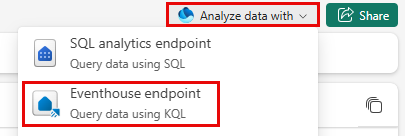
When you enable the Eventhouse endpoint, an Eventhouse and a KQL database are automatically created as child items of the source Lakehouse or Warehouse, with schema synchronization handled in the background. The endpoint always reflects the current schema of the source data, enabling near-real-time analytical access.
This integration makes Eventhouse a natural extension of the data source, rather than a separate system you need to set up and manage. For more information about the Eventhouse Endpoint, see Enable Eventhouse endpoint for lakehouse and warehouse.
Related content
- What is a lakehouse in Microsoft Fabric?
- Microsoft Fabric decision guide: Choose between Warehouse and Lakehouse
- Bring your data to OneLake with Lakehouse
- Power BI semantic models in Microsoft Fabric
- Options to get data into the Fabric Lakehouse
- How to copy data using copy activity
- Move data from Azure SQL DB into Lakehouse via copy assistant
- Connectivity to data warehousing in Microsoft Fabric
- SQL analytics endpoint of the lakehouse
- Query the SQL analytics endpoint or Warehouse in Microsoft Fabric