Note
Access to this page requires authorization. You can try signing in or changing directories.
Access to this page requires authorization. You can try changing directories.
When a Fabric data agent has more than one data source, it has to decide which source to use for each question. This decision is called data source routing. If the agent picks the wrong source — or doesn't pick a source at all — you'll see incorrect, incomplete, or empty answers. This article shows how to help the agent route reliably.
Routing only matters for agents with more than one data source. If your agent has a single source, you can skip this article.
How routing works
Every Fabric data agent has an orchestrator that selects tools and data sources. When a question comes in, the orchestrator:
- Builds a plan for answering the question.
- Picks the data source most likely to contain the answer, based on each source's metadata — name, description, selected schema, and example queries.
- Calls the source's query-generation tool and reviews the results.
- Repeats with another source or another step if more information is needed.
For speed, the orchestrator routes from a subset of each source's metadata. When that subset isn't enough — for example, the schema is large, source names are similar, or the question is ambiguous — it can call a routing tool to inspect the full schema and example queries before committing to a source.
Signs your routing needs work
Routing is likely the issue if you see:
- The agent picks the wrong source for a question you expect a specific source to answer.
- The agent says it can't find an answer when the data exists in one of the connected sources.
- The agent gives different answers to similar questions because it picks a different source each time.
Inspect routing decisions in run steps
After your data agent answers a question, expand the run steps to see which source the agent routed to and what context influenced the decision. If the orchestrator called the routing tool, it appears as its own step in the run, showing the metadata it reviewed — descriptions, schema, and example queries — before committing to a source.
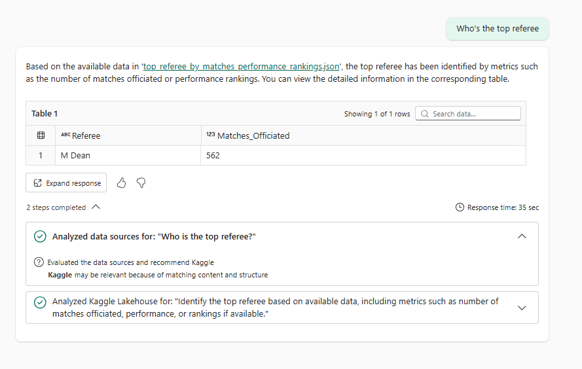
Use this view to confirm which source was used, see whether the orchestrator needed the routing tool (a signal the decision was ambiguous), and identify which piece of context drove the choice. Use these signals to make your routing more deterministic by applying the steps in the next section.
Improve routing
Work through the following steps in order. Each step adds more signal for the orchestrator.
1. Tighten your schema selection
The tables, views, and columns you select on each source are a primary signal of what the source covers. Select only the entities the agent should consider, and make sure object names are descriptive. Large or noisy selections make it harder for the orchestrator to tell what each source is for.
2. Add a data source description
A description tells the orchestrator at a glance what the source contains and when to use it. Keep it short and focused on the topics or entities the source covers. For example: "Sales fact data for North America retail, including transactions, returns, and store metadata."
For more information, see Configure your data agent.
3. Add example queries
Example queries (also called few-shot examples) show the orchestrator the kinds of questions a source is meant to answer. When a new question comes in, the orchestrator matches it against your examples to find the most relevant source. Add representative questions for each source — especially questions that previously routed to the wrong place.
For more information, see Data agent example queries.
4. Add routing rules to agent instructions
If a question still routes to the wrong source after the previous steps, use agent instructions as a last resort to declare explicit routing rules. Group rules by topic so they're easy to read and maintain.
## Topics

- When asked about logistics trends, shipment delays, or carrier performance, use **FabrikamLogisticsLH**.
- When asked about marketing campaigns, ad spend, or channel performance, use **FabrikamMarketingDW**.
- When asked about customer support tickets or SLA breaches, use **FabrikamSupportKQL**.
Keep these rules concise. Long lists of rules can crowd out other instructions, and you have to update them whenever you add or rename a data source.