Note
Access to this page requires authorization. You can try signing in or changing directories.
Access to this page requires authorization. You can try changing directories.
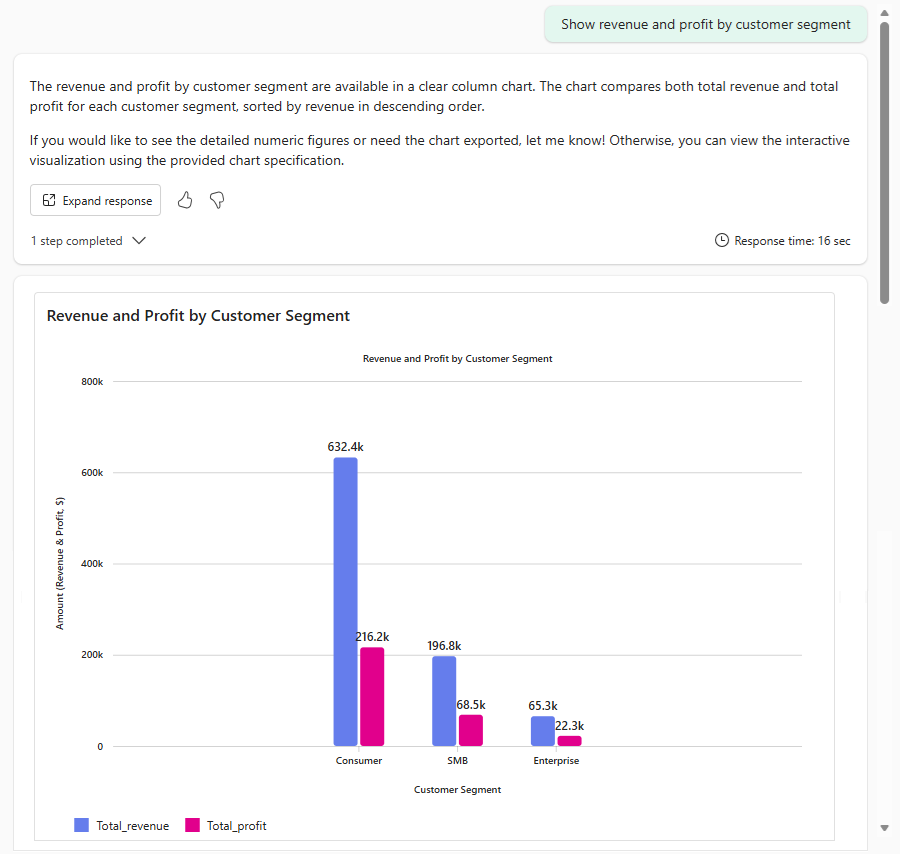
The Fabric data agent can return interactive visual responses, such as charts and graphs, in addition to text and table-based answers. Visual responses help you quickly identify trends, patterns, and outliers in your data without leaving the conversational interface. These visuals are generated using Fabric Visuals, the same visualization foundation used in Fabric apps and increasingly across the Fabric platform. As a result, the charts you receive in a data agent conversation are built on the same technology that powers visuals across other Fabric experiences, helping deliver a more consistent and familiar experience.
Prerequisites
- A paid F2 or higher Fabric capacity, or a Power BI Premium per capacity (P1 or higher) capacity with Microsoft Fabric enabled.
- Enable cross-geo processing and cross-geo storing for AI based on requirements explained in Fabric data agent tenant settings.
- At least one of these data sources, with data: A warehouse, a lakehouse, a Power BI semantic model, a KQL database, a mirrored database, or an ontology. You must have read access to the data source.
How to generate visuals
The Fabric data agent can generate a visualization as part of its response in the following scenarios:
- The user explicitly requests a visual (for example, "create a bar chart of sales by region")
- The user implicitly requests a visual (for example, "show me sales by region")
- The agent infers the user would benefit from a visual based on the data or query (for example, "what are the sales trends over the past year?")
Example questions to generate visuals
- "Show me a chart of monthly sales for 2025."
- "Compare revenue across regions in a bar chart."
- "What's the trend of customer signups over the last 12 months?"
- "Show the distribution of order values."
The agent determines the most appropriate chart type based on your question and the data returned. If you want a specific chart type, include it in your question (for example, "as a line chart" or "as a bar chart").
Tip
Hover over the chart to view tooltips with additional information.
Supported data sources
The Fabric data agent supports visual responses for data from all supported data source types, including lakehouses, warehouses, Power BI semantic models, and more.
Supported visual types
The following visual types are currently supported:
- Line chart
- Multi-line chart
- Column chart
- Multi-column chart
- Stacked column chart
- Pie chart
- Scatter plot
- Area chart
- Stacked area chart
Customization
Use agent instructions to guide the agent's use of visuals. For example, you can instruct the agent to always include a visual for certain types of questions, or to prefer specific chart types for certain data patterns. For more information, see Data agent instructions.
The colors, font sizes, title, and labels are preset and currently can't be customized.
Tip
Visuals are enabled by default. To avoid generating visuals or specify the behavior, use agent instructions to instruct the agent to avoid using visuals. For more information, see Data agent instructions.
Limitations
- The quality and type of visualization depends on the nature of the data returned by the underlying query.
- Visuals currently support up to 200 rows of data. When a query returns more than 200 rows, only the first 200 are charted, so the visualization represents a truncated result set.
- Chart types are limited to the Supported visual types.
- The colors, font sizes, title, and labels are preset and currently can't be customized.
- These visuals are currently only supported in the data agent experience in Fabric and not in other clients like SDK, M365 Copilot, Teams, or Foundry. This limitation applies to the rendered chart image. The underlying visualization specification (chart type, axes, and aggregated data) is emitted in the assistant run's steps, so a client can reconstruct the chart from that specification.
- When you consume a Fabric data agent through Microsoft 365 Copilot, you can use code interpreter to generate visualizations from the results returned by the data agent.