Note
Access to this page requires authorization. You can try signing in or changing directories.
Access to this page requires authorization. You can try changing directories.
Applies to: ✅ SQL analytics endpoint and Warehouse in Microsoft Fabric
Custom SQL pools allow administrators to have more control over how backend compute resources are allocated to their warehouse and SQL analytics endpoint in a workspace.
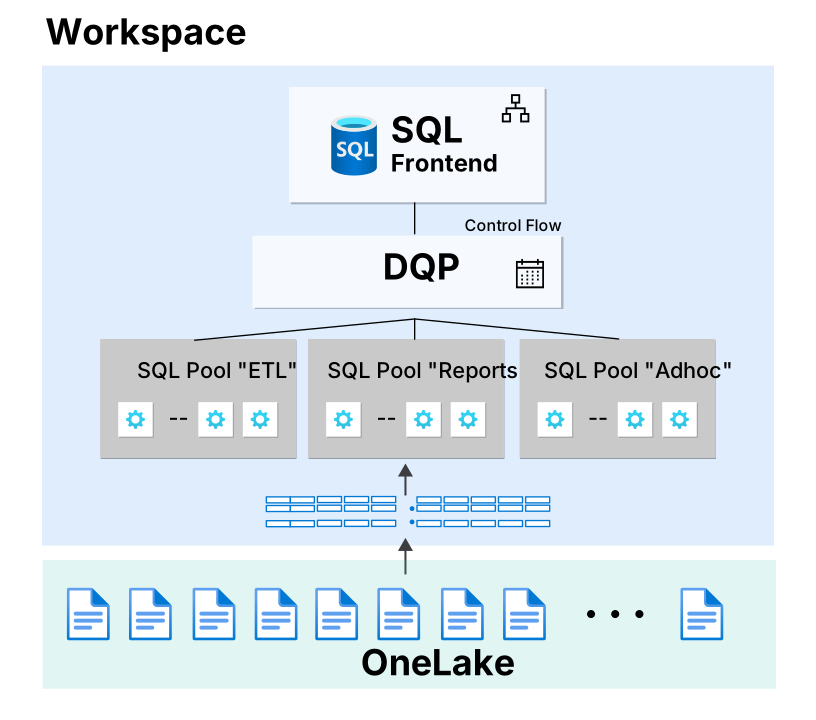
Fabric Data Warehouse provides autonomous workload management that segregates compute resources into internal "SQL pools" that scale independently based on demand.
By default, the isolation boundaries are ingestion (non-SELECT statement types) and query processing (SELECT statements). With custom SQL pools, administrators can:
- Change the number of isolation boundaries (add more custom SQL pools).
- Classify workloads by statement type and control the resource allocation for
SELECTand non-SELECTstatements. - Create application name-specific custom workload classifications.
- Control resource allocation of each pool, via a max resource percentage.
Custom SQL pools use cases
Custom SQL pools have two primary use cases: protecting workloads from resource competition, and protecting from Fabric capacity throttling from high consumption.
Competing workloads with the autonomous workload pools
This scenario applies when distinct workloads compete for resources, causing critical workloads to miss performance goals.
Example scenario
- An enterprise reporting workload performs sub-optimally when adhoc user queries are run from the SQL query editor in the Fabric portal.
Recommended approach
- Split these workloads across two separate custom SQL pools.
- Allocate a larger percentage of resources to the pool serving the enterprise reporting application, ensuring more resources are available to the business critical application.
Capacity throttling due to high consumption
This scenario applies when high Fabric capacity consumption causes throttling that impacts overall warehouse performance.
Example scenario
- Multiple analytics workloads are consuming a high number of Fabric capacity units (CUs).
Recommended approach
- Reduce the total resource percentage allocated to the affected warehouse.
- Monitor whether this change reduces query throttling and improves overall performance.
Differences between autonomous workload management and custom SQL pools
| Topic | Autonomous workload management | Custom SQL pools |
|---|---|---|
| Configuration | None (out of the box) | - Web UI - APIs |
| Permissions | N/A | Workspace administrator |
| Scope | Workspace - includes both warehouse and SQL analytics endpoint | Workspace - includes both warehouse and SQL analytics endpoint |
| Classification method | Statement type (SELECT or other) |
- Statement type - Application name - Application name regular expression |
| Unit of Measure | N/A | Percentage of the total backend nodes |
| SQL pools | SELECT or other |
User-defined allocation |
| Burstable capacity | Managed by Fabric (up to 12x per SQL pool, 24x total) | User defined based on percentage of backend nodes allocated. The total amount of resources is still 24x. |
Burstable capacity
Custom SQL pools allow for an administrator to configure the maximum resource percentage as the amount of compute resources that can be allocated. The bursting factor of the capacity SKU size will be applied and used by the percentage given for each pool.
Classifiers
A classifier is an attribute of a SQL request that informs the system how to route to the appropriate SQL pool.
Fabric Data Warehouse provides three ways to classify requests:
| Classifier type | Description | Configuration |
|---|---|---|
| Statement type | Classifies requests into either SELECT (query) or non-SELECT (all DML and DDL statements) |
- Autonomous workload management - Creates exactly two custom SQL pools with fixed SELECT and NONSELECT classifier values. The initial maximum resource percentage is 50% for each pool. You can adjust the percentages, but their sum must be 100% or less. |
| Application name | - App (or program name) used in the connection string when connecting to the Fabric Warehouse or SQL Analytics Endpoint. - Supports multiple application names per custom SQL pool - 128 characters or less - Mutually exclusive between custom SQL pools |
Custom SQL pools only |
| Application name regex | - Regular expression used to match value for the application name. - Only first value in the list is evaluated for regular expression |
Custom SQL pools only |
Statement type classification
Statement type classification lets you control the compute available to query and data modification workloads separately. When you select Statement type as the classifier, Fabric creates one pool for SELECT statements and another pool for non-SELECT statements, including DML and DDL statements. You can change each pool's maximum resource percentage to protect query performance, limit the resources available to ingestion and data modification workloads, or balance both workload types to meet your business requirements.
Statement type classification applies to requests that use distributed SQL processing through a warehouse or SQL analytics endpoint. Operations that don't use the distributed SQL path aren't assigned to the SELECT or NONSELECT pool.
Guidelines:
- Only one classifier type can be used per workspace. All custom SQL pools in a single workspace must use the same classifier.
- In the case of an application name regular expression classifier, if a request satisfies two or more classifications, selection of custom SQL pool is random and there are no prioritization criteria.
Permissions
- Members of the Administrator workspace role can enable or disable custom SQL pools for a workspace.
- Members of the Administrator workspace role can update the custom SQL pool configurations.
Configure custom SQL pools
You can configure custom SQL pools in Fabric Data Warehouse in the Fabric portal or through API calls.
- For an example of configuring in the Fabric portal, see Configure custom SQL pools in the Fabric portal.
- For an example of using the SQL Pools REST API, see How to configure custom SQL pools by using the Fabric REST API.
Monitor
You can see the application name and SQL pool that were recorded for a query in the program_name and sql_pool_name fields of the queryinsights.exec_requests_history system view.
You can use the program_name as the application name in a classifier, or in a regular expression pattern for an application name classifier.
For example, to find all the program_name and the corresponding sql_pool_name in recent history:
SELECT DISTINCT
         program_name
        ,sql_pool_name
FROM queryinsights.exec_requests_history;
You can identify which SQL pools are under pressure by querying the queryinsights.sql_pool_insights view.
For example, find periods of time when a pool was under pressure over the past week.
SELECT [timestamp]
        ,sql_pool_name
        ,max_resource_percentage
        ,is_pool_under_pressure
FROM queryinsights.sql_pool_insights
WHERE is_pool_under_pressure = 1
AND [timestamp] > DATEADD(WEEK, -1, GETDATE())
ORDER BY [timestamp] DESC, sql_pool_name;
To aggregate program_name values by some query cost metrics, you could use the following query:
SELECT
    program_name,
    sql_pool_name,
    [CPU] = SUM(allocated_cpu_time_ms),
    [Disk] = SUM(data_scanned_disk_mb),
    [Memory] = SUM(data_scanned_memory_mb),
    [Remote storage] = SUM(data_scanned_remote_storage_mb)
FROM queryinsights.exec_requests_history
GROUP BY program_name, sql_pool_name
ORDER BY [CPU] desc, [Disk] desc, [Memory] desc, [Remote storage] desc;
Limitations
- A workspace must contain one or more warehouses or SQL analytics endpoints before running the APIs.
- You can create up to eight custom SQL pools per workspace.
- When a custom SQL pool is removed while a query is running on the pool, the query will fail with a message of
Request to perform an external distributed computation has failed with error "Query canceled by user."Resizing a custom SQL pool does not cause query failure.
Fabric capacity size changes
Each workspace has a capacity with associated capacity units (CUs), based on the SKU you purchase. The burstable capacity of custom SQL pools depends on the SKU size. So, when you change the capacity, you affect the maximum amount of resources for each custom SQL pool.
When you change the capacity SKU size or assign a different capacity to a workspace, if custom SQL pools are enabled they automatically scale to the new SKU size.
If downscaling forces a SQL pool to zero nodes assigned, the following error displays at runtime: "The assigned SQL pool for this query has no resources and must be reconfigured." An admin must reconfigure custom SQL pools to remove this error.