Note
Access to this page requires authorization. You can try signing in or changing directories.
Access to this page requires authorization. You can try changing directories.
This article helps you plan a partner integration with Copilot Managed Runtime. It covers the partner journey, personas, core concepts, and required integration scenarios. Copilot Managed Runtime doesn't replace a partner's app creation product: partners retain the authoring experience, while Copilot Managed Runtime supplies the enterprise runtime and lifecycle boundary.
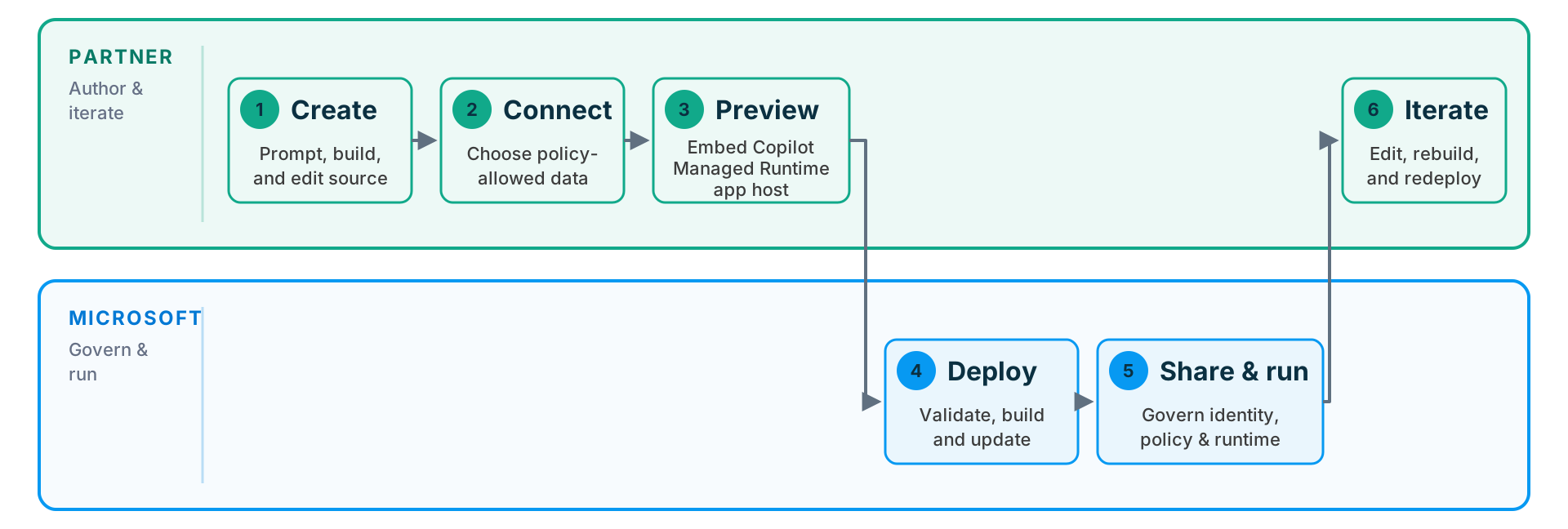
High-level partner integration journey
For product-level concepts and terminology, see the Copilot Managed Runtime overview. This page focuses on partner-specific integration.
Agree on the initial scenario with Microsoft before you implement customer onboarding. Partner application approval, resource permissions, and preview-host approval require coordination. Review the prerequisites and preview requirements to understand what to prepare. Use the integration contact to get started.
The expected journey is:
- Create - The app maker describes or builds an app in the partner product.
- Connect - The app maker chooses organizational data sources allowed by tenant policy.
- Preview - The partner embeds the Copilot Managed Runtime app host around the local app.
- Deploy - The partner submits source or an artifact through the CLI.
- Share and run - App users open the app in the Copilot Managed Runtime app host.
- Iterate - App makers return to the partner to edit, rebuild, and redeploy.
Partner integration personas
Plan your integration around the following personas and their roles in creating, running, and governing apps.
| Persona | Role |
|---|---|
| App maker | Uses an AI-assisted or visual builder to solve a business problem and may not work directly with source code or CLI commands. |
| App user | Runs an app that has been shared with them and authenticates with their Microsoft Entra identity. |
| Professional developer | Builds or extends TypeScript and JavaScript apps, manages source, and diagnoses build or runtime behavior. |
| IT administrator | Controls environments, access, connector policy, and operational governance for the tenant. |
Core Copilot Managed Runtime concepts
Partner integrations rely on three core product concepts:
| Concept | What it is | Relationship in Copilot Managed Runtime |
|---|---|---|
| Tenant | The top-level identity boundary. | Environments organize app and data resources within the tenant. |
| Environment | A division of app and data resources where IT can apply different policies to development and production workloads. | Each app belongs to one environment. Most partner experiences should let the CLI route an app maker automatically and expose explicit selection only when targeting a non-default environment. |
| App | A managed application registered in an environment. | The app carries its environment in ms.config.json. |
Partner scenarios
Use the following table to identify which scenarios require partner integration at each stage of the app lifecycle.
| Stage | Scenario | Partner integration required? |
|---|---|---|
| Create | Sign in an app maker with Microsoft Entra | Yes |
| Create | Create an app from a new or existing web project | Yes |
| Connect | Discover tenant-allowed connectors | Yes |
| Connect | Add an organizational data source and generate typed clients | Yes |
| Preview | Preview with real user data in the host | Yes |
| Deploy | Build and deploy the app | Yes |
| Deploy | Return build errors to the app maker or coding agent | Yes |
| Share & run | Host and run the app | No — apps are automatically hosted and runnable. |
| Share & run | Share with users or groups | Optional; the CLI provides this capability |
| Iterate | Find apps the app maker can edit | Yes |
| — | Administer tenant policy and environments | No — IT administrator responsibility |