Note
Access to this page requires authorization. You can try signing in or changing directories.
Access to this page requires authorization. You can try changing directories.
Publish an eligible tested plugin to customers in multiple organizations through the Microsoft 365 and Copilot program in Microsoft Partner Center.
Public publishing eligibility depends on the package type, components, authoring tool, target Microsoft 365 experiences, publisher, and current marketplace support. Creating and testing a package doesn't establish public-distribution eligibility.
Important
Work IQ Dev Tools documents wiqd agent publish for publishing declarative agents to an org catalog. Don't treat that command as a universal third-party Microsoft Marketplace submission workflow. Follow the current Microsoft Partner Center procedure for public distribution.
Before you begin
Have:
- The exact tested artifact you intend to submit.
- Confirmation that the package type and offer are eligible for the public route.
- A verified publisher account and the required Microsoft Partner Center permissions.
- A multitenant identity, authentication, consent, and customer-configuration model when required.
- Listing, support, privacy, terms-of-use, and publisher information.
Confirm public-distribution eligibility
Confirm that:
- Microsoft Partner Center supports the package and offer type.
- The components and target experiences are eligible for public distribution.
- The plugin meets the applicable identity, permission, data-access, and multitenant requirements.
- The exact artifact passed its required package and experience tests.
- The publisher can support, update, secure, and retire the offer for customers.
Use package-, component-, and experience-specific documentation as the source of truth. Certification for one component or experience doesn't establish support in every Microsoft 365 experience.
Prepare the offer
Prepare:
- Offer name, descriptions, icons, screenshots, categories, and listing information.
- Publisher identity, contact information, support information, privacy statement, and terms of use.
- Package or manifest version and the exact artifact being submitted.
- Required licenses, regions, external accounts, permissions, connections, and customer setup.
- Data-access, external-service, limitation, support, update, and retirement disclosures.
Keep the offer information consistent with the behavior and requirements of the tested artifact.
Submit through Microsoft Partner Center
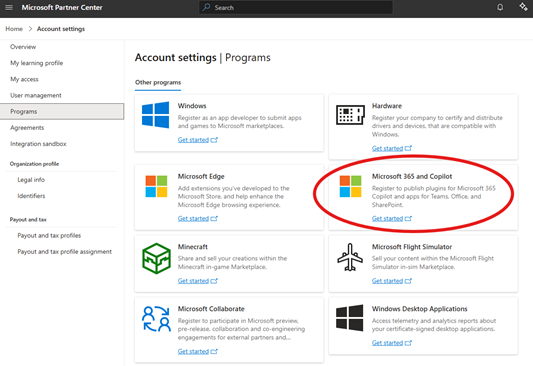
- Enroll in the Microsoft 365 and Copilot program in Microsoft Partner Center.
- Create the supported offer type for the plugin package.
- Provide the required listing, publisher, legal, support, and technical information.
- Submit the app package by using the current Microsoft Partner Center procedure.
- Record the offer identifier, submitted package version, submission date, and owner.
Complete certification and review
Review the requirements that apply to the offer:
- Microsoft Commercial Marketplace certification policies
- Microsoft 365 store validation guidelines for agents, when applicable
- Microsoft 365 App Compliance Program certification, when applicable
Respond to certification findings by updating the applicable package, listing, service, or support information. When the artifact changes, create and test a new version before resubmitting it.
Publishing to a registry or marketplace doesn't bypass certification, Store Operations review, or product-specific compatibility requirements.
Record publication status
Record:
- The Partner Center offer and submission identifiers.
- The package and listing versions under review or published.
- Certification findings and their owners.
- The experiences, regions, and audiences where the offer is available.
- The support, update, security-response, and retirement owners.
Public publishing is complete when the offer is approved and available through its supported marketplace route.
Hand off after publication
Publication doesn't automatically make the plugin available in every customer tenant. Customer administrators can still need to acquire, approve, deploy, assign, enable, or configure the plugin.
Continue to choose what happens after publishing.