Note
Access to this page requires authorization. You can try signing in or changing directories.
Access to this page requires authorization. You can try changing directories.
This article explains the Agent 365 observability data model, including what telemetry agents emit, who can emit it, where it lands, and the limits that apply. Use these concepts to plan your integration and understand telemetry across the Microsoft OpenTelemetry Distro, the deprecated Agent 365 Observability SDK, and direct OTel.
Note
Wire-level details - the URL routes in Authentication, the HTTP error codes in Limits and drop conditions, and the per-request size and rate limits - apply specifically to the direct OTel path. The SDK and Distro abstract these for you. The rest of this article (glossary, data flow, identity models, scopes, drop conditions, where data shows up) applies to every path.
Pick your integration path
Three paths emit the same span data model into Agent 365. Pick one:
| Path | Description |
|---|---|
| Microsoft OpenTelemetry Distro | Recommended for new integrations. Unified observability SDK across Agent 365, Microsoft Foundry, Azure Monitor, and more. |
| Deprecated Agent 365 Observability SDK | The legacy SDK. Existing integrations continue to work, but don't use it for new integrations. The article includes migration guides. |
| Direct OTel | The raw OTLP/HTTP path. Use it only if you already have an OpenTelemetry pipeline in place, your agent framework can't use the Microsoft OpenTelemetry Distro, or your agent is in a language the Distro doesn't yet support (such as Java). |
Whichever path you pick, the data model, identity models, scopes, limits, and downstream surfaces described below all apply.
Agent 365 observability glossary
| Term | Description |
|---|---|
App id (appId) |
The application identifier issued when a Microsoft Entra app or Microsoft Entra Agent ID agent identity is registered. - Equal to the OAuth client_id, not the Microsoft Entra object ID.- Throughout these docs, "agent id" and "blueprint id" both mean an appId. |
| Conversation | A logical thread of agent interactions, such as a Teams chat thread. - Identified by gen_ai.conversation.id.- The primary join key for a run. |
| Channel | The surface the agent runs in: msteams, outlook, web, and so on. |
| Run | One user message in, one agent reply out. Modeled as a tree of OTel spans sharing a traceId. |
How Agent 365 observability works
For an overview of Agent 365 and the telemetry it collects, see Overview of Microsoft Agent 365.
You send telemetry as OpenTelemetry trace data:
- A tree of spans describing one run (one user message in, one agent reply out).
- Each span describes a single step - the top-level agent invocation, an LLM call, a tool call, or the final reply.
Agent 365 observability data flow
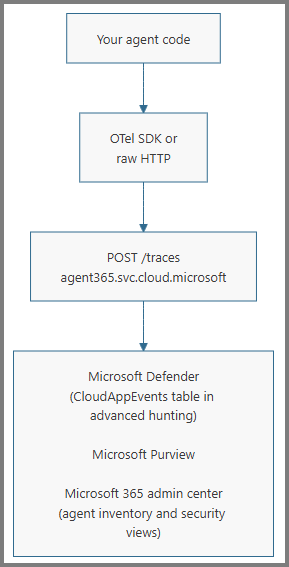
The following diagram shows how agent telemetry flows through authentication and Agent 365 observability ingestion to downstream Microsoft 365 experiences.
Identity models
For a full explanation of agent identity models (standard Microsoft Entra app registration vs. Microsoft Entra Agent ID agent identity blueprint, including AI teammates), see Agent identity. Your choice of identity model determines which authentication flow and endpoint you use.
A blueprint-derived agent identity becomes an Agent 365-registered agent instance only after Agent 365 registration completes, such as through a365 setup all. Creating a Microsoft Entra identity alone doesn't register the instance. Standard Microsoft Entra app registrations, such as the ones that custom engine agents use, aren't registered agent instances.
If your agent has no Microsoft Entra registration, it can't use these routes directly. Identify the agent through the alternate ID attributes (see Attribute reference) and contact the Agent 365 team about the appropriate ingress path.
Authentication
Authentication depends on whether your service authenticates itself or authenticates on behalf of a user. This distinction determines the OAuth flow, the token claim that carries the permission, and the URL route.
Service authenticates itself: No signed-in user - autonomous, scheduled, or event-driven.
- OAuth flow: Service-to-service (S2S) client credentials.
- Token claim:
roles. An unregistered identity needs theAgent365.Observability.OtelWriteapp role. An Agent 365-registered agent instance can use an app-only token without that role. - URL route:
/observabilityService/....
Service authenticates on behalf of a user: For AI teammates, or for the agent's own user account.
- OAuth flow: On-behalf-of (OBO).
- Token claim:
scp. - URL route:
/observability/....
The same agent app can participate in both flows, such as an AI teammate that also runs a nightly autonomous summarization pass. For more information, see autonomous app OAuth flow and on-behalf-of flow.
For the full token recipes for each combination of identity model and flow, see Authentication recipes in the Integration guide.
Agent identity is bound to the URL
The {agentId} in the URL must equal the calling application's appId (the appid or azp claim in your token). Mismatches return 403 Forbidden. For blueprint-derived identities, {agentId} is the agent identity appId, not the blueprint appId.
In addition, every span you send must set gen_ai.agent.id to the same appId. The server validates the in-payload agent identity against the authenticated agent and rejects mismatches. This step catches accidentally mixing spans from multiple agents into one request.
Scopes and consent
A scope (delegated) or app role (application) is the named permission Microsoft Entra mints into the access token. For Agent 365 telemetry, the permission is Agent365.Observability.OtelWrite on the Agent 365 Observability resource (audience 9b975845-388f-4429-889e-eab1ef63949c).
The same permission name is registered as both kinds:
- App role for unregistered identities on the autonomous (S2S / client-credentials) flow. Lands in the
rolesclaim. Selected by<resource>/.default. - Delegated scope for the OBO flow. Lands in the
scpclaim. Selected by<resource>/Agent365.Observability.OtelWrite(or<resource>/.default).
On the S2S route, an Agent 365-registered agent instance can export with an app-only token that has no Agent365.Observability.OtelWrite role. It doesn't need an Observability permission or admin consent for telemetry export. An unregistered identity still needs the app role, and the delegated route still needs the delegated scope plus admin consent.
Agent 365 also exposes a read-side permission, Agent365.Observability.OtelRead, used by operators who query Agent 365 telemetry. Most partners don't need it - these docs cover ingestion only.
Add the permission to your app
- For a standard Microsoft Entra app registration: in the Azure portal, add
Agent365.Observability.OtelWriteunder API permissions on the agent's app registration. Use the app role for S2S and the delegated scope for OBO. - For a blueprint-derived agent instance on the S2S route: complete Agent 365 registration for the agent instance. A registered instance doesn't need the Observability API permission or admin consent to export telemetry on the S2S route.
- For a blueprint-derived agent instance on the delegated route: add the delegated
Agent365.Observability.OtelWritescope to the blueprint so agent instances inherit it. See Configure inheritable permissions for agent identity blueprints. To add it with the Agent 365 CLI, see Observability permissions.
Tenant consent
Before tokens carry a required role or scope, a tenant admin in the customer's tenant must grant consent. See Grant agents access to Microsoft 365 resources.
Without consent, token acquisition fails with AADSTS65001 (The user or administrator has not consented to use the application with ID...) or the token is issued without the roles or scp claim and the ingestion endpoint rejects the request with 403.
An Agent 365-registered agent instance that exports on the S2S route doesn't need Observability admin consent. Consent is still required for unregistered S2S identities that use the app role and for all delegated-route exports that use the delegated scope.
When consent is required, it's granted once per tenant and applies to every instance built from a blueprint thereafter. Reconsent is only needed when a new permission is added to the blueprint.
Limits and drop conditions
Knowing these limits up front prevents surprises during integration. Some failures return a successful HTTP status even though the response reports that the telemetry wasn't accepted.
Wire-level limits:
- You must include
api-version=1on every request. - The maximum request body size is 1 MB. Larger requests return
413 Payload Too Large. - The two routes have separate rate limits. On
429, honorRetry-After(set to1second) and back off with jitter.
Onboarded third-party integrations that use S2S authentication can call the
tenant eligibility endpoint
as an optional preflight before sending telemetry. When you use the endpoint, rely on its decision
instead of inferring eligibility from consent or licensing alone. An enabled: false response
means the tenant isn't currently eligible. A bodyless 503 Service Unavailable means that
eligibility couldn't be determined. Retry according to its Retry-After header if you still need
an eligibility result.
Error responses:
403 Forbidden: Token missing the required app role or scope, or{agentId}in the URL doesn't match theappidorazpof your token.413 Payload Too Large: Body exceeds 1 MB.429 Too Many Requests: Rate limit hit; honorRetry-After: 1and back off with jitter.
Drop conditions (request accepted by HTTP but data doesn't appear downstream):
| # | Condition | Behavior |
|---|---|---|
| 1 | Span gen_ai.operation.name missing or not in {invoke_agent, execute_tool, chat, output_messages} |
Per-span drop. Surfaced in partialSuccess.rejectedSpans + errorMessage. |
| 2 | No user in the customer tenant has a Microsoft 365 E7 or Microsoft Agent 365 license assigned. At least one user in the tenant must have the license assigned (the SKU being present in the tenant isn't sufficient - assignment kicks off the Defender backend workflow). The licensed user doesn't have to be the human caller of the agent. | The request returns 200 OK, but each span's results entry has a rejected status and the reason tenant_not_licensed. |
A 200 OK isn't proof of ingestion. Inspect the response's results, and use the
verification flow to confirm data
lands.
Where Agent 365 observability data appears
After you accept the spans, they appear in three customer-facing experiences. All three experiences depend on a valid invoke_agent span at the root of the run. A run with only chat, execute_tool, or output_messages spans is queryable in Defender advanced hunting (the CloudAppEvents table) but is invisible to every other surface.
| Experience | Description |
|---|---|
| Microsoft Defender | Agent activity (invoke_agent, execute_tool, chat) appears in the agent-activity views. Tenant administrators and security analysts can drill into individual runs, tools, and inference calls. The agent-activity views key off the invoke_agent span; without one, the run doesn't appear there even though child spans are still queryable via advanced hunting. The advanced-hunting view - CloudAppEvents - accepts every operation: ActionType reflects the operation (InvokeAgent, InferenceCall, ExecuteToolBySDK, ExecuteToolByGateway, ExecuteToolByMCPServer) and the per-span fields are inside RawEventData. The customer-visible field names map directly to the span attributes you sent: ConversationId ← gen_ai.conversation.id, SessionIdentity ← microsoft.session.id, AgentId ← gen_ai.agent.id, PlatformTargetAgentId ← microsoft.a365.agent.platform.id, and so on. See Attribute reference for the full mapping. |
| Microsoft 365 admin center | Agent activity also surfaces in the agent-inventory and security views used by tenant admins to govern agents in their tenant. The admin center ingests invoke_agent rows only: agents with no invoke_agent telemetry don't appear in the inventory, and runs that emit only chat, execute_tool, or output_messages are invisible here. The admin center reads attributes such as agent ID, agent name, blueprint ID, caller identity, conversation ID, channel, and error status from the invoke_agent span. |
| Microsoft Purview | Agent activity also surfaces to compliance administrators in Microsoft Purview, where they can configure data-handling and policy rules over agent runs (data loss prevention, retention, communication compliance, and similar). The attributes Purview policies key off (agent ID, blueprint ID, caller identity, conversation, channel, request, and response messages) come from the invoke_agent span and its descendants. |
Next steps
- Attribute reference - Per-attribute specification, requirements, and value-picking guidance.
- Troubleshooting - Verifying ingestion, common pitfalls, and error responses.