Note
Access to this page requires authorization. You can try signing in or changing directories.
Access to this page requires authorization. You can try changing directories.
The Microsoft Frontier Program allows you to opt in to experimental and emerging AI features before they’re generally available. By enrolling in Frontier, organizations can test and provide feedback on pre-release capabilities for Microsoft Agent 365, helping shape the future of new features before they reach general availability.
Enrolling in the Frontier program
To access Agent 365 preview features in the Frontier program, your tenant must have at least one license of Microsoft E7. Tenants must be part of the Frontier preview program and agree to the Agent 365 terms of service:
In Microsoft 365 admin center, navigate to Agents > Overview and select Try now in the banner and I agree to the Terms of Service.
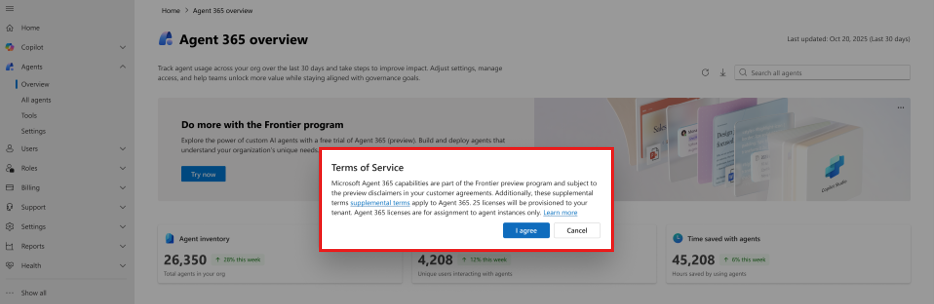
Next, navigate to Billing > Licenses and confirm you see 25 active licenses for Microsoft 365 Frontier for AI Teammates.
Only a global admin for the tenant can enable Agent 365 Frontier, and the preview disclaimers in your customer agreements apply.
Microsoft Agent 365 features in Frontier
Currently the following Agent 365 features are available to preview through the Frontier program:
Frontier program for Microsoft Agent 365 FAQ
This table provides answers to common concerns and questions about Microsoft Agent 365 enrollment in the Frontier program, including how to verify enrollment, troubleshooting access problems, and understanding Microsoft Agent 365 licenses in Frontier.
| Frontier program question | Answers |
|---|---|
| In the Microsoft 365 admin center, I don't see Copilot Frontier under Copilot Settings. | Purchase a Microsoft 365 Copilot license or Microsoft E7 license if you don't already have one. Frontier features are available to all Microsoft 365 customers with a Copilot or E7 license. |
| The option to purchase a Microsoft 365 Copilot license is unavailable for me. | Microsoft Copilot is an add-on that requires an eligible base for Microsoft 365 plan (for example, Business Premium, E3, E5, and other plans). Review the prerequisites tab when purchasing a plan for the Microsoft 365 Copilot license. |
| How do I check if I'm enrolled in Agent 365 Frontier? | In the Microsoft 365 Admin Center, ensure you have accepted the Microsoft Agent 365 Terms of Service. |
| When using the Agent 365 CLI, I encountered the following error message: ERROR: Error response: Forbidden – Access denied by Frontier access control. | Change the setting to Specific users or No access, and then change it back to All users to reapply the configuration. Updates might not appear immediately. It might take up to an hour for the change to take effect. |
| What is a Microsoft Agent 365 license and how is it used? | In the Frontier program, Microsoft Agent 365 frontier licenses enable AI agents extended to run in a Microsoft 365 tenant. Customers in the European Economic Area (EEA) can be provisioned Agent 365 Frontier without Teams licenses. Licenses are assigned per agent instance and are required before an agent instance can be created. For general availability, Agent 365 is licensed per user. All agents managed or owned by a licensed user, regardless of type, are covered under that user’s Agent 365 or Microsoft 365 E7 license. Agents don’t require their own Agent 365 or Microsoft 365 E7 license. |
| What is the Service Level Agreement for Agent 365 Frontier? | There is no specific Service Level Agreement associated with Microsoft Agent 365 Frontier. Frontier should not be used for product evaluations. Instead, it is recommended to leverage the Agent 365 trials available. Microsoft reserves the right to remove Frontier feature support at any time. |
| Why does the Frontier and General Availability experience for Agent 365 differ? | The experience between Frontier and General Availability for Microsoft Agent 365 is different as the features exposed have distinct maturity levels across the programs. |