Note
Access to this page requires authorization. You can try signing in or changing directories.
Access to this page requires authorization. You can try changing directories.
Important
This feature is part of Frontier preview program. Frontier connects you directly with Microsoft’s latest AI innovations. Frontier previews are subject to the existing preview terms of your customer agreements. As these features are still in development, their availability and capabilities may change over time.
The all-agents activity view provides a single place to review agent activity, helping track progress, review outcomes, and identify issues. The all-agents activity view has these key capabilities:
- Track progress across agents
- Review results and outputs in one place
- Identify issues and follow up faster
The All-agents activity view provides a single place to review agent activity beyond chat history. It shows what agents are working on, whether tasks are complete, and what outcomes are produced. Use the activity view to:
- Check the status of recent agent tasks
- Review how an agent completed a request
- Understand when an agent needs your input
Where to find the activity view
In Microsoft 365 Copilot, open Copilot.
Go to All agents, and then select Agent activity on the top right.
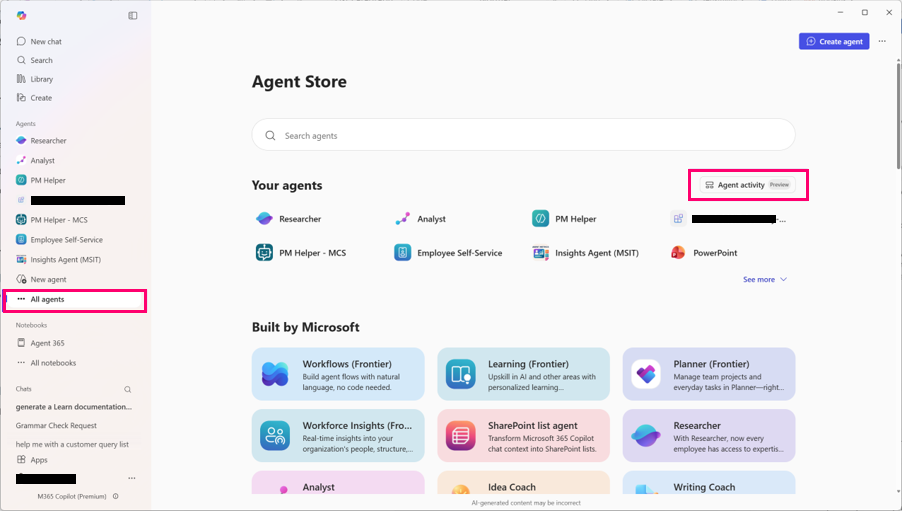
Select an agent to see its recent activity.
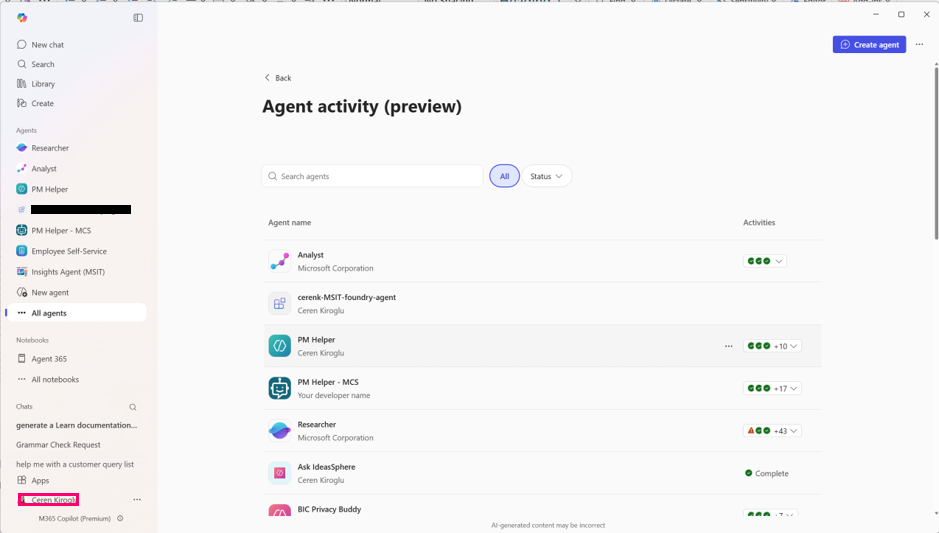
Select an activity to view details.
What you observe in the activity view
Depending on the agent and task, the activity view can show the following information:
- Activity list
- A summary of recent tasks or conversations for each agent.
- Status and timing
- Whether the activity is in progress, completed, failed, or waiting for your input, along with timestamps.
- Inputs and outputs
- What you asked the agent to do and the response it produced.
- Actions taken
- Tools or actions the agent used while completing the task.
- Results
- Content created by the agent. This information helps you understand outcomes without reviewing the full conversation history.
Agent types included
The all-agents activity view covers all agents, no matter where they’re created or how they’re published.
Microsoft‑built agents
These are agents provided by Microsoft and available directly in Microsoft 365 Copilot.
Examples include:
- Researcher
- Analyst
Copilot Studio agents
These agents are created using Microsoft Copilot Studio and published to Microsoft 365 Copilot. They are commonly used to automate specific business tasks or workflows.
Microsoft 365 Agents Toolkit agents
These agents are built using the Microsoft 365 Agents Toolkit and published to Microsoft 365 Copilot. They typically support more customized or developer‑driven scenarios.
Azure AI Foundry agents
These agents are built using Azure AI Foundry and integrated with Microsoft 365 Copilot. They are often used for advanced or specialized workloads. Activity appears for agents you interact with, depending on how the agent is configured and published.
Non-Microsoft agents
Some agents are built outside Microsoft platforms and integrated into Microsoft 365 Copilot through supported integration paths. You can see activity for non-Microsoft agents you interact with, depending on the agent’s capabilities. For more information about how to to extend agents, see Microsoft Agent 365 SDK and CLI.
Visibility and access
Activity visibility is user‑scoped:
- You see activity for agents you interact with.
- You don’t see activity for other users’ interactions.
- Administrators and IT staff don’t see detailed activity timelines in this view. Their access is limited to high‑level usage information in admin tools.
Limitations and considerations
- The activity view is read‑only and intended for review and understanding.
- You can’t rerun tasks directly from the activity view.
- Activity history is retained for a limited time (30 days).
- The level of detail can vary by agent type.
Frequently asked questions
Why don’t I see an agent on my activity list?
You might not have interacted with that agent, or the agent might not currently surface activity details in Microsoft 365 Copilot.
Is this the same as chat history?
No. Chat history shows messages. The activity view shows what the agent did, including actions, progress, and results.
Can other people see my agent activity?
No. The activity view shows only your own interactions with agents.