Note
Access to this page requires authorization. You can try signing in or changing directories.
Access to this page requires authorization. You can try changing directories.
Important
- This is a preview feature.
- Preview features aren't meant for production use and might have restricted functionality. These features are subject to supplemental terms of use, and are available before an official release so that customers can get early access and provide feedback.
Note
Microsoft is gradually rolling out apps in Copilot Studio (Preview). This feature might not be available in your environment yet.
The app creation experience in Microsoft Copilot Studio helps you build functional apps that solve business problems. Describe your requirements in natural language to get started. Copilot Studio might ask clarifying questions and propose an approach before generating an interactive app preview. You can then refine the app through conversation, publish it, and share it.
Apps created in Copilot Studio use Microsoft-hosted infrastructure that supports identity, governance, approved connectivity, and app inventory for administrators.
Prerequisites
- Get access to Microsoft Copilot Studio.
- Make sure the New experience toggle is enabled on the Home page.
- Confirm that the App (Preview) tile appears. App creation is on by default, but your administrator can turn it off.
Note
App creation is powered by the GitHub Copilot harness. Usage-based billing applies to using, building, previewing, and testing apps. These actions might consume Copilot Credits. Learn more in Overview of usage-based billing.
Benefits of building apps in Copilot Studio
| Benefit | What it means |
|---|---|
| Start with a description | Describe your business need in plain language. The agent generates a working app that includes a data model, logic, and user interface. |
| Preview as you build | Use the interactive preview while the app takes shape. |
| Work in one place | Build the app, talk to the agent, and manage data and connections in the same experience. Changes stay synchronized across the app. |
| Get AI assistance | Use suggestions, code generation, and guided problem-solving based on your business context. |
| Connect to approved data sources | Data access uses the signed-in user's existing permissions. |
| Publish and share | Publish a stable version of the app and share it with selected people and groups. |
App authoring surface
App creation begins as a conversation. After the agent has enough information to produce a first draft, the experience presents the app preview along with the available editing, publish, and share actions.
| Number | Purpose |
|---|---|
| 1 | Answer questions, request app changes, and attach files for context in the conversation area. |
| 2 | Select the dropdown menu to view the app's metadata and settings, and access the Data and Connections views. |
| 3 | Validate app features, behavior, and connected data in the interactive app preview. |
| 4 | Switch between the app preview and the underlying code. |
| 5 | Play, share, and publish the app. |
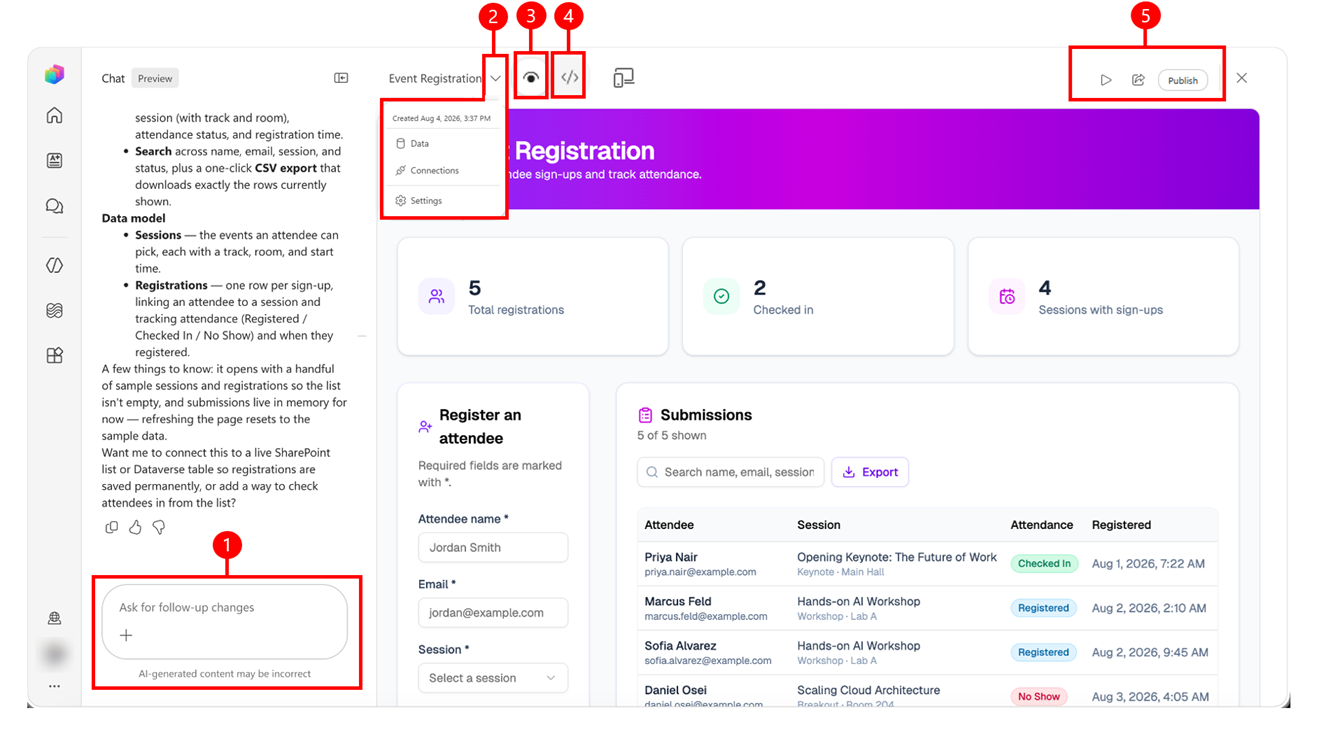
Learn how to create an app and publish and share an app.
Environments and app governance
Copilot Studio automatically routes to your personal environment for app creation. You don't have to choose or manage an environment. Your app follows your organization's data and sharing policies.
Published apps use Microsoft-hosted infrastructure and approved application dependencies. Copilot Studio also provides app inventory and policy information to administrators.
When an app connects to organizational data, it uses the signed-in user's identity. Publishing or sharing an app doesn't give users permission to data that they couldn't otherwise access.