Note
Access to this page requires authorization. You can try signing in or changing directories.
Access to this page requires authorization. You can try changing directories.
The standard harness distributes context across the components that handle a request. Each component works from its own context, and the harness doesn't automatically reconcile context at the top level. This separation provides flexibility, but it can cause duplicate messages or missed answers if information isn't returned explicitly by independent components.
This article explains why context is distributed, how the GitHub Copilot harness differs, how context moves between the agent orchestration layer and a component, and what each component can see and return. Use this information to identify context gaps and design agents that manage context deliberately.
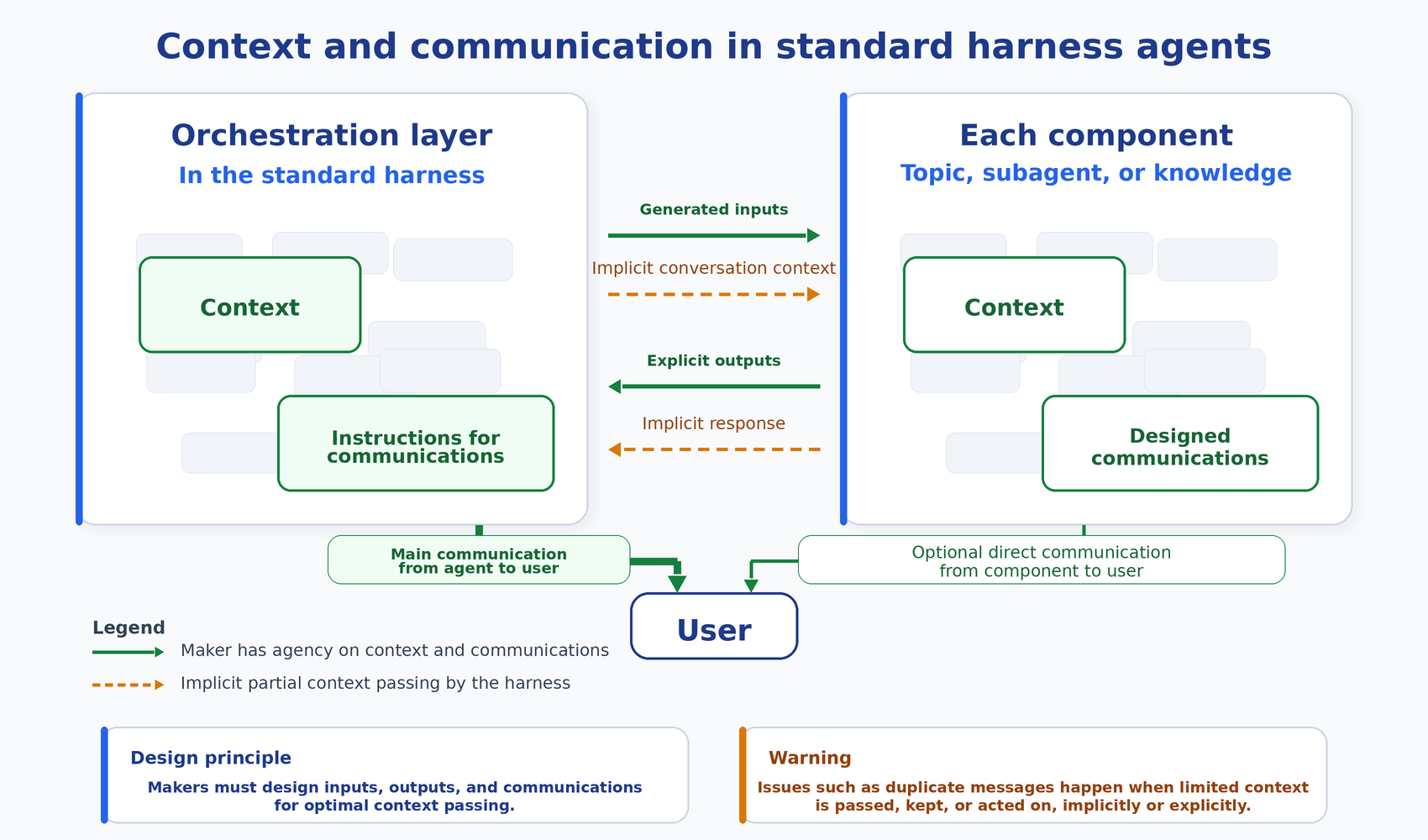
The following diagram illustrates how context and communication flow between the orchestration layer, individual components, and the user in the standard harness.
Note
This article describes features and behavior of the standard harness. Learn how to access standard features in Access standard agents and agent flows.
A harness powers everything built in Copilot Studio, and the selected model provides reasoning and generation. The harness is a runtime that exists between the two: it determines when to call the model, which components to send it, interprets what comes back, and calls the right tools. Learn more about Copilot Studio harnesses.
Why the standard harness distributes context
The standard harness is built for flexibility:
- It orchestrates tasks and supports transactional use cases.
- It balances deterministic control and AI through variables, triggers, and specialized features.
- It distributes control across components such as topics, knowledge, child agents, connected agents, and tools.
- It supports multiple authentication, channel, and integration options.
Distributing work across independent components provides flexibility but can create gaps in the context:
- The agent orchestration layer hands off control during certain component calls.
- While a component runs, the orchestration layer can't see the messages that the component sends to the user.
- The orchestration layer doesn't reconcile context at the top level.
If the design doesn't manage the agent's context, gaps develop, and requests can appear unanswered. These gaps can cause duplicate or missed answers.
How the GitHub Copilot harness differs
The orchestration layer of the GitHub Copilot harness avoids the context mismatch by being the sole communicator with the user. It never lets a connected agent take over communication:
- The reasoning and communication loop works without deliberate context management.
- Connected agent messages pass through the parent's AI layer at every turn.
The orchestration layer of the GitHub Copilot harness also treats context size differently, which makes its context orders of magnitude larger than the standard harness:
- It has direct access to the model context.
- It can use compaction.
- It can write data and files to its Bash sandbox container.
How context passes to components and returns to the orchestration layer
To manage context effectively in the standard harness, consider both what the orchestration layer passes to a component and what the component returns.
Context passes to components in two ways:
Explicit inputs and request: The orchestration layer fills each component's inputs from its active context and passes a request as designed.
Implicit conversation context: The orchestration layer also passes a longer conversation context to components such as knowledge and to subagents without explicit configuration. Note that a child agent always receives the parent conversation context. A connected agent has a setting that includes or excludes it. A tool or flow receives only its inputs.
A component sends information back to the orchestration layer in two ways:
- Explicit outputs and response as designed.
- Implicit context from certain components.
What a component only shows the user, or only keeps in its own variables, might never reach the orchestration layer unless it comes back through one of those two channels.
Implicit passing of information causes about half of cases with duplicate or missed answers because a component can act on a request that was never explicitly passed to it.
How context differs across components
The user-visible conversation and the orchestration layer context overlap, but they aren't the same. The following principles apply to what reaches the orchestration layer's context from a component call:
What a component keeps to itself stays hidden. Topic variables and multi-turn conversations inside subagents exist inside the component. The orchestration layer sees them only if they are returned as outputs.
Only two types of information return. The orchestration layer receives the explicit outputs that are designed and implicit context from a component. A component that does work but returns nothing can leave the orchestration layer unaware of what happened.
Each component has its own context, or point of view. The orchestration layer uses its active context to select steps and generate inputs. A connected agent has its own orchestration layer, its own instructions, and its own internal tool and knowledge calls.
Use the following table to ask a precise question: Which component has a given fact in its active context?
| Point of view | Has in its active context | Can write to the chat pane | Can return as context |
|---|---|---|---|
| Orchestration layer | User request, conversation context, component descriptions, input descriptions, output descriptions, plan state, implicit responses (but not whether the implicit information has been shown to the user) | Yes. Its own questions and responses. | Its own questions, answers, reasoning, and plan. |
| Topic | Topic variables, current node state | Yes. Through message nodes, question nodes, and Ask with Adaptive Card. | Topic outputs and implicit message exchanges that can still cause duplication. |
| Tool or flow | Inputs generated by the orchestration layer | No. | Tool or flow outputs. |
| Knowledge step | User request plus the active context of its agent | No. It writes to its own agent, not the chat pane. | Its answer. |
| Generative answers node (inside a topic) | What's sent in its input plus its agent's context | Yes. Directly, or to a topic variable. | Not explicitly, may be repeated. |
| Subagent (child or connected agent) | Its initial request, plus parent-provided inputs and any included parent context, within its own orchestration layer context | Yes, if it's configured or instructed to respond directly. | A response and its outputs. |
Important
Topics: Implicit context returned by topics only includes plain text information, but not whether the user saw it. Plain text information can come from message nodes, question nodes, Adaptive Card content, and user's typed replies. However, Adaptive Card action buttons and user interactions with them don't reach the standard harness context. Adaptive Card handling causes most context mismatches. Don't rely on card content as context. Instead, return any information that a later step needs as a topic output and set an answered-state output. Learn more in Design topics as mini-agents that avoid duplicate messages.
Subagents: When parent context is passed to a connected agent, it can influence every tool, topic, and knowledge call that the agent makes. If the included context still contains a request that seems like it wasn't answered, the connected agent might try to compensate and answer it again. A child agent has the same risk with less control. It runs inside the parent and always receives the parent's conversation context, with no setting to exclude it. Learn more in Design subagents that avoid duplicate messages.
Next step
With this context model in mind, the next article in this series explains why this model causes duplicate messages and suggests design patterns to prevent them.
Related information
- Design best practices to avoid duplicate messages
- Design topics as mini-agents that avoid duplicate messages
- Design subagents that avoid duplicate messages
- Troubleshoot duplicate messages and missed answers
- Apply generative orchestration capabilities
- Orchestrate agent behavior with generative AI
- Architecting agent solutions: Principles and patterns