Note
Access to this page requires authorization. You can try signing in or changing directories.
Access to this page requires authorization. You can try changing directories.
The Agent Review Pipeline is an automated quality gate for Copilot Studio agents deployed through Power Platform Pipelines. It runs the same evaluation engine as the Agent Review Tool, but as a CI/CD step: when a deployment starts, the pipeline evaluates the agent in the source solution, scores it, and either approves or rejects the deployment based on a configurable threshold.
Use the Agent Review Pipeline when you want to enforce agent quality automatically on every promotion, instead of relying on manual reviews in the Agent Review Tool.
The pipeline and the in-app tool are complementary:
| Form factor | Best for |
|---|---|
| Agent Review Tool | Interactive, on-demand reviews from inside Power Apps. Makers and reviewers can browse results, compare agents, and export reports. |
| Agent Review Pipeline (this article) | Automated CI/CD gate that runs the same checks on every Power Platform Pipelines deployment, with pass or fail enforcement and a PDF artifact. |
Architecture
The following diagram shows the architecture of the Agent Review Pipeline and how the components interact:
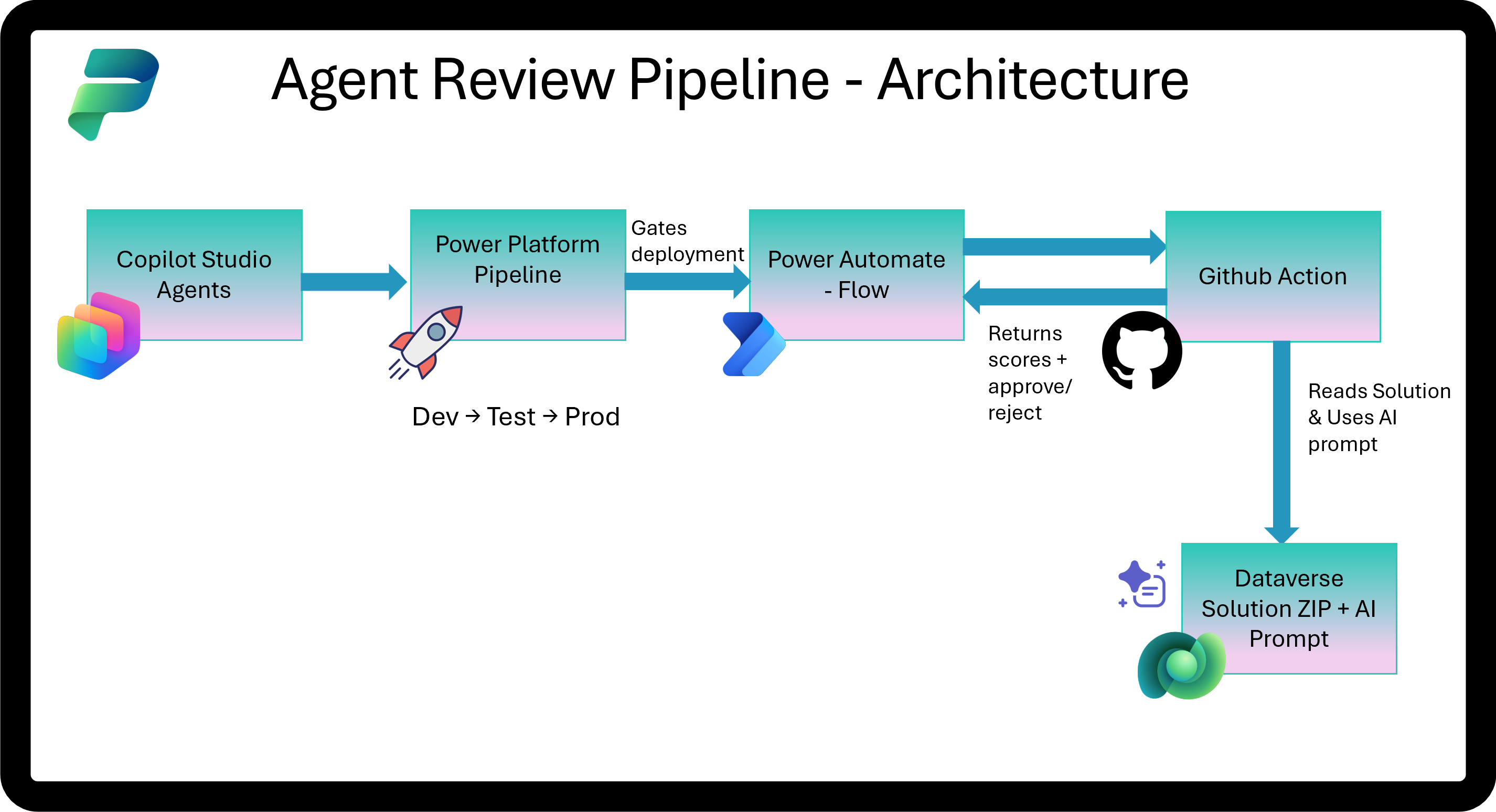
The pipeline has four components:
- Power Platform Pipelines triggers a pre-deployment step when a deployment starts.
- A Power Automate cloud flow in the pipeline host environment dispatches a GitHub Actions workflow through a webhook and waits for the callback.
- The GitHub Action downloads the solution
.zipfrom Dataverse, parses the agent configuration, runs deterministic and AI-driven evaluations, calculates a score, and generates a PDF report. - The action posts the score back to the cloud flow through an HTTP callback. The flow approves or rejects the pipeline stage based on whether the score meets the configured threshold.
What gets evaluated
The pipeline runs the same three-stage evaluation as the Agent Review Tool. For the full list of patterns and compliance criteria, see Agent Review Tool.
| Stage | Method | What it checks |
|---|---|---|
| Parse and detect | Deterministic | Missing model names, missing descriptions, variable naming, excessive tool counts, and similar structural issues. |
| Design patterns | AI (PredictV2) | Topic design, knowledge source configuration, conversation flow, and error handling. |
| Instruction compliance | AI (PredictV2) | Whether the agent's authored topics follow its own system instructions. |
Important
The AI stages consume Copilot Studio messages per evaluation run. Plan capacity accordingly if you expect a high deployment frequency.
Prerequisites
| Item | Notes |
|---|---|
| Power Platform Pipeline with a custom host | Required for extensibility. The platform host and personal pipelines can't be extended. |
| Agent Review Pipeline solution | Self-contained: includes the cloud flow, AI prompts, security role, and environment variables. Available as AgentReviewPipeline_managed.zip from the Power CAT Copilot Agent Kit GitHub releases page. |
| GitHub repository | Hosts the GitHub Action code and workflow. |
| Microsoft Entra ID app registration (SPN) | Required for Dataverse API access from the GitHub Action. |
| Copilot Studio credits | The AI stages consume Copilot Studio messages per evaluation run. |
Important
The pre-deployment flow must run in the pipelines host environment. With the platform host, Microsoft manages the environment and you can't deploy flows to it. You need a custom host so the flow, AI prompts, and extensibility actions all live in an environment you control. Learn more in Extend pipelines — Triggers.
Note
The full Copilot Agent Kit installation isn't required. The Agent Review Pipeline solution ships its own AI prompts and can be installed in any custom host environment independently.
Set up the Agent Review Pipeline
Complete the following steps in order. After setup, every deployment through your pipeline triggers an automated review.
Step 1: Create an app registration
In the Azure portal, create a service principal that the GitHub Action uses to call Dataverse.
Select Microsoft Entra ID, select App registrations, and then select New registration.
Enter a name, such as
Agent Review Pipeline SPN.Select Single tenant and leave the redirect URI empty.
Select Register.
Generate a client secret and save the following three values:
Value Used as GitHub secret Application (client) ID CLIENT_IDDirectory (tenant) ID TENANT_IDClient secret value CLIENT_SECRET
Step 2: Set up the GitHub repository
Clone or fork the agent-review-pipeline folder from the Power CAT Copilot Studio Kit repository into your own GitHub repository. The folder contains everything needed to run the action:
action.yml: action definitionpackage.json,package-lock.json,tsconfig.json: build configurationsrc/: source code (customize patterns here)dist/: compiled output.github/workflows/agent-review.yml: workflow template
Note
The dist/ folder is included prebuilt so the action runs without a build step. If you modify src/, rebuild by running npm install && npm run build.
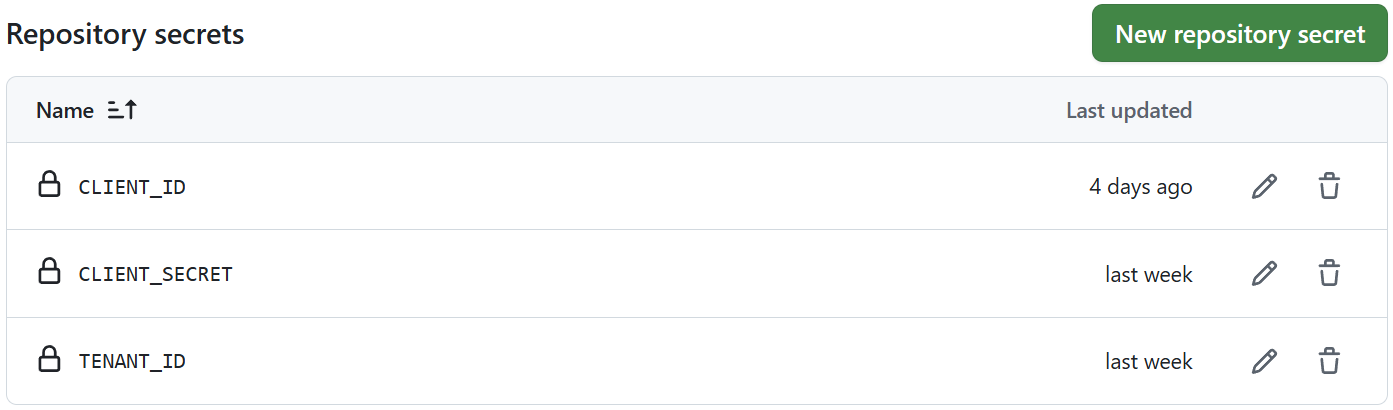
Add three repository secrets in Settings > Secrets and variables > Actions using the values from step 1:
CLIENT_IDTENANT_IDCLIENT_SECRET
Step 3: Create a GitHub personal access token
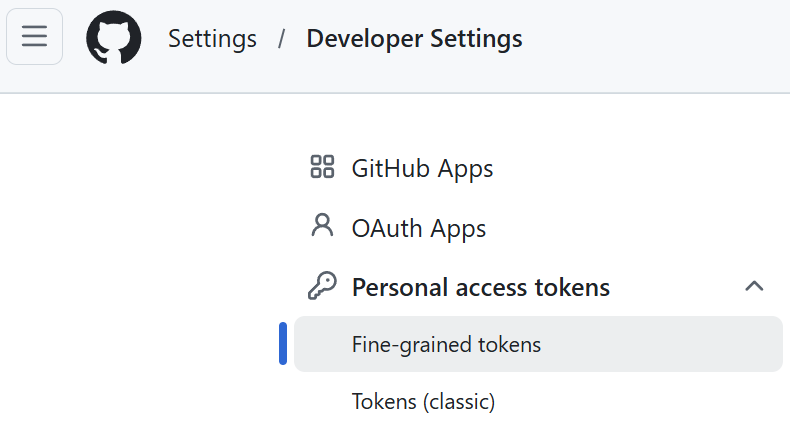
Create a fine-grained personal access token (PAT). Use a token from an organization-owned service account so the token isn't tied to an individual's lifecycle.
- In GitHub, select your profile picture in the top-right corner.
- Select Settings, select Developer settings, select Fine-grained tokens, and then select Generate new token.
- Set Repository access to Only select repositories and select the repository from step 2.
- Set repository permissions to Actions (Read and write) and Contents (Read).
- Generate the token and copy the value.
Step 4: Import the solution
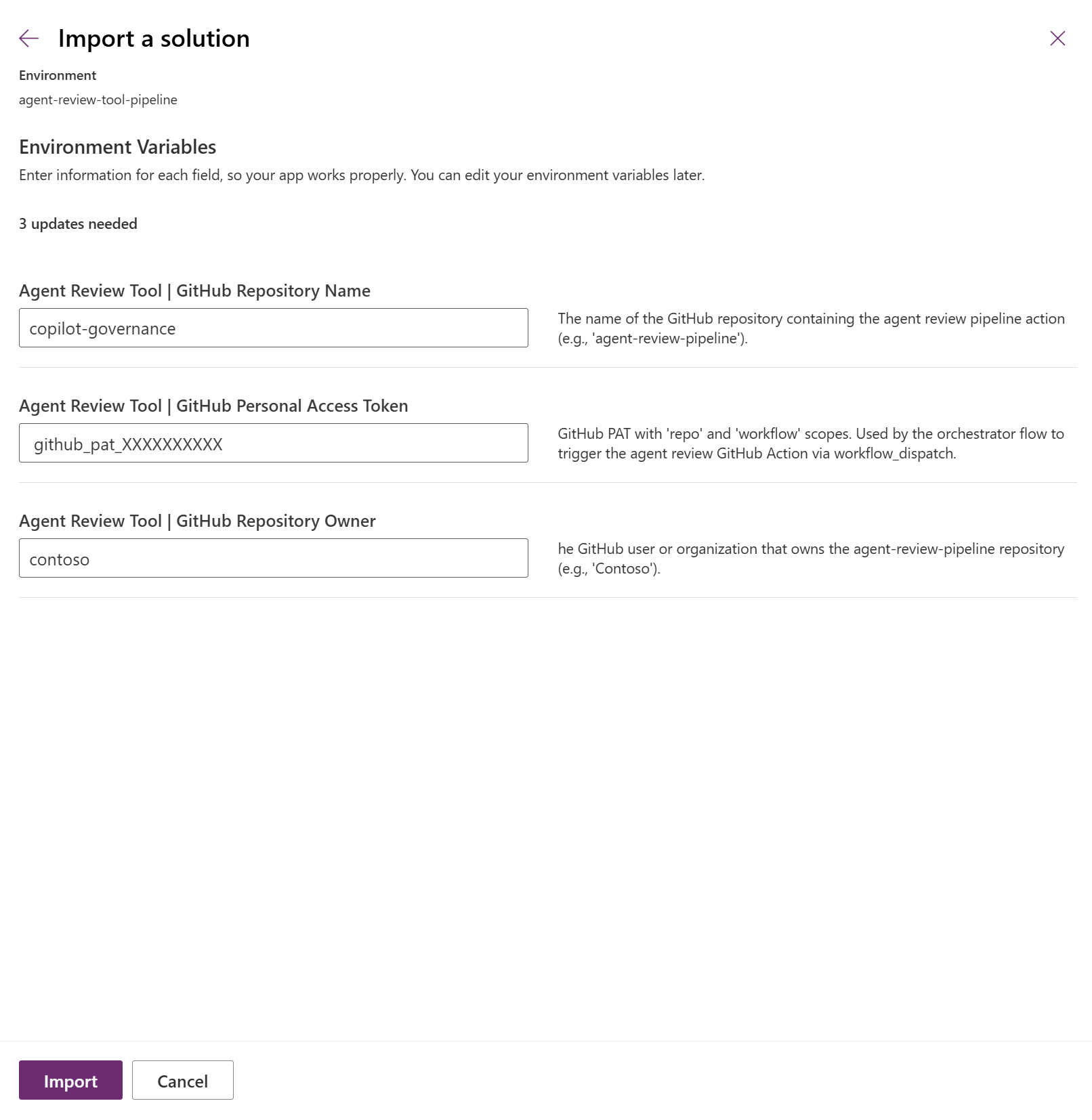
Import the AgentReviewPipeline_managed.zip solution into the pipelines host environment. During import, the wizard prompts for environment variable values:
| Variable | Value |
|---|---|
| GitHub Personal Access Token | PAT from step 3. |
| GitHub Repository Owner | Owner of the repository from step 2; for example contoso. |
| GitHub Repository Name | Name of the repository from step 2; for example copilot-governance. |
Important
The GitHub PAT is stored as a plain-text environment variable. For production use, store it as a secret environment variable backed by Azure Key Vault so the value is never exposed in the solution or API responses. If Key Vault isn't available, limit risk by using a fine-grained PAT that's scoped to a single repository with the minimum permissions listed in step 3.
After import, verify the AI prompts shipped in the solution are published.
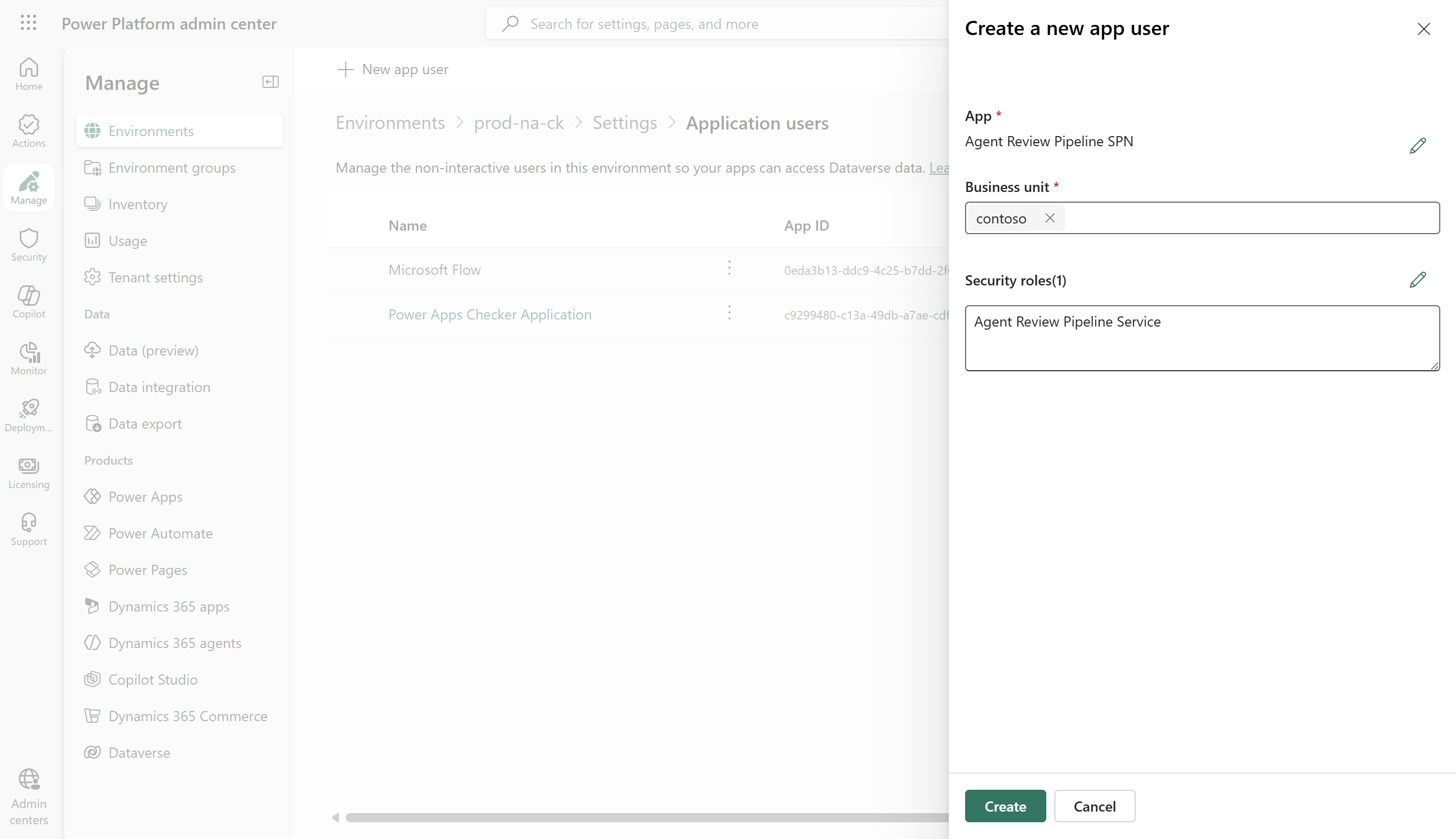
Step 5: Add the service principal to Dataverse
Grant the app registration access to the pipelines host environment.
- In Power Platform admin center, select the pipelines host environment.
- Select Settings, select Users + permissions, and then select Application users.
- Select + New app user and select the app registration from step 1.
- Assign the Agent Review Pipeline Service role that's included in the solution.
The role is based on Basic User with two additional organization-level permissions:
| Table | Privilege | Access level |
|---|---|---|
| Deployment Artifact | Read | Organization |
AI Model (msdyn_aimodel) |
Read | Organization |
Note
If you prefer an out-of-the-box alternative, Service Reader also works, but it grants broader read access to all tables.
Step 6: Enable the pre-deployment step on your pipeline
- In Power Platform admin center, select Pipelines, and create or select your pipeline.
- On the target stage, enable Pre-deployment step required.
Step 7: Turn on the flow
- Go to Power Automate and switch to the pipelines host environment.
- Open the Agent Review — Pre-Deployment Gate flow.
- Verify the connection references and turn the flow on.
Important
If you have multiple pipelines with the pre-deployment step enabled, add a trigger condition to scope the flow to a specific pipeline. Edit the flow, open the trigger settings, and add the following trigger condition. Replace Agent Review Pipeline with your pipeline name; the value is case-sensitive.
@equals(triggerOutputs()?['body/OutputParameters/DeploymentPipelineName'], 'Agent Review Pipeline')
Without this condition, the flow fires for every pipeline that has the pre-deployment step enabled.
Step 8: Test the gate
Deploy a solution that contains a Copilot Studio agent through your pipeline. Verify each step of the gate:
- The cloud flow triggers (visible in the flow's run history).
- The GitHub Action runs (visible in the repository's Actions tab).
- A PDF report is uploaded as a workflow artifact.
- The pipeline stage is approved or rejected based on the score.
Review the results
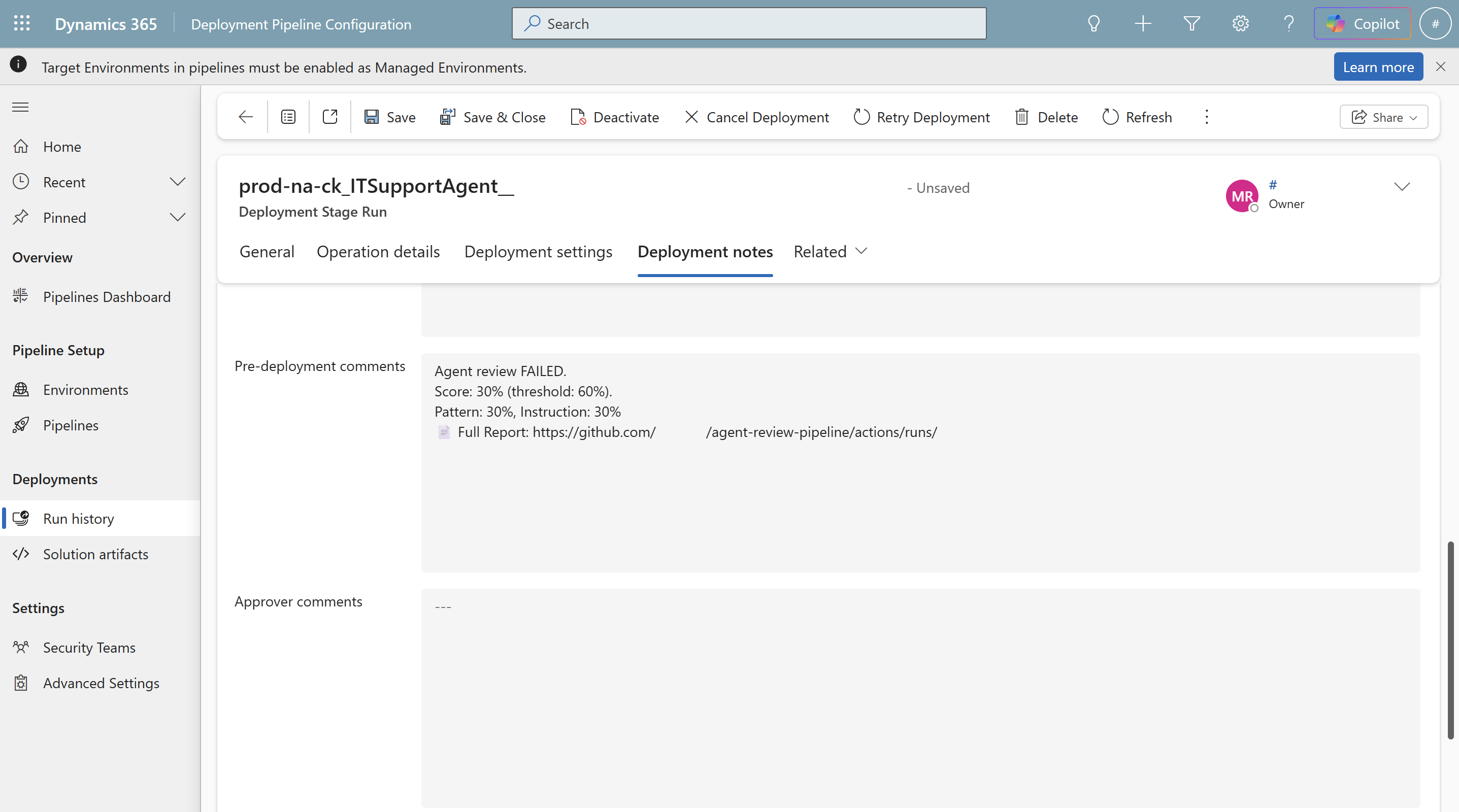
Each evaluation run produces a PDF report that's uploaded as a GitHub Actions artifact. The report includes:
- Score cards for the overall score, pattern score, and instruction compliance score.
- Failed patterns with the affected topics and recommendations.
- Instruction compliance issues.
The artifact URL is included in the pre-deployment comments on the pipeline stage, so reviewers can open the full report directly from the stage history.
Customize the pipeline
| What | How |
|---|---|
| Change the pass threshold | Update the threshold input on the workflow (default: 60). |
| Add or change pattern checks | Edit src/analysis/StageAService.ts in your repository, then rebuild with npm run build. |
| Send notifications | Add Teams or email actions to the cloud flow after the gating condition. |
| Persist results to Dataverse | Add a Create row action to the cloud flow that writes to the cat_agentreviews table. |
Build the flow from scratch
If you need to recreate the cloud flow manually instead of importing the shipped solution, use the following configuration. The parameters(...) values reference the environment variables configured during solution import (see step 4).
Trigger: When an action is performed—
OnPreDeploymentStarted(Dataverse, unbound). No trigger condition is required. The trigger fires only when a pipeline with the pre-deployment step enabled starts a deployment. If you have multiple such pipelines, add the trigger condition described in step 7.HTTP Webhook action (dispatches the GitHub workflow and waits for the callback):
Field Value Method POSTURI https://api.github.com/repos/@{parameters('cat_GitHubRepoOwner')}/@{parameters('cat_GitHubRepoName')}/actions/workflows/agent-review.yml/dispatchesHeaders Authorization: Bearer @{parameters('cat_GitHubPAT')},Accept: application/vnd.github.v3+jsonBody {"ref":"main","inputs":{"artifact_url":"@{triggerOutputs()?['body/OutputParameters/ArtifactFileDownloadLink']}","callback_url":"@{listCallbackUrl()}"}}Timeout PT10MCondition:
@equals(body('HTTP_Webhook')?['scores']?['passed'], true).If yes, call the unbound action
UpdatePreDeploymentStepStatus:StageRunId:@{triggerOutputs()?['body/InputParameters/StageRunId']}Status:20(approved)
If no, call the same action with
Statusset to30(rejected) and include the score details inComments.
Warning
Always call UpdatePreDeploymentStepStatus with status 30 from an error handler. If the flow fails without setting the status, the pipeline stage hangs indefinitely.
Troubleshooting
| Symptom | Resolution |
|---|---|
| Flow never triggers | Confirm Pre-deployment step required is enabled on the target stage. Verify the flow is in the pipelines host environment and the connection references are connected. |
| Authentication fails with 401 | The service principal isn't added as an application user in the pipelines host environment. Repeat step 5. |
| Artifact download returns 403 | The service principal is missing the security role. Verify the Agent Review Pipeline Service role assignment from step 5. |
| AI prompt evaluation returns 404 | The AI prompts shipped with the solution aren't published. Open the Agent Review Pipeline solution, go to AI models, and verify both prompts are published and have status On. |
| Pipeline stage is stuck in Pending | The flow errored without calling UpdatePreDeploymentStepStatus. Add an error handler that always sets status 30 on failure. |
| Callback never arrives | The GitHub Actions workflow failed. Check the Actions tab in your repository for failed runs and inspect the logs. |