Note
Access to this page requires authorization. You can try signing in or changing directories.
Access to this page requires authorization. You can try changing directories.
Each harness handles requests differently. Understanding these orchestration patterns helps you design agents that make effective use of your chosen harness.
For customer-facing voice and chat scenarios, also consider the Customer Conversation harness, particularly when you need customer verification, connected actions, Teams Phone integration, contact center integration, or human handoff.
Compare capabilities across harnesses
Every harness powers agents with instructions, knowledge, and tools. The key design differences are how requests are orchestrated, which tools and capabilities are available, how state is managed, and how agents work with other agents.
| Capability | Standard harness | Microsoft Copilot harness |
|---|---|---|
| Orchestration model | Classic or generative orchestration | Reasoning loop |
| Defined execution path | Topics, agent flows | Workflows |
| Tools | Connectors, REST APIs, prompts, agent flows, MCP servers, computer use | Connectors, workflows, MCP servers |
| Computation | Power Fx, prompts with code interpreter | Agent sandbox |
| Context beyond the conversation | Cross-session variables | Memory |
| Multi-agent composition | Child agents, connected agents | Connected agents |
How requests are orchestrated
Some harnesses follow a path you define. Others use AI to choose the next step at runtime. These differences affect how predictable the agent's behavior is, how much control you have over the process, and how the agent combines knowledge, tools, and context to complete a task.
Copilot harness reasoning loop
The Copilot harness uses a continuous reasoning loop. It reasons over the latest state (thought), calls a tool (action), evaluates the result (observe), and then determines the next step (decide). Unlike the standard harness, the process path isn't defined in advance.
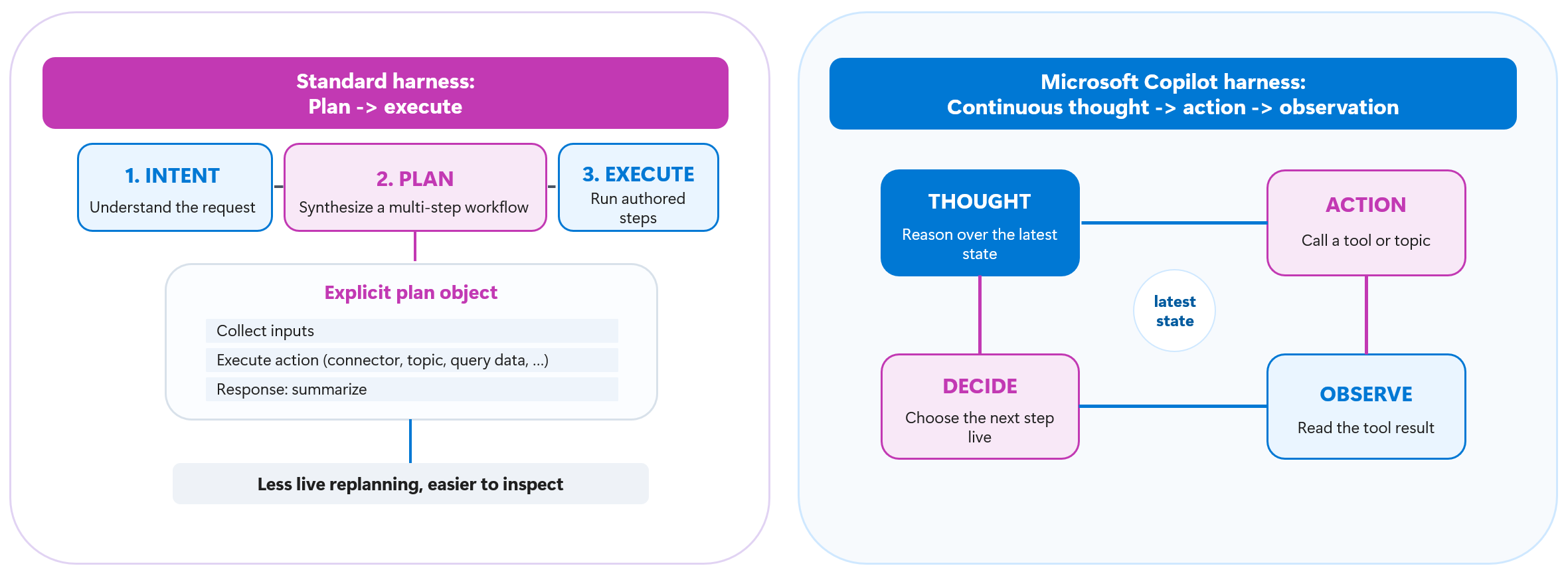
Agents powered by the Copilot harness can adapt their process path at runtime. They can:
- Infer answers from available context instead of asking the user.
- Combine or reorder questions.
- Use one tool's output as input to another.
- Run independent tools in parallel.
- Follow a user's change of topic and then return to the task.
- Choose an alternative path when a tool call fails.
Standard harness classic orchestration
Classic orchestration follows a cascade: Match, or search, or fall back.

- The agent matches the user's request against the trigger phrases you defined.
- If a topic matches, it follows your defined steps to ask questions, send messages, access external data, and return a response.
- If no topic matches, the agent searches its knowledge sources and uses generative AI to summarize an answer if it finds one.
- If the search finds no answer, the Fallback system topic responds with a default message.
Classic orchestration follows predefined steps rather than reasoning about what to do next. The knowledge fallback is the only generative step, which makes it the only step whose wording you don't directly control. If your channel requires specific wording, either constrain this fallback or author topics well enough that the cascade never reaches it.
Standard harness generative orchestration
Generative orchestration lets the agent use AI to choose the best tools, knowledge, topics, and other agents for a request.
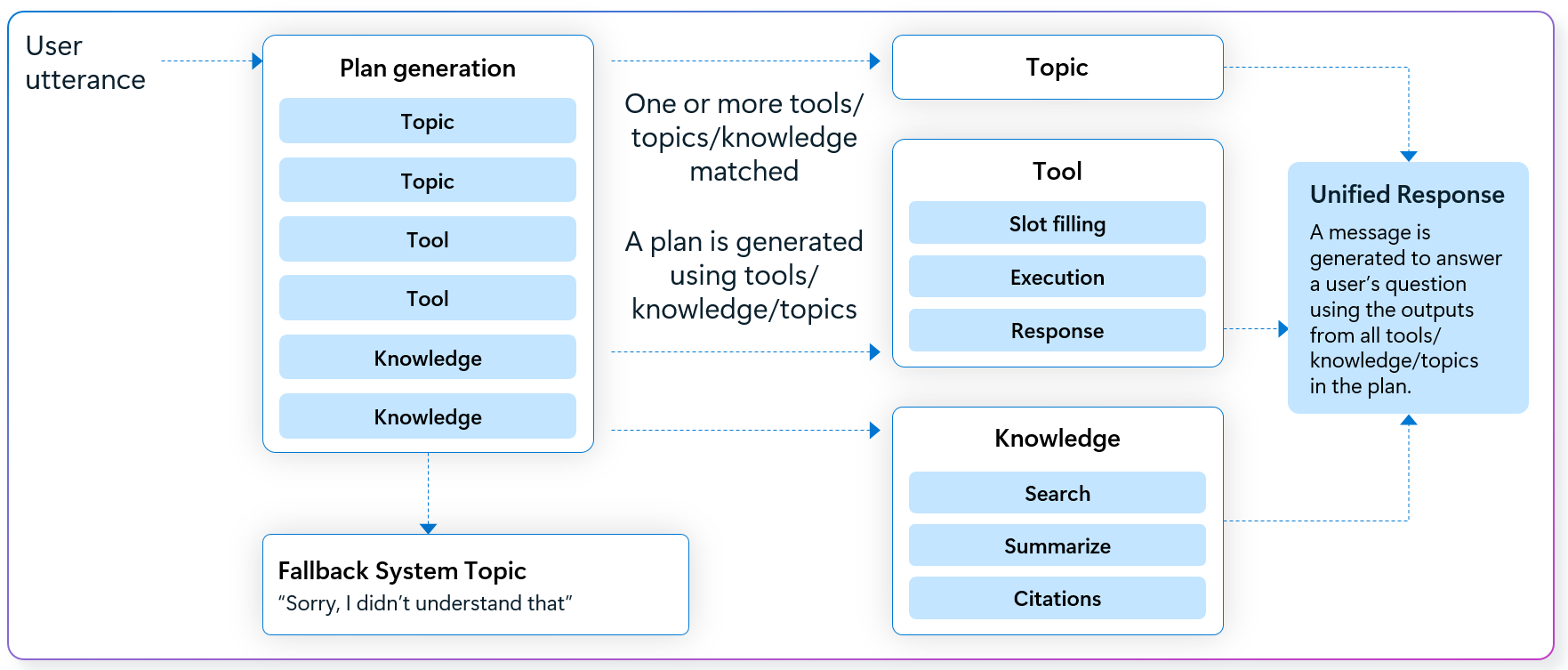
- A user submits a request.
- The orchestrator generates an explicit plan using tools, knowledge, and topics.
- The agent gathers any missing inputs needed to call tools (slot filling).
- Knowledge retrieval searches knowledge sources, summarizes results, and generates citations.
- The agent combines the outputs from every component in the plan into a unified response.
Newly created agents on the standard harness use generative orchestration by default. By using generative orchestration, agents can automatically chain together topics, actions, and knowledge sources. This approach replaces the traditional Natural Language Understanding (NLU) model with one powered by large language models that can recognize multiple intents in a single utterance and extract multiple entities, even of the same type. When paired with actions, agents can call APIs, run agent flows, or trigger connectors. The agent prompts the user only for missing details and then summarizes outputs. This approach allows agents to not just answer, but also act across systems.
Learn more: Apply generative orchestration capabilities