Note
Access to this page requires authorization. You can try signing in or changing directories.
Access to this page requires authorization. You can try changing directories.
The GitHub Copilot harness in Microsoft Copilot Studio is a redesigned authoring and runtime environment for building AI agents. It introduces a natural-language-first approach to agent creation, a unified single-surface design, and an enhanced orchestration model that improves response quality and reasoning capability.
Note
Features in this article are used by agents or workflows powered by the GitHub Copilot harness.
Usage-based billing applies to using, building, testing, and evaluating agents. These actions might consume Copilot Credits. Learn more in Manage costs for agents powered by the GitHub Copilot harness.
What is the GitHub Copilot harness?
The GitHub Copilot harness is built on an enhanced orchestration runtime that replaces the standard model used in Copilot Studio's standard harness agents. Instead of authoring explicit conversation topics, flows, and branching logic, you describe your agent in natural language (preview) and the system generates the underlying configuration.
Agents powered by the GitHub Copilot harness are available alongside agents using the standard harness. You choose which harness to use when you create a new agent. Agents created with the GitHub Copilot harness can't be transferred to the standard harness, and vice versa.
Learn more in Harnesses in Copilot Studio.
Important
The GitHub Copilot harness is a Microsoft Copilot Studio authoring and orchestration framework, not the GitHub Copilot service. Although the harness shares underlying technology and SDK components with GitHub Copilot, customer data isn't sent to or processed by the GitHub Copilot service when agents run in Copilot Studio. Existing Microsoft Copilot Studio privacy, security, compliance, and data residency commitments continue to apply.
Key concepts
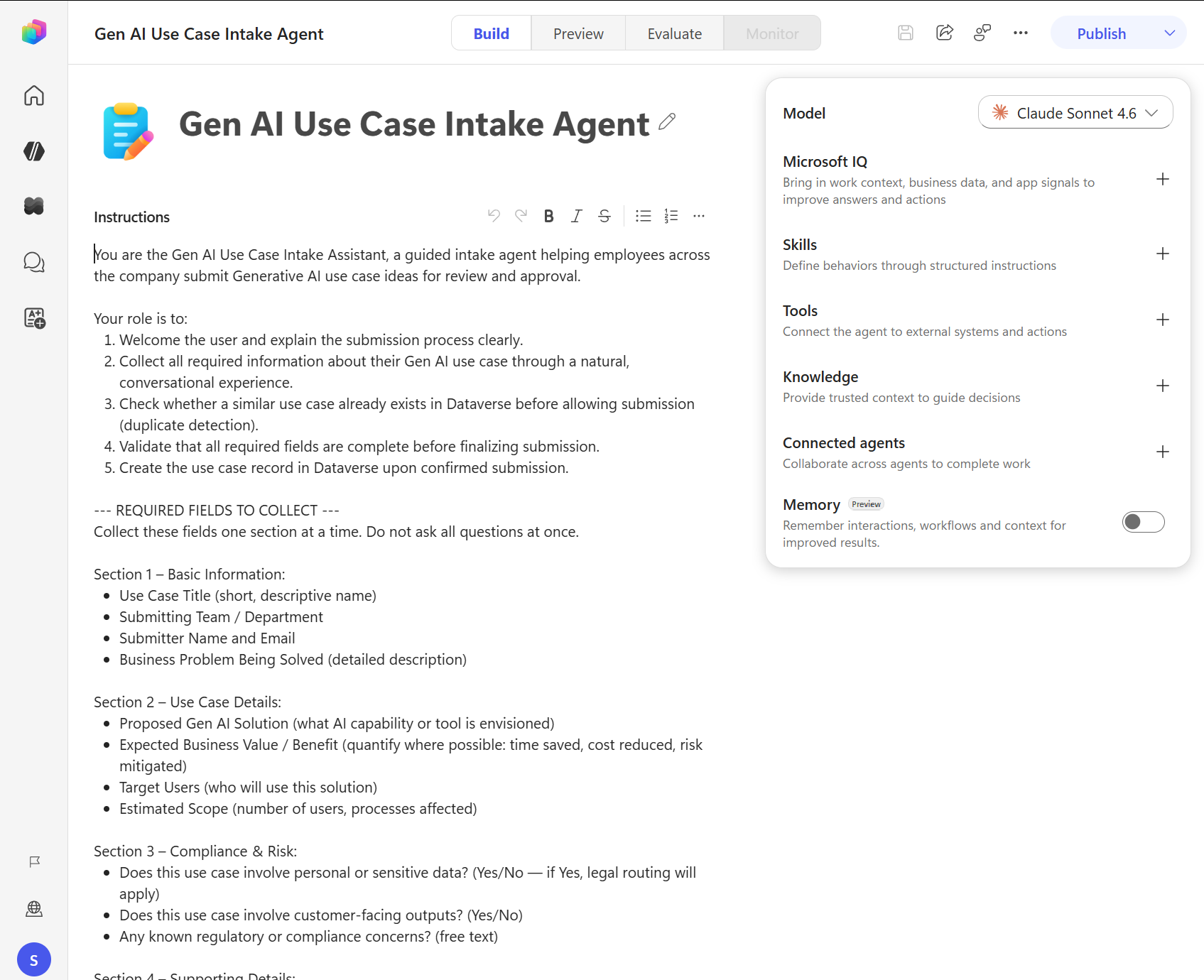
Agents powered by the GitHub Copilot harness are organized around their core components. You can configure the following from the Build tab:
Instructions: Define the agent's identity, tone, scope, and behavior. Learn more in Configure agent details and instructions (preview).
Knowledge: Connected data sources and memory give the agent context for answering questions. Learn more in Add knowledge to an agent.
Tools: Tools let the agent perform actions, such as calling APIs and running flows. Learn more in Tools overview for agents.
Skills: Skills define reusable structured behaviors. Learn more in Skills overview for agents.
Model: Choose the AI model that powers the agent's reasoning. Learn more in Select a model for an agent.
Connected agents: Delegate specialized tasks to other agents. Learn more in Connected agents overview.
Memory: Turn Memory on to help an agent remember details from its interactions and use that context for future interactions. Learn more in Memory (preview).
How the Build tab differs from the standard harness
In agents powered by the GitHub Copilot harness, the Build tab brings the core parts of agent authoring together in one place. Instead of designing explicit topic flows and branching logic, you describe your agent in natural language and connect the resources it needs to respond and act. By using the Build tab's natural-language-first approach, you create agents that rely on enhanced orchestration to interpret your instructions, decide when to use knowledge, and determine when to invoke tools. In the standard harness, explicit topics, triggers, and branching conversation flows shape the agent behavior. The GitHub Copilot harness's approach reduces the need to author detailed flow logic up front. Instead, you focus on describing your agent, connecting the right components, and defining the boundaries that guide how it operates.
Agent authoring surface
Agents powered by the GitHub Copilot harness use a tab-based surface for building and managing:
| Tab | Purpose |
|---|---|
| Build | Configure the agent's identity, knowledge, tools, skills, model, and memory |
| Preview | Test the agent interactively in a preview chat interface |
| Evaluate | Create and run test sets to measure agent quality |
| Monitor | Review production health, outcomes, reactions, sessions, and credit usage |
Agent lifecycle
Building an agent with the GitHub Copilot harness follows this general flow:
- Create: Start from the Copilot Studio home page and choose to create a new agent powered by the GitHub Copilot harness.
- Build: Configure who the agent is, what it knows, what it can do, and what its limits are.
- Test: Use the Preview tab and Evaluate tab to validate the agent's behavior.
- Publish: Deploy the agent to your chosen channels.
- Monitor: Review production health and identify where to improve the agent. You can open Monitor before publishing, but production data appears after people use the published agent.
Orchestration and reasoning
The GitHub Copilot harness uses an improved orchestration runtime that supports deep reasoning capabilities and higher-quality responses compared to the standard harness—particularly over Microsoft 365 data. Unlike the standard harness, where you can configure orchestration behavior, the GitHub Copilot harness uses this enhanced orchestration model for all agents. Learn more in Harnesses in Copilot Studio.
Availability
Agents built with the standard harness remain fully supported alongside agents powered by the GitHub Copilot harness. For information on standard agents, see Create and delete agents and AI-based agent authoring overview. Learn more in Harnesses in Copilot Studio.
Send feedback about the agent authoring experience
To send comments about the authoring experience, select the feedback button  in the top toolbar of the Microsoft Copilot Studio agent authoring experience. To learn more about support and feedback options, see Find support and give feedback for Copilot Studio.