Note
Access to this page requires authorization. You can try signing in or changing directories.
Access to this page requires authorization. You can try changing directories.
Note
This article describes features used in agents or agent flows powered by the standard harness.
When your agent uses NLU+, you can configure intent confidence thresholds that control when a user's message switches the conversation to another topic. Thresholds help keep conversations on track while still letting users change topics when they intend to. For example, a user's answer to a question might resemble a trigger phrase for another topic. A suitable threshold reduces these unintended interruptions, so the user can finish providing details without needing to recover the conversation.
Set an agent-level default, and then make selected topics more or less selective without changing every topic. A higher threshold requires a stronger intent match before the agent switches topics. A lower threshold makes deliberate topic changes easier. To test the balance, use the recognized intent name and confidence score that the agent stores after a topic switch.
These thresholds control intent-based topic switching only. They don't affect speech recognition confidence or entity confidence scores.
Prerequisites
- An agent that uses classic orchestration and NLU+. NLU+ requires a Dynamics 365 Contact Center license. Learn more in Configure NLU+.
- Permission to edit the agent.
- The topic-switching confidence settings must be available in your environment.
Set the agent-level threshold
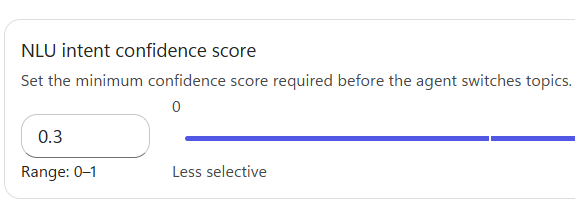
The agent-level threshold applies to every topic that doesn't have its own threshold. The threshold accepts values from 0 to 1. The default is 0.3. Although the setting's name includes "confidence score," the value you set is a cutoff, not the score that NLU+ returns for a message.
Open your agent and select Settings > Language understanding.
Make sure the NLU+ option (More prework, enhanced precision) is selected.
Under NLU intent confidence score, move the slider or enter a value.
Select Save.
Before the agent switches to another topic, it compares the recognized intent's confidence score with the threshold that applies to that topic. The score must be greater than the threshold. A score equal to the threshold doesn't qualify.
Note
A score that passes the threshold doesn't guarantee a topic switch. Existing topic-matching and interruption rules still apply. For example, a question's interruption settings can block a switch, and a valid answer to a question can be captured as an entity instead of being treated as a topic change.
Set a threshold for a topic
Use a topic-level threshold when one topic needs to be more or less selective than the rest of the agent.
Go to the Topics page for your agent, and open the topic that you want users to switch to.
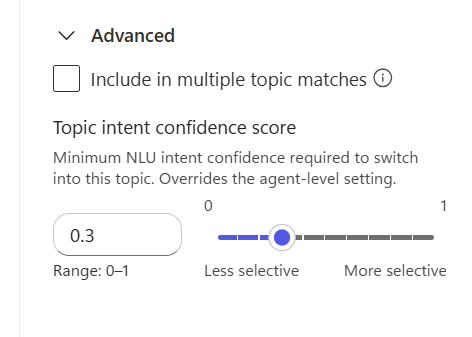
On the Trigger node, select Edit to open the trigger's properties panel, and then expand Advanced.
In Topic intent confidence score, move the slider or enter the threshold for this topic.
Save the topic.
How the agent chooses a threshold
Until you enter a value for a topic, the topic shows the agent-level threshold and follows any later changes to it. When you enter a value, it overrides the agent-level threshold for that topic only. The threshold of the topic the user is leaving doesn't control whether the agent switches into another topic.
For each topic it might switch to, the agent uses the first threshold that applies:
- The topic-level threshold of the target topic
- The agent-level threshold
- The default threshold of 0.3
The agent doesn't combine these values or choose the larger one.
For example, suppose the agent-level threshold is 0.5 and the Check account balance topic has a topic-level threshold of 0.8. A recognized intent with a confidence score of 0.7 doesn't qualify for a switch into Check account balance. For a target topic without its own threshold, 0.7 exceeds the agent-level threshold, although other routing rules still apply. These values illustrate the comparison only. They aren't recommended settings or predicted scores.
View the recognized intent
After a topic switch based on a single recognized intent, the following read-only system variables contain the most recently recognized intent and its NLU confidence score.
| Variable | Type | Description |
|---|---|---|
System.Recognizer.LastIntent.Name |
string | The name of the recognized intent. |
System.Recognizer.LastIntent.ConfidenceScore |
number | The confidence score of the recognized intent. |
To reference either value in a message, open the variable picker, switch to the System tab, and select Recognizer > LastIntent. To keep a copy in your own variable, add a Set variable value node, select your variable as the destination, and use the system variable as the value. Don't assign values to these read-only system variables.
Note
- These variables are made available separately from the threshold settings. If they're not available for your agent, they're blank.
- The values persist across turns and aren't updated for every message. If a switch is blocked, or a turn doesn't include a new topic switch, the variables can still contain values from an earlier switch.
- The variables don't show scores for intents that didn't result in a switch, and you can't use them to prevent a switch before it happens.
Test and tune topic switching
In the test panel, try clear requests to change topics, ambiguous messages, and valid answers while the agent is asking a question. Check both intended switches and conversations that should stay in the current topic.
Change one threshold at a time, and repeat the same messages from the same point in the conversation. Raise a threshold if unwanted matches interrupt the flow. Lower a threshold if intended switches are too difficult. Use a topic-level threshold when the issue affects only one target topic. After each change, recheck answers to questions and intended interruptions.