Note
Access to this page requires authorization. You can try signing in or changing directories.
Access to this page requires authorization. You can try changing directories.
Note
Socket mode is in public preview and only available for newly created bots and agents. We recommend using an HTTPS messaging endpoint for agents in production. Preview features can change before general availability.
Choose how your agent receives Teams activities: through an HTTPS endpoint or socket mode. Agent Communication Service (ACS) connects your agent to Teams. ACS sends your agent activity data in real time, such as messages, card actions, installs, reactions, and meeting events. Your agent sends data to ACS to act on those activities, such as replying, posting a card, or updating a message.
Your agent always uses HTTPS requests to send data to ACS. You choose how ACS sends data to your agent:
| Delivery method | Description |
|---|---|
| HTTPS endpoint | Your agent hosts an HTTPS endpoint that's reachable from the internet. You set the endpoint URL in the agent's bot registration. ACS sends each activity as an HTTPS request to that endpoint. |
| Socket mode | You turn on socket mode in the agent's bot registration; no endpoint is needed. When your agent starts, it opens outbound WebSocket connections to ACS. ACS sends each activity over one of those connections, and your agent's response goes back over HTTPS. |
With either delivery method, your agent sends messages and other requests to ACS the same way, with the ACS REST API, and receives the same activities with the same payloads. You can change the delivery method at any time. This article helps you decide which one to use.
Choose a delivery method
| HTTPS endpoint | Socket mode | |
|---|---|---|
| How activities reach your agent | ACS sends an HTTPS POST for each activity. | ACS sends each activity over a WebSocket that your agent opened. |
| Network | A public HTTPS endpoint. For local development, you need a tunnel such as dev tunnels or ngrok. | Outbound connections only, on port 443. No inbound connectivity, no tunnel, no public URL. |
| Authentication | Your agent validates the bearer token on every incoming request. | ACS authenticates your agent once, when it connects. Your agent can trust that activities received over the authenticated socket come from Teams. It doesn’t need to authenticate each activity separately. |
| Connection | A short-lived request per activity. | Long-lived connections, replaced at least once an hour. Your agent keeps them open and reconnects when one closes. |
| Scale | Any number of instances behind a load balancer. | Up to 4 open connections per agent in each region, so up to 4 connected instances. |
| When your agent is offline | Requests to your endpoint fail. | ACS doesn't deliver activities in a region unless your agent has an active WebSocket connection in that region. It doesn't fall back to a previously saved HTTPS endpoint. |
| Status | Generally available. | Public preview. |
| Distribution via Teams Store | Supported. | Not supported. |
Use socket mode when:
- You're developing and testing locally. Run your agent on your own machine without exposing a public endpoint or setting up a tunnel. Restarting your agent doesn't change any URL.
Use an HTTPS endpoint when:
- Your agent is in production, especially at scale. There are fewer moving parts: you don't maintain long-lived connections, and you can run any number of instances.
- You need more than 4 instances receiving activities in a region.
The choice isn't permanent. Many developers use socket mode while building an agent and switch to an HTTPS endpoint when they deploy it. Switching is a registration change plus a configuration change in your agent's code; the agent's logic doesn't change.
Getting started
HTTPS
When you create your agent in Teams Developer Portal or with the Teams CLI, provide an HTTPS endpoint if you're using HTTPS mode.
Socket mode
To connect your agent to Teams using socket mode with the Teams SDK, see Configure the delivery method for an agent. We recommend using the Teams SDK with socket mode, because the SDK handles the WebSocket connections for you.
If you prefer to use another language or framework with socket mode, see Connect an agent to Teams without an SDK.
Architectural considerations
This section explains what happens under the hood in socket mode, so you can assess its effect on your system and choose the right settings.
How socket mode works
Socket mode is built on Azure SignalR Service. Your agent never sees an inbound connection:
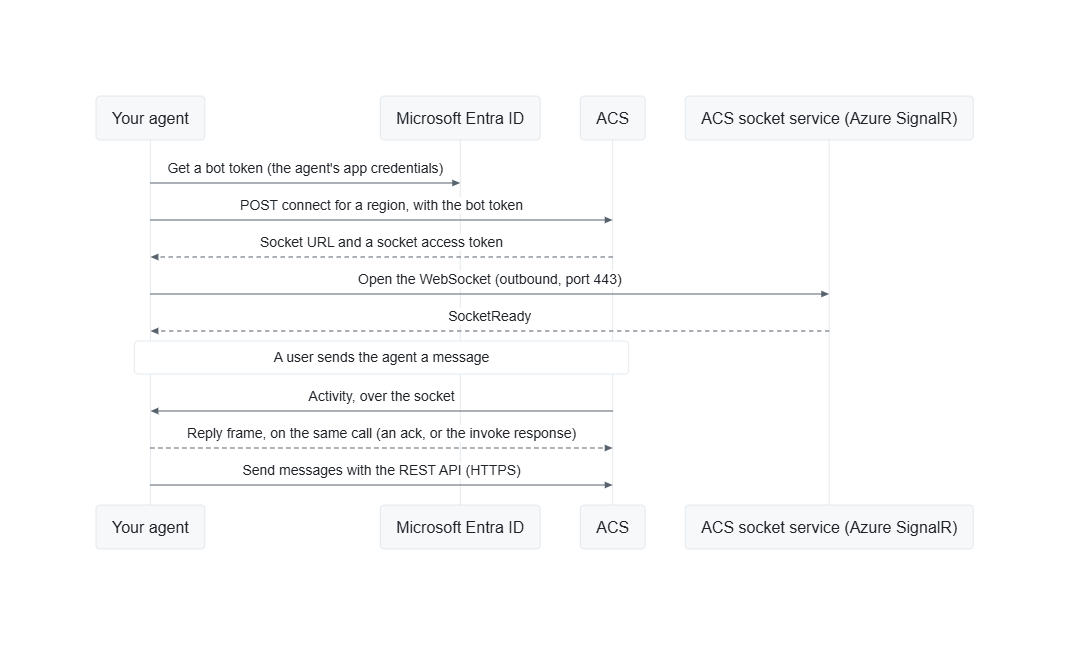
- Connect. Your agent gets a token for its own app registration, the same token it uses to send messages, and calls the ACS connect endpoint for a region. ACS checks that socket mode is on for the agent and returns a URL and an access token for one socket.
- Open the socket. Your agent opens a WebSocket to that URL. Once ACS is ready to deliver to it, ACS sends a
SocketReadymessage. - Receive activities. ACS sends each activity to the agent over the socket. The activity is the same JSON your HTTPS endpoint would receive.
- Respond. Your agent's handler returns a reply on the same call. For an invoke (such as a card action) the reply is the invoke response. For any other activity, the reply is an acknowledgment that the agent has handled it. ACS waits for this reply, just as it waits for the HTTP response from an HTTPS messaging endpoint.
- Send. To post messages, reply in a thread, update cards, and so on, your agent calls the ACS REST API over HTTPS, exactly as with an HTTPS endpoint.
Regions
Teams handles each conversation in one region, and ACS delivers the conversation's activities only to sockets connected for that region. Your agent must connect at least one socket in each region. Otherwise, it won't receive activities from conversations in that region. To cover all users, connect to all regions, currently: amer, emea, and apac. The Teams SDK does this by default.
Multiple instances and load distribution
Each instance of your agent opens its own sockets, one per region. ACS sends each activity to one of the agent's sockets in the activity's region, favoring the socket with the fewest activities waiting for a reply. ACS doesn't keep a conversation on the same socket: two messages in one conversation can go to different instances, just as two HTTPS requests can land on different instances behind a load balancer. Keep conversation state in shared storage, as you would for an HTTPS agent.
ACS doesn't wait for one activity's reply before it sends the next on the same socket. Handle activities concurrently, and don't block the handler while waiting on slow work.
Delivery and timing
- Time limit. ACS waits for your reply for the same duration as with HTTPS delivery: currently 25 seconds, given in each delivery as
deadlineMs. After that, the delivery fails. If your work takes longer, acknowledge the activity, then finish the work in the background. - No retry on the socket. ACS sends each activity once, to one socket. If a reply doesn't arrive (the agent was too slow, the socket closed, or the reply was invalid), ACS considers the delivery to have failed. It doesn't resend it on another socket.
- Duplicates. As with HTTPS delivery, the sender of an activity can retry a delivery that failed, so your agent might occasionally see an activity twice. Use the activity
idto detect duplicates. - Ordering. Activities can arrive concurrently and on different instances, so don't rely on their order.
Connection lifecycle
Sockets are long-lived but not permanent:
- Token expiry. Each socket's access token expires after a set lifetime, currently 60 minutes (given as
expiresInwhen you connect), and the socket closes when its token expires. Replace each socket shortly before its token expires to avoid a gap. The Teams SDK does this automatically. - Other disconnections. Sockets can close during ACS service updates or network problems. Reconnect with backoff after these transient disconnections. If ACS sends a
SocketClosingnotice, follow its reconnect instructions (see Handle disconnects). Don't reconnect if socket mode is turned off for the agent. - Redundancy. While a socket is reconnecting, activities for that region go to the agent's other sockets in the region. If there are none, the activity is not delivered. Running two or more instances of your agent keeps delivery going while one instance reconnects.
- Turning it off. When you turn off socket mode for an agent, ACS closes the agent's open sockets within about a minute and refuses new ones.
Limits
| Limit | Value |
|---|---|
| Open sockets per agent, per region | 4. A socket that's being replaced by a refresh doesn't count towards this limit. |
| Time to reply to an activity | 25 seconds (deadlineMs) |
| Reply size, from your agent to ACS | 1 MB |
| Socket access token lifetime | 60 minutes (expiresIn) |
| Sockets per access token | 1 |
| Regions | amer, emea, apac |
When an agent already has the maximum number of sockets in a region, the connect request fails with 429 Too Many Requests and a Retry-After header.
Security
- Outbound only. Your agent opens every connection. It needs no inbound ports, public IP address, or public DNS name.
- Authenticated with the agent's own identity. To connect, your agent proves its identity with the token from its Microsoft Entra app registration, the same token it uses to send messages. ACS only gives a socket to the agent the token belongs to.
- Scoped, short-lived socket tokens. Each socket token works for one socket, for that agent only, and expires. ACS delivers only that agent's activities on the socket. Like any access token, treat the socket's token as a secret: don't log it or share it.
- Encrypted. All connections use TLS.
For IT admins
Network requirements. Socket mode needs these outbound HTTPS (port 443) connections. No inbound connection is needed.
Destination Used for login.microsoftonline.comGetting the agent's token. Every agent needs this, whichever delivery method it uses. *.botapi.skype.comThe connect request *.service.signalr.netThe socket. Proxies and firewalls must allow WebSocket upgrades and long-lived connections. The serviceUrlhosts in incoming activities (for example,smba.trafficmanager.net)Sending messages with the ACS REST API. Every agent needs this, whichever delivery method it uses.