Note
Access to this page requires authorization. You can try signing in or changing directories.
Access to this page requires authorization. You can try changing directories.
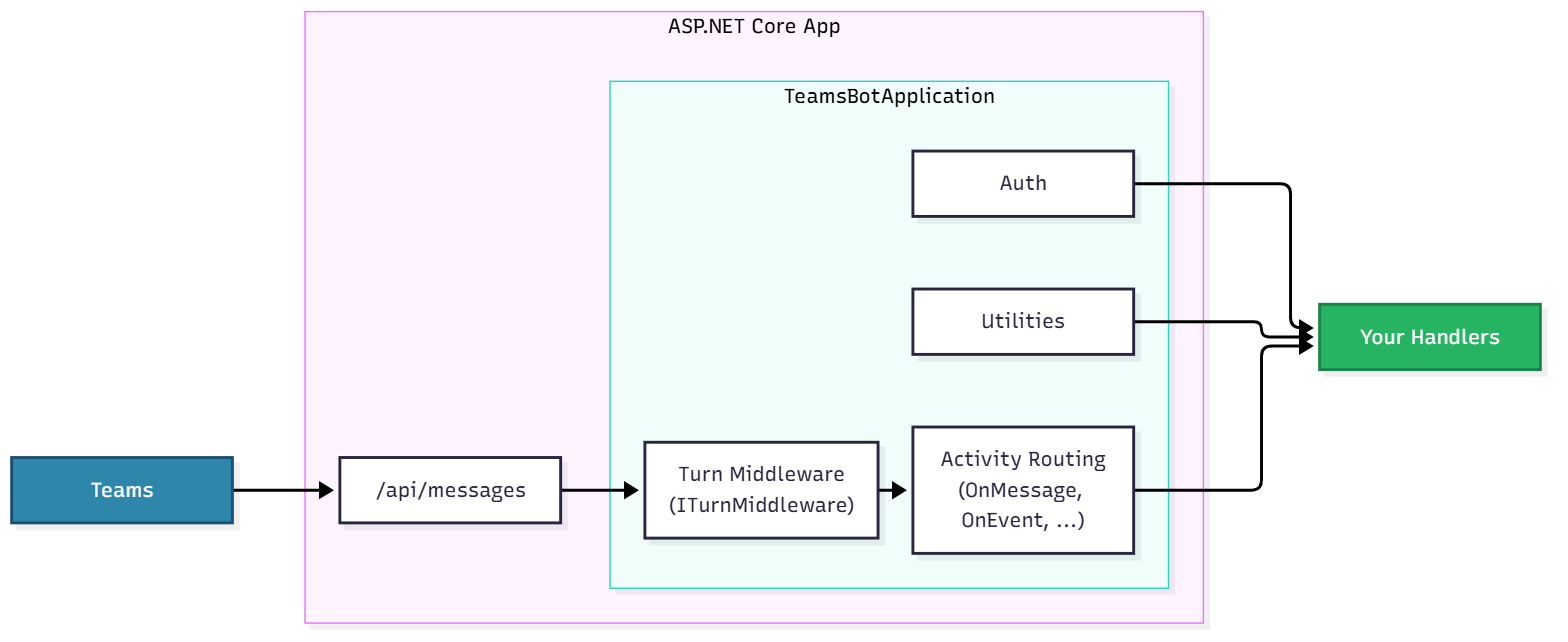
The app is the main entry point for your agent. It is a TeamsBotApplication, built on top of a standard ASP.NET Core web application. You register it at startup with builder.Services.AddTeamsBotApplication() and expose it as your bot's HTTP endpoint with app.UseTeamsBotApplication() — see the quickstart or Teams SDK Code Basics for the full setup.
It is responsible for:
- Hosting and running the server (via ASP.NET Core / Kestrel)
- Serving incoming requests on
/api/messagesand routing them to your handlers - Handling authentication for your agent to the Teams backend (via your
AzureAdconfiguration) - Providing helpful utilities which simplify interacting with the Teams platform (
context.SendAsync,context.ReplyAsync, the API client, etc.) - Letting you extend behavior with standard ASP.NET Core middleware and dependency injection
Definitions
- Activity: The Teams-specific payload that flows between the user and your app. Activities include things like messages, reactions, adaptive card actions, and installs.
- InvokeActivity: A specific kind of activity triggered by user interaction (like submitting a form), which may or may not require a response.
- Handler: The logic in your application that reacts to an activity. You register handlers (
OnMessage,OnMessageReaction,OnEvent, …) that decide what to do, when, and how to respond.

Core Components
Hosting (ASP.NET Core)
- Runs the web server (Kestrel) and exposes your bot at
/api/messages - Managed with the standard host lifecycle (
IHostApplicationLifetimefor start/stop)
Activity Routing
- Routes incoming activities to the appropriate typed handler (
OnMessage,OnEvent,OnMembersAdded,OnInstall, …)
Turn Middleware
- Cross-cutting logic that runs on every turn (logging, metrics, etc.)
- Implement
ITurnMiddlewareand register it withteams.UseMiddleware(...)
Utilities
- Convenience methods for interacting with Teams (
context.SendAsync,context.ReplyAsync,context.TypingAsync, thecontext.Apiclient, and streaming)
Auth
- Handles authenticating your agent with the Teams backend using your
AzureAdconfiguration - Validates inbound tokens before any handler runs (see Teams SDK incoming request authentication).
Dependency Injection
- Register your own services in
builder.Servicesand inject them into handlers and middleware, just like any ASP.NET Core app
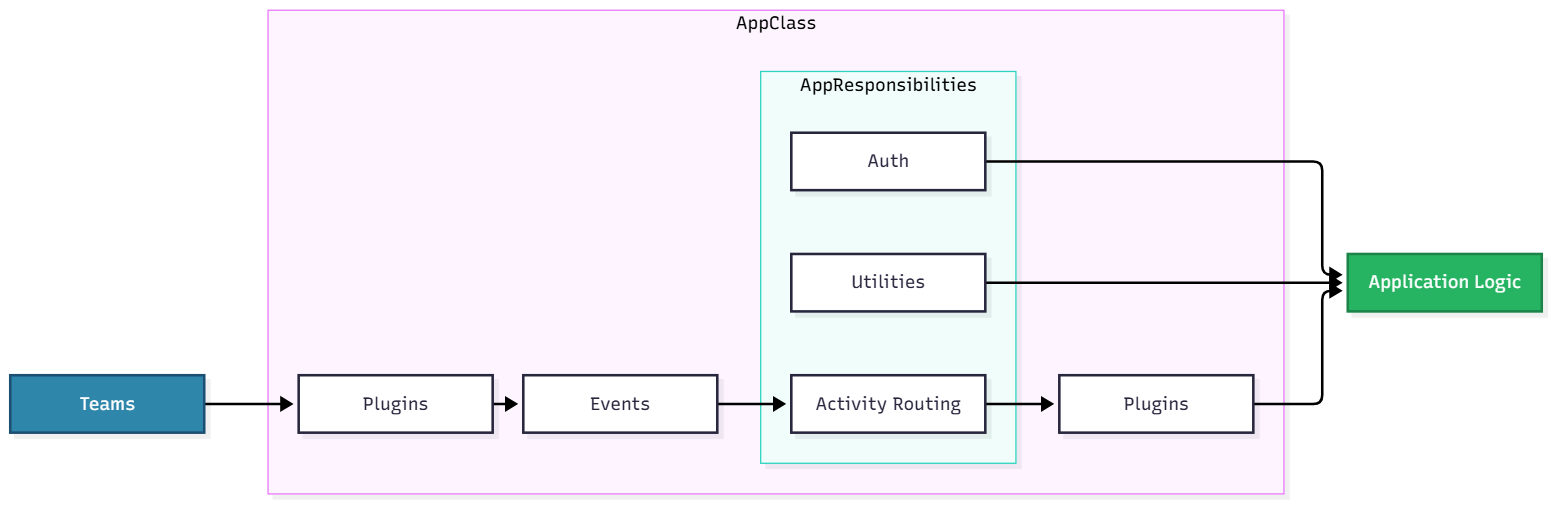
The App class is the main entry point for your agent.
It is responsible for:
- Hosting and running the server (via plugins)
- Serving incoming requests and routing them to your handlers
- Handling authentication for your agent to the Teams backend
- Providing helpful utilities which simplify the ability for your application to interact with the Teams platform
- Managing plugins which can extend the functionality of your agent
Definitions
- Event: Anything interesting that happens on Teams — or within your application as a result of handling an earlier event.
- Activity: A special type of Teams-specific event. Activities include things like messages, reactions, and adaptive card actions.
- InvokeActivity: A specific kind of activity triggered by user interaction (like submitting a form), which may or may not require a response.
- Handler: The logic in your application that reacts to events or activities. Handlers decide what to do, when, and how to respond.
Core Components by Language
Plugins
- Can be used to set up the server
- Can listen to messages or send messages out
Events
- Listens to events from core plugins
- Emit interesting events to the application
Activity Routing
- Routes activities to appropriate handlers
Utilities
- Provides utility functions for convenience (like sending replies or proactive messages)
Auth
- Handles authenticating your agent with Teams, Graph, etc.
- Simplifies the process of authenticating your app or user for your app
Plugins (Secondary)
- Can hook into activity handlers or proactive scenarios
- Can modify or update agent activity events
Plugins
You'll notice that plugins are present in the front, which exposes your application as a server, and also in the back after the app does some processing to the incoming message. The plugin architecture allows the application to be built in an extremely modular way. Each plugin can be swapped out to change or augment the functionality of the application. The plugins can listen to various events that happen (e.g. the server starting or ending, an error occurring, etc), activities being sent to or from the application and more. This allows the application to be extremely flexible and extensible.

