Note
Access to this page requires authorization. You can try signing in or changing directories.
Access to this page requires authorization. You can try changing directories.
Appropriate roles: Report viewer | Executive report viewer
In addition to Microsoft 365 Secure Productivity workloads, the AI Business Solutions & Security Insights extends its Growth Propensity and Land and Expand (LXP)-based machine learning models for Windows 365 and Cloud Endpoints. The Cloud Endpoints Opportunities experience offers tailored data and insights for marketing, sales, and customer success organizations to grow usage and upsell specifically for Windows 365 along the entire customer life cycle. Signals such as Microsoft Intune usage, Windows 365 white space including Microsoft 365 for frontline workers, tenant industry, and licensing are distilled into actionable insights at account level.
Key models and data include:
- Total Windows 365 eligible Microsoft 365 licenses and white space metrics to allow measurement of overall opportunity size.
- Targeting scenarios for customers based on Land/Expand/Expand to Frontline (Flex) framework used by Microsoft sellers.
- Windows 365 monthly active usage (MAU) and paid available units (PAU) as well as Intune and Microsoft Entra ID utilization.
- Microsoft Commerce Incentive (MCI) eligibility to propel Windows 365 adoption and license expansion.
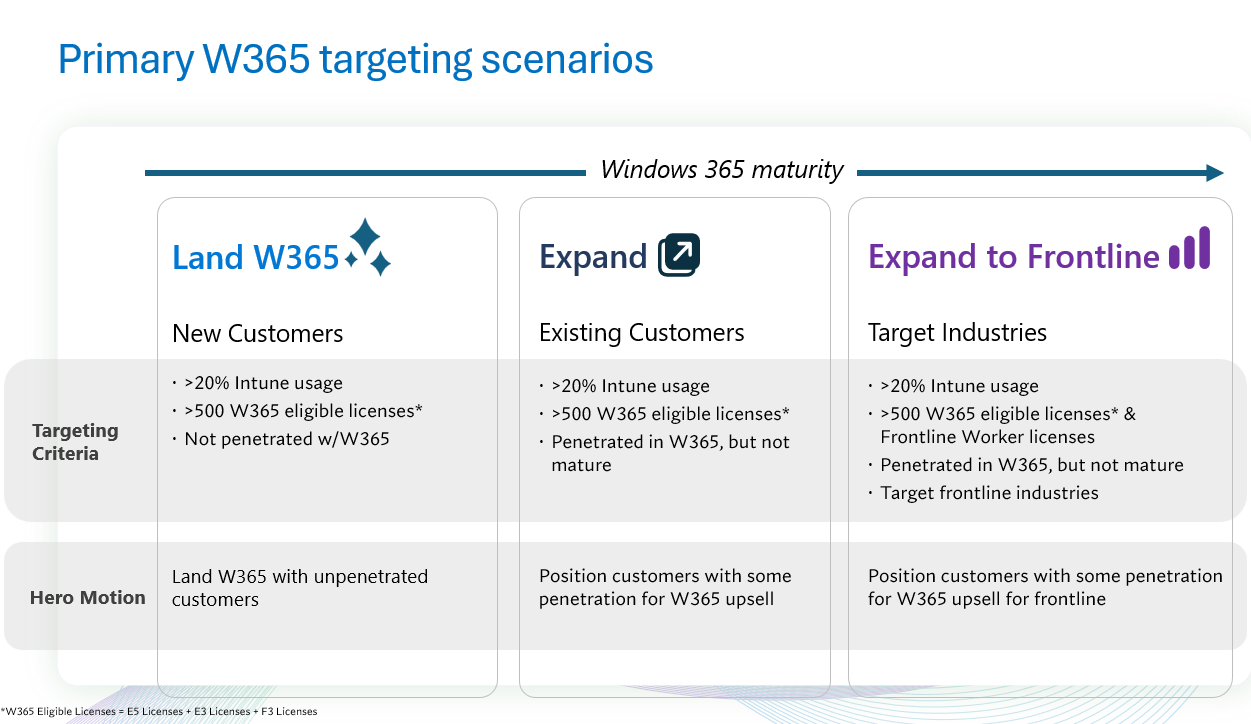
The Window 365 LXP framework focuses on key targeting scenarios, and prefilters for high propensity customers based on Windows 365 eligible licenses, Intune usage, licensing, and tenant industry. However, the remaining tenants that don't meet the above criteria are also available for review, with one caveat: another filter exists in the Cloud Endpoints experience that isn't present in other growth opportunities experiences. To be visible, the customer must have at least 100 eligible Windows 365 licenses.
For more information, review the Sales Motion field in the following data dictionary.
Cloud Endpoints Opportunities tab data dictionary
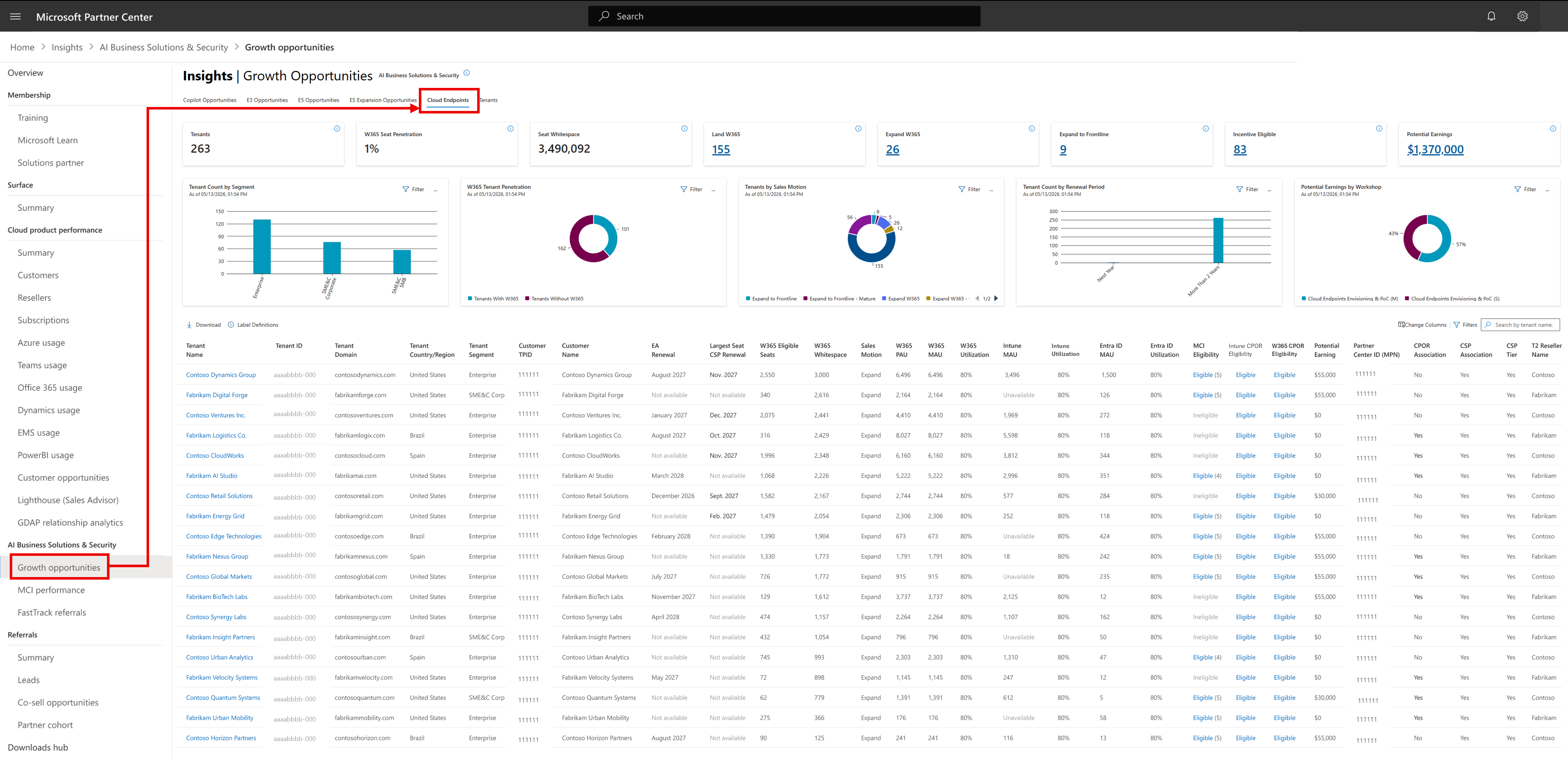
Following is a view of the data available in the Cloud Endpoints Opportunities tab.
Default Columns
| Name | Definition |
|---|---|
| Cloud Endpoints Opportunities tab | The Cloud Opportunities tab lists each Claiming Partner of Record (CPOR) and CSP associated tenant with more than 100 W365 eligible licenses. Using Microsoft aligned propensity framework and usage metrics, the data shows tenants likely to add W365 licenses or needs more engagement. |
| KPI tile: Tenants | Total number of tenants with >100 W365 eligible licenses. |
| KPI tile: W365 Seat Penetration | Total W365 PAU / W365 eligible Microsoft 365 licenses across all tenants. |
| KPI tile: W365 Seat Whitespace | W365 eligible licenses - W365 PAU, showing available space for license expansion. |
| KPI tile: Land W365 | Count of tenants in Land W365 targeting scenario. These customers have higher propensity to purchase W365 because they have >20% Intune usage and 500 or more W365 eligible licenses. |
| KPI tile: Expand W365 | Count of tenants in Expand W365 targeting scenario. These customers have some W365 PAU and have higher propensity to further purchase W365 licenses because they have >20% Intune usage and 500 or more W365 eligible licenses. |
| KPI tile: Expand to Frontline (Flex) | Count of tenants in Expand to Frontline (Flex) targeting scenario. These customers have some W365 PAU, have frontline licenses, match certain priority frontline industries, and have higher propensity to further purchase W365 licenses because they have >20% Intune usage and 500 or more W365 eligible licenses. |
| KPI tile: Incentive Eligible | Tenants who have workloads that are eligible for MCI engagements. |
| KPI tile: Potential Earnings | Potential earnings from all tenants via MCI engagements. This isn't a precise number, but more an estimate of incentive earnings. This estimate isn't simply the sum of potential earnings in the data table because one MCI engagement can span multiple workloads. Thus, partners can't sum potential earnings across workloads, only across tenants. |
| Tenant Name | Name of the customer tenant as entered by the customer when the tenant was first created. |
| Tenant ID | Unique identifier of a customer tenant that contains all the unique users, domains, and subscriptions, and is administered by the tenant admin. |
| Tenant Domain | The email domain of the tenant. |
| Tenant Country/Region | The country/region assigned to the tenant when the tenant was first created. |
| Tenant Segment | Indicates how Microsoft classifies the customer tenant segment. |
| TPID | The TPID is associated with the Tenant ID. For any given Tenant ID on any given date, there's only one customer TPID. |
| Customer Name | Name of the customer TPID. |
| EA Renewal | Month when the Microsoft Enterprise Agreement (EA) is up for renewal. This data only shows if the tenant has the partner's name listed as the EA reseller. |
| Largest Seat CSP Renewal | Month when the largest (by license count) Cloud Solutions Provider (CSP) subscription is up for renewal. This data is only visible if the tenant has the partner name listed as the CSP provider for the subscription. This applies to all Microsoft 365 related subscriptions only. |
| W365 Eligible Seats | The sum of Microsoft 365 licenses that are eligible for W365 upsell. This is the sum of the ME5, ME3, and F3 licenses. |
| W365 Whitespace | W365 eligible licenses - W365 PAU, showing available space for license expansion. |
| Sales Motion | Categorizes the tenant based on the targeting scenario. There are multiple possible Sales Motions: Land W365: These customers have higher propensity to purchase W365 because they have greater than 20% Intune usage and 500 or more W365 eligible licenses. Expand W365: These customers have some W365 PAU and have higher propensity to further purchase W365 licenses because they have greater than 20% Intune usage and 500 or more W365 eligible licenses. Expand to Frontline (Flex): These customers have some W365 PAU, have frontline licenses, match certain priority frontline industries, and have higher propensity to further purchase W365 licenses because they have greater than 20% Intune usage and 500 or more W365 eligible licenses. Expand W365 - Mature: These customers meet the same criteria as "Expand W365" but already have > 250 W365 PAU. Expand to Frontline (Flex) - Mature: These customers meet the same criteria as "Expand to Frontline (Flex)" but already have > 250 W365 PAU. Low Whitespace: These customers have less than 500 W365 eligible licenses (but still greater than 100 W365 eligible licenses and more than 20% Intune usage). Nurture Intune: These customers have less than 20% Intune usage (but still greater than 100 W365 eligible licenses). |
| W365 PAU | PAU is the measure of paid licenses assigned to a tenant that is revenue associated. PAU is always less than or equal to the number of licenses because PAU doesn't count trial licenses, promotional licenses, step-up SKUs, or any unpaid subscription. Also, PAU requires the license to be assigned to a user and requires the service plan to be enabled in the tenant admin portal. Since paid licenses fluctuate due to billing cycles, PAU smooths these fluctuations by applying logic that removes cyclical impacts. |
| W365 MAU | Monthly active usage for W365. MAU is the measure, determined by Microsoft product telemetry, of unique signed-in users who have taken one or more intentional actions in the last rolling 28 days. The intentional action establishes clear user intent to perform a specific business action. MAU only measures licensed users (can be free trial) as well. |
| W365 Utilization | The ratio of MAU divided by PAU, capped at 100%, specifically for W365. |
| Intune MAU | Monthly active usage for Intune. MAU is the measure, determined by Microsoft product telemetry, of unique signed-in users who have taken one or more intentional actions in the last rolling 28 days. The intentional action establishes clear user intent to perform a specific business action. MAU only measures licensed users (can be free trial) as well. |
| Intune Utilization | The ratio of MAU divided by PAU, capped at 100%, specifically for Intune. |
| Entra ID MAU | Monthly active usage for Microsoft Entra ID (P1 and P2 features). MAU is the measure, determined by Microsoft product telemetry, of unique signed-in users who have taken one or more intentional actions in the last rolling 28 days. The intentional action establishes clear user intent to perform a specific business action. MAU only measures licensed users (can be free trial) as well. |
| Entra ID Utilization | The ratio of MAU divided by PAU, capped at 100%, specifically for Entra ID (P1 + P2 features). |
| MCI Eligibility | Eligibility of the tenant and workload for one or more MCI engagements. This eligibility depends on the eligibility of the partner and customer, taking into account geography as well. Eligibility is automatically calculated based on whether the claiming partner country/region is within a customer's headquarters area*. Partners claiming customers outside of their headquarters area may be paused or removed from Microsoft Commerce Incentives. *See slide 32 "Microsoft Area Mapping" in the Microsoft Commerce Partner Incentives Guide available at https://aka.ms/MCI. |
| Intune CPOR Eligibility | Eligibility of the tenant and workload for CPOR claim. All CPOR claimable workloads may not be eligible for incentives. See Potential Earnings column for this information. |
| W365 CPOR Eligibiity | Eligibility of the tenant and workload for CPOR claim. All CPOR claimable workloads may not be eligible for incentives. See Potential Earnings column for this information. |
| Potential Earnings | Potential earnings from all tenants via MCI engagements and CPOR usage incentives. This isn't a precise number, but more an estimate of incentive earnings. |
| Partner Name | This is the name of the associated Partner Center ID (MPN). The associated partner is the partner on the specific claim with the tenant. This partner name is typically at a regional level. This could be a CPOR claim, a CSP association or more. Sometimes, the same tenant may be associated with multiple Partner IDs within an organization. Most commonly, if an organization has multiple lines of business (for example, CSP reseller and service based via CPOR), the same tenant may have different Partner IDs for the CSP association and the CPOR association. Sometimes, these different MPNIDs are eligible for different incentives, which is why they're shown separately. |
| Partner Center ID (MPN) | This is the associated Partner Center ID (MPN). The associated partner is the partner on the specific claim with the tenant. This partner name is typically at a regional level. This could be a CPOR claim, a CSP association or more. Sometimes, the same tenant may be associated with multiple Partner IDs within an organization. Most commonly, if an organization has multiple lines of business (for example, CSP reseller and service based via CPOR), the same tenant may have different Partner IDs for the CSP association and the CPOR association. Sometimes, these different MPNIDs are eligible for different incentives, which is why they're shown separately. |
| CPOR Association | Yes/No flag if this customer is associated with the partner via a CPOR claim. |
| CSP Association | Yes/No flag if this customer is associated with the partner via a CSP association. |
| CSP Tier | If this is associated via CSP, a breakdown of which customers are associated as a distributor or as a reseller. |
| T2 Reseller Name | For tier 2 CSP associations, this is the name of the T2 reseller. This data is only visible if the tenant has the partner name listed as the CSP provider for the subscription. This applies to all Microsoft 365 related subscriptions only. |
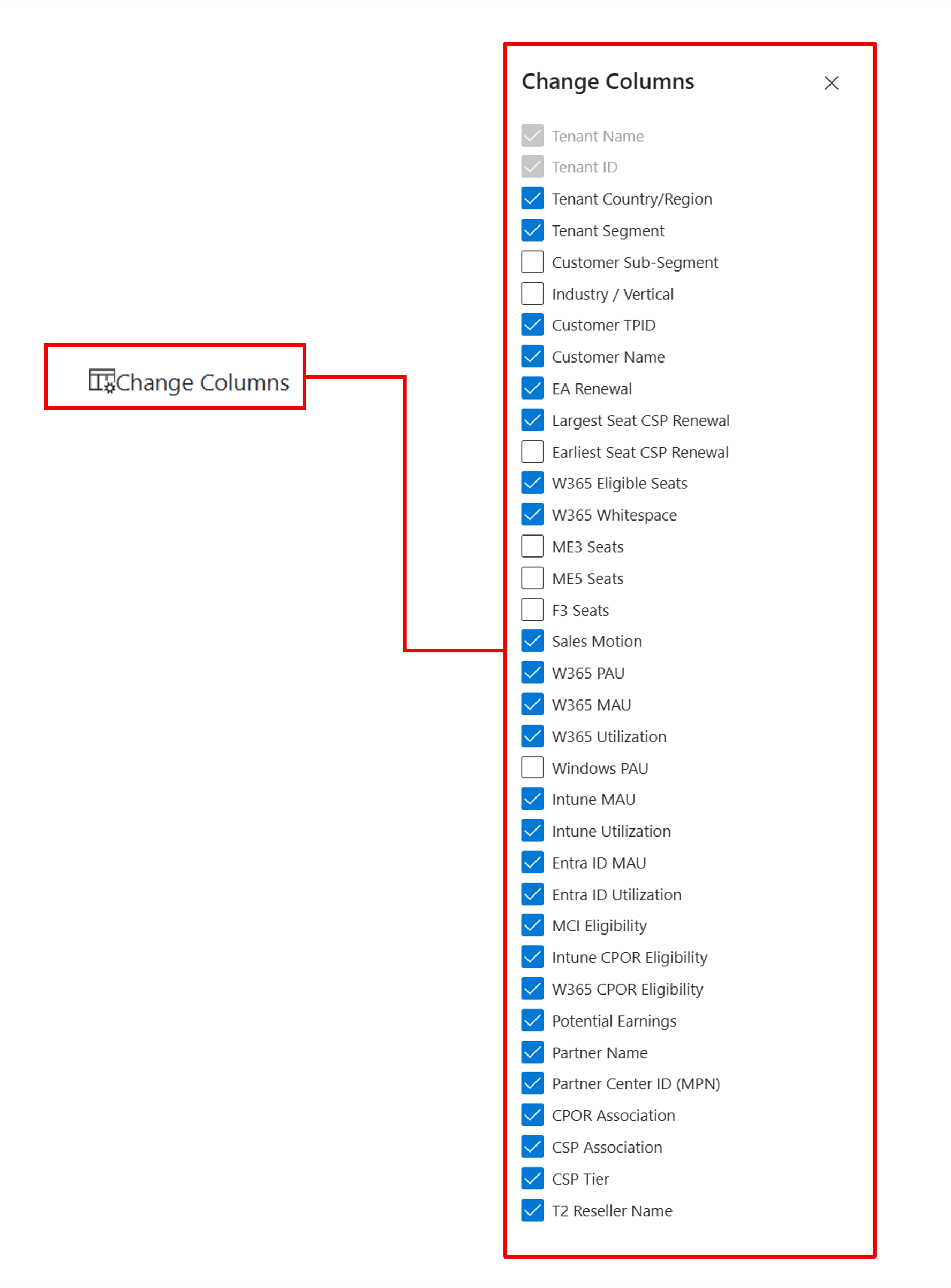
Hidden Columns
| Column Name | Description |
|---|---|
| Customer Sub-Segment | Represents Microsoft’s standardized customer subsegment classification at the customer Top Parent Organization ID (TPID) level. This is used to group customers into comparable market tiers for segmentation, targeting, and prioritization. |
| Industry/Vertical | Indicates the customer’s primary industry or vertical at the customer TPID level, enabling industry-specific segmentation, filtering, and go-to-market analysis within ASPX. |
| ME5 Seats | Breakdown of licenses that fall into the ME5 category. |
| ME3 Seats | Breakdown of licenses that fall into the ME3 category. |
| F3 Seats | Breakdown of licenses that fall into the F3 category. |
| Windows PAU | Total amount of windows (not W365) paid available units. PAU is the measure of paid licenses assigned to a tenant that is revenue associated. PAU is always less than or equal to the number of licenses because PAU doesn't count trial licenses, promotional licenses, step-up SKUs, or any unpaid subscription. Also, PAU requires the license to be assigned to a user and requires the service plan to be enabled in the tenant admin portal. Since paid licenses fluctuate due to billing cycles, PAU smooths these fluctuations by applying logic that removes cyclical impacts. |
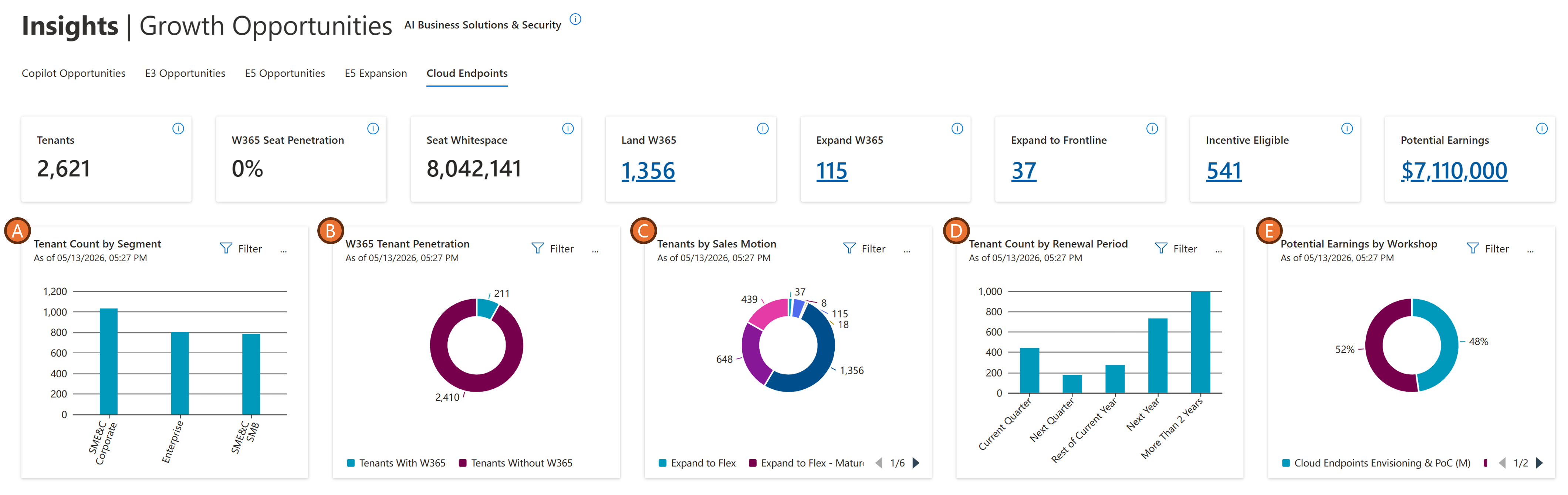
Charts
| Label | Column Name | Description |
|---|---|---|
| A. | Tenant Count by Segment | Count of tenants by Microsoft defined customer segmentation. |
| B. | W365 Tenant Penetration | Count of tenants by those that have W365 PAU vs. no W365 footprint. |
| C. | Tenant by Sales Motion | Count of tenants by Sales Motion, and an easy way to filter by sales motion. |
| D. | Tenant Count by Renewal Period | Count of tenants by renewal period. If an EA renewal is available, this is the EA renewal. Otherwise, this showcases the Largest Seat CSP Renewal, if that exists. If the tenant is associated to you through a non-transacting association (for example, CPOR), and you aren't the listed Licensing Solution Partner, then this chart won't surface those tenants. |
| E. | Potential Earnings by Workshop | Potential Earnings break down by MCI workshop. |
Customer data associations
Data in AI Business Solutions & Security Insights is limited to customers with whom partners have an established compliant association. A compliant association requires customer consent for data sharing, with availability of an opt-out option. Anonymized and derived data is only shared with customer consent. The specific associations configured in AI Business Solutions & Security Insights for data sharing purposes are outlined below.
Note
The Cloud Endpoints tab surfaces data for customer tenants that meet the following licensing criteria:
- Enterprise customers with more than 150 Microsoft 365 licenses, or
- Small Medium Enterprise & Channel (SME&C) with more than 25 Microsoft 365 licenses, and
- Customers with greater than 100 Windows 365 eligible licenses.
Any customer tenant meeting these license thresholds appears in ASPX, regardless of their Cloud Endpoints license count.
| Association | Description |
|---|---|
| CPOR | If partners claimed one or more workloads via CPOR with a customer, they can view data in AI Business Solutions & Security Insights across all workloads and SKUs for the associated tenant. Once a new CPOR claim is completed, data will be available in AI Business Solutions & Security Insights in alignment with the timing outlined in this Data Refresh article. |
| Cloud Solution Provider (CSP) | If partners are the transacting partner as stated via an existing CSP association with a tenant, they can view data across all workloads and SKUs for the associated tenant. This includes: - CSP Tier 1 and Tier 2 associations - Monthly and annual billing cycles For new CSP associations, data will be available in AI Business Solutions & Security Insights in alignment with the timing explained in this Data Refresh article. |
| Enterprise Agreements (EA) | If a partner is the Licensing Solution Provider (LSP) transacting on an EA with a customer, the partner can only see the EA renewal dates. Other data is currently not provided due to lack of customer consent for data sharing. |
We're assessing and expanding to other association types as customer consent is obtained and will update this section when new associations are added to AI Business Solutions & Security Insights.
Notes on usage data
In some cases, Monthly Active Usage (MAU) is greater than Paid Available Units (PAU). This can occur for these various reasons:
Unpaid or Trial Users: Some workloads allow usage by users who don't hold paid licenses. For example, in the case of Cloud Endpoints or Compliance workloads, features may be accessible to a broader set of users than those with paid entitlements. This leads to higher MAU counts compared to PAU.
Tenant-Level Policies: In security workloads like Microsoft Defender or Insider Risk Management (IRM), tenant-wide policies may apply protections to all users or devices, regardless of licensing. This results in MAU counts that include users not covered by paid licenses.
Misconfigured or Missing Licensing Data: There are cases where licensing data is incomplete or misaligned. For instance, if IRM isn't configured but Communication Compliance (CC) is, MAU may still be reported due to CC activity, while PAU remains zero for IRM.
Over-Deployment or Over-Usage: In security and compliance workloads, over-deployment is common. For example, a product like Purview may be deployed across an organization, but only a subset of users are licensed. This is seen as a monetization opportunity to convert active users into paid ones.
Multiple Workload Attribution: Some workloads aggregate usage across multiple features (for example, MIP DLP, DLM, DNR under Purview). If users engage with any of these features, they may be counted in MAU even if only one feature is licensed, inflating MAU relative to PAU.