Note
Access to this page requires authorization. You can try signing in or changing directories.
Access to this page requires authorization. You can try changing directories.
[This article is prerelease documentation and is subject to change.]
This article answers common questions about the Microsoft Dataverse semantic model that gives AI agents and Copilot experiences a shared, business-aware understanding of your Dataverse data.
Important
- This is a preview feature.
- Preview features aren’t meant for production use and might have restricted functionality. These features are subject to supplemental terms of use, and are available before an official release so that customers can get early access and provide feedback.
Why are some views from a table not visible in the semantic model?
Only public views with join conditions and sub-grid views are included in the semantic model. These view types are excluded:
- System views. This includes Quick Find, Advanced Find, Associated, and Lookup views.
- Personal views.
If a view you expect to see is missing, it's most likely one of these excluded types.
For more information about how views contribute to the semantic model, see Fine-tune semantic model signals.
Why does the semantic model show a Regenerating status?
The Regenerating status appears when a manual regeneration is triggered or the scheduled 12-hour regeneration cycle is running. The Regenerate button is grayed out while the regenerate job is queued or in progress.
Wait for the job to complete. The overview page refreshes and displays the updated timestamp when regeneration finishes.
Note
If the Regenerating status appears stuck for more than 24 hours, turn Dataverse Intelligence off and back on in the Power Platform admin center to force a restart.
How is the semantic model consumed by agents and Copilot experiences?
The semantic model is automatically consumed by the following experiences:
- Copilot in Power Apps
- Microsoft 365 Copilot with Dataverse
- Sales Agent in Microsoft 365
- Microsoft Copilot Studio agents over Dataverse data
Agents reference the semantic model associated with their app or knowledge source to understand and reason over your Dataverse data.
Why is the semantic model not appearing for my agent or Copilot experience?
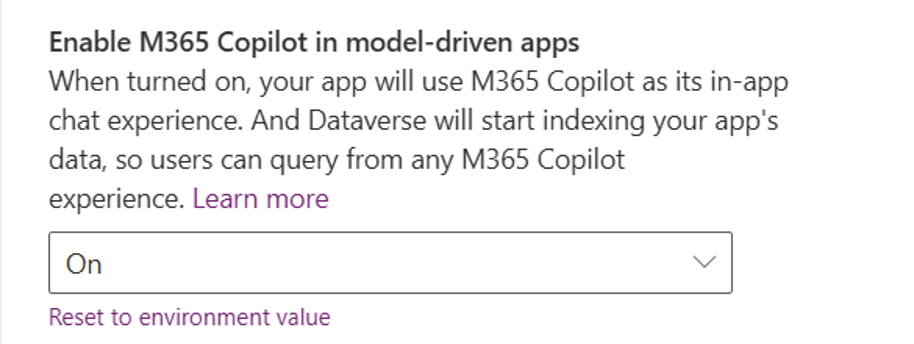
Semantic models are available only when the Copilot experience is consuming Dataverse data with semantic indexing enabled. For Microsoft 365 Copilot experiences specifically, you must enable Microsoft 365 Copilot in model-driven apps in the app settings.
For an overview of which experiences automatically use the semantic model, see Dataverse semantic model overview.
How does the semantic model behave when an environment is copied or moved?
The Dataverse semantic model doesn't currently support application lifecycle management (ALM). ALM support will be available when the feature reaches general availability. After any ALM action - such as copying or moving an environment - turn Dataverse Intelligence off and back on in the Power Platform admin center to force a restart.
Why can't I delete a glossary entry that was created by the system?
System-defined glossary entries are part of a solution provided by Microsoft and can't be deleted. You can edit them to update the term or definition to better reflect your organization's terminology.
For instructions on editing glossary entries, see Manage semantic model glossary entries.
What does Secondary_model mean in the name of a Microsoft 365-enabled semantic model?
Secondary_model is a naming convention that indicates the semantic model is not ALM-compatible. If you see this in a model name, the model doesn't carry over when the environment is copied or moved. For details on ALM behavior and the recommended workaround, see How does the semantic model behave when an environment is copied or moved?
How long does it take for the semantic model to reflect a newly created or updated view?
The semantic model automatically regenerates every 12 hours. To reflect a change immediately, trigger a manual regeneration from the semantic model overview page by selecting Regenerate.
Regeneration time depends on the volume of changes:
| Scenario | Approximate generation time |
|---|---|
| Initial generation | Up to 2 hours |
| Incremental changes | Up to 30 minutes |
For steps to trigger a manual regeneration, see Regenerate semantic model.