Note
Access to this page requires authorization. You can try signing in or changing directories.
Access to this page requires authorization. You can try changing directories.
For machines with an Outlook installation, you can manage your mailboxes by using the Outlook actions.
![IMPORTANT] Outlook automation actions don't support the new Outlook for Windows application. Ensure you're using the Outlook desktop application.
After you create an Outlook instance by using the Launch Outlook action, use the Retrieve email messages from Outlook action to get the messages from a specified account and mail folder.
Important
When you filter the retrieved results by modifying the From contains or To contains argument in the Retrieve email messages from Outlook action, using email addresses in plain display format (SMTP) doesn't yield any data if the email addresses are stored in x.500 format.
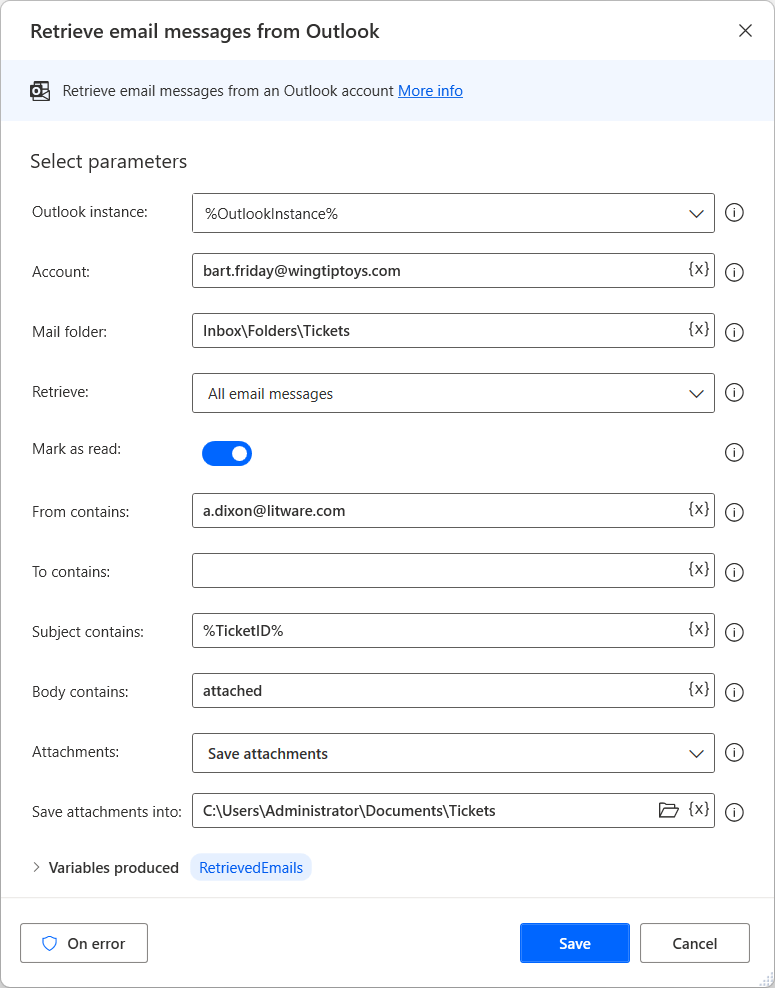
The following example retrieves all the email messages from the Tickets folder, a subfolder of the Inbox. The specified filters limit the results to messages from a specific sender that contain particular words in their subject and body.
The Process email messages in Outlook action processes email messages retrieved by the Retrieve email messages from Outlook action. To use this action, you must provide an Outlook instance, an account, and a variable with retrieved emails. Then, you can select whether to move, delete, or mark as read the selected messages.
Store Outlook email messages locally by using the Save Outlook email messages action. Specify an Outlook instance, an account, a variable with the messages to save, and the format and location for the created files.
To close an open Outlook instance, use the Close Outlook action.
Launch Outlook
Launch Outlook and create a new Outlook instance.
Input parameters
This action doesn't require any input.
Variables produced
| Argument | Type | Description |
|---|---|---|
| OutlookInstance | Outlook instance | The specific Outlook instance for use with later Outlook actions |
Exceptions
| Exception | Description |
|---|---|
| Failed to launch Outlook | Indicates a problem launching Outlook |
Retrieve email messages from Outlook
Retrieve email messages from an Outlook account.
Input parameters
| Argument | Optional | Accepts | Default Value | Description |
|---|---|---|---|---|
| Outlook instance | No | Outlook instance | The Outlook instance to work with. Specify this variable in a Launch Outlook action | |
| Account | No | Text value | The name of the Outlook account (data file name) to work with. | |
| Mail folder | No | Text value | The name of the folder to retrieve messages from. Enter the full folder path for subfolders (ex: Inbox\Work) | |
| Retrieve | N/A | All email messages, Unread email messages only, Read email messages only | All email messages | Specifies whether to retrieve all messages in the folder or only the unread ones |
| Mark as read | N/A | Boolean value | True | Specifies whether to mark as read all the unread messages retrieved |
| From contains | Yes | Text value | The full email address of the sender whose messages to retrieve. Leave this attribute blank to retrieve all messages regardless of the sender | |
| To contains | Yes | Text value | The full email address(es) of the recipient(s) (separated by space or semicolon if more than one) for the messages to retrieve. Leave this attribute blank to retrieve all messages regardless of the recipient(s) | |
| Subject contains | Yes | Text value | The key phrase to find within the email subject. Leave this attribute blank to retrieve all email messages regardless of their subject | |
| Body contains | Yes | Text value | The key phrase to find within the email body. Leave this attribute blank to retrieve all email messages regardless of their content | |
| Attachments | N/A | Save attachments, Don't save attachments | Don't save attachments | Specifies whether to save the attachments of the email messages retrieved or not |
| Save attachments into | No | Folder | The path to save the attachments of the retrieved emails into |
Variables produced
| Argument | Type | Description |
|---|---|---|
| RetrievedEmails | List of Outlook mail messages | The retrieved email messages for later processing. The variable contain a list of Outlook message objects |
Exceptions
| Exception | Description |
|---|---|
| Failed to find Outlook account | The specified Outlook account doesn't exist. |
| Mail-folder specified not valid in Outlook | Indicates that the specified mail folder isn't valid |
| Directory for saving attachments not found | Indicates that the directory to save the attachments into doesn't exist |
| Failed to retrieve email messages from Outlook | Indicates a problem retrieving the email messages from Outlook |
Send email through Outlook
Create and send a new email message through Outlook.
Input parameters
| Argument | Optional | Accepts | Default Value | Description |
|---|---|---|---|---|
| Outlook instance | No | Outlook instance | The Outlook instance to work with. Specify this variable in a Launch Outlook action | |
| Account | No | Text value | The name of the Outlook account (data file name) to work with. | |
| Send email from | N/A | Account, Other mailbox | Account | Specifies whether to send the email using the specified account or a different one, for example from a shared mailbox |
| Send from | No | Text value | The name of the Outlook account to send the email from; for example, a shared mailbox. | |
| To | No | Text value | The email addresses of the recipients. To enter more than one email address, separate the list of addresses by spaces or semicolons. | |
| CC | Yes | Text value | The email addresses of the CC recipients. To enter more than one email address, separate the list of addresses by spaces or semicolons. | |
| BCC | Yes | Text value | The email addresses of the BCC (hidden) recipients. To enter more than one email address, separate the list of addresses by spaces or semicolons. | |
| Subject | Yes | Text value | The subject of the email | |
| Body | Yes | Text value | The text of the body. | |
| Body is HTML | N/A | Boolean value | False | Specifies whether to interpret the body of the email as HTML coding |
| Attachment(s) | Yes | List of Files | The full path of any attachments. Enclose multiple files in double quotes (") and separate them by a space character. |
Variables produced
This action doesn't produce any variables.
Exceptions
| Exception | Description |
|---|---|
| Failed to find Outlook account | Indicates that the specified Outlook account doesn't exist. Power Automate doesn't throw this error for the email addresses populated in the Send from input parameter |
| Failed to send email | Indicates a problem sending the email |
| Attachment not found | Indicates that the specified attachment(s) don't exist |
Process email messages in Outlook
Move or delete an email (or a list of email messages) retrieved by a Retrieve emails from Outlook action.
Input parameters
| Argument | Optional | Accepts | Default Value | Description |
|---|---|---|---|---|
| Outlook instance | No | Outlook instance | The Outlook instance to work with. Specify this variable in a Launch Outlook action | |
| Account | No | Text value | The name of the Outlook account (data file name) to work with. | |
| Email messages to process | No | List of Outlook mail messages | The email message(s) to process. Use a variable populated by a Retrieve email messages from Outlook action | |
| Operation | N/A | Delete email messages, Move email messages to mail folder, Mark as unread | Move email messages to mail folder | Specifies which operation to perform on the specified email messages |
| Mail folder | No | Text value | The name of the folder to retrieve messages from. Enter the full folder path for subfolders (for example, Inbox\Work) |
Variables produced
This action doesn't produce any variables.
Exceptions
| Exception | Description |
|---|---|
| Failed to find Outlook account | The specified Outlook account doesn't exist. |
| Specified mail-folder doesn't exist | Indicates that the specified mail folder doesn't exist |
| Failed to process email messages in Outlook | Indicates a problem processing the specified email messages in Outlook |
Save Outlook email messages
Save Outlook email messages for an account.
Input parameters
| Argument | Optional | Accepts | Default Value | Description |
|---|---|---|---|---|
| Outlook instance | No | Outlook instance | The Outlook instance to work with. Specify this variable in a Launch Outlook action | |
| Account | No | Text value | The name of the Outlook account (data file name) to work with. | |
| Email message(s) to save | No | List of Outlook mail messages | The email message(s) to save. Use a variable populated by a 'Retrieve email messages from Outlook' action | |
| Save format | N/A | Text only (.txt), Outlook template (.oft), Outlook message format (.msg), Outlook message format - Unicode (.msg), HTML (.html), MHT files (.mht) | Outlook message format (*.msg) | Specifies the format to save the messages |
| File name | N/A | Default, Custom | Default | Specifies whether to save the messages using the default name (subject) or provide another |
| Save as | No | Text value | Specifies the custom name for messages' name, which differs from message to message by an automatically added suffix | |
| Save email message(s) to | No | Folder | The folder to save the messages to |
Variables produced
| Argument | Type | Description |
|---|---|---|
| StoredMessagesFiles | List of Text values | The file paths of the saved email messages for later processing |
Exceptions
| Exception | Description |
|---|---|
| Failed to find Outlook account | The specified Outlook account doesn't exist. |
| Directory not found | The specified email messages can't be saved because the directory doesn't exist. |
| Email message is deleted or moved to another folder | The specified email messages can't be saved because they're moved or deleted. |
| Failed to save email messages | There's a problem saving the specified email messages. |
Respond to Outlook mail message
Respond to an Outlook message by replying, replying to all, or forwarding it.
Input parameters
| Argument | Optional | Accepts | Default Value | Description |
|---|---|---|---|---|
| Outlook instance | No | Outlook instance | The Outlook instance to work with. Specify this variable in a Launch Outlook action | |
| Account | No | Text value | The name of the Outlook account (data file name) to work with. | |
| Mail message | No | Outlook mail message | The mail message to act upon. Use a variable populated by a Retrieve email messages from Outlook action. | |
| Response action | N/A | Reply, Reply all, Forward | Reply | Specifies whether to reply (to sender or all) with a message or forward the received message. |
| To | No | Text value | The email addresses of the recipients. To enter more than one email address, separate the list of addresses by spaces or semicolons. | |
| CC | Yes | Text value | The email addresses of the CC recipients. To enter more than one email address, separate the list of addresses by spaces or semicolons. | |
| BCC | Yes | Text value | The email addresses of the BCC (hidden) recipients. To enter more than one email address, separate the list of addresses by spaces or semicolons. | |
| Body | Yes | Text value | The text of the body. | |
| Attachment(s) | Yes | List of Files | The full path of any attachments. Enclose multiple files in double quotes (") and separate them by a space character. |
Variables produced
This action doesn't produce any variables.
Exceptions
| Exception | Description |
|---|---|
| Failed to find Outlook account | The specified Outlook account doesn't exist. |
| Failed to send email | Indicates a problem sending the email |
| Attachment not found | Indicates that the specified attachment(s) don't exist |
Close Outlook
Close a previously launched Outlook instance.
Input parameters
| Argument | Optional | Accepts | Default Value | Description |
|---|---|---|---|---|
| Outlook instance | No | Outlook instance | The Outlook instance to work with. Specify this variable in a 'Launch Outlook' action. |
Variables produced
This action doesn't produce any variables.
Exceptions
| Exception | Description |
|---|---|
| Failed to close Outlook instance | Indicates a problem closing the Outlook instance |