Note
Access to this page requires authorization. You can try signing in or changing directories.
Access to this page requires authorization. You can try changing directories.
As data volume continues to grow, so does the challenge of wrangling that data into well-formed, actionable information. We want data that’s ready for analytics to populate visuals, reports, and dashboards, so we can quickly turn our volumes of data into actionable insights. With self-service data prep for big data in Power BI, you can go from data to Power BI insights with just a few actions.
Tip
Power BI Dataflow Gen1 is now in a legacy state and won't receive new feature investment. For Premium customers with Fabric access, Dataflow Gen2 is the recommended path, offering improvements in performance, scale, reliability, functionality, and built-in AI. Pro/PPU customers can continue to use Gen1 as Gen2 guidance for these scenarios is evolving. See Upgrade from Dataflow Gen1 to Dataflow Gen2 for upgrade guidance.
Dataflows are designed to support the following scenarios:
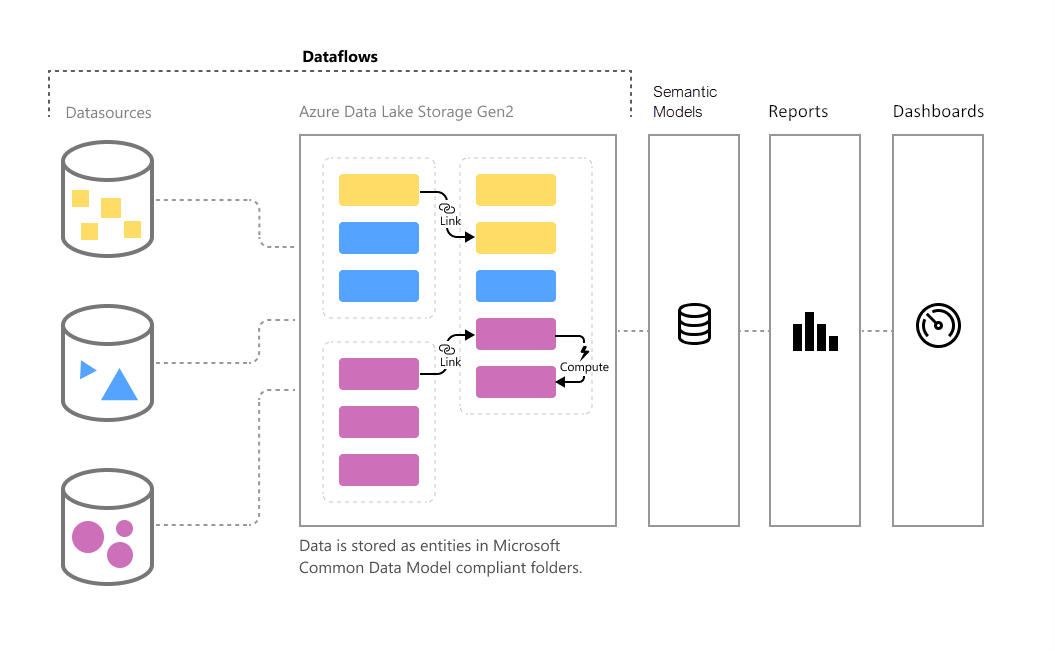
Create reusable transformation logic that many semantic models and reports can share inside Power BI. Dataflows promote reusability of underlying data elements, preventing the need to create separate connections with your cloud or on-premises data sources.
Persist data in your own Azure Data Lake Gen 2 storage, allowing you to expose it to other Azure services outside Power BI.
Create a single source of truth, curated from raw data using industry-standard definitions, which can work with other services and products in the Power Platform. Encourage uptake by removing analysts' access to underlying data sources.
Strengthen security around underlying data sources by exposing data to report creators in dataflows. This approach allows you to limit access to underlying data sources, reducing the load on source systems, and gives administrators finer control over data refresh operations.
If you want to work with large data volumes and perform ETL at scale, dataflows with Power BI Premium scales more efficiently and gives you more flexibility. Dataflows supports a wide range of cloud and on-premises sources.
You can use Power BI Desktop and the Power BI service with dataflows to create semantic models, reports, dashboards, and apps that use the Common Data Model. From these resources, you can gain deep insights into your business activities. Dataflow refresh scheduling is managed directly from the workspace in which your dataflow was created, just like your semantic models.
Note
Dataflows might not be available in the Power BI service for all US Government DoD customers. For more information about which features are available and which aren't, see Power BI feature availability for US Government customers.
Related content
This article provided an overview of self-service data prep for big data in Power BI, and the many ways you can use it.
The following articles provide more information about dataflows and Power BI:
- Creating a dataflow
- Configure and consume a dataflow
- Configuring Dataflow storage to use Azure Data Lake Gen 2
- Premium features of dataflows
- Dataflows considerations and limitations
- Dataflows best practices
- Power BI usage scenarios: Self-service data preparation
For more information about the Common Data Model, you can read its overview article: