Note
Access to this page requires authorization. You can try signing in or changing directories.
Access to this page requires authorization. You can try changing directories.
Applies to: ✅ Power BI Desktop and Power BI service
Use a Shape map visual to display data on any shape you can define—countries, regions, floor plans, seating charts, or custom boundaries. Color each area based on your data to quickly spot patterns, compare values across regions, and highlight areas that need attention. Choose from built-in maps for common regions, upload your own TopoJSON or GeoJSON files, or reference maps directly via URL.
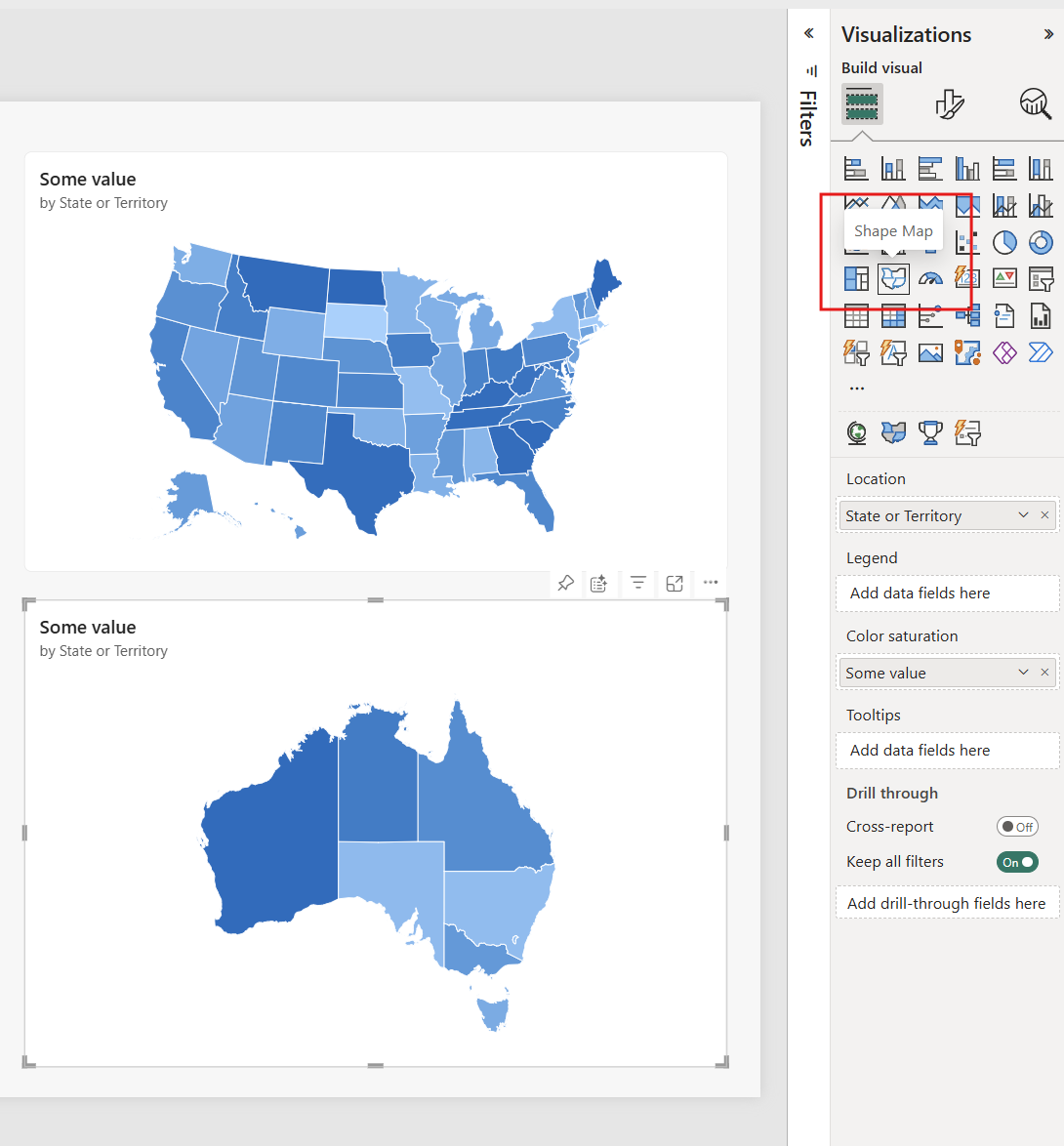
Create a shape map
You can test the Shape map control with the built-in maps, or you can use your own custom map as long as it meets the requirements outlined in the following section called Use custom maps. Shape map visuals are based on maps that you can find on the Internet, create yourself, or convert to TopoJSON or GeoJSON format. Examples of custom maps are: geographical, seating arrangements, floor plans, and others.
Add a shape map visual
- Open or create a report in Power BI Desktop or the Power BI service.
- In the Visualizations pane, select the Shape map icon to add an empty visual to the canvas.
- (Optional) Resize the visual so it's large enough to view region shading clearly.
Sample data for testing
To try the Shape map visual with sample data, you can add this TMDL script to a blank Power BI Desktop file. This script creates a table with US states and Australian states and territories, along with random values for demonstration purposes.
createOrReplace

	/// Table listing US states and Australian states and territories with random values, used for map visual demos.
	table Map

		/// Sum of RandomValue from the Map table, used for the map visual demo.
		measure 'Some value' = ```

				        SUM(Map[RandomValue])
				```
			formatString: #,0

		column RandomValue
			formatString: 0
			summarizeBy: sum
			isNameInferred
			sourceColumn: [RandomValue]

			annotation SummarizationSetBy = Automatic

		column 'Country or Region'
			dataCategory: Country
			summarizeBy: none
			isNameInferred
			sourceColumn: [Country or Region]

			annotation SummarizationSetBy = Automatic

		column 'State or Territory'
			dataCategory: StateOrProvince
			summarizeBy: none
			isNameInferred
			sourceColumn: [State or Territory]

			annotation SummarizationSetBy = Automatic

		partition Map = calculated
			mode: import
			source = ```

					VAR USAStates =
					    DATATABLE(
					        "Country or Region", STRING,
					        "State or Territory", STRING,
					        {
					            {"USA", "Alabama"},
					            {"USA", "Alaska"},
					            {"USA", "Arizona"},
					            {"USA", "Arkansas"},
					            {"USA", "California"},
					            {"USA", "Colorado"},
					            {"USA", "Connecticut"},
					            {"USA", "Delaware"},
					            {"USA", "Florida"},
					            {"USA", "Georgia"},
					            {"USA", "Hawaii"},
					            {"USA", "Idaho"},
					            {"USA", "Illinois"},
					            {"USA", "Indiana"},
					            {"USA", "Iowa"},
					            {"USA", "Kansas"},
					            {"USA", "Kentucky"},
					            {"USA", "Louisiana"},
					            {"USA", "Maine"},
					            {"USA", "Maryland"},
					            {"USA", "Massachusetts"},
					            {"USA", "Michigan"},
					            {"USA", "Minnesota"},
					            {"USA", "Mississippi"},
					            {"USA", "Missouri"},
					            {"USA", "Montana"},
					            {"USA", "Nebraska"},
					            {"USA", "Nevada"},
					            {"USA", "New Hampshire"},
					            {"USA", "New Jersey"},
					            {"USA", "New Mexico"},
					            {"USA", "New York"},
					            {"USA", "North Carolina"},
					            {"USA", "North Dakota"},
					            {"USA", "Ohio"},
					            {"USA", "Oklahoma"},
					            {"USA", "Oregon"},
					            {"USA", "Pennsylvania"},
					            {"USA", "Rhode Island"},
					            {"USA", "South Carolina"},
					            {"USA", "South Dakota"},
					            {"USA", "Tennessee"},
					            {"USA", "Texas"},
					            {"USA", "Utah"},
					            {"USA", "Vermont"},
					            {"USA", "Virginia"},
					            {"USA", "Washington"},
					            {"USA", "West Virginia"},
					            {"USA", "Wisconsin"},
					            {"USA", "Wyoming"}
					        }
					    )
					VAR AustraliaStates =
					    DATATABLE(
					        "Country", STRING,
					        "State", STRING,
					        {
					            {"Australia", "New South Wales"},
					            {"Australia", "Victoria"},
					            {"Australia", "Queensland"},
					            {"Australia", "Western Australia"},
					            {"Australia", "South Australia"},
					            {"Australia", "Tasmania"},
					            {"Australia", "Northern Territory"},
					            {"Australia", "Australian Capital Territory"}
					        }
					    )
					VAR AllStates = UNION(USAStates, AustraliaStates)
					RETURN
					    ADDCOLUMNS(
					        AllStates,
					        "RandomValue", RANDBETWEEN(1000, 1000000)
					    )
					```
Build the shape map
Select the empty Shape map visual.
In the Data pane, drag a geographic field to the Location well (for example, State, Region, or District).
Tip
You can mark a column as geographic by setting the Data category property when editing the semantic model.
Drag a numeric measure (for example, Sales, Population) to the Color saturation well.
With the visual still selected, in the Visualizations pane, select Format visual and expand Map settings.
Choose a Map type (for example, Italy, Mexico, USA) from the dropdown.
To display the map keys of the currently selected map, select View map type key.
Choose which way to display a three-dimensional object (the earth) as a two-dimensional map using the Projection dropdown.
- Equirectangular: Cylindrical projection that converts the globe into a grid with each rectangular cell having the same size, shape, and area.
- Mercator: Cylindrical projection with the equator depicted as the line of tangency. Polar areas are more distorted than Equirectangular projections.
- Orthographic: A projection from an infinite point, as if from deep space. It gives the illusion of a three-dimensional globe.
For more detailed information, see Esri map projections reference.
(Optional) Add a categorical field to Legend to classify the map regions by category.
(Optional) In the Visualizations pane, expand Colors to adjust the palette and other color settings.

Use custom maps
You can use the built-in map types or your own custom map as long as it meets the requirements outlined in Load a custom map. Shape map visuals are based on maps you can find, create, or convert to TopoJSON or GeoJSON format (for example: geographical regions, seating layouts, floor plans).
Load a custom map
You can load a custom map by uploading a file or providing a URL.
Upload a map file
- Add or select a Shape map visual.
- In the Visualizations pane, select Format visual and expand Map settings.
- In Map type, select Custom map.
- Select Add a map type.
- Browse to and select your .topojson or .geojson file, and then select Open.
- (Optional) Select View map type key to verify that the region names or IDs match your Location field values.
Add a map from URL
You can also reference a map file hosted online:
- Add or select a Shape map visual.
- In the Visualizations pane, select Format visual and expand Map settings.
- In Type, select URL.
- Paste the URL to a TopoJSON or GeoJSON file into Enter a URL, or use the Fx button to point to a measure that contains the URL.
This approach is useful when you want to share a map across multiple reports or use a map hosted in a central location.
Download and edit a custom map
If you previously uploaded a custom map and need to make changes, you can download it:
- Select the Shape map visual that uses the custom map.
- Open the Format pane and expand Map settings.
- Select Download map.
- Edit the downloaded file as needed using a text editor or GIS tool.
- Upload the updated file using the steps in Upload a map file.
Sample custom map
The Offices of the United States Attorneys release an annual fiscal report on their litigation and caseload data. We convert some of their district data into .json files and add them to this sample PBIX.
Custom shape map demo .PBIX file
If you want to experiment with custom maps, download this PBIX file and follow along.
- From Power BI Desktop, select File > Open report.
- Since states can be divided into multiple districts, you need to use a custom shape map for districts. By importing the TopoJSON map of the U.S. judicial districts into Power BI Desktop, you can visualize the annual fiscal district attorney data.
Supported map formats
Shape map supports two map file formats:
- TopoJSON: An extension of GeoJSON that encodes topology. TopoJSON files are typically smaller than GeoJSON files because shared boundaries are stored only once.
- GeoJSON: An open standard format for encoding geographic data structures.
Both formats work with Shape map. Use TopoJSON for smaller file sizes or GeoJSON if that's what your mapping tools produce.
Color formatting options
The Colors section in the visual formatting options adapts based on your data configuration:
- Location only: Set colors with conditional formatting or individually for each region.
- Location and legend: Set a distinct color for each legend value individually.
- Color saturation: Pick gradient colors based on the values in the Color saturation field.
You can also customize Blank area color for regions that don't match your data, and adjust Border color and thickness.
Tip
Using Location with the Default color conditional formatting (Fx) can achieve the same gradient effect as using Color saturation. The difference is that Color saturation automatically shows the measure value in the tooltip with its name. Using Location alone with Default color conditional formatting gives you additional options to set color via rules or field value, in addition to gradient options.
Example: Gradient colors by region
When you use only the Location field (without Legend or Color saturation), you can use conditional formatting with a DAX measure to create a gradient effect within each region. The following measure calculates a hex color based on Total Sales, with each region using its own color palette. States with higher sales appear more saturated, while states with lower sales appear lighter.
Region Gradient Color =
VAR ScaleWithinRegion = TRUE
VAR CurrentSales = [Total Sales]

VAR ScopeMin =
    IF (
        ScaleWithinRegion,
        CALCULATE (
            MINX ( VALUES ( StateRegion[StateName] ), [Total Sales] ),
            ALLEXCEPT ( StateRegion, StateRegion[Region] )
        ),
        CALCULATE (
            MINX ( VALUES ( StateRegion[StateName] ), [Total Sales] ),
            ALL ( StateRegion )
        )
    )

VAR ScopeMax =
    IF (
        ScaleWithinRegion,
        CALCULATE (
            MAXX ( VALUES ( StateRegion[StateName] ), [Total Sales] ),
            ALLEXCEPT ( StateRegion, StateRegion[Region] )
        ),
        CALCULATE (
            MAXX ( VALUES ( StateRegion[StateName] ), [Total Sales] ),
            ALL ( StateRegion )
        )
    )

VAR Ratio =
    DIVIDE ( CurrentSales - ScopeMin, ScopeMax - ScopeMin )

VAR Region = SELECTEDVALUE ( StateRegion[Region] )

VAR EndR = SWITCH ( Region,
    "Northwest", 17,  "Northeast", 216, "Southeast", 116,
    "Southwest", 224, "Alaska", 17,     "Hawaii", 17,    128 )
VAR EndG = SWITCH ( Region,
    "Northwest", 141, "Northeast", 106, "Southeast", 78,
    "Southwest", 68,  "Alaska", 141,    "Hawaii", 141,   128 )
VAR EndB = SWITCH ( Region,
    "Northwest", 255, "Northeast", 44,  "Southeast", 194,
    "Southwest", 68,  "Alaska", 255,    "Hawaii", 255,   128 )

VAR TintStrength = 0.15
VAR StartR = 255 - ( 255 - EndR ) * TintStrength
VAR StartG = 255 - ( 255 - EndG ) * TintStrength
VAR StartB = 255 - ( 255 - EndB ) * TintStrength

VAR R01 = MIN ( 1, MAX ( 0, Ratio ) )

VAR R = INT ( StartR + ( EndR - StartR ) * R01 )
VAR G = INT ( StartG + ( EndG - StartG ) * R01 )
VAR B = INT ( StartB + ( EndB - StartB ) * R01 )

VAR HexChars = "0123456789ABCDEF"
VAR Hex =
    "#" &
    MID ( HexChars, QUOTIENT ( R, 16 ) + 1, 1 ) & MID ( HexChars, MOD ( R, 16 ) + 1, 1 ) &
    MID ( HexChars, QUOTIENT ( G, 16 ) + 1, 1 ) & MID ( HexChars, MOD ( G, 16 ) + 1, 1 ) &
    MID ( HexChars, QUOTIENT ( B, 16 ) + 1, 1 ) & MID ( HexChars, MOD ( B, 16 ) + 1, 1 )

RETURN
    IF ( ISBLANK ( CurrentSales ), "#FFFFFF", Hex )
To use this measure:
- Add the measure to your semantic model.
- In the Shape map visual, add your location field to the Location well.
- In the Format pane, expand Colors > Location.
- Select the Fx button next to Default.
- Set Format style to Field value and select the
Region Gradient Colormeasure.
Each state displays a color intensity based on its sales relative to other states in the same region.

Get map data
To quickly get data into a model to test Shape map, copy one of the tables at the end of this article, and then select Enter data from the Home ribbon.
The top row is automatically identified as a header. Enter a new column by typing a new column name in the blank column to the right. Add values in each cell just like you can do in Excel. When finished, select Load. The table is added to the data model.
Note
When working with countries/regions, use the three-letter abbreviation to ensure that geocoding works properly in map visualizations. Don't use two-letter abbreviations, as some countries/regions might not be properly recognized.
If you only have two-letter abbreviations, check out this external blog post for steps on how to associate your two-letter country/region abbreviations with three-letter country/region abbreviations.
Considerations and limitations
Consider the following when using Shape map:
- The Color saturation bucket must be set for the Legend classification to work properly.
- The Shape map visual plots up to a maximum of 1,500 data points.
Region keys
Use the following Region keys to test Shape map.
Australia: States
| ID | Abbreviation | ISO | Name | Postal |
|---|---|---|---|---|
au-wa |
WA |
AU-WA |
Western Australia |
WA |
au-vic |
Vic |
AU-VIC |
Victoria |
VIC |
au-tas |
Tas |
AU-TAS |
Tasmania |
TAS |
au-sa |
SA |
AU-SA |
South Australia |
SA |
au-qld |
Qld |
AU-QLD |
Queensland |
QLD |
au-nt |
NT |
AU-NT |
Northern Territory |
NT |
au-nsw |
NSW |
AU-NSW |
New South Wales |
NSW |
au-act |
ACT |
AU-ACT |
Australian Capital Territory |
ACT |
Austria: States
| ID | ISO | Name | English name | Postal |
|---|---|---|---|---|
at-wi |
AT-9 |
Wien |
Vienna |
WI |
at-vo |
AT-8 |
Vorarlberg |
Vorarlberg |
VO |
at-tr |
AT-7 |
Tirol |
Tyrol |
TR |
at-st |
AT-6 |
Steiermark |
Styria |
ST |
at-sz |
AT-5 |
Salzburg |
Salzburg |
SZ |
at-oo |
AT-4 |
Oberösterreich |
Upper Austria |
OO |
at-no |
AT-3 |
Niederösterreich |
Lower Austria |
NO |
at-ka |
AT-2 |
Kärnten |
Carinthia |
KA |
at-bu |
AT-1 |
Burgenland |
Burgenland |
BU |
Brazil: States
| ID |
|---|
Tocantins |
Pernambuco |
Goiás |
Sergipe |
São Paulo |
Santa Catarina |
Roraima |
Rondônia |
Rio Grande do Sul |
Rio Grande do Norte |
Rio de Janeiro |
Piauí |
Paraná |
Paraíba |
Pará |
Minas Gerais |
Mato Grosso |
Maranhão |
Mato Grosso do Sul |
Distrito Federal |
Ceará |
Espírito Santo |
Bahia |
Amazonas |
Amapá |
Alagoas |
Acre |
Litigated Zone 1 |
Litigated Zone 2 |
Litigated Zone 3 |
Litigated Zone 4 |
Canada: Provinces
| ID | ISO | Name | Postal |
|---|---|---|---|
ca-nu |
CA-NU |
Nunavut |
NU |
ca-nt |
CA-NT |
Northwest Territories |
NT |
ca-yt |
CA-YT |
Yukon |
YT |
ca-sk |
CA-SK |
Saskatchewan |
SK |
ca-qc |
CA-QC |
Quebec |
QC |
ca-pe |
CA-PE |
Prince Edward Island |
PE |
ca-on |
CA-ON |
Ontario |
ON |
ca-ns |
CA-NS |
Nova Scotia |
NS |
ca-nl |
CA-NL |
Newfoundland and Labrador |
NL |
ca-nb |
CA-NB |
New Brunswick |
NB |
ca-mb |
CA-MB |
Manitoba |
MB |
ca-bc |
CA-BC |
British Columbia |
BC |
ca-ab |
CA-AB |
Alberta |
AB |
France: Regions
| ID | Name | English name |
|---|---|---|
Auvergne-Rhone-Alpes |
||
Bourgogne-Franche-Comte |
||
Bretagne |
Bretagne |
|
Centre-Val de Loire |
Centre-Val de Loire |
Centre-Val de Loire |
Corse |
Corse |
Corsica |
Grand Est |
||
Guadeloupe |
||
Hauts-de-France |
||
Ile-de-France |
Île-de-France |
Ile-de-France |
La Reunion |
||
Mayotte |
||
Normandie |
Normandie |
|
Nouvelle-Aquitaine |
||
Occitanie |
||
Pays de la Loire |
Pays de la Loire |
Pays de la Loire |
Provence-Alpes-Cote d'Azur |
Provence-Alpes-Côte d'Azur |
Provence-Alpes-Cote d'Azur |
Germany: States
| ID | ISO | Name | English name | Postal |
|---|---|---|---|---|
de-be |
DE-BE |
Berlin |
Berlin |
BE |
de-th |
DE-TH |
Thüringen |
Thuringia |
TH |
de-st |
DE-ST |
Sachsen-Anhalt |
Saxony-Anhalt |
ST |
de-sn |
DE-SN |
Sachsen |
Saxony |
SN |
de-mv |
DE-MV |
Mecklenburg-Vorpommern |
Mecklenburg-Vorpommern |
MV |
de-bb |
DE-BB |
Brandenburg |
Brandenburg |
BB |
de-sh |
DE-SH |
Schleswig-Holstein |
Schleswig-Holstein |
SH |
de-sl |
DE-SL |
Saarland |
Saarland |
SL |
de-rp |
DE-RP |
Rheinland-Pfalz |
Rhineland-Palatinate |
RP |
de-nw |
DE-NW |
Nordrhein-Westfalen |
North Rhine-Westphalia |
NW |
de-ni |
DE-NI |
Niedersachsen |
Lower Saxony |
NI |
de-he |
DE-HE |
Hessen |
Hesse |
HE |
de-hh |
DE-HH |
Hamburg |
Hamburg |
HH |
de-hb |
DE-HB |
Bremen |
Bremen |
HB |
de-by |
DE-BY |
Bayern |
Bavaria |
BY |
de-bw |
DE-BW |
Baden-Württemberg |
Baden-Wurttemberg |
BW |
Ireland: Counties
| ID |
|---|
Wicklow |
Wexford |
Westmeath |
Waterford |
Sligo |
Tipperary |
Roscommon |
Offaly |
Monaghan |
Meath |
Mayo |
Louth |
Longford |
Limerick |
Leitrim |
Laoighis |
Kilkenny |
Kildare |
Kerry |
Galway |
Dublin |
Donegal |
Cork |
Clare |
Cavan |
Carlow |
Italy: Regions
| ID | ISO | Name | English name | Postal |
|---|---|---|---|---|
it-vn |
IT-34 |
Veneto |
Veneto |
VN |
it-vd |
IT-23 |
Valle d'Aosta |
Aosta Valley |
VD |
it-um |
IT-55 |
Umbria |
Umbria |
UM |
it-tt |
IT-32 |
Trentino-Alto Adige |
Trentino-South Tyrol |
TT |
it-tc |
IT-52 |
Toscana |
Tuscany |
TC |
it-sc |
IT-82 |
Sicilia |
Sicily |
SC |
it-sd |
IT-88 |
Sardegna |
Sardinia |
SD |
it-pm |
IT-21 |
Piemonte |
Piedmont |
PM |
it-ml |
IT-67 |
Molise |
Molise |
ML |
it-mh |
IT-57 |
Marche |
Marche |
MH |
it-lm |
IT-25 |
Lombardia |
Lombardy |
LM |
it-lg |
IT-42 |
Liguria |
Liguria |
LG |
it-lz |
IT-62 |
Lazio |
Lazio |
LZ |
it-fv |
IT-36 |
Friuli-Venezia Giulia |
Friuli-Venezia Giulia |
FV |
it-er |
IT-45 |
Emilia-Romagna |
Emilia-Romagna |
ER |
it-cm |
IT-72 |
Campania |
Campania |
CM |
it-lb |
IT-78 |
Calabria |
Calabria |
LB |
it-bc |
IT-77 |
Basilicata |
Basilicata |
BC |
it-pu |
IT-75 |
Apulia |
Puglia |
PU |
it-ab |
IT-65 |
Abruzzo |
Abruzzo |
AB |
Mexico: States
| ID | Abbreviation | ISO | Name | English name | Postal |
|---|---|---|---|---|---|
mx-zac |
Zac. |
MX-ZAC |
Zacatecas |
Zacatecas |
ZA |
mx-yuc |
Yuc. |
MX-YUC |
Yucatán |
Yucatan |
YU |
mx-ver |
Ver. |
MX-VER |
Veracruz |
Veracruz |
VE |
mx-tla |
Tlax. |
MX-TLA |
Tlaxcala |
Tlaxcala |
TL |
mx-tam |
Tamps. |
MX-TAM |
Tamaulipas |
Tamaulipas |
TM |
mx-tab |
Tab. |
MX-TAB |
Tabasco |
Tabasco |
TB |
mx-son |
Son. |
MX-SON |
Sonora |
Sonora |
SO |
mx-sin |
Sin. |
MX-SIN |
Sinaloa |
Sinaloa |
SI |
mx-slp |
S.L.P. |
MX-SLP |
San Luis Potosí |
San Luis Potosi |
SL |
mx-roo |
Q.R. |
MX-ROO |
Quintana Roo |
Quintana Roo |
QR |
mx-que |
Qro. |
MX-QUE |
Querétaro |
Queretaro |
QE |
mx-pue |
Pue. |
MX-PUE |
Puebla |
Puebla |
PU |
mx-oax |
Oax. |
MX-OAX |
Oaxaca |
Oaxaca |
OA |
mx-nle |
N.L. |
MX-NLE |
Nuevo León |
Nuevo Leon |
NL |
mx-nay |
Nay. |
MX-NAY |
Nayarit |
Nayarit |
NA |
mx-mor |
Mor. |
MX-MOR |
Morelos |
Morelos |
MR |
mx-mic |
Mich. |
MX-MIC |
Michoacán |
Michoacan |
MC |
mx-mex |
Méx. |
MX-MEX |
Estado de México |
Mexico State |
MX |
mx-jal |
Jal. |
MX-JAL |
Jalisco |
Jalisco |
JA |
mx-hid |
Hgo. |
MX-HID |
Hidalgo |
Hidalgo |
HI |
mx-gro |
Gro. |
MX-GRO |
Guerrero |
Guerrero |
GR |
mx-gua |
Gto. |
MX-GUA |
Guanajuato |
Guanajuato |
GT |
mx-dur |
Dgo. |
MX-DUR |
Durango |
Durango |
DU |
mx-dif |
CDMX. |
MX-DIF |
Ciudad de México |
Mexico City |
DF |
mx-col |
Col. |
MX-COL |
Colima |
Colima |
CL |
mx-coa |
Coah. |
MX-COA |
Coahuila |
Coahuila |
CA |
mx-chh |
Chih. |
MX-CHH |
Chihuahua |
Chihuahua |
CH |
mx-chp |
Chis. |
MX-CHP |
Chiapas |
Chiapas |
CP |
mx-cam |
Camp. |
MX-CAM |
Campeche |
Campeche |
CM |
mx-bcs |
B.C.S. |
MX-BCS |
Baja California Sur |
Baja California Sur |
BS |
mx-bcn |
B.C. |
MX-BCN |
Baja California |
Baja California |
BN |
mx-agu |
Ags. |
MX-AGU |
Aguascalientes |
Aguascalientes |
AG |
Netherlands: Provinces
| ID | ISO | Name | English name |
|---|---|---|---|
nl-zh |
NL-ZH |
Zuid-Holland |
South Holland |
nl-ze |
NL-ZE |
Zeeland |
Zeeland |
nl-ut |
NL-UT |
Utrecht |
Utrecht |
nl-ov |
NL-OV |
Overijssel |
Overijssel |
nl-nh |
NL-NH |
Noord-Holland |
North Holland |
nl-nb |
NL-NB |
Noord-Brabant |
North Brabant |
nl-li |
NL-LI |
Limburg |
Limburg |
nl-gr |
NL-GR |
Groningen |
Groningen |
nl-ge |
NL-GE |
Gelderland |
Gelderland |
nl-fr |
NL-FR |
Fryslân |
Friesland |
nl-fl |
NL-FL |
Flevoland |
Flevoland |
nl-dr |
NL-DR |
Drenthe |
Drenthe |
UK: Countries/Regions
| ID | ISO | Name |
|---|---|---|
gb-wls |
GB-WLS |
Wales |
gb-sct |
GB-SCT |
Scotland |
gb-nir |
GB-NIR |
Northern Ireland |
gb-eng |
GB-ENG |
England |
USA: States
| ID | Name | Postal |
|---|---|---|
us-mi |
Michigan |
MI |
us-ak |
Alaska |
AK |
us-hi |
Hawaii |
HI |
us-fl |
Florida |
FL |
us-la |
Louisiana |
LA |
us-ar |
Arkansas |
AR |
us-sc |
South Carolina |
SC |
us-ga |
Georgia |
GA |
us-ms |
Mississippi |
MS |
us-al |
Alabama |
AL |
us-nm |
New Mexico |
NM |
us-tx |
Texas |
TX |
us-tn |
Tennessee |
TN |
us-nc |
North Carolina |
NC |
us-ok |
Oklahoma |
OK |
us-az |
Arizona |
AZ |
us-mo |
Missouri |
MO |
us-va |
Virginia |
VA |
us-ks |
Kansas |
KS |
us-ky |
Kentucky |
KY |
us-co |
Colorado |
CO |
us-md |
Maryland |
MD |
us-wv |
West Virginia |
WV |
us-de |
Delaware |
DE |
us-dc |
District of Columbia |
DC |
us-il |
Illinois |
IL |
us-oh |
Ohio |
OH |
us-ca |
California |
CA |
us-ut |
Utah |
UT |
us-nv |
Nevada |
NV |
us-in |
Indiana |
IN |
us-nj |
New Jersey |
NJ |
us-ri |
Rhode Island |
RI |
us-ct |
Connecticut |
CT |
us-pa |
Pennsylvania |
PA |
us-ny |
New York |
NY |
us-ne |
Nebraska |
NE |
us-ma |
Massachusetts |
MA |
us-ia |
Iowa |
IA |
us-nh |
New Hampshire |
NH |
us-or |
Oregon |
OR |
us-mn |
Minnesota |
MN |
us-vt |
Vermont |
VT |
us-id |
Idaho |
ID |
us-wi |
Wisconsin |
WI |
us-wy |
Wyoming |
WY |
us-sd |
South Dakota |
SD |
us-nd |
North Dakota |
ND |
us-me |
Maine |
ME |
us-mt |
Montana |
MT |
us-wa |
Washington |
WA |