Note
Access to this page requires authorization. You can try signing in or changing directories.
Access to this page requires authorization. You can try changing directories.
This reference architecture shows how to design scalable Power Apps canvas apps by using reusable components for common user interface (UI) elements and named formulas to centralize reusable application logic. The pattern helps reduce duplicated logic and provides a consistent user experience across screens.
Tip
This article provides an example scenario and a generalized example architecture to illustrate how to use design scalable canvas apps by using named formulas and reusable components. The architecture example can be modified for many different scenarios and industries.
Architecture diagram
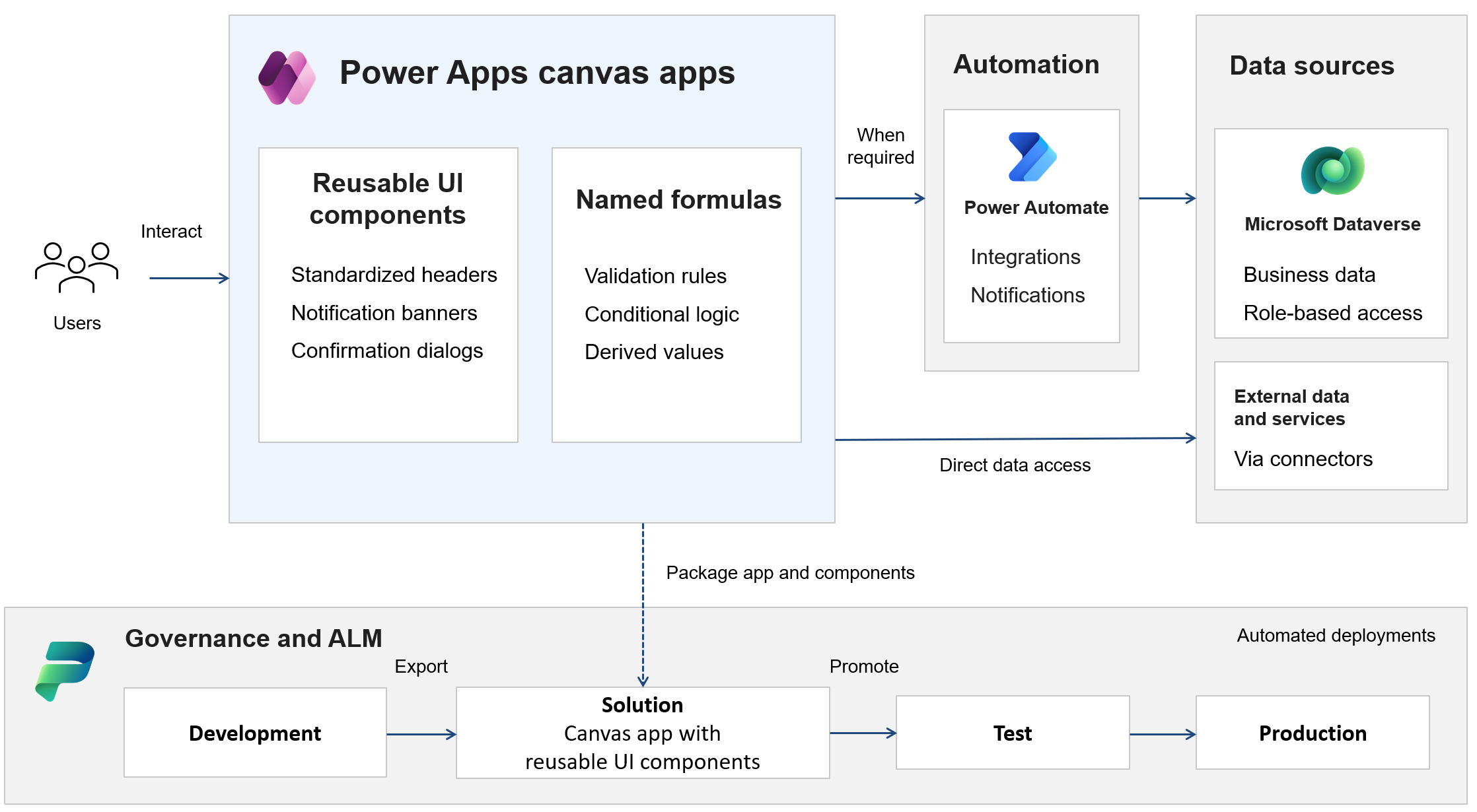
Workflow
The following workflow describes how users and system components interact within this architecture.
Business users interact with the Power Apps canvas app through a user interface built for operational business processes.
The application interface uses reusable UI components, like standardized headers, notification banners, and confirmation dialogs.
User interface controls reference centralized named formulas defined at the application scope instead of embedding business logic directly in control properties.
Named formulas evaluate validation rules, conditional logic, and derived values. These formulas act as a single source of truth for business logic within the application.
When users perform actions that require data operations, the canvas app communicates with enterprise data services such as Microsoft Dataverse or external systems via connectors.
When business processes require orchestration or automation, Power Automate cloud flows can be triggered to execute background workflows, integrations, or notifications.
Application lifecycle management (ALM) processes package the application and shared components into managed solutions and deploy them across development, testing, and production environments.
Governance policies enforce naming conventions, component ownership, and version management to support sustainable enterprise adoption.
Components
The architecture uses the following components to build scalable and maintainable canvas apps.
App and UI
Power Apps canvas apps provide a flexible user interface that connects to enterprise data sources and services.
Canvas components provide reusable building blocks for common UI patterns. Components can expose input and output properties for configuration and interaction. In this architecture, components standardize UI elements such as headers, notification banners, and confirmation dialogs.
App logic
- Named formulas define declarative formulas at the app level. Centralizing validation rules, conditional logic, and derived values reduces duplicated logic and makes updates easier to maintain.
Data and automation
Microsoft Dataverse stores structured business data securely and at scale. Dataverse supports relational data models, role-based security, and integration with other services.
Power Automate cloud flows automate workflows and integrate systems across Microsoft and third-party services. In this architecture, use Power Automate when business processes require background automation or cross-system orchestration.
Application lifecycle management (ALM)
Managed solutions and automated deployments support application lifecycle management (ALM) across environments. In this architecture, promote solutions from development to test and production through an automated deployment process.
Alternative approaches include keeping logic in individual controls and recreating UI patterns on each screen. As apps grow more complex, these approaches increase duplication and maintenance effort.
Scenario details
Organizations frequently use canvas apps to rapidly digitize business processes. While this approach accelerates solution delivery, rapid development can lead to architectural challenges as applications grow in complexity.
Challenges
Common issues in enterprise apps built with Power Apps canvas apps include:
- Repeated inline business logic across multiple screens
- Duplicated validation rules
- Inconsistent user interface behavior
- Increased regression risk when making changes
- High maintenance effort when updating business logic
Solution
This reference architecture addresses these challenges with a modular pattern based on two design principles: centralized logic abstraction and reusable UI modularization.
Use named formulas defined at the app level to centralize reusable business logic instead of repeating logic in individual control properties. This approach makes validation rules and conditional logic easier to update and maintain.
Use reusable components for common UI patterns instead of recreating them on individual screens. Components help maintain consistent behavior and styling across the app.
The pattern is designed to support enterprise scalability and cross-application reuse through shared component libraries and governance standards.
Benefits
This architecture pattern can:
- Reduce the time it takes to implement changes.
- Centralize business logic updates.
- Simplify debugging through centralized logic.
- Reduce the risk of regression issues when making changes.
- Improve UI consistency across the application.
Considerations
These considerations implement the pillars of Power Platform Well-Architected, a set of guiding tenets that improve the quality of a workload. Learn more in Microsoft Power Platform Well-Architected.
Reliability
Centralize business logic by using named formulas to improve reliability by ensuring consistent rule evaluation across screens. Instead of maintaining multiple versions of the same validation logic, the application references a single formula definition.
This approach reduces the risk of inconsistent behavior and minimizes regression defects when business rules change.
Security
The Power Platform security model enforces security.
Dataverse role-based access control ensures that users only access data appropriate to their role. Environment isolation prevents unintended cross-environment data exposure. Managed solutions help control how application components are modified in downstream environments.
These controls support enterprise governance and secure application operation.
Operational Excellence
Structured governance practices help you achieve operational excellence, including:
- Standardized naming conventions for named formulas
- Central ownership of reusable components
- Managed solution deployment across environments
- Alignment with enterprise ALM pipelines
These practices ensure that application updates remain controlled and predictable.
Performance Efficiency
Named formulas are declarative expressions that the Power Apps calculation engine evaluates automatically. By centralizing repeated logic into a single formula, the application reduces redundant evaluations and improves formula management.
Reusable components also reduce duplication and simplify UI rendering logic across screens.
Experience Optimization
Reusable UI components provide a consistent interaction model for users across the application.
Standardized headers, dialogs, and notification banners improve usability by ensuring predictable interface behavior. You can apply changes to UI patterns centrally, enabling faster design improvements while maintaining consistency.
Responsible AI
This architecture doesn't incorporate generative AI capabilities. Therefore, Responsible AI considerations don't apply to this implementation.
Next steps
If you're implementing this architecture, consider these next steps:
- Establish component libraries for enterprise UI standards.
- Define governance policies for naming named formulas.
- Integrate Power Platform solutions into enterprise ALM pipelines.
- Expand the modular architecture pattern across multiple applications.
Learn more in Power Apps canvas components and Named formulas.
Contributors
Microsoft maintains this article. The following contributors wrote this article.
Principal authors:
- Gaelle Abou Khalil, Technical and Functional Consultant
- Najib Mrad, Technical and Functional Consultant
- Antoine Antoun, Technical and Functional Consultant