Note
Access to this page requires authorization. You can try signing in or changing directories.
Access to this page requires authorization. You can try changing directories.
As Power Platform adoption scales, organizations often struggle to maintain a consistent and governed development model across multiple makers, developers, and environments. Common challenges include shared development environments, limited change traceability, inconsistent release documentation, and difficulty applying standard software development life cycle controls in low-code delivery teams. These challenges increase deployment risk, slow collaboration, and make audit and compliance activities harder to support.
This reference architecture addresses these challenges by combining native Dataverse Git integration with pipelines in Power Platform, Azure DevOps governance, and AI-assisted release notes generation to create a repeatable enterprise application lifecycle management (ALM) pattern.
Tip
This article provides an example scenario and a generalized example architecture to illustrate how to use Dataverse Git integration, pipelines in Power Platform, and Copilot Studio to automate deployments and generate relates notes. The architecture example can be modified for many different scenarios and industries.
Architecture diagram
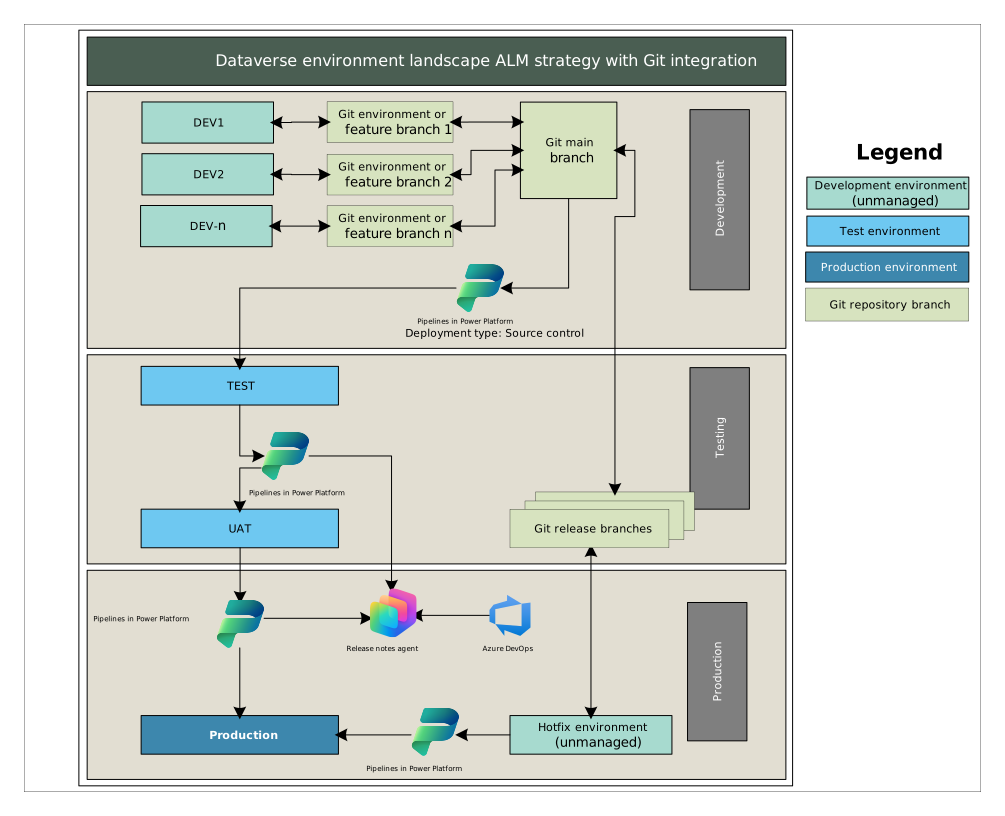
Workflow
The following steps describe the development, test, production, and hotfix workflows shown in the architecture diagram.
Development and source control workflow
Makers and developers use one of several Dataverse development environments to make changes. Along with a primary development environment, teams can use other environments, such as for junior developers, external resources, work in progress for long-running initiatives, or for other work that teams shouldn't automatically promote to the main production path.
Map each development stream to a Git environment or feature branch.
Synchronize changes into Git through Dataverse Git integration.
Review feature branches and merge them into the Git main branch by using pull requests and branch protection policies when ready for submission into the production testing ALM path.
To avoid feature drift, pull changes accepted into the main branch into branches corresponding to all development environments.
Ensure the main branch becomes the authoritative source for integration and release promotion.
Test and validation workflow
From the main branch, use a custom pipeline host to promote the packaged solution into the test environment directly from the source code in the main branch by using the Source Control deployment type.
Use the test environment for technical validation, integration checks, and smoke testing.
After validation, promote the solution to the user acceptance test (UAT) environment by using pipelines in Power Platform. Create or update the corresponding release branch in Git from the main branch.
Generate release notes from DevOps work items in a UAT status and distribute them to UAT responsible testers. Use a Copilot Studio agent to generate and format these release notes by using the Azure DevOps Get Query Results connector action.
Ensure UAT supports business validation and release-readiness checks before production approval.
Production release workflow
Promote approved UAT changes to production by using pipelines in Power Platform.
Generate release notes once again from DevOps work items by status for standardized release communication.
Distribute release notes to technical and business stakeholders through approved channels, such as Teams, Outlook, or SharePoint.
Hotfix workflow
Address urgent production issues in a dedicated hotfix environment.
Connect hotfix environments to the current production Git release branch via Dataverse Git integration.
Promote validated hotfixes to production through the same controlled pipeline mechanism.
Merge hotfix changes back from the release branch into the main branch to ensure they're kept intact in future releases.
Components
The following components support source control, environment promotion, governance, and release communication in this architecture.
Git integration in Power Platform
Role in architecture: Microsoft Dataverse Git integration synchronizes solution changes to and from development environments into Git-based source control.
Why chosen:
- Enables source-backed ALM for Dataverse solution assets
- Supports branch-based team collaboration
- Reduces manual export and import handling
Azure Repos, branches, and work items
Role in architecture: Azure DevOps hosts main, feature, and release branches and enforces pull request (PR) governance. It also stores work items and acts as the structured source for release scope and change summaries.
Why chosen:
- Includes strong enterprise policy controls, such as PR approvals, branch protection, and audit trails
- Enables native alignment with work items and release governance practices
- Provides consistent release scope definition
- Supports automated filtering of release-ready items
- Improves traceability between code changes and communicated release content
Alternatives considered: GitHub for code repositories and project work items
Why this architecture favors Azure DevOps:
Although GitHub projects can provide flexible work tracking, like custom fields, roadmap views, and automation, this architecture includes Azure Boards as the authoritative release work-item source. Azure Boards currently provides stronger enterprise work item process modeling, shared query and Work Item Query Language (WIQL) based release scoping, and richer built-in development and deployment traceability for governed release operations.
Pipelines in Power Platform
Role in architecture: Pipelines in Power Platform promote solutions across environments, including hotfix promotion paths.
Why chosen:
- Native Power Platform deployment experience
- Environment-aware deployment orchestration
- Accessible to both platform admins and solution teams
Alternatives considered:
- Azure DevOps or GitHub-only deployment orchestration
- Fully custom Power Platform command-line interface (PAC CLI) pipeline orchestration
Why this architecture favors pipelines in Power Platform:
This architecture uses pipelines in Power Platform as the primary environment promotion mechanism. They reduce configuration complexity and specialized continuous integration/continuous deployment (CI/CD) knowledge requirements while providing a native, governed deployment experience for makers, admins, and pro developers.
Microsoft Copilot Studio
Role in architecture: A Copilot Studio release notes agent generates standardized release notes from approved work items and release context.
Why chosen:
- Reduces manual release documentation effort
- Improves consistency and readability of release communication
- Supports dual audiences (business and technical stakeholders)
Alternatives considered:
- Manual authoring in email or wiki pages
- Templated but non-AI automation only
Why this architecture includes AI:
It demonstrates practical, low-risk generative AI augmentation in a high-value operational process, with clear human review and accountability. It's more flexible to changing audiences, projects, and delivery avenues than rigid automation.
Scenario details
The architecture is especially valuable for organizations that need to support multiple development environments working in parallel (DEV1, DEV2, DEVn) while maintaining a shared, governed source of truth in Git. Each developer or small team can work in an isolated environment and synchronize changes through branch-based workflows, enabling teams to collaborate without relying on a single shared development environment.
Business value
Key value delivered by this architecture includes:
Source control as the source of truth for solution customizations, rather than treating a maker environment as the authoritative deployment source. This approach improves consistency and supports controlled promotion into downstream environments.
Safety, auditing, and compliance through software development lifecycle (SDLC) best practices, including version control, code reviews, change traceability, and integration with enterprise governance processes.
Parallel development at scale by using branches and isolated development environments so multiple contributors can build and iterate simultaneously with less collision risk.
Support for short-lived development environments, enabling teams to rehydrate environments from source control for testing, experimentation, and temporary development scenarios while reducing long-term environment sprawl.
Fusion team productivity, allowing makers, developers, and admins to collaborate through native in-product source control experiences while still aligning to enterprise DevOps practices.
Operational protection and recoverability through source control, which preserves version history and supports restoration to prior states when unintended changes occur.
In this architecture, the AI release notes agent additionally extends that value by improving operational communication and release transparency. It transforms approved DevOps work items into standardized, stakeholder-friendly release notes, reducing manual effort while preserving human review and accountability.
Considerations
These considerations implement the pillars of Power Platform Well-Architected, a set of guiding tenets that improve the quality of a workload. Learn more in Microsoft Power Platform Well-Architected.
Reliability
This architecture improves reliability by implementing controlled promotion paths and branch-aware release handling. This approach reduces deployment failure risk and supports recoverability during urgent production support scenarios.
- Standardized deployment progression from development to test to production
- Dedicated hotfix path with release branch traceability
- Reusable pipeline mechanisms instead of manual deployments
- Validation checkpoints before production promotion
Security
This architecture applies security through least privilege, role separation, and controlled automation identities. This approach reduces the risk of unauthorized changes and improves change accountability.
- Role‑based access control across Power Platform environments and Azure DevOps
- Service principals or managed identities for pipeline execution
- Restricted production deployment permissions
- Auditable branch merge and release activities
- Approved channels for release note distribution
Operational Excellence
This architecture scores highly for operational excellence. A repeatable, scalable release management model improves operational excellence and supports governed delivery across multiple teams and environments.
- Codified branch strategy (feature, main, release)
- Repeatable environment promotion process
- Standardized hotfix handling pattern
- Automated release notes generation integrated into release workflow
- Reduced reliance on tribal knowledge for release communication
Performance Efficiency
This architecture optimizes delivery process efficiency more than runtime app performance, which is appropriate for an ALM reference architecture. By supporting parallel development streams and reducing manual coordination across release activities, it increases throughput for change delivery while lowering operational effort per release.
- Automated deployment and release communication
- Reduced manual coordination overhead
- Standardized workflow for faster release cycles
- Scaling to DEVn parallel streams without governance redesign
Experience Optimization
This architecture supports a predictable and well-defined release process across development, testing, and production environments, improving collaboration between makers, developers, release managers, and support teams.
- Role-aligned workflows
- Predictable promotion model
- Consistent release note format and timing
- Minimized ambiguity in handoffs between teams
The experience is improved for multiple user groups:
- Developers and makers through clear environment and branch workflows
- Release managers through standardized promotion and traceability
- Business stakeholders through readable AI-assisted release summaries
- Support teams through a defined hotfix route
Responsible AI
Fairness: The AI capability summarizes approved release work items. It doesn't make personnel decisions, determine eligibility, or make decisions that affect customers.
Reliability and safety: Human reviewers check content before distribution.
Privacy and security: The agent processes only enterprise release metadata that's in scope, like approved work items and release context. Follow your organization's data governance and connector policies for sensitive data handling.
Inclusiveness: The generated output supports technical and nontechnical audiences with structured sections and plain-language summaries.
Transparency: Label release notes as AI-assisted and link the reviewed source of truth to the actual source work items in DevOps.
Accountability: A named release owner or deployment approver remains accountable for final release content and production deployment decisions.
Next steps
- Connect your Dataverse development environments to a Git repository.
- Plan your Azure DevOps organizational structure and strategy.
- Pull work items from DevOps with Copilot Studio by using connectors as tools.
Contributors
Microsoft maintains this article. The following contributors wrote this article.
Principal authors:
- Nick Talsma, Power Platform Technical Architect