Note
Access to this page requires authorization. You can try signing in or changing directories.
Access to this page requires authorization. You can try changing directories.
This reference architecture uses Microsoft Power Platform to support an engineer-to-order process from configuration and quoting through ordering, advisory capacity planning, and production phasing. Model-driven apps and Microsoft Dataverse orchestrate the core process, while Microsoft Dynamics 365 finance and operations apps serve as the ERP (enterprise resource planning) system of record. This reference architecture also relies on Azure services for long-running asynchronous execution beyond platform limits.
Tip
This article provides an example scenario and a generalized example architecture to illustrate how to combine Dynamics 365 finance and operation apps, Power Platform, and Azure services to build an engineer-to-order solution with estimation, pricing, quoting, and product planning capabilities. The architecture example can be modified for many different scenarios and industries.
Architecture diagram
The following diagram shows the primary system context and architecture.
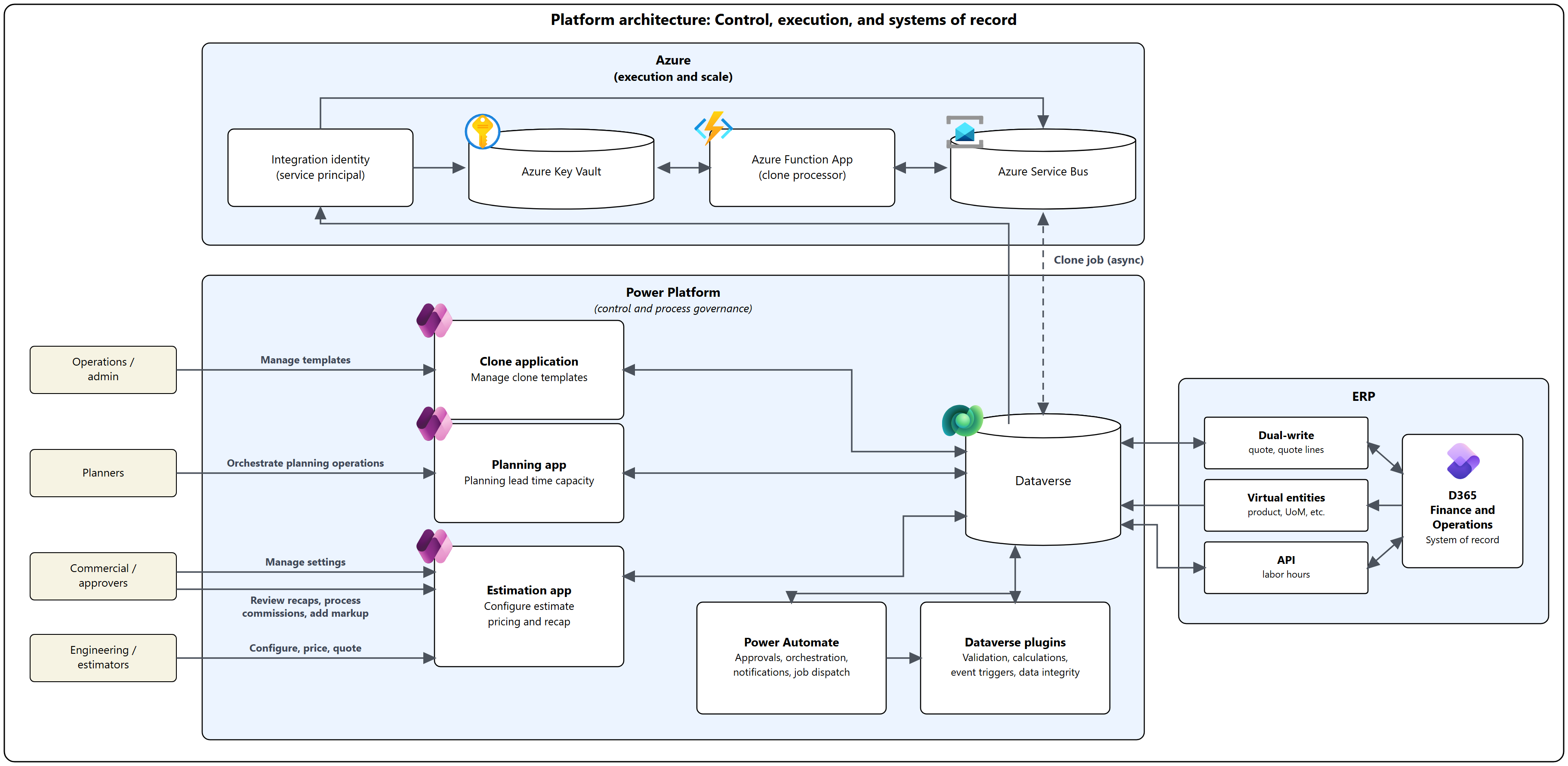
Users work through the workflow by using three Power Apps model-driven applications:
Estimation app: The estimator's primary workspace. The estimator starts an estimate by importing an engineering design from an XML file or selecting a design from the library. The estimator then adds or removes components to refine the estimate. Server plugins continuously recalculate weights, labor hours, cost drivers, and prices. The estimator runs the recap to combine standard pricing with pricing for the customer, and then finalizes and locks the package. This app is the configure-price-quote core of the solution.
Planning app: Supports advisory preproduction planning. Planners phase finalized designs by site and time, and assign tentative production start dates. They then review capacity dashboards that combine ERP resource-calendar baselines and scheduled production orders with estimate-derived workload and manual forecast placeholders. The app supports capacity visibility and lead-time communication. It's not authoritative—production orders, MRP (material resource planning), and scheduling remain in the finance and operation apps.
Clone application: A productivity tool for replicating complex estimation records—estimates, structure designs, and their component hierarchies—using reusable, template-driven clone definitions. An estimator uses a copy of an existing engineered estimate as the starting point for a new one. The application uses Azure Service Bus and Azure Functions to run complex clone jobs asynchronously and records each job's status in Dataverse.
Workflow
The following steps describe the end-to-end process:
Create or identify a commercial trigger record (opportunity source might vary by implementation) and create an ERP quote early in the lifecycle. The ERP quote serves as the commercial anchor for the estimation process.
Create or open a Dataverse estimation record linked to the ERP quote, and seed an initial design (XML import or library-based selection). Then, refine the configuration in the Estimation app.
Persist estimate, designs, and component details in Dataverse. Server-side plugins validate engineering rules and continuously recalculate labor hours, weights, cost drivers, and totals as the design changes.
Initiate a recap to finalize the package for review. Orchestration batches recap inputs and triggers server-side calculations for the estimate and all designs.
Run customer-specific pricing (CSP) evaluation during recap. ERP trade agreements (price and discount agreements) are consumed as structured pricing inputs where applicable. Other CSP constructs, such as $/lb, range-based pricing, and component-table pricing, are supported to meet engineering-driven scenarios that can't be represented solely through trade agreements without significant ERP customization.
Finalize and lock the recap package. Locked recap outputs preserve traceability of the pricing basis used at the time of pricing composition. Trade agreements are date-effective. Subsequent trade agreement changes intentionally don't retroactively modify finalized recap outputs. If repricing is required, execute a formal requote cycle (configuration review and recap re-execution).
Gate the process on review completion. When the recap is complete and marked review-complete, trigger downstream commercial processing.
Apply margin and commission to standard-priced items before ERP write-back, as required. Commercial reviewers perform this step. Financial margin realization occurs in ERP post-award via Project Management and Accounting and WBS-based (work breakdown structure) cost tracking.
Normalize finalized outputs into ERP-ready quote-line structures and add the quote lines to the existing ERP quote in Dynamics 365 finance and operations apps. ERP doesn't reprice finalized quote lines. ERP is the authoritative system of record for the accepted price and downstream financial execution.
Use the Planning app to phase designs by site and time, assign tentative production start dates, and review capacity dashboards. The capacity dashboards combine ERP-scheduled production orders and runtimes with estimate-derived workload for work not yet created as ERP products and production orders. Capacity baselines come from ERP resource calendars. Production orders and MRP remain exclusively in ERP.
Remove forecasts as estimates, sales orders, and production orders are created. (Forecast records are manually entered placeholders used to reserve capacity for anticipated demand when configuration details aren't yet known.)
Use the Clone application to replicate complex estimation records, including estimates, structure designs, and component hierarchies, with reusable clone templates. Operations and administration initiate these jobs. Azure Service Bus dispatches long-running clone jobs to an Azure Function for asynchronous processing, and the function writes the job status to Dataverse.
Scenario details
This workload helps organizations turn complex configurations and estimates into repeatable ERP transactions while supporting dynamic, customer-specific requirements in an engineer-to-order business model.
The architecture is designed to separate responsibilities by lifecycle phase:
- Engineering-time configuration and pricing composition occur in Dataverse (Estimation/Planning apps, plugins, orchestration).
- Financial-time authority and execution occur in ERP (quote lifecycle, award, sales order, project/WBS cost tracking, production orders, MRP, scheduling, and posting).
- Recap outputs are locked at finalization to preserve traceability and prevent retroactive changes unless a formal requote is performed.
Primary users and responsibilities
- Engineering and estimators: Build and validate designs, manage configuration, and produce labor-hour, weight, and cost estimates.
- Commercial and approvers: Review recap packages, apply margin/commission for standard pricing items, and approve outputs for customer-facing use.
- Planners: Phase designs by site and time, assign tentative start dates, and manage capacity/lead-time visibility using ERP capacity baselines plus estimate and forecast demand signals.
- Operations and administration: Manage cloning templates, monitor integrations, and support users across environments.
Licensing and product boundary
Most users need licenses for Dynamics 365 finance and operations apps because the workflow uses these apps from start to finish. Users who work with commercial records such as quotes, quote lines, and products need a Dynamics 365 Sales Enterprise attach license. Finance and operations apps remain the ERP system of record for quote lifecycles, awards, and downstream financial execution.
Key requirements
Support engineered configure-to-quote workflows that require iterative design recalculation, engineering validation, and controlled gating before ERP commitment.
Use ERP trade agreements where applicable while enabling engineering-driven CSP constructs that exceed standard trade agreement representation without significant ERP customization.
Preserve traceability and commercial stability through recap finalization and locking. Enable repricing only through a formal requote cycle.
Maintain ERP as the authoritative system of record for quote lifecycle, award, sales order creation, project/WBS financial governance, production orders, MRP, scheduling, and posting.
Enable advisory preproduction capacity planning by using estimate-derived workload and manual forecast placeholders aligned to ERP resource calendars and existing production order runtimes.
Govern integration scope across three patterns—virtual entities (read), dual-write (write), and an OData API—with explicit exclusion of financial posting entities from dual-write.
Out of scope features
- Detailed manufacturing execution and shop-floor control (handled in ERP and downstream systems).
- Project Operations (the solution uses the Project Management and Accounting module in finance and operations apps instead).
- AI-driven pricing or fully autonomous decision-making (human review remains the control point).
Components
The following components provide application capabilities, asynchronous processing, enterprise data integration, and financial governance for this reference architecture.
Power Platform
Estimation app (model-driven): Guided configuration, estimation, pricing composition, and recap execution.
Planning app (model-driven): Supports advisory preproduction planning only. It doesn't control production schedules. The app provides phasing by site and time, tentative start dates, and capacity and lead-time visibility. Capacity baselines come from ERP resource calendars. Production orders and MRP remain exclusively in finance and operations apps. Forecasts are manual placeholders that reserve capacity for not-yet-configured demand and are removed as estimates, sales orders, and production orders are created.
Clone application (model-driven): Clones complex estimation records using reusable, template-driven clone definitions, for estimates, structure designs, and their component hierarchies. Users can copy an existing engineered estimate as the starting point for a new estimate. Long-running clone jobs run asynchronously on Azure services.
Dataverse: Primary data store for estimates, designs, components, planning records, forecast placeholders, and clone templates and requests. It also provides security, auditing, and server-side execution surface.
Dataverse plugins: Validation, calculations, recap finalization and locking, and normalization logic to prepare ERP-consumable quote-line outputs.
Power Automate: Orchestration for recap batching, approvals and notifications, and job dispatch patterns where appropriate.
Azure services
Azure Service Bus: Queues clone job messages and decouples long-running processing from interactive sessions.
Azure Function App: Processes clone jobs (and other asynchronous workloads where applicable) beyond platform time limits. Writes status back to Dataverse.
Azure Key Vault: Stores secrets and connection details. Access it by using an integration identity.
Integration identity (service principal): Authenticates to Azure resources following least-privilege principles.
ERP and data integration
Dynamics 365 finance and operations apps: System of record for ERP quote and quote lines, award, sales orders, Project Management and Accounting, WBS cost tracking, production orders, MRP and scheduling, and posting. Integration uses three distinct patterns, chosen per scenario to minimize risk:
- Virtual entities provide read-only access to reference and core data in finance and operations apps, including released products, variants, and units of measure. They don't copy the data to Dataverse.
- Dual-write handles writes back to ERP, primarily the finalized quote lines, plus the reference and business entities required for orchestration and governance.
- OData API retrieves labor hours by operation. Financial posting entities (general ledger, invoice journals, cost transactions, production postings, accounting distributions, and financial dimensions) are deliberately excluded from dual-write, avoiding any shadow-ERP behavior.
ERP pricing constructs: Trade agreements (price/discount agreements) are consumed as authoritative pricing inputs during recap where applicable. ERP doesn't dynamically reprice finalized quote lines written from recap outputs.
ERP pricing API usage: ERP pricing APIs (including Commerce Scale Unit pricing interrogation) aren't invoked during iterative estimation or recap. Pricing composition occurs in Dataverse during recap using governed inputs (including trade agreements) and engineering-driven constructs.
Considerations
These considerations implement the pillars of Power Platform Well-Architected, a set of guiding tenets that improve the quality of a workload. Learn more in Microsoft Power Platform Well-Architected.
The workload is designed to balance enterprise controls (security, ALM, and auditability) with usability for business users executing complex estimation and planning processes.
Reliability
- Use asynchronous processing (Service Bus + Azure Function) for operations that can exceed interactive time limits. Track job status in Dataverse for recoverability and support.
- Design server-side calculations and job handlers to be idempotent where possible, enabling safe retries and reprocessing.
- Capture failure states explicitly (validation failures, pricing evaluation exceptions, integration faults) and surface them with actionable remediation guidance.
- Lock recap outputs at finalization to preserve traceability and prevent unintended post-finalization changes.
Security
- Enforce role-based access aligned to personas and use least privilege for all integrations.
- Store secrets in Key Vault and access them via an integration identity. Avoid embedding secrets in flows, apps, or source control.
- Apply environment-specific connection references and configuration to prevent cross-environment leakage.
- Audit key actions such as recap completion and locking, review completion, pricing execution, and quote line write-back.
Operational Excellence
- Automate deployments by using a single orchestrator pipeline and consistent branch tagging to trace and reproduce deployments.
- Implement monitoring across Power Automate runs, Dataverse plugin execution, and Azure Function/Service Bus data. Provide runbooks for common failure patterns.
- Document ownership and support processes for apps, plugins, flows, Azure resources, and ERP integrations.
Performance Efficiency
- Prefer server-side compute for validations and calculations (plugins) to reduce client round-trips.
- Batch recap calculations and downstream line preparation to control load during peak usage.
- Align synchronization to business needs and avoid unnecessary Dual-write scope.
Experience Optimization
- Support rapid estimate creation through XML-based seeding and reusable library selections. Allow iterative refinement.
- Use clear gates (recap finalization/locking, review complete) to make state visible and reduce handoff ambiguity.
- Provide planners with streamlined phasing operations and dashboards that reflect ERP capacity baselines plus estimate/forecast demand signals.
Responsible AI
This workload doesn't rely on AI-generated outputs for pricing, approvals, or decisions. Business users remain accountable for final review and approval steps.
Contributors
Microsoft maintains this article. The following contributors wrote this article.
Principal authors:
- Esteban Salinas, Principal
Related resources
- Microsoft Dataverse documentation
- Power Apps model-driven apps documentation
- Power Automate documentation
- Finance and operations application documentation
- Dual-write overview
- Azure Service Bus Messaging documentation (queues, retries, and monitoring)
- Azure Functions documentation
- Azure Key Vault documentation
- Application lifecycle management (ALM) with Microsoft Power Platform
- Establish effective application lifecycle management practices