Note
Access to this page requires authorization. You can try signing in or changing directories.
Access to this page requires authorization. You can try changing directories.
Organizations that standardize on Microsoft Teams often need to migrate a large number of meetings from a legacy conferencing platform. Manually rebuilding the meetings takes time, introduces errors, and breaks attendees' existing invitations when an organizer recreates a series.
This reference architecture shows how a conversational agent built with Microsoft Copilot Studio enables employees to migrate their meetings in place. The agent preserves attendees, recurrence, and room bookings, lets employees preview changes, and provides post-migration reporting.
Tip
This article provides an example scenario and a generalized example architecture to illustrate how to migrate legacy meetings to Microsoft Teams. Use it as a starting point and adapt the components, controls, and workflow to the requirements of your own environment.
Architecture
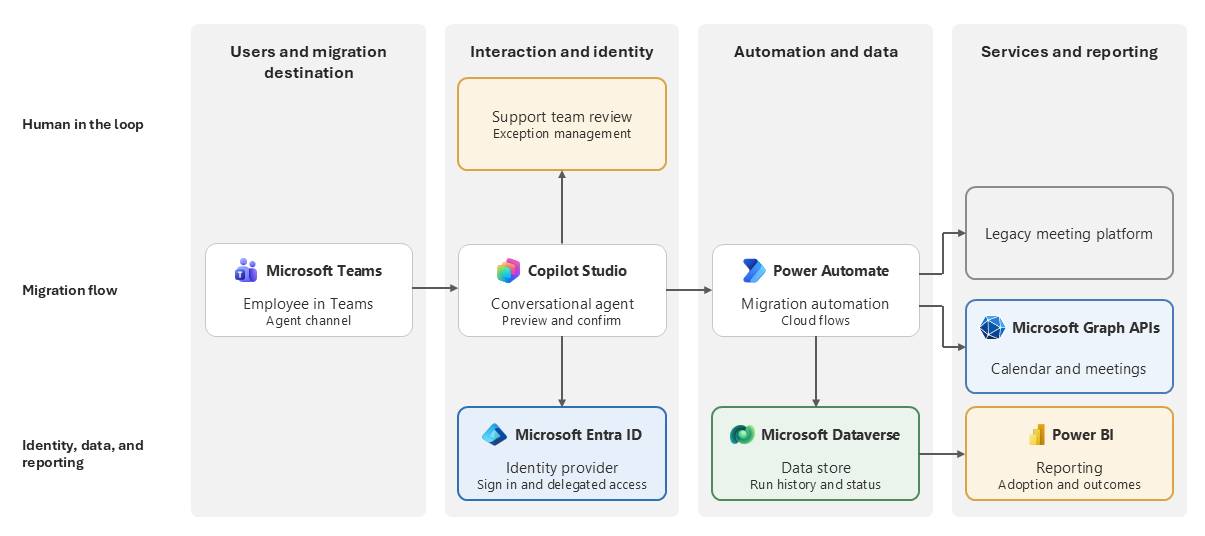
Workflow
An employee starts a conversation with the agent and asks to move their meetings to Microsoft Teams. The agent explains what will change and what will stay the same.
The agent signs the employee in through the identity provider and acquires delegated access on the employee's behalf. The employee consents once for all downstream calls instead of approving each connection separately. Each action uses the employee's permissions.
The agent passes the confirmed request to the migration automation and remains in the conversation to report progress.
The automation reads the employee's meetings from the legacy meeting platform and creates a preview that lists the meetings in scope with attendees, recurrence patterns, and room bookings. The agent shows the preview and allows the employee to choose which meetings to convert before confirming any changes.
After the employee confirms the change, the automation converts each meeting in the calendar and meeting service. It keeps the attendees, recurrence settings, and rooms, so each attendee's existing invitation stays valid.
Depending on organizational requirements, meetings that the automation can't convert might be routed to a support team or other manual review process.
The agent returns a summary to the employee, including which meetings were successfully migrated, which meetings failed, and what needs attention.
The automation writes the run history and status for each meeting to the migration data store.
Reporting reads data from the data store so the program team can track adoption, migration volume, and recurring failure patterns.
Scenario details
Use this pattern for large migrations to Microsoft Teams when your organization prefers a self-service approach that allows employees to review and selectively migrate their own meetings. The pattern preserves existing invitations, attendees, recurrence patterns, and room bookings.
Business challenge
An organization moving its collaboration platform to Microsoft Teams needs to move existing meetings. These meetings often recur, include long attendee lists, and reserve physical rooms. Requiring employees to recreate these meetings manually takes hours per person and risks losing details. It also invalidates invitations, disrupts attendee calendars, and ultimately drives employees back to the legacy platform, which stalls the migration.
A central migration team can't migrate these meetings alone. To manage other people's calendars at scale, the team needs broad standing permissions that regulated organizations are reluctant to grant. Self-service migration also creates friction because users must approve multiple connection requests before migration starts. At scale, these approvals reduce adoption and lead users to abandon the process before the migration tool converts any meetings.
Solution
A conversational agent lets each employee migrate meetings under their own identity. The employee asks the agent to migrate their meetings, signs in once, and lets the agent call each downstream service with delegated access. This delegated access model reduces approval prompts and simplifies sign-in.
The solution updates existing meetings in place rather than creating replacement meetings, and preserves invitations, attendees, recurrence patterns, and room bookings. A preview step keeps the employee in control: they see exactly which meetings are included in the migration and choose whether to convert them. A data store records run history for reporting, which helps the program team track adoption, monitor migration progress, and identify recurring issues.
Components
The architecture uses the following Microsoft services to provide the agent experience, authenticate employees, migrate meetings, and track results.
| Component | Role in the architecture |
|---|---|
| Copilot Studio | Hosts the conversational agent. Handles the dialog with the employee, presents the preview, triggers the migration actions, and returns the result summary. |
| Microsoft Teams | Provides the destination platform for migrated meetings and the surface where employees access the agent. |
| Microsoft Entra ID | Authenticates the employee and grants the agent delegated access on behalf of the signed-in user, so the agent acts with that person's permissions instead of broad, standing rights. |
| Microsoft Power Automate | Runs the migration steps for each meeting, and reads each meeting from the legacy platform and converts it in place. |
| Microsoft Graph | Provides the calendar and meeting APIs that the automation calls to convert each meeting and retain its attendees, recurrence settings, and rooms. |
| Microsoft Dataverse | Stores run history and status for each meeting for troubleshooting and reporting. |
| Power BI | Presents adoption and migration reporting to the program team. |
Other technologies
The pattern uses a legacy meeting and conferencing platform as its source system. The automation reads an employee's existing meetings to identify which meetings to convert. After conversion, the source platform no longer hosts those meetings.
Considerations
These considerations implement the pillars of Power Platform Well-Architected, a set of guiding tenets that improve the quality of a workload. Learn more in Microsoft Power Platform Well-Architected.
Reliability
Treat each meeting as an independent unit of work so that one failure doesn't stop the batch. Make the conversion idempotent so the second run recognizes meetings that the first run moved and doesn't duplicate them. Record each meeting's status, and let the employee retry any failed meetings.
Security
The delegated access model is the security foundation of this pattern. The agent acts on behalf of the signed-in employee and accesses only meetings that the employee controls. This model avoids the broad standing permissions that a central migration service needs. Grant only the calendar permissions that the workflow needs. Store only meeting identifiers and status in the run history, not meeting content such as agendas or attachments.
Operational Excellence
Deploy the agent through managed environments by using a standard application lifecycle. Before wider release, validate the agent against a representative set of meetings, including recurring series, large attendee lists, and room bookings. Use the run history in the data store to help support staff answer employee questions without reproducing problems. Monitor failure patterns during rollout. A single unsupported meeting configuration often causes the majority of the exceptions.
Performance Efficiency
Design for peak migration traffic because campaigns send employees to the agent in bursts. Batch calls to the calendar service and respect service protection limits. Process long meeting lists asynchronously to keep the conversation responsive while work continues in the background. Keep previews lightweight so that they load quickly and don't block the user experience.
Experience Optimization
Increase adoption by reducing employee effort. Remove repeated connection prompts, let employees complete the process in the app they already use, and replace migration terminology with plain language. The preview and confirmation step builds trust by showing employees changes before they occur. The closing summary identifies anything that still needs their attention.
Responsible AI
The agent interprets a request and follows a deterministic workflow. Keep the boundary clear: the model handles the conversation but doesn't decide whether to modify a calendar. For example, it changes a meeting only after the employee explicitly confirms the change. State plainly what the agent can and can't do. When automation can't complete the request, give the employee a way to contact a person for assistance. Log each agent action so the organization can audit what changed and and on whose behalf.
Contributors
Microsoft maintains this article. The following contributors wrote this article.
Principal authors:
- Andrew Hess, Senior Program Manager