Note
Access to this page requires authorization. You can try signing in or changing directories.
Access to this page requires authorization. You can try changing directories.
Organizations that rely on frontline workers often need to modernize legacy applications to improve reliability, mobility, and operational efficiency while preserving existing business processes and integrations.
This reference architecture shows how to modernize a material replacement and quality feedback solution by using Microsoft Power Platform. The solution enables frontline workers to create and manage cases from desktop or mobile devices, work offline when connectivity is unavailable, automate approval workflows, integrate with SAP, and provide operational visibility through Power BI.
Tip
This article provides an example scenario and a generalized example architecture for modernizing a frontline material request application by using Power Platform. The architecture example can be modified for many different scenarios and industries.
Architecture diagram
Workflow
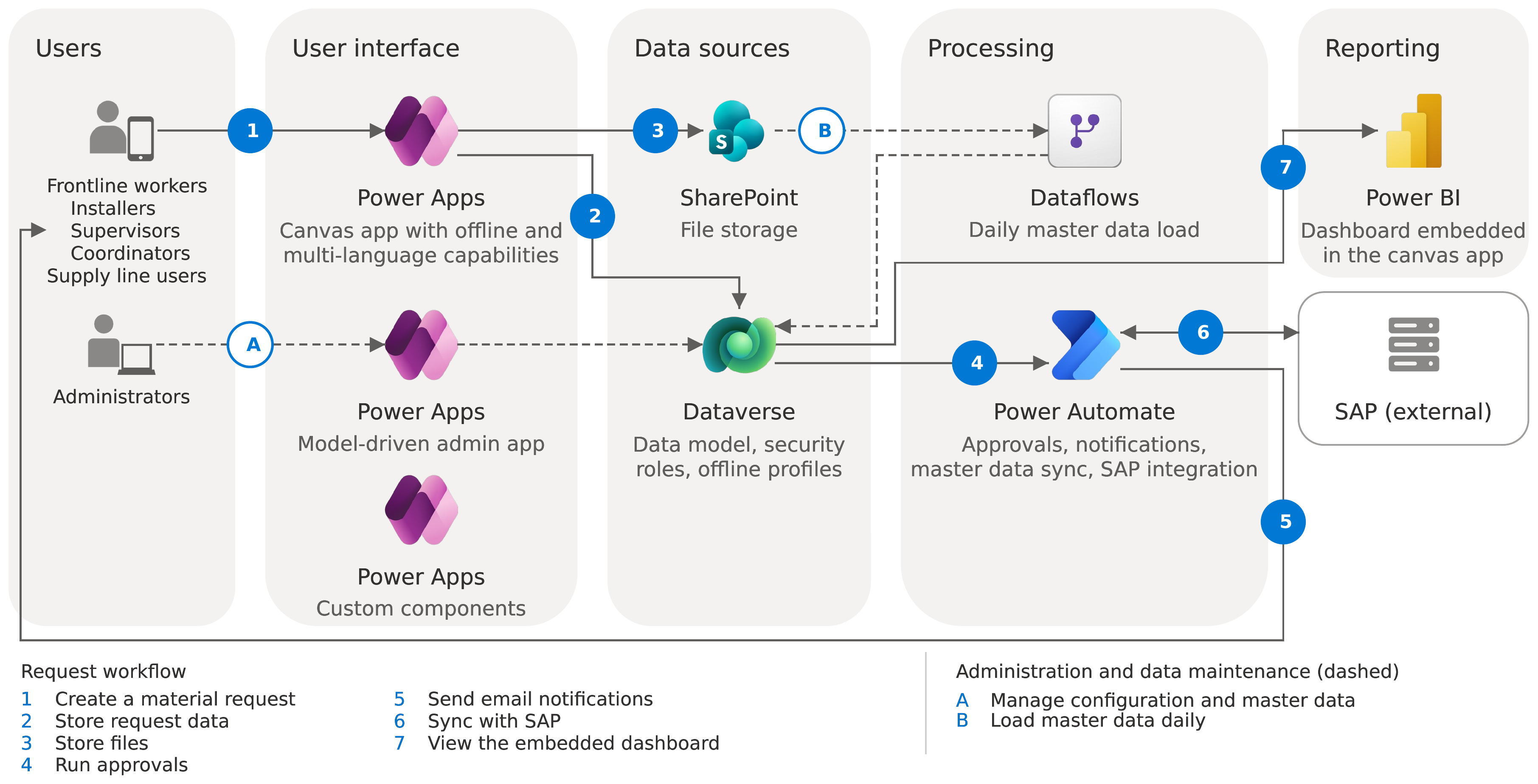
The architecture diagram shows two workflows: one from the frontline workers' perspective for handling material requests, and another for administrators managing configuration and master data.
This workflow describes how a material request moves from submission through approval and fulfillment:
A frontline worker creates a new material request and provides equipment details, material information, and supporting files.
Workers can create and update material requests while offline. A built-in Power Apps canvas app feature synchronizes the changes with Microsoft Dataverse when connectivity is restored.
The solution stores the material request details in Dataverse.
The solution stores supporting documents and files in SharePoint.
Based on the case details and user profile, the solution routes the case to the appropriate approval stage by using Power Automate cloud flows.
The solution sends email notifications to assigned workers with relevant information and direct links to the material requests.
Assigned workers receive automated reminders every two days.
Frontline approvers review the case, update information if needed, and either reject the case or approve it for supply line approval.
Frontline coordinators can reassign cases to other users or teams to balance the workload. Coordinators perform reassignment actions from a dedicated screen in the Power Apps canvas app.
If the case is approved in the supply line approval stage, Power Automate sends the case details to SAP to create a material delivery request.
Communication with SAP is handled through an integration layer:
Power Automate transforms case data into the format required by SAP before it is submitted.
After SAP processes the material request, Power Automate receives and processes the response.
If the response is successful, Power Automate updates the case with the generated IDs.
If the response is unsuccessful, users resubmit the SAP material delivery request from the canvas app after making updates to the case information.
Frontline workers track all status changes in the case. Status changes are visible on the case details screen in the application.
Frontline workers update material delivery status from the application and close the case once all the materials are received.
Users view case and material delivery data in an embedded Power BI dashboard.
The architecture also includes an administration and data management workflow (shown with dashed lines in the diagram):
A. Configuration and master data management
Administrators use a Power Apps model-driven app to manage configuration and master data.
B. Material data import and updates
- Users upload Excel files containing material data to SharePoint.
- Power Automate processes, transforms, and loads the data into Dataverse.
- Power Platform dataflows and custom processing logic update the material data available in the application daily.
Components
Power Apps: Powers a multilingual, role-aware, offline-enabled canvas app with Creator Kit components, custom components, and deep form logic.
The solution uses a canvas app instead of a model-driven app because the business needs a highly customized user interface.
Power Automate: Orchestrates notifications, assignments, reminders, SAP request and response processing, SharePoint file operations, access provisioning, time calculations, and CSV exports.
Dataverse: Stores data, including structured relational data, in a secure, scalable platform with built-in security and auditing features.
SharePoint Online: Stores files for import, Excel exports, and supporting documents in document libraries integrated with Dataverse records.
The solution uses SharePoint for file management instead of Dataverse to reduce capacity use in Dataverse.
Power BI: Visualizes data in an embedded dashboard filtered by user role.
Scenario details
This scenario is based on a multinational elevator and escalator engineering company with more than 60,000 employees across 60 countries and regions. When installers identify issues during the installation process, such as incorrect, missing, or damaged materials, they need to submit a replacement request immediately. This replacement request process is business-critical to the organization.
The application enables frontline workers to report material issues directly from the installation site, including incorrect, missing, damaged, malfunctioning, or field letter and retrofit-related materials. It integrates with SAP, supports safety reporting, and provides operational insights through an integrated dashboard. Users accesses all application functionality from desktop and mobile devices through a responsive user interface. The application supports more than 20 languages through a custom multilingual component, which allows users to switch languages dynamically within the application.
Frontline users:
Create quality feedback (material replacement) cases directly from the installation site, even when offline.
Use the application in their preferred language through multilingual support.
Supply line users:
Review and validate quality feedback requests, and submit approved requests to SAP to initiate the material delivery process.
Monitor cases throughout the process through a Power BI dashboard and custom views.
Any user associated with a submitted request can communicate with one or more users through a chat custom component included in the application.
The chat component is case context-aware.
Users can include one or more files while using the chat.
Users are notified by email when they receive a chat message.
Key benefits
By using this architecture, you can achieve the following benefits:
Transparent, supportable automation: Automated workflows provide clear status transitions, routing, error handling, and auditability throughout the process.
Integration with existing business systems: The architecture supports integration with systems such as SAP, helping organizations preserve existing business processes while modernizing the user experience.
Centralized data management: Dataverse provides storage for business data, such as cases, materials, conversations, and master data. This approach supports security through roles and teams, and enables governance and lifecycle management across environments.
Low‑code application development: You build the end‑to‑end process with Power Apps (canvas apps) and Power Automate, minimizing custom code and centralizing configuration for consistent, scalable operations.
Built for site conditions: The canvas app supports offline use through a dedicated mobile offline profile.
Faster evidence capture: Document flows move material photos and chat attachments to SharePoint automatically and link them back to cases and materials.
Role‑based multilingual experiences: Requestors, approvers, and frontline and supply line coordinators work in screens tailored for their roles, such as tasks, cases, reassign, and help. A multilingual component lets them use the application in their preferred language.
Real-time visibility: Embedded Power BI (DirectQuery) tiles show open and closed trends and status distribution by role or frontline. Export to CSV is available when needed.
Actionable telemetry: Automated calculations of lead time in business days and conversation time, together with status and approval logs, improve traceability and help identify systemic issues earlier.
Considerations
These considerations implement the pillars of Power Platform Well-Architected, a set of guiding tenets that improve the quality of a workload. Learn more in Microsoft Power Platform Well-Architected.
Reliability
Assignment flows deterministically route cases by status.
SAP exchange: Grouped sends, async HTTP and email responses, material-level status persisted to Dataverse.
Centralized error-handling child flow emails admins with run URL, environment, and failing flow name.
Security
Dataverse security roles and team-based access per persona.
Clear environment segmentation (development, test, stage, production).
Controlled application lifecycle management (ALM) process by using pipelines in Power Platform.
Logical data segmentation for different roles.
Operational Excellence
Operational runbooks define repeatable steps for environment preparation, post-deployment checks, and data import and synchronization for operations and support teams.
Environment variables centralize configuration for each environment.
A documented promotion sequence covers solution import, post-deployment configuration, and Power Platform dataflows, making releases repeatable even when run manually.
Power Automate flows automate reminders, assignments, exports, file movements, and access provisioning, reducing manual effort and variance.
Documented steps for enabling Creator Kit and Power Apps component framework (PCF) code components support a consistent UI and faster iteration.
A child error-handling flow emails admins with failed run URLs, environment details, and flow names to speed up diagnosis.
Performance Efficiency
Defined promotion paths across development, test, stage, and production, together with documented post-deployment checks and data import sequences, support load testing and performance tuning before production deployment.
Dataverse stores business data, SharePoint stores files, and Power Automate orchestrates workflows. This combination meets throughput and data-access needs while keeping logic close to the platform.
Power Automate handles offloaded processing, Dataverse views filter data, and canvas app component libraries and documented formulas keep client logic lean and consistent with platform patterns.
Experience Optimization
User-friendly, fully responsive, full-featured, offline-capable canvas app help frontline on-site workers quickly create cases and attach evidence. Supervisors and coordinators use the app to review and approve cases.
Standardized UI with Power CAT Creator Kit patterns and custom components to deliver a consistent look and feel and predictable behavior across screens.
Multilingual component that lets users work in their preferred language.
Automatic field population and conditional UI reduce data entry and errors.
Automated notifications identify who needs to act, what to do, and when, and include deep links to relevant records.
Role-gated actions, such as approve or reject, that appear only when appropriate. These actions reduce error paths and decision fatigue.
Contributors
Microsoft maintains this article. The following contributors wrote this article.
Principal authors:
- Martin Gonzalez, Solution Architect