Note
Access to this page requires authorization. You can try signing in or changing directories.
Access to this page requires authorization. You can try changing directories.
Large organizations manage HR across several systems of record. Employees often switch between a human capital management (HCM) system, an IT service management portal, and a learning platform to find a policy, update a personal detail, or request time off.
This reference architecture describes a conversational multi-agent Human Resources assistant for employees and managers. An orchestrator agent built with Microsoft Copilot Studio routes each request to a specialized agent, and each specialized agent completes its work in the system of record on the employee's behalf. Employees work in Microsoft Teams and Microsoft 365 Copilot throughout the process.
Tip
This article provides an example scenario and architectural overview of a conversational agent for HR processes. This solution is a generalized example that can be adapted to various industries and use cases.
Architecture
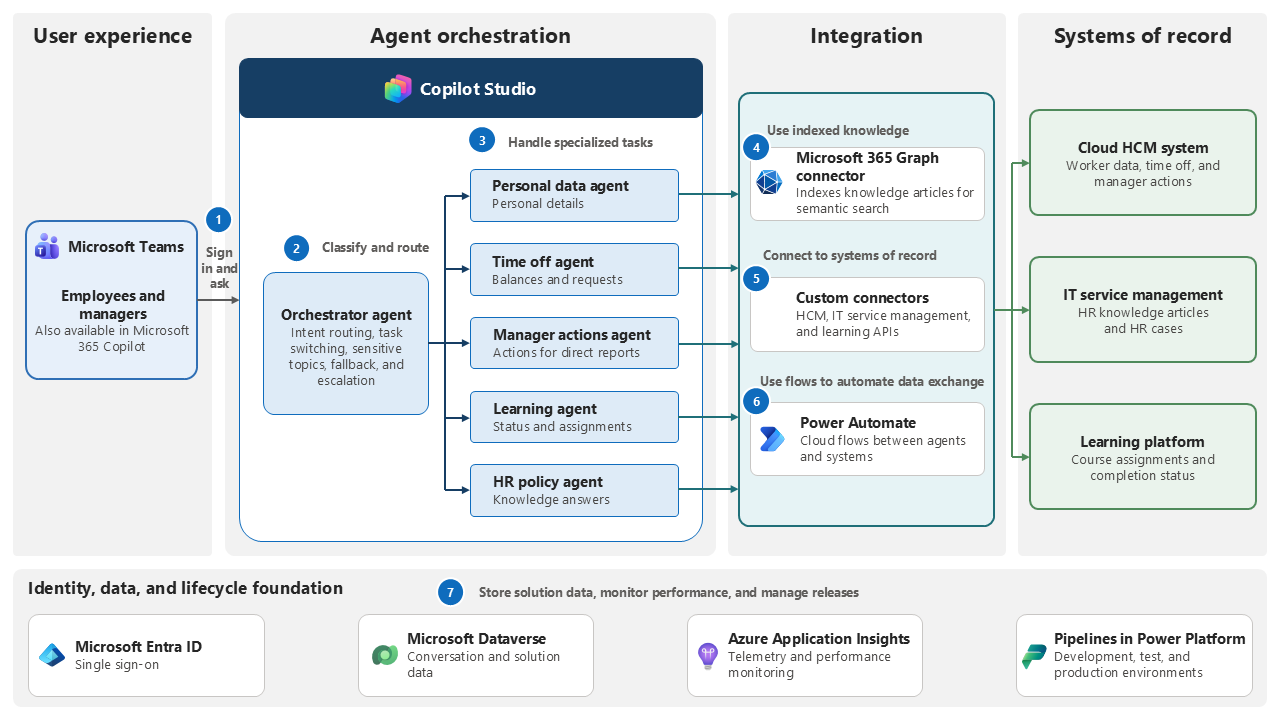
Workflow
An employee or a manager opens the assistant in Microsoft Teams or Microsoft 365 Copilot and signs in with Microsoft Entra ID single sign-on to ask a question.
The orchestrator agent classifies the request and routes it to the specialized agent that owns that HR area. The orchestrator also handles task switching, collects missing details, recognizes sensitive topics, detects out-of-scope requests, and applies fallback behavior.
Specialized agents cover personal data, time off, manager actions, learning, and HR policy. Each agent owns one set of tasks and the connections that support it.
The HR policy agent answers policy questions from knowledge articles in the IT service management platform. A Microsoft 365 Graph connector indexes those articles, and Copilot Studio generates the answer from the results returned by semantic search.
Agents that act on HCM data call custom connectors and Power Automate flows.
When a request needs follow-up from an HR specialist, the agent creates a case in the IT service management platform through a custom connector. The learning agent reads and assigns learning through a custom connector to the learning platform.
Conversation and performance data is stored in Dataverse and Azure Application Insights. Pipelines in Power Platform move releases between environments.
Components
The architecture uses the following Microsoft services to provide the agent experience, authenticate employees, connect to systems of record, and track results.
| Component | Role in the architecture |
|---|---|
| Copilot Studio | Hosts the orchestrator agent and each specialized agent, including topics, instructions, knowledge, actions, and answer evaluation. |
| Microsoft Teams | Delivers the assistant in the collaboration client that employees and managers already use. |
| Microsoft 365 Copilot | Provides a second entry point to the same assistant inside the Microsoft 365 experience. |
| Microsoft 365 Graph connector | Indexes knowledge articles from the IT service management platform so the HR policy agent can retrieve them with semantic search. |
| Microsoft Power Automate | Runs the flows that carry requests between agents and the connected systems. |
| Custom connectors | Expose the APIs of the HCM, IT service management, and learning systems as actions the agents can call. |
| Microsoft Entra ID | Authenticates employees, provides single sign-on, and issues the tokens used for delegated access. |
| Microsoft Dataverse | Collects telemetry for conversation volume, agent performance, and failures. |
| Azure Application Insights | Presents adoption and migration reporting to the program team. |
| Pipelines in Power Platform | Move solutions through development, test, and production environments. |
Scenario details
This use case is based on a company's approach to consolidate HR-related processes into a single conversational experience for employees and managers.
Note
For examples of similar employee-facing architectures, learn how Coca-Cola Andina improves HR support for frontline workers, the Copilot Studio agent MAIA supports Banco Hipotecario's employees, and Microsoft accelerates employee services with the Employee Self-Service Agent.
Business challenge
HR services in a large enterprise often span several systems. Employees need to know which system has the answer, which portal accepts the request, and which form starts the process. Managers face the same friction when they act for their direct reports. The result is a high volume of repetitive questions to HR teams, slow self-service, and inconsistent answers.
A single assistant doesn't solve this problem well. HR spans many unrelated tasks, each with its own data source, permission model, and conversation flow. Combining them into one agent makes intent recognition unreliable and makes the solution hard to extend.
Solution
This architecture splits HR work across specialized agents. An orchestrator routes requests to the appropriate agent and maintains the conversation when users move between tasks. Each specialized agent focuses on one HR area. The orchestrator handles fallback and escalation when needed. Teams can extend the solution with additional agents without reworking existing ones.
The assistant answers policy questions from approved knowledge articles, returns time-off balances, updates personal details, completes manager actions for direct reports, and reports learning status. Interactive cards guide more complex tasks that need several inputs.
When you implement this architecture, consider how agents authenticate to connected systems and how you evaluate answer quality:
Use the signed-in employee's identity to run actions in systems of record when possible. This approach preserves the existing permission model and audit trail in each system. Use service accounts as a workaround when delegated user access isn't supported. Pass user information through a query parameter.
Evaluate answer quality with the evaluation features in Copilot Studio and with Copilot Agent Kit, so accuracy is measured before and after each release.
Other technologies
The pattern uses three external systems of record. A cloud human capital management system stores worker data, time-off balances, and manager actions. An IT service management platform stores HR knowledge articles that support policy answers and receives HR cases from agents. A learning platform stores course assignments and completion status. Reach each system through a custom connector and preserve each system's permission model.
Adapt the scope and connected systems to your own environment, and validate the design with your HR, security, and compliance teams before you build.
Considerations
These considerations implement the pillars of Power Platform Well-Architected, a set of guiding tenets that improve the quality of a workload. Learn more in Microsoft Power Platform Well-Architected.
Reliability
The orchestrator needs an explicit fallback path for requests it can't classify and for downstream systems that don't respond. Isolate each HR area in its own agent so that a failure in one connected system doesn't prevent other agents from operating. Design for graceful degradation, so the assistant tells the employee what it can't do and offers case creation as an alternative.
Security
Delegated access is the core security decision in this architecture. Running every call as the signed-in employee preserves the authoritative permission model and audit trail in the system of record, rather than granting broad rights to a service identity. Protect the token broker as a privileged component, restrict its network exposure, and keep its secrets in a managed store. Define how the orchestrator recognizes sensitive HR topics and routes them to a human instead of answering.
Operational Excellence
Ship each agent as part of a managed solution and promote it through pipelines. Use telemetry in Application Insights and conversation data in Dataverse to understand which topics need adjustment. Run answer evaluations as part of the release process so that quality regressions are identified before they affect employees.
Performance Efficiency
Keep each specialized agent narrow. Short instructions and a small set of actions per agent improve routing accuracy and response time compared to one agent that handles every HR task. Index knowledge instead of calling the source system for every question, and use semantic search over indexed articles for policy answers.
Experience Optimization
Meet employees in the tools they already use instead of asking them to learn a new portal. Use guided conversation for simple requests and interactive cards for tasks that need several structured inputs. Make agent handoff invisible, so the employee experiences one assistant rather than a set of agents. Plan for language and regional differences before a global rollout.
Responsible AI
Ground policy answers in approved knowledge articles and cite the source article in the response. Measure answer quality with built-in evaluations and with Copilot Agent Kit, both before release and on an ongoing basis. Define the topics the assistant must not answer, and make the path to a human specialist clear at any point in the conversation.
Contributors
Microsoft maintains this article. The following contributors wrote this article.
Principal authors:
- Petros Feleskouras, Senior Program Manager