Note
Access to this page requires authorization. You can try signing in or changing directories.
Access to this page requires authorization. You can try changing directories.
This article presents an architecture pattern for modernizing legacy applications by combining Power Platform with React web resources and Dataverse custom APIs. The approach uses standard Power Platform capabilities for core business functionality and extends the application with custom code only where specialized user experiences or complex integrations are required.
Tip
This article provides an example scenario and a visual representation of how to combine Power Platform, React web resources, and Dataverse custom APIs to modernize legacy applications. This solution is a generalized example architecture that you can use for many different scenarios and industries. This article is limited to best practices.
Architecture diagram
Workflow
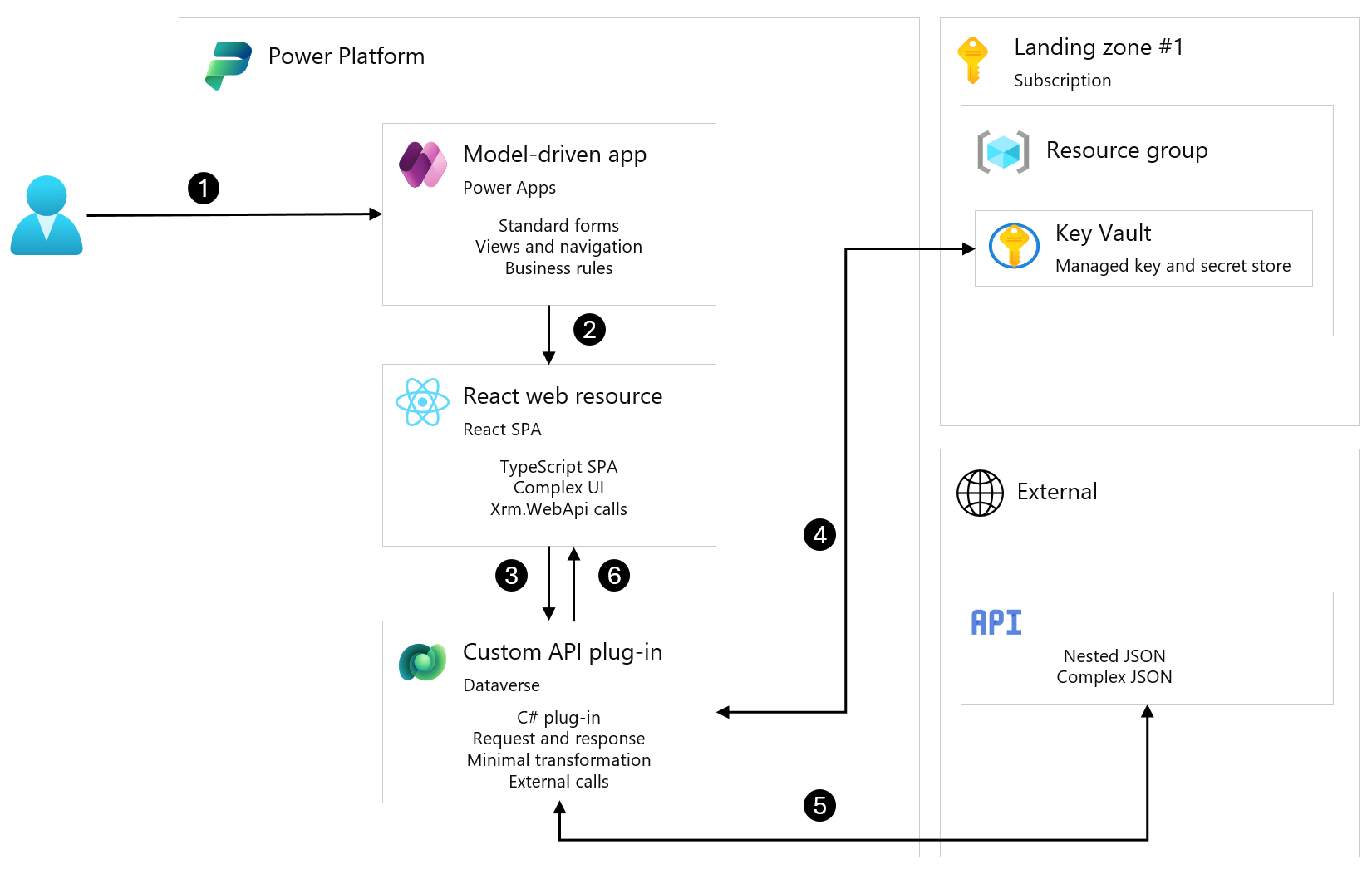
This architecture uses Power Platform for standard business functionality (step 1). A React SPA (single-page application) is embedded for a specific component where complex external API integration and tailored user interface (UI) are simpler to implement with TypeScript (steps 2 to 6).
User authentication: User signs in with Microsoft Entra ID and accesses the model-driven app. Standard model-driven app forms handle record creation, editing, and viewing. Dataverse manages data storage and business rules.
Navigation: User opens a specialized function, such as product configuration with complex calculations, from the model-driven app sitemap. The React SPA loads as a web resource, using the existing Dataverse session.
User interaction: User works with the custom UI for data entry or calculations.
Custom API call: React calls a Dataverse custom API via Xrm.WebApi with a typed request object.
Credentials: The custom API plug-in gets credentials from Azure Key Vault by using a managed identity.
External call: The custom API plug-in transforms the request, calls the external service, and transforms the response.
Response and persistence: React receives the typed response and updates the UI. Results are saved to Dataverse if needed.
Components
The architecture combines core Power Platform services with custom development to deliver the user experience and external integration.
Core Power Platform components
Microsoft Dataverse: Underlying data platform. Stores business data, hosts web resources as solution components, and provides the execution context for custom API plug-ins.
Power Apps model-driven app: Main UI for data management. Hosts the React web resource via a dialog box by using Xrm.Navigation.navigateTo().
Custom development
React web resource: SPA built with React and TypeScript. Deployed as static files in Dataverse. Handles the complex UI and calls custom APIs only, never external services directly. No external hosting is needed. The application inherits the user session, and the files are packaged in the solution for application lifecycle management (ALM).
Dataverse custom APIs: C# plug-ins that handle external integration. Uses a single-input-object, single-output-object pattern. The plug-ins retrieve credentials from Key Vault, call external services, and transform responses.
Azure Key Vault: Stores external API credentials. Accessed by using managed identity for Dataverse plug-ins, so no credentials are stored in code.
Alternative options
Custom page or embedded canvas app: Low-code canvas pages embedded in model-driven apps. While this approach works well for simpler integrations, parsing deeply nested JSON in Power Fx becomes hard to maintain.
Code app: Code-first React or Vue app hosted on Power Platform. Code apps can call Dataverse actions and custom APIs. However, a code app runs as its own app, so it has to be embedded in the model-driven app through an iframe with record context passed in the URL. This approach also doesn't support Power Platform Git integration.
App building in Copilot Cowork (Frontier) and Copilot Studio (preview): AI-native app generation from natural language. Not a production option for this scenario. Learn more about building apps with Copilot Cowork and app creation in Copilot Studio.
Code components: Custom controls bound to form fields. While custom controls are well suited for field-level customization, this scenario needed a full multi-view application, not a single control.
External hosting embedded in Dynamics 365: Host the SPA externally and embed it through an iframe. This approach adds hosting complexity, CORS configuration, and separate authentication, which is unnecessary overhead when you can use web resources.
Generative pages: AI-generated React pages that run natively in model-driven apps. Generative pages provide a way to run React code inside a model-driven app. However, this scenario doesn't use them because the page data API handles only Dataverse table operations and can't invoke a custom API. Connector support, which is in preview, might make generative pages a practical option. Since the server side of this architecture stays the same, generative pages could be the subject of a follow-up pattern.
A React web resource was chosen because, at the time, it was the simplest option that met all the requirements for this component.
Scenario details
When modernizing an existing application, Power Platform handles most business requirements, including forms, workflows, reporting, and approvals. However, specialized functionality might require custom integrations or a tailored user experience.
Challenge
A specialized business function in a legacy application relies on an external API that returns deeply nested JSON responses, with three or four levels of nesting. Different response types require different processing logic, and the user experience doesn't map well to standard model-driven app forms.
Solution
Use Power Platform for the standard application requirements:
- Model-driven apps for standard data entry and navigation
- Power Automate for workflows and notifications
- Dataverse custom APIs to handle external integration server-side
Build a React SPA and deploy it as a web resource for the complex UI components.
Why a React web resource was chosen
Custom pages or embedded canvas apps initially seemed like a good fit. However, for this scenario, the team encountered challenges as the application logic became more complex:
- Parsing deeply nested JSON in Power Fx became difficult to manage.
- Error handling became more complex.
- Testing complex formulas wasn't practical for this scenario.
- Multiple developers working on the same formulas caused conflicts.
Custom pages or embedded canvas apps can work well for simpler scenarios, but the requirements for this component led the team to choose a React web resource. With this approach, you can build a full multi-view UI in React and TypeScript and unit test the transformation logic. The SPA runs inside the model-driven app, reuses the existing Dataverse session, and calls the custom API directly. The web resource, custom API, and plug-in are all Dataverse solution components, so they follow the Power Platform ALM pattern. No additional hosting or authentication is required.
Learn more: Optimize the performance of canvas apps that require complex business logic
When to use this pattern
Use this approach when:
- External APIs return complex nested responses that are hard to parse in Power Fx.
- You need unit testing for transformation logic.
- The UI requirements don't fit standard forms or canvas apps.
- You have developers who can write TypeScript and C#.
Industries that can benefit from this pattern:
- Energy: Equipment configuration with external pricing engines.
- Manufacturing: Product configurations with complex option dependencies.
- Financial Services: Quote and proposal calculators that call external rating systems.
- Healthcare: Clinical system integrations with complex data mapping.
When not to use this pattern
- The integration is straightforward (flat JSON, simple mapping).
- Custom pages or code components meet the requirements.
- You don't have pro-developer resources for ongoing maintenance.
Considerations
These considerations implement the pillars of Power Platform Well-Architected, a set of guiding tenets that improve the quality of a workload. Learn more in Microsoft Power Platform Well-Architected.
Reliability
Error handling: Custom APIs return structured error objects. The React app shows user-friendly messages, not stack traces.
Retry logic: Plug-ins retry transient failures with exponential backoff.
Independence: If the React component breaks, users can still use all standard model-driven app features. The complex integration is additive.
Testing: TypeScript and C# both support unit testing. Test transformation logic before deployment.
Data consistency: Plug-ins use Dataverse transactions. External calls happen after Dataverse commits. Idempotency keys prevent duplicate operations on retry.
Security
Credentials: Don't store credentials in frontend code. Store them in Key Vault and retrieve them by plug-ins through managed identity.
User context: Custom APIs run as the calling user. Dataverse security roles apply normally.
No direct external calls: React talks to custom APIs only. All external communication goes through server-side code.
Validation: Server-side validation is authoritative. Client-side validation is for UX only.
Operational Excellence
Source control: Store the React app and plug-in code in Git and use pull request reviews.
CI/CD: Use Azure DevOps or GitHub Actions for build, test, and deploy. Use Dataverse solutions for ALM.
Environments: Use the same architecture in dev, test, and prod. Use environment variables for endpoint configuration.
Monitoring: Use Application Insights for React telemetry and plug-ins in addition to standard Plug-in Trace Logs for server-side.
Performance Efficiency
Plug-in timeout: A Dataverse message operation, including its synchronous plug-ins, has a hard two-minute limit, and Microsoft recommends keeping plug-in execution under two seconds. Design external calls with that constraint in mind.
Caching: Cache Key Vault credentials within plug-in execution. Cache reference data where appropriate.
Bundle size: Minify React production builds. Use code splitting for large apps.
API design: Use single-request patterns. Avoid chatty calls between React and custom APIs.
Experience optimization
Visual consistency: Style React component to match model-driven app look and feel (FluentUI).
Loading states: Use clear indicators during API calls.
Error messages: Provide actionable messages when things fail.
Accessibility: React components follow Web Content Accessibility Guidelines (WCAG).
Next steps
- Check if custom pages work for your scenario before committing to this approach.
- Evaluate code apps and generative pages. These capabilities continue to evolve, so check the current documentation and the roadmap before deciding.
- Evaluate code components if the requirement is field or subgrid level, not a full app.
- Set up Key Vault and the API before starting development.
- Design custom API contracts and TypeScript models upfront.
- Plan your ALM strategy for mixed low-code and pro-code deployments.
Contributors
Microsoft maintains this article. The following contributors wrote this article.
Principal authors:
- Allan De Castro, Global D365 & Power Platform Solution Architect
Related resources
Power Platform development:
- Web resources in model-driven apps
- Create and use custom APIs
- Overview of custom pages for model-driven apps
- Power Apps component framework overview
- Power Apps code apps overview
- Generate a page using natural language
Azure integration:
Application lifecycle management: