Note
Access to this page requires authorization. You can try signing in or changing directories.
Access to this page requires authorization. You can try changing directories.
This reference architecture defines a standardized security model for Microsoft Dataverse that aligns access control with Microsoft Entra ID. By using Microsoft Entra security groups mapped to Dataverse teams, organizations can assign Dataverse security roles to teams instead of individual users. This approach centralizes access management, reduces administrative overhead, and helps align Dataverse access with organizational security policies and lifecycle processes.
Tip
This article provides an example scenario and a visual representation of how to standardize access control in Dataverse with Microsoft Entra security groups and Dataverse teams. You can apply the generalized architecture to Dataverse and Dynamics 365 solutions across various scenarios and industries.
Architecture diagram
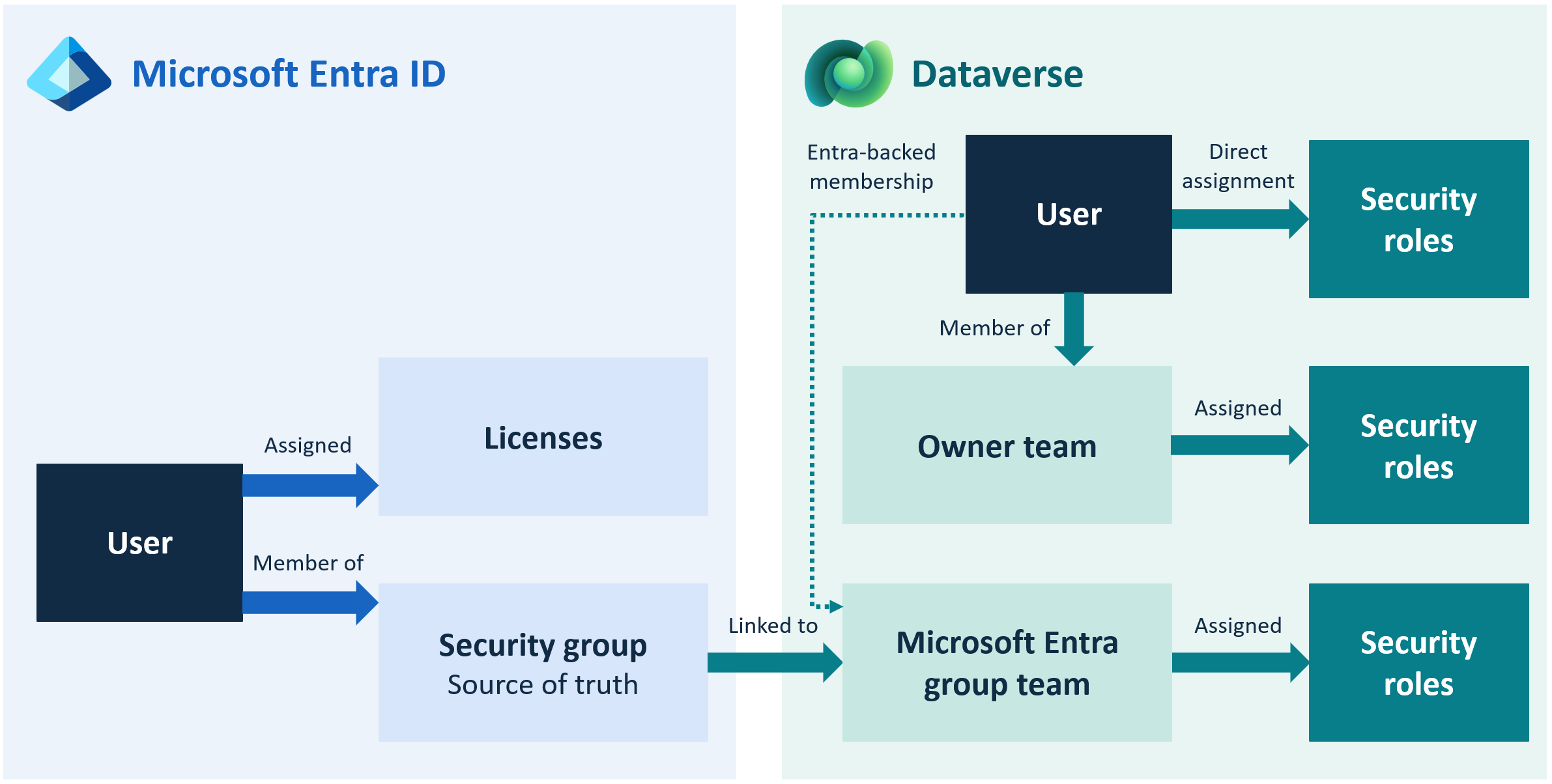
Workflow
This architecture manages user access primarily through Microsoft Entra security groups mapped to Dataverse teams. Assign security roles to these teams to centralize identity governance in Microsoft Entra ID and reduce administrative overhead in Dataverse.
The following workflow outlines how identity, access, and privilege evaluation occur across the system.
Manage user identity and group membership in Microsoft Entra ID.
- Administrators create and maintain Microsoft Entra security groups that represent business units, job functions, or access profiles.
- Add or remove users from these groups through standard identity governance processes, such as HR-driven provisioning, lifecycle workflows, and access reviews.
Create Dataverse teams of type Microsoft Entra group team.
- When you reference a Microsoft Entra group in Dataverse, the platform synchronizes the members of that group to the Dataverse team.
- This Dataverse team acts as the security container inside Dataverse.
Note
Users must meet the environment group and licensing requirements for access.
Assign Dataverse security roles to the Dataverse team of type Microsoft Entra group team.
- Administrators assign one or more Dataverse security roles to the team.
- These roles define the privileges and data access that members of the Microsoft Entra group inherit.
- The Member's privilege inheritance setting on the security role determines how the permissions for the role relate to the team and user. Use Direct User (Basic) access level and Team privileges to ensure users receive the privileges of the role as if it were assigned directly to them.
Users sign in to a model‑driven app or Dataverse‑backed service.
- Authentication occurs through Microsoft Entra ID.
- Dataverse retrieves the user's teams and security roles to determine access. These teams are based on the user's Microsoft Entra groups.
Dataverse evaluates the user's effective permissions.
Dataverse calculates the union of:
- Privileges assigned directly to the user (rare, exception‑only)
- Privileges inherited from Dataverse Microsoft Entra Group teams
- Privileges inherited from Owner teams (if used for record ownership)
- Business unit hierarchy rules
This calculation results in the user's effective access profile.
Users interact with data according to their effective permissions.
- Access to tables, records, and operations, such as read, write, append, assign, and share, is determined by the security roles assigned to their teams.
- If you remove a user from a Microsoft Entra group, their Dataverse access is removed automatically the next time they authenticate. They lose access granted solely through their team membership.
Enforce governance and lifecycle processes through Microsoft Entra ID.
- Access reviews, automated provisioning or deprovisioning, and audit controls occur in Microsoft Entra ID.
- Dataverse administrators no longer manage user‑level security role assignments, reducing risk and operational overhead.
Handle exceptions through direct user role assignment.
Assign a small number of roles, such as Dynamics 365 App for Outlook, directly to users. Document and manage these roles as exceptions to the standard pattern.
Components
This architecture combines Microsoft Entra security groups, Dataverse teams, and Dataverse security roles to manage access. Together, these components connect centrally managed group membership to the privileges users receive in Dataverse.
Microsoft Entra groups: Microsoft Entra security groups provide centralized identity and access management for the organization. Use them to represent job roles, departments, or functional access profiles. They serve as the authoritative source for user membership and lifecycle governance.
Dataverse teams: Dataverse teams of type Microsoft Entra group team are created from Microsoft Entra security groups and act as security containers within Dataverse. They allow group membership to flow automatically into the Dataverse security model, enabling scalable and consistent assignment of security roles.
Dataverse security roles: Security roles define the specific privileges users receive within Dataverse, including table‑level and task‑based permissions. Assigning these roles to Dataverse Microsoft Entra group teams enables consistent access control and reduces the need for direct user role assignments.
Alternatively, assign security roles directly to individual users or to manually created Dataverse teams. However, both approaches require ongoing maintenance by system administrators and don't integrate with organizational identity governance. Standardizing access at the Microsoft Entra ID level ensures that the organization's security team manages security, supports automated lifecycle processes, and reduces manual effort within Dataverse.
Scenario details
Organizations adopting Microsoft Dataverse often struggle with fragmented, inconsistent, and manually maintained security models. As environments scale, direct user role assignments and manually managed Dataverse teams create operational bottlenecks, increase risk, and make it difficult to enforce enterprise‑wide governance standards.
This architecture addresses those challenges by using Microsoft Entra security groups mapped to Dataverse teams as the foundation for identity and access management. By shifting security administration to Microsoft Entra ID, organizations centralize control, reduce administrative overhead, and ensure that Dataverse access aligns with enterprise identity governance practices.
Considerations
These considerations implement the pillars of Power Platform Well-Architected, a set of guiding tenets that improve the quality of a workload. Learn more in Microsoft Power Platform Well-Architected.
Reliability
This architecture improves reliability by centralizing identity management in Microsoft Entra ID, ensuring that access changes propagate consistently across all Dataverse environments. Because Dataverse automatically synchronizes Microsoft Entra group membership, user access remains accurate without manual updates or custom automation. This approach reduces the risk of stale permissions and ensures predictable access behavior as users move across roles or departments.
Security
Using Microsoft Entra security groups as the source of truth aligns Dataverse access with enterprise identity governance. Conditional access, multi-factor authentication, access reviews, and automated deprovisioning all apply consistently. Assigning security roles to Dataverse Microsoft Entra group teams reduces the risk of inconsistent or overly permissive access, while minimizing direct user role assignments limits the attack surface and supports least‑privilege principles.
Operational Excellence
This approach reduces administrative overhead by eliminating manual user‑level role assignments and minimizing the need to maintain Dataverse teams directly. Access changes occur automatically through Microsoft Entra ID processes, enabling security and identity teams, not Dataverse admins, to manage lifecycle events. These processes support standardized operations, reduce human error, and simplify environment management.
Performance Efficiency
The primary performance efficiency gains of this security model come from reducing administrative complexity. Standardizing access through Microsoft Entra groups simplifies role assignment, shortens the time required to diagnose security issues, and reduces the effort needed by Dataverse administrators to maintain access across environments.
Experience Optimization
End users benefit from consistent, predictable access across apps and environments. Microsoft Entra group membership determines user access. When Microsoft Entra group membership changes take effect, a user's inherited Dataverse permissions update automatically, without requiring manual updates. Administrators also experience a more intuitive and manageable security model, improving overall usability of the platform.
Contributors
Microsoft maintains this article. The following contributors wrote this article.
Principal authors:
- Kylie Kiser, MVP