Note
Access to this page requires authorization. You can try signing in or changing directories.
Access to this page requires authorization. You can try changing directories.
This reference architecture shows how to use Power Platform to support a structured, auditable lifecycle for supplier onboarding and assessment. It replaces fragmented tools and email-based processes with a governed flow from initial scoping through third-party risk (TPR) and Personal (Privacy) Due Diligence (PDD) assessments to reassessment.
Tip
This article provides an example scenario and a generalized example architecture to illustrate how to build a supplier onboarding solution with Power Platform. The architecture example can be modified for many different scenarios and industries.
Architecture diagram
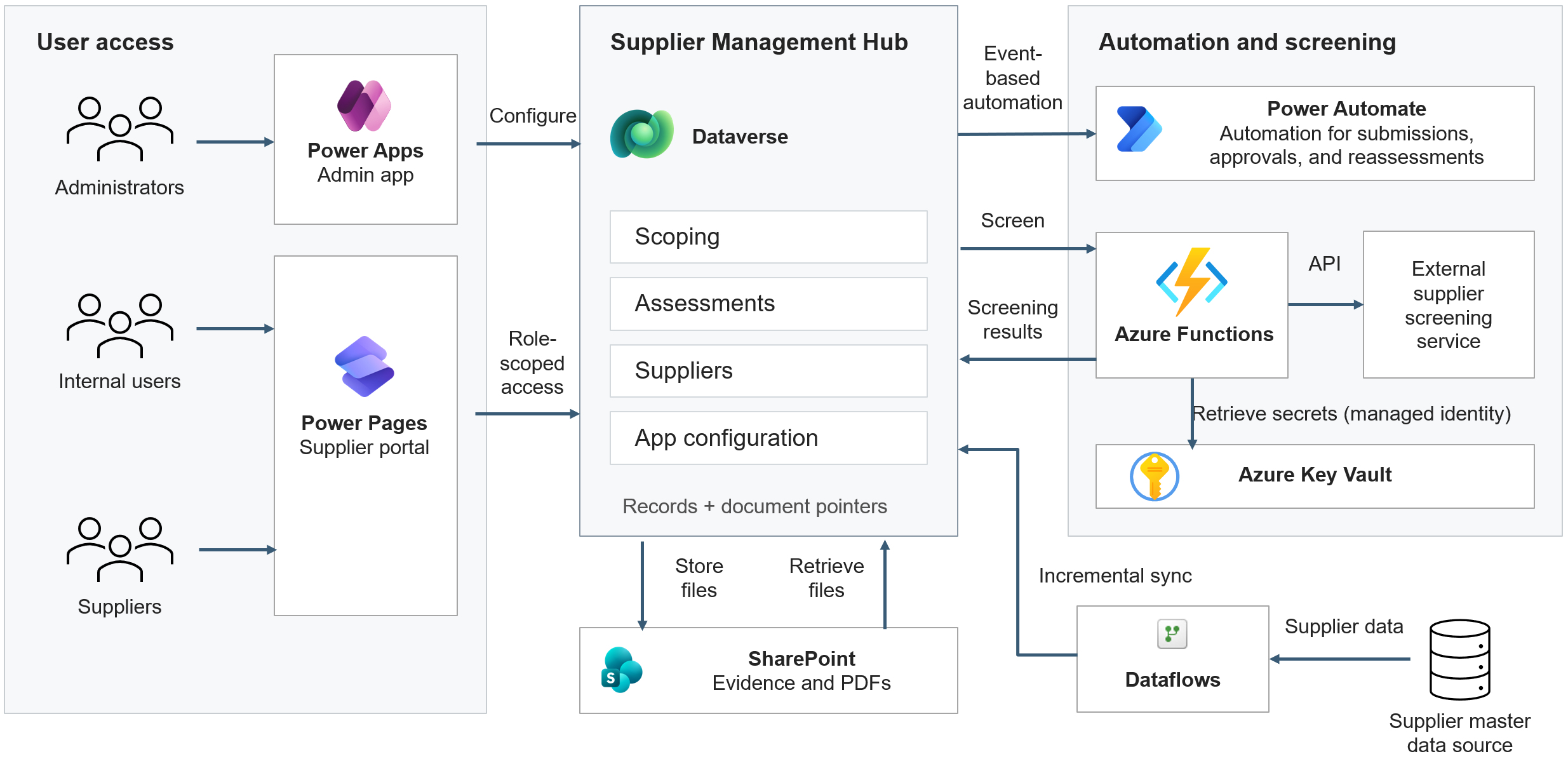
Workflow
The workflows are state-driven, predictable, and auditable. They include scoping, TPR, and PDD assessments.
Scoping
Scoping defines the supplier engagement and identifies the assessments and documentation needed for onboarding.
Initiate (draft): The Contract Owner (CO) captures engagement context, such as supplier, contact, and area, and completes scoping questions. The draft supports saving and resuming.
Validate and submit: The system enforces mandatory fields and dependencies. Resolve errors before submission.
Generate artifact (completed): The system generates the scoping summary (PDF), records the timestamp, and notifies the CO.
Recommend assessments: Rules compute a scoping score and recommend tracks for the TPR and PDD assessments. The CO confirms and creates linked assessments.
Outputs: The system stores the scoping PDF with pointers, links assessments for lineage, and sends next-step notifications.
Third-party risk (TPR)
The TPR assessment evaluates the overall risk of engaging with a third party. The reviewer (TPR) evaluates the supplier's responses, evidence, and screening results, and escalates high-risk assessments to Legal.
Initiate (draft): The CO starts the TPR and the system assigns a reviewer (TPR). The supplier is invited if supplier input is required.
With supplier: The supplier completes a dynamic questionnaire and uploads evidence mapped to specific questions. The system moves the submission to With Reviewer and notifies the reviewer (TPR) and CO.
With reviewer (TPR): The reviewer evaluates the answers, evidence, and screening results, and then makes one of the following decisions:
If the assessment is identified as low or medium risk, the system moves it to Completed and notifies stakeholders.
If the submission is identified as high risk, the system moves it to Legal Review, notifies stakeholders, and records the rationale.
If more information is required, the assessment is sent back to the supplier or CO for clarification or more input. The system tracks the loop with comments.
If the submission is rejected, the system moves it to Rejected, notifies stakeholders, and records the rationale.
Legal review (if escalated): If Legal approves, the system moves the assessment to Completed. If Legal refers it back, it goes to the reviewer (TPR) and CO. If Legal rejects it, the system moves it to Rejected.
Closure and artifact: The system generates or updates the TPR summary, records the validity window, and retains evidence pointers.
Reassessment: The system schedules reassessment according to policy, such as annually, creates a child assessment linked to the parent, and sets reminders.
Personal (Privacy) Due Diligence (PDD)
PDD applies when personal data is in scope and assesses the supplier's privacy safeguards and supporting compliance evidence. A GBS or privacy reviewer evaluates the privacy measures. Then the Contract Owner assigns the final risk level and decides whether corrective actions or Legal review are required.
Initiate (draft): The CO starts PDD when personal data is in scope. The supplier is invited if input is required.
With supplier: The supplier completes the tailored PDD questionnaire, uploads evidence (DPA, certifications, safeguards), and submits it to Pending GBS Review. Notifications are issued.
With Reviewer (GBS): The reviewer validates the privacy measures and makes one of the following decisions:
If approved, it moves to CO Finalization.
If corrections are needed, it is sent back to the supplier with comments.
If rejected, it moves to Rejected, notifications are sent, and the rationale is recorded.
CO finalization: The CO assigns the final risk (Low/Medium/High). For High risk, corrective actions are defined and Legal is engaged if necessary. The process is finalized upon resolution.
Legal review (optional): If escalated, Legal can Approve, Refer Back, or Reject per contractual and compliance considerations.
Closure and artifact: The system generates the PDD summary, sets the validity window, and retains answer-level evidence pointers.
Reassessment: The system tracks validity, issues reminders ahead of expiry, and creates a new child reassessment linked to the parent upon expiration.
Components
Each component minimizes custom build, maximizes governance, and keeps change inexpensive.
Power Pages (portal): Used in this architecture as a role-aware collaboration surface for internal users and suppliers. Supports dynamic forms, conditional visibility, and evidence uploads. The system enforces page and row permissions at runtime. Chosen for this architecture due to its external-facing capabilities.
Power Apps model-driven apps (administration): Curates questions, category mappings, scoring thresholds, conditional rules, environment parameters, and role mappings. The changes are managed as configuration with audit trails.
Microsoft Dataverse: Relational backbone for operational and configuration entities. Auditing, relationships, field security, and row-level access align natively with the portal and administration app.
SharePoint: Versioned storage for evidence and artifacts. Dataverse pointers preserve provenance, and binaries are kept outside transactional tables for scale and lifecycle control.
Power Automate cloud flows: Automation for submissions, approvals, send-backs, notifications, PDFs, and reassessments, with standardized retry, timeout, and error routing patterns.
Azure Functions: Provides server-side encapsulation of screening APIs, retrieves secrets through managed identity, normalizes outputs and audit archives, reduces client exposure, and centralizes logging.
Dataflows: Provides incremental master data synchronization for supplier and contact data, including normalization (ISO country, email casing, phone), deterministic keys, lineage capture, and mirrored inactivation for historical joins.
The alternative approach to use custom web apps and APIs for supplier onboarding wasn't chosen for this architecture because it would require higher maintenance and reimplementing capabilities that already exist in the platform, such as security, identity, and auditing.
Scenario details
This reference architecture addresses a common enterprise challenge: third-party assurance is fragmented across teams, tools, and geographies. The goal is to provide a single, governed lifecycle that captures engagement context, runs the right assessments, anchors every decision to evidence, and preserves history for reassessments, without extensive custom code. The approach standardizes how internal teams and suppliers collaborate, while maintaining strict isolation and auditability.
Challenges
Inconsistent and manual assurance processes, such as email, spreadsheets, and ad-hoc reviews, lead to delays, gaps, and limited traceability.
Evidence is stored outside governed systems, making audits time-consuming and error-prone.
Supplier collaboration is unstructured. Questionnaires vary by team and are hard to evolve.
Reassessments are late or missed, with no clear lineage between prior and current reviews.
Solution
The architecture uses configuration-driven questionnaires, scoring, and routing, with controlled access to assessment data and supporting evidence.
Adapts as policies change, without replatforming.
Aligns operational collaboration in the portal with administrative governance in the configuration app.
Establishes a single source of truth for assessments, outcomes, and evidence across teams and regions.
Scales across business units and geographies with environment segregation and controlled promotion.
Reduces change friction by moving questions, scoring, and routing into configuration with audit trails.
Target outcomes
A single operating model for scoping, assessments (TPR, PDD), and reassessments across regions and business units.
Explicit state transitions with clear ownership, notifications, and artifacts at each step.
Evidence attached to the precise answers it supports, with version history and provenance.
Server-side integrations for screening and authoritative master data synchronization.
Configuration-driven questionnaires, scoring, and routing to adapt as policies change.
Personas and responsibilities
Contract Owner: Initiates scoping and assessments, coordinates supplier engagement, and finalizes outcomes.
Supplier Contact: Completes questionnaires, uploads evidence, and responds to send-backs.
Reviewer (TPR): Evaluates third-party risk, approves, sends back, escalates, or rejects.
GBS/Privacy Reviewer (PDD): Validates privacy safeguards and compliance artifacts, and recommends actions.
Legal Reviewer: Adjudicates escalated, high-risk cases, and contract-related decisions.
System/Orchestration: Enforces lifecycle, generates PDFs, routes notifications, and schedules reassessments.
Scope boundaries
In scope: Scoping, TPR, PDD, reassessments, supplier collaboration, evidence and artifact management, screening integration, master data sync, and reporting hooks.
Out of scope (baseline): Deep contract lifecycle management, procurement source-to-pay workflows, and generative AI. You can integrate these features later through standard interfaces.
Primary scenarios (happy paths)
New engagement requires scoping: The CO finishes scoping, and the system recommends TPR, PDD, or both, and then creates and routes assessments.
Supplier responds: The supplier completes a questionnaire and uploads required evidence, reviewers assess and finalize risk, and the system generates the summary and validity dates.
Reassessment: The system schedules and creates a child assessment ahead of expiry. Prior decisions and evidence remain linked for continuity.
Secondary scenarios (variations)
Send-back loops: The reviewer requests clarification, the supplier or CO updates responses or evidence, and the reviewer finalizes.
High-risk escalation: The reviewer (TPR) escalates to Legal, and Legal approves, refers back, or rejects with rationale.
Screening enrichment: A server-side function runs external checks and stores the normalized summary and risk PDF. The system writes the attributes to the assessment.
Edge cases and exception handling
Supplier changes, such as contact updates, and identity redemption issues are handled through invitation lifecycle and relationship-scoped access.
Evidence replacement: Versioning keeps prior artifacts and answer-level links maintain provenance.
Assessment withdrawal or engagement termination: Closure rules archive state with rationale and retain lineage.
Data and lifecycle expectations
Operational data: The process captures scoping, assessments, and answer-level results with timestamps, owners, and decisions.
Documents: The system stores evidence and generated PDFs in governed libraries. Dataverse pointers preserve provenance and version history.
Lineage: The system maintains parent and child relationships between reassessments, upstream source IDs, and environment stamps for master data.
Reporting: The system provides views and exports that pull from operational tables. PDFs and evidence trace back to the exact answers.
Compliance and audit posture
End-to-end traceability: The system records each decision, who made it, when they made it, and the evidence they used.
Supplier isolation: The system supports relationship-scoped permissions and folder-level document controls to prevent cross-supplier exposure.
Internal confidentiality: The system uses field- and record-level security to hide internal notes and reviewer commentary from suppliers.
Benefits
The following benefits were captured from the supplier onboarding process on which this reference architecture is based.
Cycle time: 30 to 50 percent reduction from initiation to decision for standard risk cases.
Touches per case: Fewer send-back loops due to clear roles, states, and evidence requirements.
Audit readiness: Real-time retrieval of decisions with linked evidence and version history.
Policy agility: New questions and scoring rules deployed via configuration without code releases.
Business value summary
Consistency and governance across the assurance lifecycle and predictable decisions supported by evidence.
Efficiency and throughput via automation, standardized states, and clear handoffs.
Reduced operational and compliance risk and easier audits due to answer-level provenance.
Better supplier experience with a single, guided collaboration surface and transparent status.
Considerations
These considerations implement the pillars of Power Platform Well-Architected, a set of guiding tenets that improve the quality of a workload. Learn more in Microsoft Power Platform Well-Architected.
Reliability
Deliver predictable outcomes and graceful degradation under transient faults.
Use idempotent orchestration steps, retries, and timeouts for external calls, and use compensating actions for partial failures.
Separate scheduled jobs, such as reminders and reassessments, from interactive flows to reduce perceived latency, and use backoff policies for long-running tasks.
Use dedicated development, test, and production environments, and run smoke tests for identity, transitions, integrations, PDFs, and evidence. Track metrics and error summaries for operations.
Security
Protect data, enforce isolation, and keep secrets off client tiers.
Use least-privilege, role- and relationship-scoped access. Suppliers see only their assigned records, and reviewers are scoped by team.
Use appropriate field- and record-level security for internal notes and scoring commentary, with distinct layouts for supplier and internal views.
Use server-side integrations with vault-managed secrets, keep secrets out of browsers, use managed identities for functions, and use attachment scoping and download controls.
Operational Excellence
Make operations observable and repeatable.
Use telemetry and operational mailboxes for proactive monitoring and alerting on failed runs and retriable conditions.
Use managed promotion with connection rebinding, environment variables, predeployment validation, rollback guidance, and runbooks.
Use configuration governance for questions, scoring, and routing, with versioning, approvals, and change logs. Document support procedures and a Responsible, Accountable, Consulted, and Informed (RACI) matrix.
Performance Efficiency
Keep interactions responsive and workload steady.
Use conditional rendering and filtered queries to minimize payloads, and tune views for portal lists.
Use batch or scheduled processing for reassessments and reminders, and cache summaries where appropriate.
Use server-side normalization to avoid repeated client processing, and use pagination and incremental loads on dataflows.
Experience Optimization
Keep users focused and reduce friction.
Use role-specific task lists, concise instructions, clear decision checkpoints, and context panels for reviewers.
Use invitation-based supplier flows with status visibility, upload feedback, and send-back guidance. Provide accessible documents that use consistent naming.
Use generated, standardized PDFs for scoping and assessment summaries to streamline reviews and handoffs.
Contributors
Microsoft maintains this article. The following contributors wrote this article.
Principal authors:
- Vijay Bhimrao Waghmare, Power Platform Capability Manager / Solution Architect