Note
Access to this page requires authorization. You can try signing in or changing directories.
Access to this page requires authorization. You can try changing directories.
Enterprise solutions need to reliably deliver messages when data changes occur in Dataverse. This reference architecture shows how to implement the Transactional Outbox pattern with Dataverse to reduce the risk of message loss and help keep integrated systems synchronized.
Tip
This article provides an example scenario and a generalized example architecture to illustrate how to implement reliable event delivery from Dataverse. The architecture example can be modified for many different scenarios and industries.
Architecture diagram
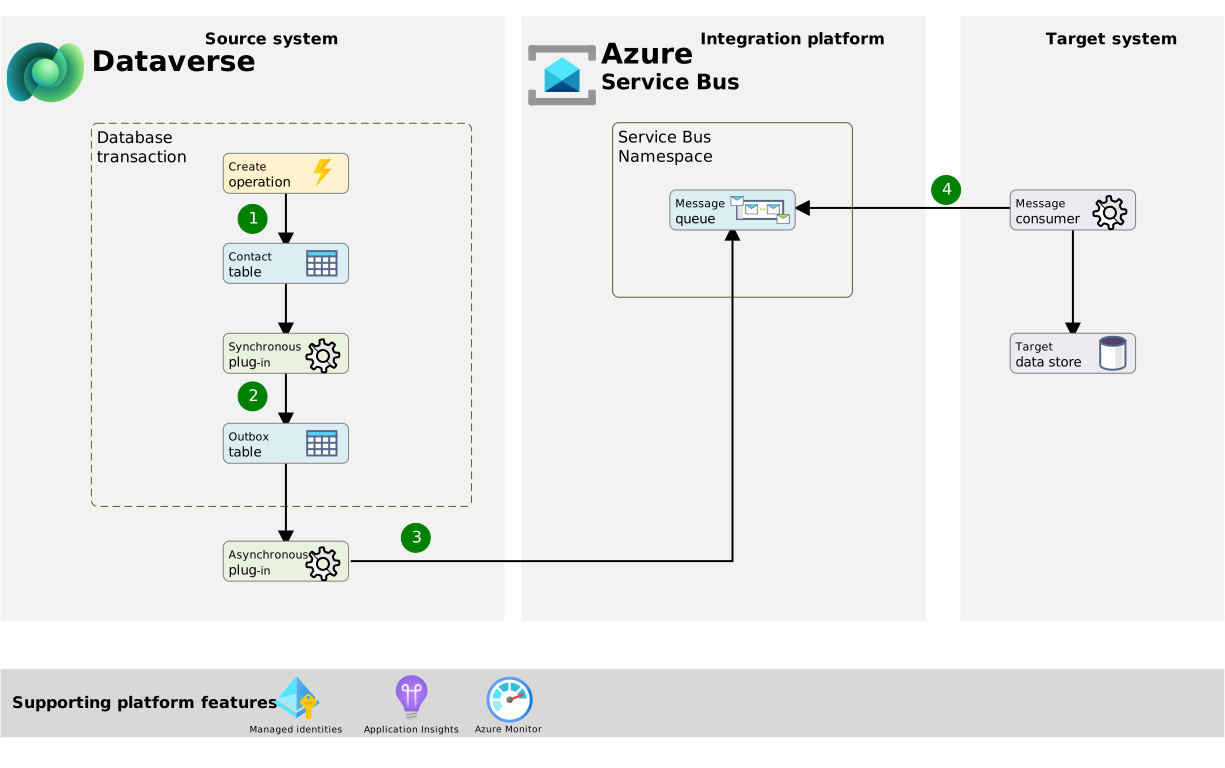
Workflow
The following steps describe the workflow that's shown in the example architecture diagram:
- A data operation in Dataverse occurs, such as the creation or update of a Contact record. This operation creates a database transaction.
- A Dataverse synchronous plug-in triggers in response to this event and creates a record in an outbox table within Dataverse as part of the same transaction.
- If the plug-in executes successfully, the transaction commits both the outbox record and the original record (for example, Contact) changes.
- If the plug-in execution fails, the original data event rolls back, and Dataverse doesn't commit any record modifications.
- An asynchronous plug-in triggers in response to the creation of a record in the outbox table in Dataverse and writes a message to an Azure Service Bus queue or topic.
- A message consumer listens for messages to process and push to a target system.
Components
Dataverse is the source transactional system of record where the data event occurs and the outbox table lives. It asynchronously sends messages to the message broker by using a plug-in.
Azure Service Bus is the reliable enterprise broker that receives messages from Dataverse for processing from receiving systems.
- Queues are ideal when there's a single receiver of a message.
- Topics are best when many subscribers might process the same message or need filter criteria to selectively process messages.
Azure Monitor is a comprehensive monitoring solution for collecting, analyzing, and responding to monitoring data from cloud and on-premises solutions. Use built-in metrics for Azure Service Bus to monitor the number of messages in a queue or topic, or dead letter queue.
Azure Application Insights is used for application performance monitoring and can be enabled for Dataverse plug-ins to send trace logs to an Application Insights workspace.
Alternative options:
- Azure Logic Apps: A viable low-code alternative to deliver messages from the outbox table to the message broker if you want more precise control over when to trigger the orchestration and delivery of the message (for example, micro-batching).
- Azure Functions: A code-first alternative that gives you the most flexibility and scale to handle higher volumes and intermittent failure retries.
Scenario details
Enterprise solutions often need to exchange critical data with other systems through messages. To ensure consistency across systems, handle the data operation and message delivery as a single atomic operation. However, most transactional systems and message brokers rarely support distributed transactions, or they introduce tight coupling that you want to avoid. Without a distributed transaction, there's no reliability guarantee because a failure might occur when sending the message to the broker after a transaction is committed.
The Transactional Outbox pattern solves this challenge by creating a message in the same local database transaction that updates the business data. A separate process can then deliver the message from the outbox table to the message broker. Intermittent process failures aren't a problem. The outbox table stores the message so it isn't lost, and the process retries until it succeeds.
Dataverse is a capable and extensible low-code data platform with transactional data storage that can implement this pattern for critical outbound integration scenarios.
Considerations
These considerations implement the pillars of Power Platform Well-Architected, a set of guiding tenets that improve the quality of a workload. Learn more in Microsoft Power Platform Well-Architected.
Reliability
This pattern significantly increases reliability, guarantees at-least-once delivery, and eventual consistency by ensuring transactional consistency. By relying on a message broker, it protects downstream systems from being overwhelmed by controlling the flow of data between source and target systems and protects against availability issues of downstream systems.
When message ordering is required, enable Azure Service Bus sessions on the queue or subscription. The producer should assign a consistent SessionId, such as the Dataverse record or aggregate ID, to related messages so they're processed in order within that session. Design consumers for idempotent processing, as this pattern provides at-least-once delivery and duplicate messages might occur. Where detecting missing or out-of-sequence events is important, messages can include an application-level sequence number. Ordering guarantees apply within a session rather than globally, and the solution should define how retries and dead-lettered messages affect subsequent processing for that session.
Security
By using Azure services, Dataverse can authenticate to the message broker (Azure Service Bus) through Azure managed identities via the Power Platform managed identity feature. This approach eliminates the risk of storing sensitive credentials and downtime caused when rotating secrets.
Performance Efficiency
Using a message broker such as Azure Service Bus helps level the load to ensure downstream applications don't become overwhelmed during high-volume periods.
Consider using an Azure function over an asynchronous Dataverse plug-in to send messages to Azure Service Bus if volumes become very high. This approach provides the most scale and flexibility to process a large volume of records in batch and handle transient errors.
Contributors
Microsoft maintains this article. The following contributors wrote this article.
Principal authors:
- Chris Piasecki, Solution Architect