Note
Access to this page requires authorization. You can try signing in or changing directories.
Access to this page requires authorization. You can try changing directories.
Use a governance answer from Power Platform Admin in Cowork (preview) to create a report, a recurring briefing, and follow-up actions in the same Microsoft Copilot Cowork conversation.
Important
Before you begin, review the Power Platform Admin in Cowork prerequisites and prepare for rollout.
Step 1: Ask a governance question
Ask your question in Cowork and refine it with follow-up questions until the answer meets your needs. For example prompts, see Governance prompt library.
Step 2: Shape the answer
In the same conversation, ask Cowork to turn the answer into a format your audience reads, such as:
- A one-page HTML briefing for leadership.
- A Word report.
- A PowerPoint slide for the steering group.
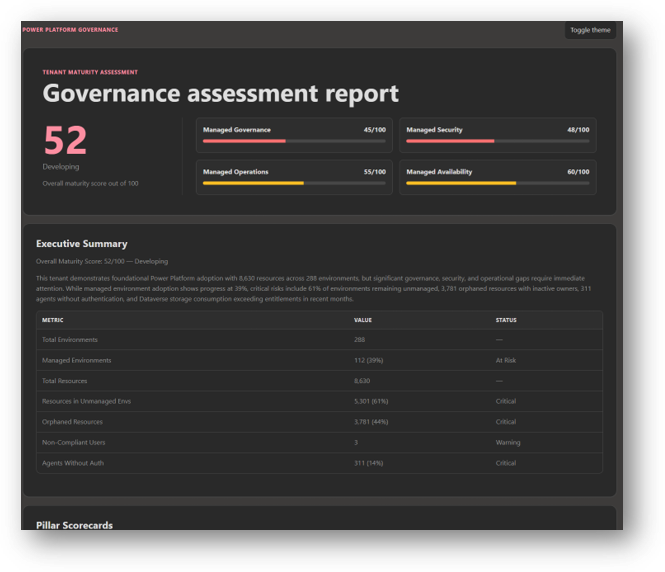
Build an HTML report with this information. Make sure I can filter tables and sort columns by value.
The following image shows an example HTML report generated from prompts that assess a tenant's governance maturity.
Step 3: Schedule the briefing
Tell Cowork when to repeat the prompt. The briefing arrives in your inbox on schedule with what changed, what's at risk, and who to talk to. No custom flows, scripts, or command-line tools are required.
Every Monday at 8 AM, use the Power Platform Admin plugin to find what changed in my Power Platform tenant last week, turn it into a one-page HTML briefing, and email it to me.
Manage your schedules from the Automations view in Cowork. For scheduling controls, see Schedule prompts in Cowork.
Step 4: Act on the findings
Ask Cowork to act on the answer, for example:
- Draft an email to the owners of unused apps.
- Post the highlights in your platform team's Microsoft Teams channel.
- Add a line to the change advisory board pack.
Cowork pauses for your approval before anything is sent or posted. Learn more in Approve actions in Cowork.
Create a reusable governance skill
When a conversation produces the result you want, turn it into a reusable skill that gathers fresh data, updates the report, and delivers it automatically. For the skills experience, see Cowork skills.
Create a reusable skill from this conversation and the report it generated. Schedule it to run every Monday at 8:00 AM, embed the updated HTML report in an email, and send it to me.
Common governance skills include weekly executive briefings, capacity alerts, owner outreach, and department-level showback.
Centralize insights in a Power App
When you're ready to share insights more widely, ask Cowork to create or update a Power App from the HTML report. See Build apps with the App skill in Cowork for the app-building experience and its availability. Use Power Platform to host the solution, manage access, secure the data, and extend the experience with workflows and business rules.
Address findings with Managed Platform labs
Use findings from Power Platform Admin in Cowork to choose the next steps for your platform team. The guided, self-paced Power Series labs provide implementation guidance.
| If Power Platform Admin in Cowork shows... | Start with |
|---|---|
| Many widely used apps in the default environment. | Managed Governance labs: environment groups, rules, and default environment routing. |
| No visibility of what's running or failing. | Managed Operations labs: inventory and monitoring. |
| Gaps in your security baseline. | Managed Security labs. |