Note
Access to this page requires authorization. You can try signing in or changing directories.
Access to this page requires authorization. You can try changing directories.
This article introduces an end-to-end solution for implementing a privileged access architecture. It's aimed at security and identity planners and implementers.
In the Microsoft security adoption model:
- Implementation solutions provide prescriptive deployment guidance.
- Solutions align to business scenarios that define high priority security outcomes.
Before you begin implementation, learn how a secure privileged access architecture plays a critical role in the business scenario - Protect critical business assets - by reducing this risk and strengthening control over sensitive systems.
Solution goals
Privileged access represents one of the highest-impact risks in any organization because it provides direct control over identity systems, cloud control planes, and critical business resources.
This guide defines a Zero Trust approach to privileged access by treating it as an end-to-end access path, spanning identity, device, interface, target resource, and monitoring. Instead of securing individual components in isolation, this model ensures the entire access pathway is governed and continuously validated.
The objective is to reduce risk by:
- Limiting who can perform privileged actions.
- Controlling where and how those actions can occur.
- Continuously monitoring and responding to privileged activity.
Implement this architecture using Microsoft Entra ID, Microsoft Intune, and Microsoft Defender for Endpoint.
Deploy the solution in phases. Start by establishing a secure foundation (identity control plane and trusted devices), enforce policy controls, and then set up monitoring and response operations.
Privileged access risk
Privileged identities (human and non‑human) control high‑value assets and security enforcement mechanisms. When compromised, the resulting business impact is severe. With privileged access attackers can:
- Exfiltrate, encrypt, or destroy data.
- Shut down or disrupt business operations.
- Disable detection and enforcement controls.
- Subvert identity systems and create persistent access.
Common attacks
Attacks follow two common patterns:
- Targeted data theft: Cyberattackers locate and exfiltrate sensitive intellectual property, financial data, or strategic plans. Stolen data is sold, leaked, or used for competitive advantage.
- Human-operated ransomware: Cyberattackers leverage privileged access to encrypt systems, halt operations, and extort the organization - forcing executive decisions under extreme time pressure.
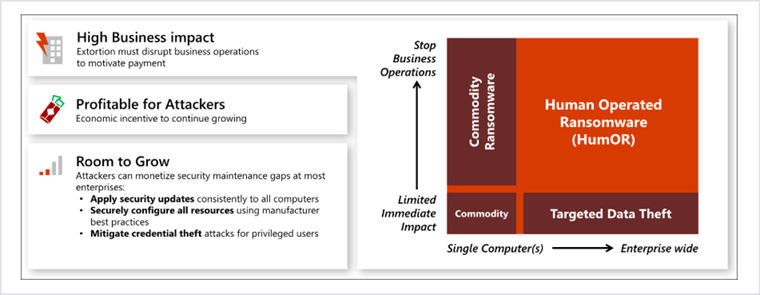
Why privileged access is risky
Privileged access risk is unique and systemic for a number of reasons.
| Risk | Details |
|---|---|
| Operates in the control plane | Privileged accounts operate in the control plane, not just the workload plane. Privileged identities can modify identity, change security configurations, disable or bypass enforcement controls, and tamper with business-critical data. Once attackers obtain privileged access, they can undermine the very mechanisms designed to detect and stop them. This makes traditional containment strategies far less effective and allows compromise to persist undetected. |
| High business impact by design | Privileged access exists to manage critical systems, so abuse of that access has immediate and severe consequences. With privileged access, attackers can: - Exfiltrate or destroy sensitive data - Shut down or manipulate business operations - Encrypt entire environments for extortion (human‑operated ransomware) - Subvert systems in ways that can cause real‑world harm. These outcomes aren't theoretical. They're observed repeatedly across industries, making privileged access one of the most reliable ways for attackers to achieve maximum impact. |
| Loud and disruptive | Unlike stealthy data theft, many privileged access attacks—especially human‑operated ransomware—are intentionally disruptive. They halt operations, break customer‑facing services, and force executive‑level decision‑making under extreme time pressure. Because all organizations are financially and operationally motivated to restore service quickly, these attacks are universally applicable and highly effective, regardless of industry or size. |
| Risk growing, not shrinking | Attackers are flexible and technology‑agnostic. They don't target a single product or control, but exploit whatever privileged access path is weakest in the moment. The privileged access attack surface is broad and interconnected, spanning: - Accounts and identity systems - Workstations and devices - Intermediary systems such as remote access tools and PAM/PIM solutions. - Management interfaces, portals, APIs, and elevation paths. Compromise of any one of these elements can provide a path to full enterprise control, and new access paths are continuously introduced as environments evolve. |
| Single‑solution approaches fail | Deployment of only one class of control such as PAM/PIM, network restrictions, or detection tooling, does not sufficiently reduce risk. These controls address parts of the problem, not the system. If privileged access is not protected end‑to‑end, attackers simply route around isolated defenses and exploit an unprotected link in the access path. This is why privileged access must be treated as a complete system—from identity and device trust, through elevation and execution, to monitoring and response—rather than as a collection of independent tools. |
Architectural principles and outcomes
Microsoft’s recommended approach is to build a closed‑loop privileged access system that:
- Delivers immediate risk reduction
- Supports incremental, sustainable progress
- Avoids unnecessary complexity
- Enables clear outcomes and success criteria
Architectural outcomes
Implementing the strategy based on these principles creates a number of clear outcomes and success criteria.
| Outcome | Architecture | Success criteria |
|---|---|---|
| Privileged access is enforced as an end‑to‑end system | Privileged risk is controlled across the entire access path: identity, role assignment, device, execution environment, elevation workflow, intermediary systems, management interfaces, monitoring, and response. Privileged work occurs only through explicit, authorized elevation paths with Zero Trust validation (identity assurance, device trust, session context). | Each session validates that the user account and device are trusted at a sufficient level before allowing access. Measure examples: % of privileged sign-ins meet requirements such as MFA and required device trust, % of privileged actions performed via approval elevation workflow vs standing privilege. |
| Protect and monitor identity systems | Protect identity systems that host or confer privilege (directories, identity management, admin accounts etc.). Governance, policy enforcement, logging, and analytics are centralized to reduce drift and improve visibility. |
Each of these systems is protected at a level appropriate for the potential business impact of accounts hosted in it. Measure examples: % of privileged identities covered by regular access review Completion rate of periodic privileged access reviews (who reviewed, who revoked). |
| Mitigate lateral traversal | Isolate privileged work from high‑exposure environments. Protect local administrator credentials, service account secrets, and elevation mechanisms so that compromise of a single device, account, or credential doesn't enable broader administrative control. | Compromising a single device doesn't immediately lead to control of many or all other devices in the environment. Measure example: % of privileged actions from admin workstations only. |
| Respond quickly to threats | Privileged activity is a priority signal for detection and response. Design monitoring and incident response to disrupt multistage attacks and limit adversary dwell time targeting privileged access. | Your incident response can reliably stop multistage attacks before they reach privileged access and can contain privileged misuse fast when it occurs. Measure example: Mean time to remediate (MTTR) privileged incidents is reduced to minutes rather than hours or days. Unexpected or new privileged access paths are quickly identified and closed. |
Track these measures monthly for progress, and review quarterly as part of privileged access governance.
Understand privileged access paths
Privileged access paths are access paths that form a complete chain from identity to execution, as illustrated in the following diagram.
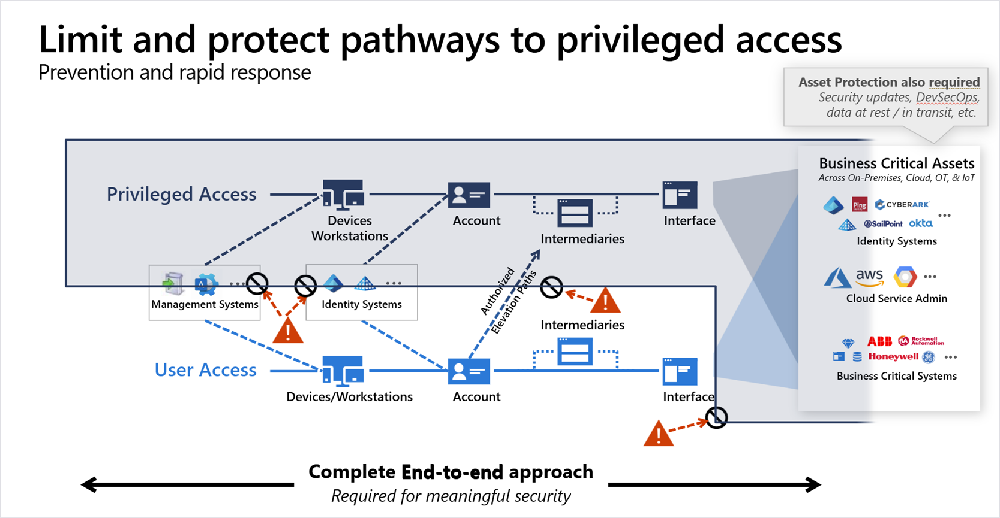
If any link in the chain is weak, the entire path is vulnerable.
| Path | Components | Risk |
|---|---|---|
| User access paths User access paths support standard productivity and business operations, such as email, collaboration, web browsing, and line‑of‑business applications. |
A user access path typically involves: - Identity: A standard user account - Device: A general‑purpose workstation - Intermediary: Optional intermediaries such as a VPN or remote access. - Interface: Interaction with enterprise applications and services. |
While compromise of a user access path can cause harm, the potential impact is limited compared to privileged access. |
| Privileged access paths Privileged access paths manage identities, infrastructure, security controls, and business‑critical systems. |
Privileged access paths typically consist of: - Identity: An account performing privileged work. - Device: The endpoint workstation or device used by the privileged session. - Intermediary: Any system or service brokering or hosting the privileged session, such as remote access or management tools. - Interface: The management surface where privileged control is exercised. For example, portals, APIs, command-line tools, or automation. |
Although the technical components appear similar to a user access path, the potential damage from compromise is dramatically higher. Privileged access paths must therefore be: - Fewer in number - Explicitly defined - Isolated from user access paths - Protected with the strongest available controls. |
Example path
In a typical privileged access path:
- A dedicated admin identity signs in.
- The sign-in is from a hardened Privileged Access Workstation (PAW).
- The sign-in activates a role through Privileged Identity Management (PIM).
- The sign-in uses a specific administrative interface, such as a portal, API, or CLI.
- The signed-in identity performs a privileged action.
Solution components
The privileged access solution is built on three tightly coupled elements that ensure - privileged actions by the right identities, from trusted devices, under enforced conditions.
Privileged identities
- Dedicated admin accounts that are allowed to perform privileged actions.
- Identities protected with strong authentication and, where possible, passwordless authentication.
- Limited privileged role assignment.
- Just-in-time privileged elevation with approval.
Privileged Access Workstations (PAWs)
- Hardened, restrictive devices.
- Reduced attack surface on devices.
- Protection against credential threat and malware.
- Isolated from high-risk user activity.
Policy enforcement and monitoring
- Conditional Access validates identity, device, and session context.
- Privileged elevation paths are explicitly defined.
- All privileged activity is logged, monitored, and reviewable.
Identity systems and elevation paths
Identity systems and elevation paths are foundational components of every privileged access path. They define where privileged identities are created, how administrative roles are assigned, and how users transition from a non‑privileged state to performing privileged actions.
This implementation guidance treats identity systems and elevation paths as part of the privileged attack surface and identity control plane.
| Area | Details | Risk mitigation |
|---|---|---|
| Identity systems | Where privileged identities, roles, and administrative permissions are defined and managed. This definition includes directories, role assignments, administrative groups, and tenant‑level configuration. |
Privileged identities operate in the control plane. If identity systems are compromised, attackers can create, modify, or persist privileged access—bypassing device controls, access conditions, and monitoring. Securing the identity control plane is the highest implementation priority. |
| Authorized elevation paths | How a user transitions from a non‑privileged state to perform privileged actions. For example, time‑bound role activation, approval workflows, and scoped administrative sessions. |
Ensures elevation requires strong authentication, and that privileged elevation is intentional, temporary, monitored, and only happens from approved devices and interfaces. By forcing elevation through approved workflows, devices, and interfaces, you prevent standing privilege and reduce abuse, lateral movement, and silent persistence. |
Solution phases
Implement the privileged access architecture by using a phased adoption model aligned to Microsoft best practices.
- Kick off adoption by using the structured adoption model. Adoption guidance helps business leaders identify critical business-level outcomes for secure identity, and understand the access and identity discipline, including the teams and efforts needed to drive identity initiatives such as privileged access.
- Plan the solution. Planning helps you to identify design goals, assign security levels to determine privileged access strategy, and plan for implementation.
- Follow the implementation phases summarized in the following table. Each phase has a specific objective and is implemented by using concrete configuration steps in the corresponding articles.
Implementation phases
| Phase | Mitigate Risk | Apply Zero Trust principles |
|---|---|---|
| Phase 1. Secure the identity control plane Create: - Dedicated admin identities. Security groups for role assignment. - Emergency break-glass accounts if you don't have them. |
Reduces the risk of credential theft, privilege misuse, and unauthorized elevation. | Verify explicitly Use strong authentication. Use least privilege Restrict admin roles/enable just-in-time privilege. Assume breach. Use break-glass accounts for recovery. |
| Phase 2. Deploy and harden privileged access devices Provision dedicated privileged access workstations (PAWs). Apply OS hardening and security baselines. Enforce patching, endpoint protection, and disk encryption. Minimize installs of apps and services. |
Reduces the risk of credential compromise and device-based attacks. | Verify explicitly Ensure devices are enrolled, trusted, and compliant before granting access. Assume breach Minimize potential compromise paths by hardening devices and isolating administrative credentials. Use least-privileged access. Restrict what administrators can do on these dedicated devices. |
| Phase 3. Enforce privileged access policies Configure Conditional Access for privileged roles. Require compliant devices and strong authentication. Enforce context‑aware access conditions. Restrict access to approved interfaces. |
Prevents unauthorized access and credential replay. | Assume breach. Prevent misuse of credentials if accounts are stolen by restricting where and how access is granted. Use least privilege. Enforce role-based and context-aware permissions. |
| Phase 4. Monitor and continually validate Investigate incidents and remediate quickly. Continuously reassess trust and coverage. |
Detect, investigate, and respond to privileged threats. Monitor privileged role activations and sessions. Detect anomalies and suspicious patterns. Reduce the impact of undetected compromise and prolonged attacker dwell time. |
Assume breach.Continuously monitor for attacker activity and anomalous behavior. Verify explicitly.Evaluate trust continuously and investigate suspicious access patterns. |
Next steps
Now, start planning an implementation strategy.