Note
Access to this page requires authorization. You can try signing in or changing directories.
Access to this page requires authorization. You can try changing directories.
This article shows the shortest path to run an Azure-hosted application that calls a Fireworks AI model deployed through Microsoft Foundry. The architecture starts with a containerized application, a Fireworks deployment endpoint, and basic secret management. Add databases, queues, API gateways, caching, and other supporting services only when your product needs them.
Why this matters for startups
Inference is one of the largest controllable costs for an AI-native company. The serving architecture you choose early can influence cost, operational overhead, performance, and future flexibility.
Microsoft Foundry and Fireworks AI provide:
- Azure-native governance and billing
- Access to open-weight and customizable models
- Managed inference infrastructure
- A consistent deployment experience
- A path from experimentation to production without building GPU infrastructure
Compare your inference options
| Option | Strengths | Limitations | When it fits |
|---|---|---|---|
| Self-hosted vLLM on a GPU fleet | Full control over model, scheduling, and cost | Requires dedicated ML platform engineering and ongoing operations | Series C+ companies with platform teams |
| Frontier closed-source APIs | Fastest path to experimentation | Costs can increase at scale and fine-tuning options may be limited | Early prototyping |
| Generic cloud AI services | Easy to integrate | Less workload-specific optimization | Apps where AI is not the core differentiator |
| Fireworks on Microsoft Foundry | Open-weight and customizable models, Azure-native governance and billing, managed inference | Requires deployment and configuration of Foundry resources | AI-native startups building on Azure |
Reference architecture at a glance
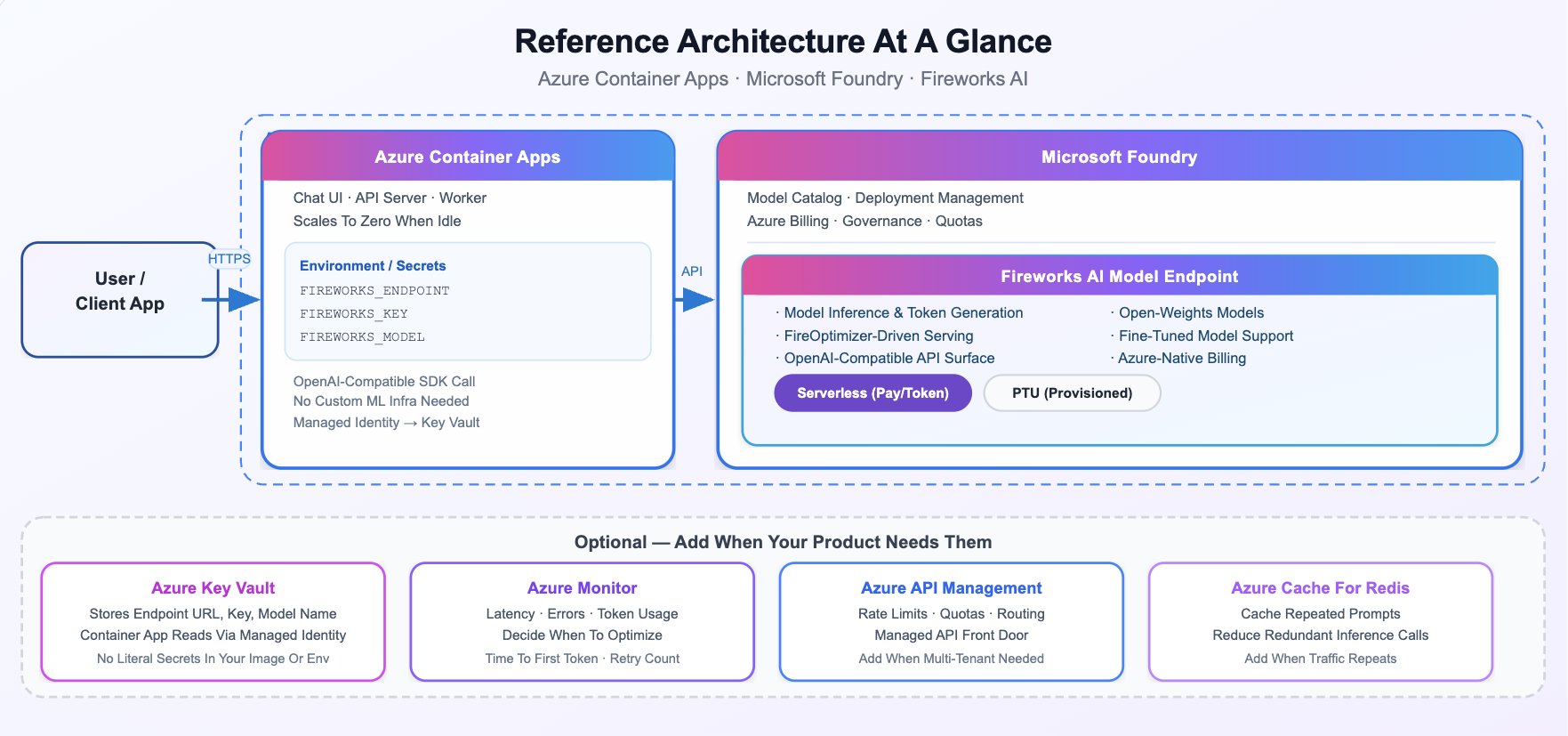
The architecture intentionally starts small and expands only as requirements emerge.
Components
| Component | Purpose |
|---|---|
| Azure Container Apps | Hosts the application or API that sends inference requests |
| Microsoft Foundry + Fireworks AI models | Provides model deployment, governance, billing, and inference |
| Azure Container Registry | Stores container images |
| Secret management | Stores credentials and endpoint information securely |
| Azure Monitor (optional) | Provides observability and performance insights |
What you build
- A Fireworks deployment hosted through Microsoft Foundry
- A containerized application that invokes the deployment
- Container image storage
- An Azure Container Apps deployment
- Secure access to deployment credentials
- Basic observability and validation
Before you begin
You need:
- An Azure subscription
- A Microsoft Foundry project
- Permissions to deploy models in Foundry
- Permissions to create Container Apps resources
- Permissions to create or use Azure Container Registry
Deployment workflow
Step 1: Deploy a Fireworks model
- Create or open a Microsoft Foundry project.
- Browse the model catalog and select a model published by Fireworks AI (search models starting with FW or browse by collection).
- Choose a deployment option appropriate for your workload.
- Deploy the model and record the deployment details.
Step 2: Secure deployment settings
Your application requires access to:
- Deployment endpoint information
- Deployment credentials
- Deployment name
For prototypes, application-level secrets might be sufficient. For production workloads, consider managed identity and Azure Key Vault.
Step 3: Connect your application
Fireworks deployments expose a standards-based inference endpoint that you can call by using supported SDKs. Applications typically provide:
- Endpoint location
- Authentication credentials
- Deployment name
- Request parameters
Tip
For complete examples in Python and Azure Container Apps, see the companion GitHub repository with full code samples.
Step 4: Deploy the application
The simplest deployment path is:
- Containerize the application.
- Store the image in Azure Container Registry.
- Deploy the image to Azure Container Apps.
- Configure secrets and environment settings.
- Validate connectivity.
Measure before adding complexity
Capture a small set of metrics before introducing additional components:
- Time to first token
- Total response latency
- Request volume
- Error rate
- Retry rate
- Token consumption
- Estimated cost per request
- Deployment usage patterns
Use these measurements to determine which architectural improvements are actually required.
Add production components only when needed
| If you need... | Add... |
|---|---|
| Tenant rate limiting and API governance | Azure API Management |
| Repeated prompts and caching | Azure Managed Redis |
| User and application state | Azure Database for PostgreSQL or Azure Cosmos DB |
| File storage | Azure Blob Storage |
| Background processing | Azure Service Bus |
| Enterprise network controls | Private endpoints and virtual networks |
Next steps
- Deploy a Fireworks model in Microsoft Foundry.
- Review the companion GitHub implementation.
- Add monitoring and observability.
- Introduce persistence and caching as needed.
- Evaluate API Management and network isolation for production workloads.