Note
Access to this page requires authorization. You can try signing in or changing directories.
Access to this page requires authorization. You can try changing directories.
Microsoft for Startups helps founders build fast, scale smart, and sell more. Eligible Imagine Cup 2027 participants can use a unique referral code to unlock an initial $1,000 in startup credits. As startups build and grow, they might become eligible for more credits, up to $150,000 in total, based on Azure adoption and usage, and continued program eligibility.
This article explains:
- Who is eligible for the Imagine Cup credit offer
- How to receive and redeem an initial unique code
- How credit progression works after the initial allocation
- What is required for Imagine Cup judging eligibility
Eligibility for the Imagine Cup credit offer
Startup credits offered through the Imagine Cup 2027 competition are available to eligible startups that are two years old or younger (must be a legal entity founded on or after November 2, 2024).
Microsoft reviews the information you submit with your Imagine Cup application before issuing a unique referral code to redeem startup credits. Microsoft might decline or revoke access when information is incomplete, can't be verified, conflicts with submitted documents, indicates fraud or misuse, or is restricted by applicable law or policy.
To be considered, your application must include accurate and complete information about your startup, including:
- Founder name, contact information (including business address), and a personal LinkedIn profile.
- Company name, website or domain, country/region, and company LinkedIn profile when available.
- Startup funding stage and category selection.
What if my startup is already in the Microsoft for Startups program?
Startups that are already active in the Microsoft for Startups program can register and apply to the Imagine Cup competition if they meet the eligibility requirements in the previous section.
Depending on your startup's existing credit offer amount and lifetime credit maximum, additional credit allocation might not be available.
If your startup is already enrolled in Microsoft for Startups, use the same organizational account and connect the Azure subscription associated with your existing startup profile. Don't create a duplicate Microsoft for Startups profile or Azure account solely for the Imagine Cup competition.
How to unlock benefits through Imagine Cup
- Complete and submit the initial Imagine Cup registration through the designated competition platform.
- Wait 24 business hours for Microsoft to complete the initial eligibility screening. For those approved, Microsoft distributes codes via email Monday through Friday.
- Use the unique referral code and instructions sent to your founder email to enroll in Microsoft for Startups and redeem your credits.
- Create or connect the Azure subscription that your startup will use for its Imagine Cup solution.
- Note the Azure Subscription ID and provide it through the Imagine Cup competition process when requested.
Note
A unique referral code is issued only to an approved startup and must not be shared, transferred, published, sold, or used for another startup. Receiving a code doesn't guarantee competition advancement, access to the Microsoft for Startups program, or eligibility for the maximum credit amount.
How startup credits can grow
After you redeem a valid Imagine Cup unique referral code and complete the required onboarding steps, your startup receives $1,000 in starter credits. After the initial allocation, Imagine Cup participants are eligible for up to $150,000 in startup credits based on verified progress, service adoption, sustained usage, and continued program eligibility.
You don't need to request a credit increase when you reach each milestone. The progression applies automatically when you meet the requirements in the following table:
| Credit progression | Requirements to unlock |
|---|---|
| $1,000 | $1,000 in starter credits are allocated after you receive a unique Imagine Cup referral code after eligibility screening and redeem it through the Microsoft for Startups application. |
| $5,000 | No action. Additional credits are automatically applied and two years granted in Microsoft for Startups program when application is approved. |
| $25,000 | Use five or more eligible Azure workloads over a sustained period of 60 continuous days. |
| $50,000 | Use seven or more eligible Azure workloads over a sustained period of 60 continuous days. |
| $150,000 | Use 10 or more eligible Azure workloads and maintain $3,000 per month in Azure usage over a sustained period of 60 continuous days. |
Meet workload and usage requirements
A workload represents an Azure service actively used in your solution. Examples include virtual machines, AI and machine learning services, databases, and application hosting services.
- Each unique eligible Azure service counts as one workload.
- Each workload must maintain at least $1 in spend.
- The 60-day usage period starts when the required number of workloads meets the minimum spend threshold. Each workload must remain above the threshold for a continuous 60-day period.
Startup credits can be used on eligible Azure services to develop, run, and scale your solution. See best ways to use startup credits.
Caution
Microsoft for Startups credits apply to Microsoft Foundry models that are sold and billed directly by Azure. Models billed by third‑party providers (including Anthropic), partner services, or available through the Microsoft Marketplace aren't eligible and are charged as pay-as-you-go. See Microsoft for Startups Sponsorship Coverage for Foundry Models for more information.
Complete business verification
Business verification confirms that your startup is a registered legal entity. You need to complete business verification to qualify for Imagine Cup finalist consideration.
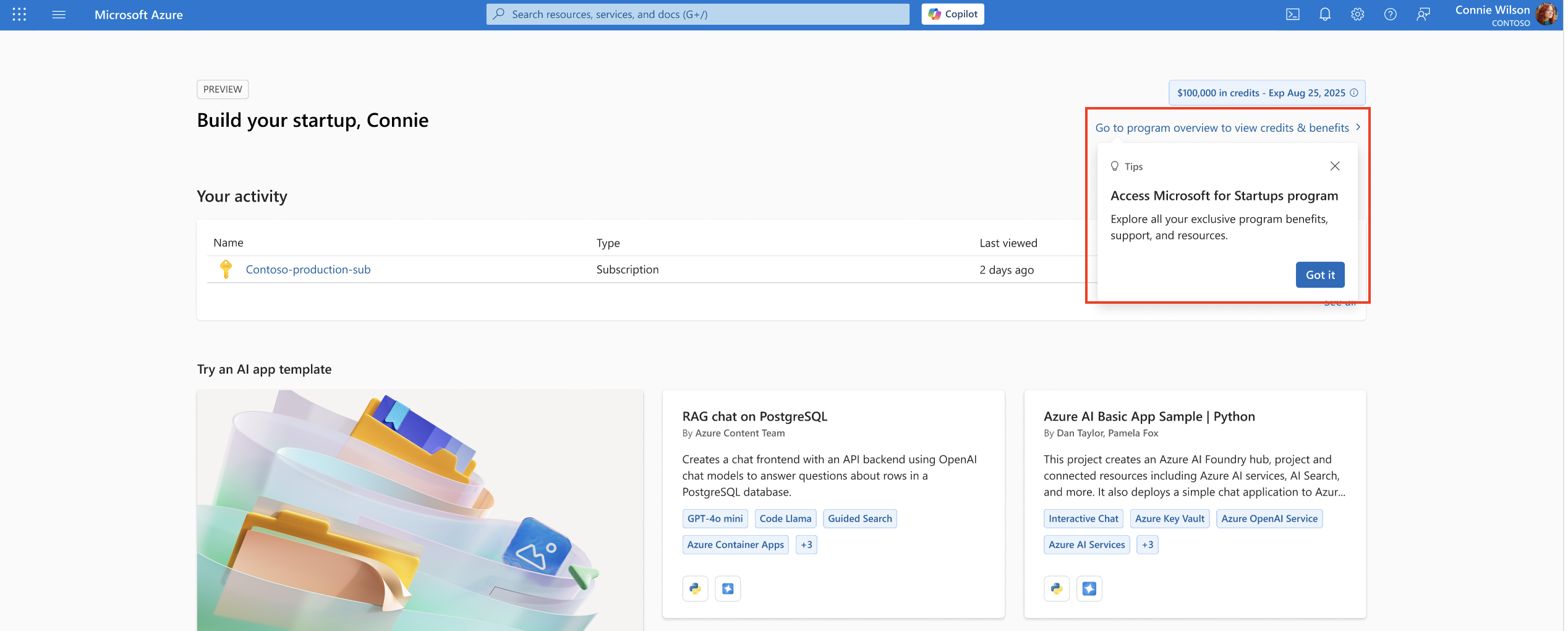
To verify your business, sign in to the Azure portal and go to the Program Overview Page.
Select Settings > Company Profile and then select Edit business information under Registered business address.
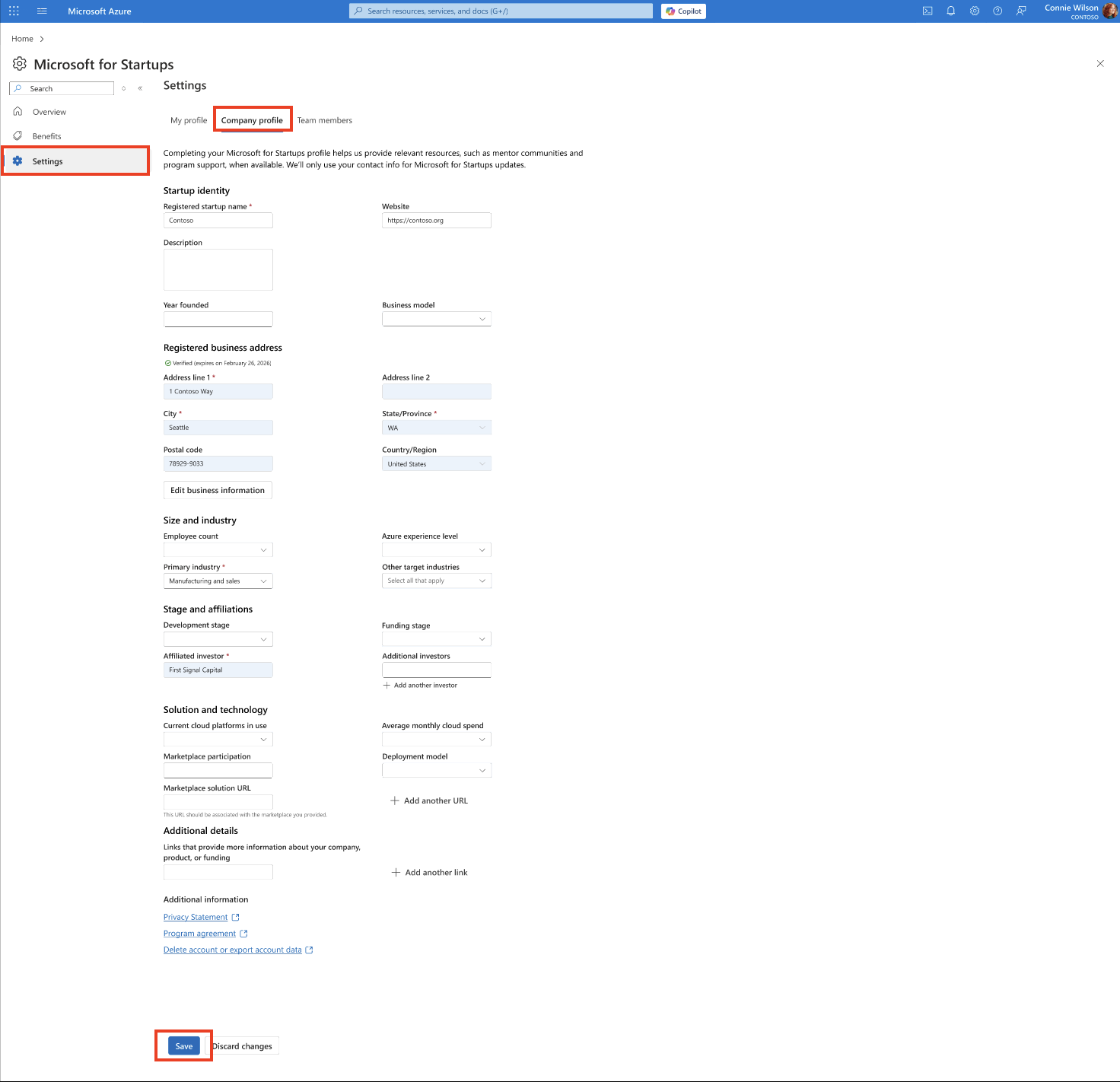
To reduce verification delays, enter your company information exactly as it appears in your official registration and tax documents:
- Use the startup’s full legal name rather than a product or trading name unless requested.
- Ensure the address, country/region, registration number, and tax information match your official documents.
- Use leading zeros in the business registration code if your country/region’s business code isn't long enough.
Imagine Cup judging eligibility
The credit path and competition judging process are related but separate. To remain eligible for Imagine Cup judging, your startup must:
- Provide a valid Azure Subscription ID.
- Run at least 10 Azure workloads on the subscription for the submitted solution by the competition deadline communicated by Microsoft.
- Submit materials, including your pitch deck materials, recorded videos of your pitch and demo, and live presentations during judging rounds, in English and use formats specified on the Competition Website. While your product can support multiple languages, it must include English.
- Complete product summary, customer problem, target user, market opportunity, business model, traction, and go-to-market approach.
- Complete description of the Microsoft technologies and Azure services used, including architecture, security, scale, and technical differentiation.
- Document customer validation, user evidence, pilots, revenue, investment, or other support for claims, as applicable.
Important
Receiving or redeeming a unique code, obtaining startup credits, completing business verification, or using Azure doesn't guarantee eligibility, advancement, selection as a category winner, or any Imagine Cup prize.