Architecture
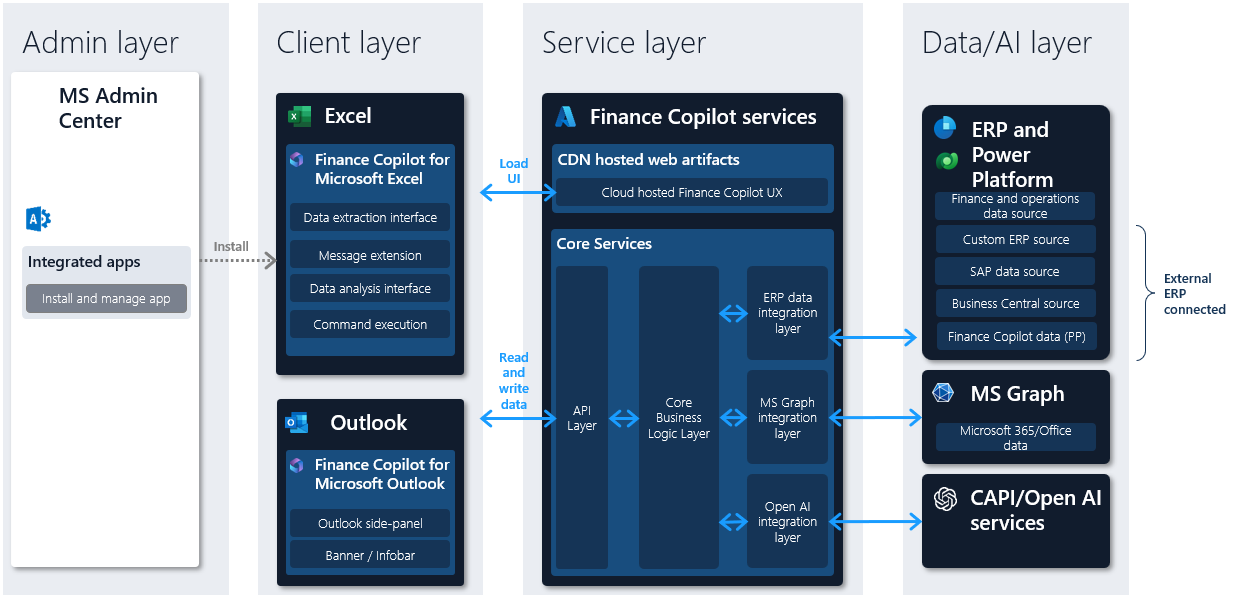
The architecture consists of the following component layers.
- Admin layer
- Client layer
- Service layer
- Storage and security layer
- Microsoft 365 and Microsoft Office data layer
- Enterprise Resource Planning (ERP) data layer
Admin layer
Finance agents are integrated as copilot extensions within Microsoft Office; Outlook and Excel. The administrative layer of finance agents provides users with the ability to install and manage these Office add-ins.
Client layer
Finance agents consist of two distinct client experiences - Finance agents for Microsoft Outlook and finance agents for Microsoft Excel. The Outlook experience is developed as an Outlook add-in, and the Excel experience is developed as an Excel add-in.
Both consist of a manifest, which describes how the add-in and app integrate into Outlook and Excel, and JavaScript/HTML, making up the User Interface (UI) of the experience. The UI for both experiences is cloud-hosted and managed by Microsoft. None of the UI or business logic for finance agents is shipped as client-side code in Excel or Outlook. Therefore, customers don't need to manage any application lifecycles for the finance agents client or server-side components. For more information, see Application Lifecycle Management.
The finance agents clients store minimal setup and settings data in the local browser-based application storage, and no personal or other customer data outside of settings is persisted locally.
Service layer
The finance agents service layer consists of the Cloud Hosted finance agents experiences, which are served to the finance agents client experiences, and Core Business Logic Layer, which processes and combines ERP data, MS Graph Data; for example, E-Mails, Meetings, and Microsoft Azure OpenAI Service generated data. All finance agents services are hosted on the Microsoft Azure cloud to provide a resilient foundation to help meet organizational compliance, reliability, availability, and disaster recovery needs.
The finance agents data layer consists of distinct sets of data:
- MS Graph Data - The end user’s existing M365/Office Data; E-Mails, Meetings, and more, are stored in Microsoft Graph.
- ERP Data -The customer’s ERP data is stored in the existing ERP system; for example, SAP, and Dynamics 365 Finance, which serves as the system of record for all ERP entities.
- Non-ERP related data - Finance agents store some non-ERP related data in customer’s Power Platform Dataverse; for example, email summaries, emails and notes.
- Finance agents Data - The customer’s finance agents data is generated through finance agents feature flows and does not fall into the definition for Office Data, ERP Data, or Dataverse data. For example, finance agents settings or finance agents generated insights data.
Storage and security layer
- Finance agents respect the data privacy, data security, data retention, and compliance boundaries of the underlying data store for data at rest and uses Transport Layer Security (TLS) to protect data in transit and doesn't store data outside any of the data stores described earlier.
Microsoft 365 and Office data layer
The end-user’s Microsoft 365 and Office data is always accessed in the end user’s authentication context and referenced in two ways:
- Read in real-time to enable insights scenarios - For example Generative AI e-mail replies, AI generated e-mail summaries, and more. The Microsoft 365 Office data is read in these scenarios and discarded after it is processed.
- Read in real-time to enable value in the customer’s ERP system - For example when e-mail data is copied from the Microsoft Graph to the customer’s ERP as activities, or meeting transcripts are copied to Dataverse to enable extensibility scenarios.
ERP data layer
All ERP data access (read and write access) in finance agents is managed via real-time integrations with the underlying ERP system. Finance agents don't copy any ERP data to other systems except when unique identifiers are used for mapping the ERP environment and entities to finance agents specific data. For example, finance agents customer identifiers are used to map customers to nonfinancial data stores in Dataverse. In these scenarios, finance agents store the unique identifiers from the ERP system being referenced. Finance agents respect the existing retention policies and compliance boundaries of the existing ERP system and Dataverse.
Finance agents are designed and intended to work with a single ERP connection at a time. Finance agents don't connect to multiple ERP or Dataverse instances at the same time, nor synchronize data between them. The data accessed and stored via finance agents is scoped to the ERP of the end user that is currently connected to.