Configure Copilot connectors
A provider decides which models see your prompts. A connector decides which data Copilot can reach—and that second decision carries its own version of the same risk. A connector can make Copilot dramatically more useful by reaching Relecloud's line-of-business systems: contract repositories, case-management tools, project trackers, anything that currently sits outside Microsoft 365 and outside Copilot's grounding. But a connector can just as easily surface a source system's contents to people who were never meant to see them, if the permissions on that source don't carry across correctly. Richer grounding and expanded exposure arrive through the same door. This unit teaches you to tell them apart.
Recognize what a connector does
A Copilot connector brings external content into Microsoft 365 Copilot's reach so users can search and reason over more of Relecloud's enterprise data, not just what already lives in Microsoft 365. Connected content surfaces in Microsoft 365 Copilot itself, in Microsoft Search, and in other intelligent experiences built on the same grounding—Copilot in Excel and the Researcher agent both draw on it. The line-of-business system you're picturing right now, whatever it is, is exactly the kind of source a connector exists to reach.
That reach is the whole appeal. It's also why the decision that matters most here isn't whether to connect a source—it's which connector model carries that source's content into Copilot, because the two models available today handle permissions in fundamentally different ways.
Compare the two connector models
| Dimension | Synced connector | Federated connector (early access preview) |
|---|---|---|
| Data movement | Content indexed into Microsoft Graph | None; fetched live at query time |
| Permission model | Source ACL copied in at index time | Source enforces per user, in real time |
| Authentication | Admin-configured, organization-level | Each user authenticates (OAuth 2.0) |
| Access | Read and index | Read-only |
| Protocol | Microsoft Graph connectors API | Model Context Protocol (MCP) |
| Custom connectors | Yes | No (Microsoft-published only) |
| Best for | Knowledge bases, document stores, LOB systems to index | Sensitive or fast-changing data that must stay in its source |
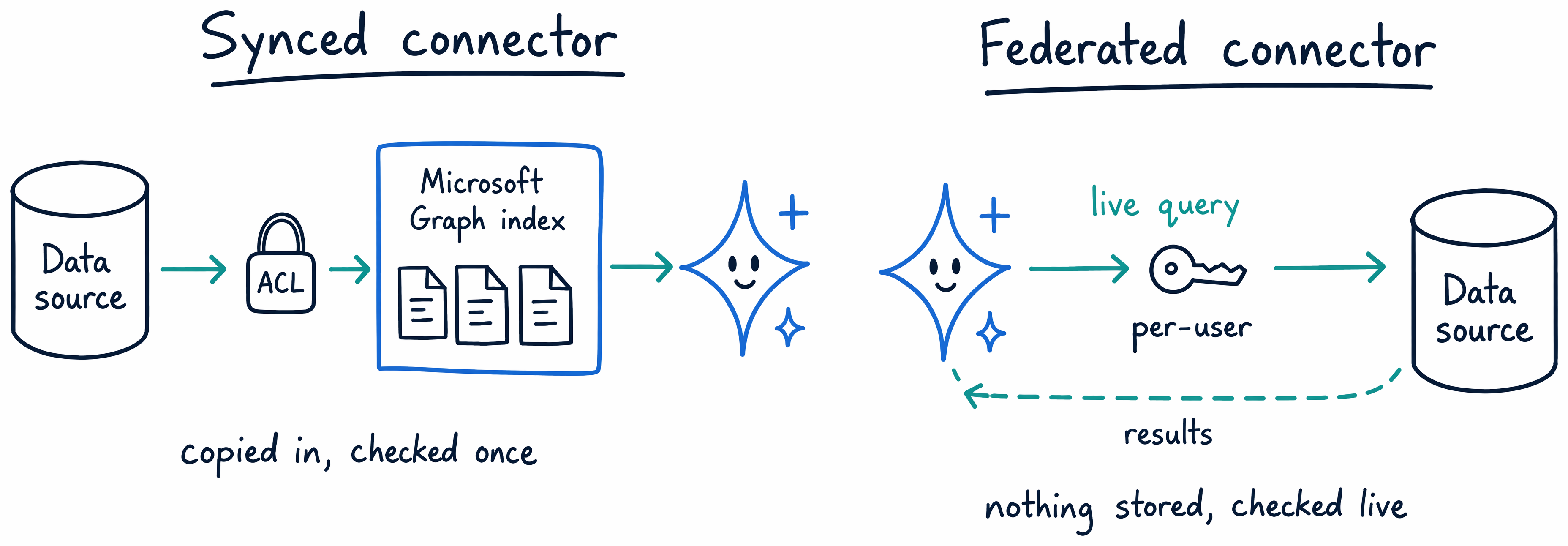
Synced connectors crawl external content and index it into Microsoft Graph. Each item they ingest brings three things with it: the content itself, its metadata, and an access control list (ACL) that mirrors the source system's own permissions. That ACL is what keeps a synced connector safe—Copilot only shows an indexed item to a user who already had access to it in the source, so indexing the content doesn't loosen who can see it. Setup is admin-configured, and the access model operates at the organization level: once an admin sets up the connector, its permission enforcement runs automatically for everyone in the tenant. You can build a custom connector for a source unique to Relecloud using the Microsoft Graph connectors API, or choose from Microsoft- and partner-provided ready-to-use connectors for common systems. Either way, content stays synced continuously—the connector checks periodically for changes, and you can configure how often that check runs or trigger a full crawl yourself when the source changes significantly.
Federated connectors work on a different premise entirely, and they're currently an early access preview. Instead of indexing content into Microsoft Graph, a federated connector uses the Model Context Protocol (MCP) to fetch content live, at the moment a user queries it. Nothing from the source gets copied or stored in Microsoft 365—the data never leaves its system of record. The access model shifts too: rather than an admin-configured, organization-wide setup, each user authenticates with their own credentials to reach the source, and the source system enforces permissions in real time, for that user, on that query. Federated connectors are also read-only—they can search and fetch content, but they can't write anything back. That combination—nothing indexed, per-user authentication, live enforcement—makes federated connectors the better fit for sensitive or fast-changing data that has to stay put.
Both models can run in the same Relecloud tenant at once, and both show up together in the same connector list—choosing one doesn't rule out the other for a different source.
Match the connector to the requirement
The distinction between these two models comes down to one question: does this content need to live inside Microsoft Graph, or does it need to stay exactly where it is? If a requirement says index this knowledge base into Microsoft Graph and preserve its existing permissions, that's a synced connector—you want the content searchable inside Copilot's normal grounding, with the source's ACLs carried over automatically. If a requirement says this data is sensitive, or it changes too fast to index reliably, and it can't leave its source system, that's a federated connector—you want live, per-user, read-only access with nothing copied anywhere.
Think of it as choosing where the permission check happens. A synced connector answers that question once, at index time, and stores the answer as an ACL. A federated connector answers it every time, live, against the source itself. Neither approach is more secure in the abstract—each is correct for a different kind of data.
Guiding question: Pick a line-of-business system at Relecloud or in Woodgrove Bank's engagement—a contract repository, a case file store, a compliance tracker, anything you'd want Copilot to reach. Would you connect it with a synced connector or a federated one? What about that system's data—how sensitive it is, how often it changes, whether it needs to be searchable inside Copilot's normal grounding—drives your answer?
Close the configuration arc
That question is the same one you've been answering all module, just with a new set of levers. The settings catalog let you turn tenant-wide capabilities on or off. Web search and Copilot Search let you decide what Copilot reaches beyond Microsoft 365 content and how it recognizes Relecloud's own terms. Third-party AI providers let you decide which models see your prompts. Connectors let you decide which data Copilot can reach, and—through synced versus federated—how that data's permissions travel with it. Every one of these is an individual, reversible trade between what Copilot can do and what your data is exposed to, and every one of them is a setting an administrator configures deliberately, not a default left in place.
Two edges of that same extensibility catalog remain before the module's knowledge check: extending AI in SharePoint with skills, and the Copilot Frontier program. Neither needs a hands-on walkthrough, but you still need to recognize them—the next unit gets you there.
Learn more: Copilot connectors overview and Federated Microsoft 365 Copilot connectors overview (early access preview).