When to use the cluster autoscaler

Completed

You may need to adjust the number of nodes that run your workloads. The cluster autoscaler component watches for pods in your cluster that can't be scheduled on existing nodes because of resource constraints. When unscheduled pods can run on more nodes and a node pool hasn't reached its configured maximum, the number of nodes in that node pool increases to meet application demand. The cluster autoscaler also checks whether underutilized nodes can be removed and their pods safely rescheduled, then decreases the number of nodes as needed. This ability to automatically scale up or down the number of nodes in your AKS cluster lets you run an efficient, cost-effective cluster. For deeper guidance on how the cluster autoscaler behaves and the best practices to follow, see Cluster autoscaling in AKS overview.

About the cluster autoscaler

To adjust to changing application demands, such as between the workday and evening or on a weekend, clusters often need a way to automatically scale. This module focuses on two complementary AKS autoscaling options:

  • The cluster autoscaler periodically checks for pods that can't be scheduled on nodes because of resource constraints. By default, it reevaluates the cluster every 10 seconds. The cluster then automatically increases the number of nodes in an autoscale-enabled node pool, up to the configured maximum.
  • The horizontal pod autoscaler uses the Metrics Server in a Kubernetes cluster to monitor the resource demand of pods. If an application needs more resources, the number of pods is automatically increased to meet the demand.
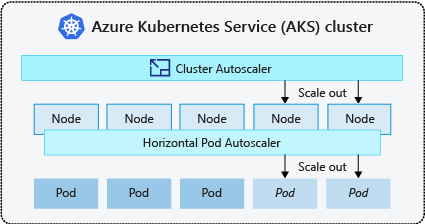
Diagram showing the horizontal pod autoscaler changing pod replicas while the cluster autoscaler adds or removes nodes to host the schedulable pods.

Both the horizontal pod autoscaler and cluster autoscaler can decrease the number of pods and nodes as needed. The cluster autoscaler doesn't add nodes because a node has high CPU or memory use; it reacts when pods can't be scheduled and uses pod resource requests in its scheduling simulations. It decreases the number of nodes only after capacity has been unneeded for a configured period and the pods on the node can be evicted and rescheduled elsewhere. In the default autoscaler profile, scale-down-unneeded-time is 10 minutes, and scale-down evaluation resumes 10 minutes after a node is added. Autoscaler profile settings apply cluster-wide to all autoscale-enabled node pools. For more information, see Use the cluster autoscaler profile.

The cluster autoscaler might be unable to scale down in the following situations where pods can't move:

  • A pod isn't backed by a controller object, such as a Deployment, ReplicaSet, Job, or StatefulSet.
  • A pod disruption budget (PDB) would be violated by evicting the pod, such as when minAvailable or maxUnavailable is too restrictive for the current replica count.
  • A pod uses scheduling constraints, such as node selectors, node affinity or anti-affinity, topology spread constraints, persistent volume topology, resource requests, or host ports, that can't be honored on a different node.
  • A pod has the cluster-autoscaler.kubernetes.io/safe-to-evict: "false" annotation.
  • A pod uses local storage and the autoscaler profile is configured to skip nodes that run pods with local storage.
  • A node has a non-DaemonSet, non-mirror pod in the kube-system namespace while the profile keeps the default skip-nodes-with-system-pods=true behavior.

Scale-up can also be blocked or delayed by node pool and Azure infrastructure limits. Common AKS causes include the node pool maximum size, regional vCPU quota exhaustion, subnet IP address exhaustion, and API rate limits. Set maximum node counts that fit your subscription and network capacity, and request quota increases before relying on higher limits. For more information, see Common issues and mitigation recommendations for cluster autoscaling in AKS.

The cluster and horizontal pod autoscalers can work together and are often both deployed in a cluster. When combined, the horizontal pod autoscaler runs the number of pods required to meet application demand. The cluster autoscaler runs the number of nodes required to support the scheduled pods.